
In an increasingly cashless world, digital payment solutions have become indispensable tools for managing personal finances. Among these, Apple Pay stands out as a pervasive and convenient method for secure transactions, offering a seamless experience across countless vendors and online platforms. At its core, Apple Pay functions as a secure wrapper for your existing credit and debit cards, but it also integrates a powerful feature known as Apple Cash. This digital debit card, housed within your Apple Wallet, allows users to send and receive money directly, much like a peer-to-peer payment app, and store funds for future use. Understanding how to effectively add money to your Apple Cash balance is crucial for leveraging the full potential of this financial tool, enhancing your ability to manage everyday spending, facilitate instant transfers, and maintain a clear overview of your digital funds.

This guide delves into the specifics of funding your Apple Cash card, exploring the methods available, providing step-by-step instructions, and offering insights into maximizing its utility within your personal financial ecosystem. By demystifying the process, we aim to empower users to confidently navigate their digital wallets, ensuring that funds are always accessible for a myriad of financial interactions, from splitting a dinner bill with friends to making quick online purchases.
Understanding Apple Pay and Apple Cash within Your Financial Landscape
Apple Pay is not just a payment method; it’s an integral part of Apple’s broader ecosystem designed to streamline and secure financial transactions. While often conflated, it’s important to distinguish between Apple Pay itself and Apple Cash, as the latter is what you directly add money to. Apple Pay is the overarching service that allows you to use your iPhone, Apple Watch, iPad, or Mac to make payments using credit, debit, and prepaid cards stored in the Wallet app. Apple Cash, on the other hand, is a specific card within this Wallet app, powered by Green Dot Bank, that holds a balance of funds. These funds can be used wherever Apple Pay is accepted, to send money to other Apple Cash users, or even transferred back to your bank account.
The Ecosystem of Digital Payments
The advent of digital payment platforms like Apple Pay has profoundly reshaped the landscape of personal finance. They offer unparalleled convenience, eliminating the need to carry physical cards or cash, and enhance security through tokenization and biometric authentication. For the savvy financial manager, integrating such tools into daily routines means not only faster transactions but also better tracking of expenditures through digital records. Apple Cash, in particular, acts as a versatile digital purse, bridging the gap between traditional banking and instant digital transfers. Its integration within the Apple ecosystem means that financial actions, from checking balances to initiating payments, are often just a few taps away, consolidating various financial touchpoints into a single, user-friendly interface. This efficiency can significantly reduce the mental load associated with managing multiple payment methods and accounts, allowing for a more streamlined approach to daily financial operations.
Why Use Apple Cash for Your Transactions?
The utility of Apple Cash extends beyond mere convenience. For individuals focused on prudent financial management, it offers several compelling advantages. Firstly, it provides a dedicated balance that can be used to control spending. By adding a specific amount of money to Apple Cash, users can effectively budget for certain categories of expenses, preventing overspending from primary bank accounts. Secondly, its seamless integration with Messages makes peer-to-peer payments incredibly straightforward, facilitating instant money transfers to friends and family with minimal friction. This is particularly useful for splitting bills, contributing to group purchases, or sending allowances. Thirdly, any cash-back rewards earned through Apple Card (if you have one) are deposited directly into Apple Cash, providing an immediate and liquid form of reward. From a security standpoint, using Apple Cash ensures that your primary bank account or credit card details are not directly exposed during transactions, adding an extra layer of protection against potential breaches. These combined factors make Apple Cash a powerful financial instrument for modern personal finance, offering flexibility, control, and security in equal measure.
Primary Methods for Funding Your Apple Cash Balance
Adding money to your Apple Cash card is a straightforward process designed to integrate seamlessly with your existing financial accounts. The primary methods revolve around linking a debit card or, in some cases, directly leveraging funds from your bank account through linked debit options. Understanding these mechanisms is key to efficiently managing your Apple Cash balance.
Adding Funds from a Debit Card
The most common and generally recommended method for adding money to your Apple Cash balance is by using a linked debit card. This process is secure, instant, and typically free of charge, making it the preferred choice for most users. When you add a debit card to your Apple Wallet, it becomes an available source for funding your Apple Cash. The transaction effectively functions like a direct debit from your checking account, facilitated by your debit card’s network. This method leverages the existing security protocols of your bank and card provider, ensuring that your financial information is protected throughout the transfer. For those who frequently manage their funds digitally, linking a primary debit card specifically for this purpose can simplify tracking and ensure consistent funding. It’s important to note that while credit cards can be used for Apple Pay transactions, they generally cannot be used to directly add money to Apple Cash due to associated cash advance fees.
Utilizing Your Bank Account Directly (via Linked Debit)
While you don’t typically link a bank account directly to Apple Cash in the same way you would a debit card, the functionality is effectively achieved through your linked debit card. When you use a debit card to add funds, those funds are drawn directly from the checking account associated with that card. Therefore, “utilizing your bank account directly” is, in practice, synonymous with using your debit card. Some users might wonder about ACH transfers or other direct bank-to-app integrations; however, for Apple Cash, the debit card serves as the primary conduit for moving funds from your traditional bank account into your digital wallet. This design simplifies the user experience by leveraging an existing and familiar payment instrument, reducing the need for additional complex bank account integrations within the app. Always ensure that the debit card you link is from a reputable bank and that you are familiar with any daily transaction limits or other terms associated with it.
Step-by-Step Guide to Topping Up Your Account
Adding money to your Apple Cash balance is a quick and intuitive process, primarily managed through the Wallet app on your Apple device. Following these simple steps will ensure a smooth transfer of funds, making your digital wallet ready for immediate use.
Navigating the Wallet App
The Wallet app is your central hub for managing all your digital cards and passes, including Apple Cash.
- Open the Wallet App: Locate and tap the “Wallet” app icon on your iPhone or iPad. It typically looks like a brown wallet.
- Select Your Apple Cash Card: Within the Wallet app, you will see all your added cards. Tap on your Apple Cash card. It will usually display your current balance.
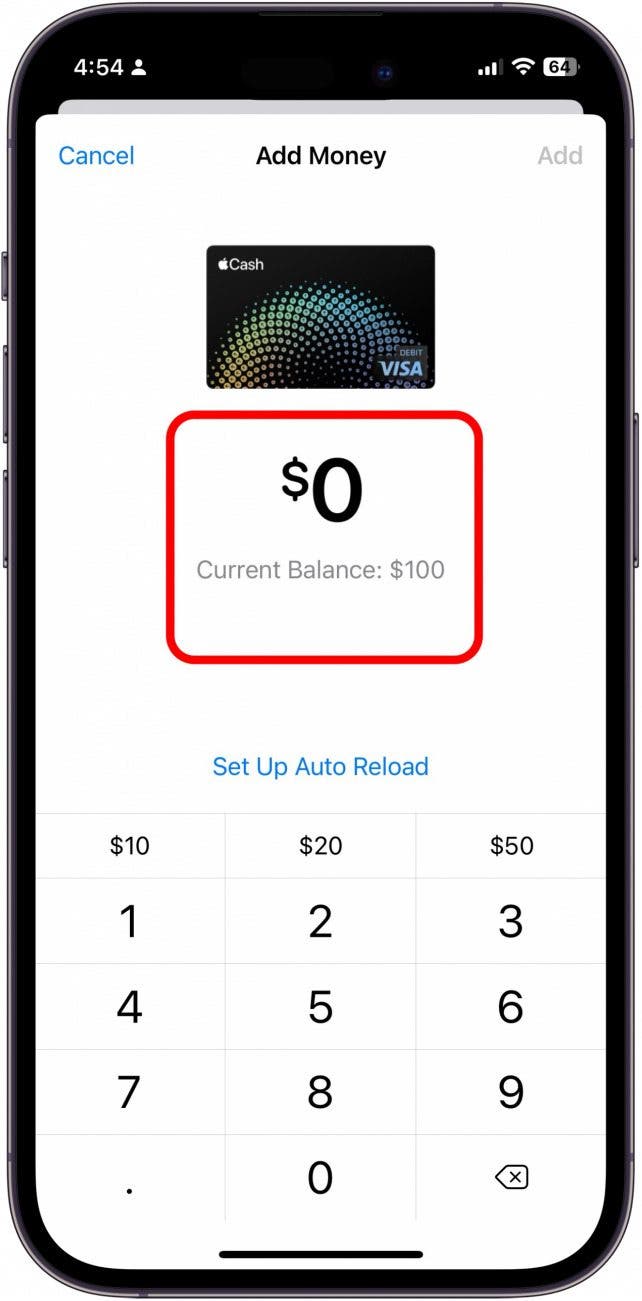
- Initiate “Add Money”: Once you’ve selected your Apple Cash card, you’ll see a small menu or a button labeled “Add Money,” “Add Funds,” or a similar phrase, often with a “+” icon. Tap this option to begin the funding process.
Executing the Transfer: A Walkthrough
After initiating the “Add Money” process, the system will guide you through the final steps:
- Enter Amount: You’ll be prompted to enter the specific amount of money you wish to add to your Apple Cash balance. Apple Cash typically has a minimum addition amount (e.g., $10) and a maximum limit per transaction and per week/month. Ensure the amount you enter falls within these limits.
- Select Funding Source: The app will display your linked debit cards. Choose the debit card you wish to use as the funding source for the transfer. If you haven’t added a debit card yet, you’ll be prompted to do so.
- Confirm with Face ID, Touch ID, or Passcode: For security purposes, you will need to authenticate the transaction using Face ID, Touch ID, or by entering your device’s passcode. This step verifies your identity and authorizes the transfer from your chosen debit card to your Apple Cash balance.
- Confirm Transfer: Once authenticated, review the details of the transaction (amount, source card) and confirm. The funds are typically transferred instantly to your Apple Cash balance. You will usually receive a notification confirming the successful addition of funds.
Maximizing Your Apple Pay Experience
Beyond simply holding funds, your Apple Cash balance is designed to be an active part of your financial toolkit, enabling a range of transactions from sending money to friends to making purchases. Understanding how to utilize these funds effectively, alongside being aware of the associated limits and security features, is key to fully harnessing its potential.
Spending and Sending with Apple Cash
Once you’ve added money to your Apple Cash balance, its utility expands significantly.
- Making Purchases: You can use your Apple Cash balance wherever Apple Pay is accepted, both in stores and online. When making a payment, if your Apple Cash balance covers the transaction amount, it will automatically be the default payment method. This provides a convenient way to spend without directly tapping into your linked bank accounts or credit cards.
- Sending Money to Friends and Family: One of the most popular features of Apple Cash is its integration with the Messages app. You can instantly send money to anyone with an Apple Cash account directly from a conversation, making splitting bills, repaying small debts, or sending gifts incredibly easy. This peer-to-peer transfer capability is a prime example of how digital wallets streamline personal finance interactions, eliminating the need for separate apps or complex bank transfers for small amounts.
- Transferring to Your Bank Account: If you accumulate a significant balance in Apple Cash and wish to move it back to your traditional bank account, you can easily transfer the funds. This process usually involves linking your bank account (via routing and account numbers) and initiating a transfer, which may take 1-3 business days to process. This flexibility ensures that your funds are never “locked” within the digital wallet.
Security and Transaction Limits: What You Need to Know
Security is paramount in digital finance, and Apple Pay employs robust measures to protect your funds and personal information. Each transaction requires authentication via Face ID, Touch ID, or a passcode, ensuring that only you can authorize payments or transfers. Furthermore, your actual card numbers are never stored on your device or Apple servers, and they are not shared with merchants during transactions; instead, a unique, encrypted device account number is used.
However, understanding transaction limits is equally important for effective financial management:
- Minimum/Maximum Additions: Apple Cash typically has a minimum amount you can add per transaction (e.g., $10) and a maximum amount per transaction (e.g., $10,000). There are also usually daily, weekly, or monthly limits on how much money you can add to your balance. These limits are in place for security and regulatory compliance.
- Spending Limits: Similarly, there may be limits on how much you can spend from your Apple Cash balance per transaction or within a given timeframe.
- Sending/Receiving Limits: Limits also apply to the amounts you can send to and receive from other Apple Cash users via Messages.
- Identity Verification: To access higher transaction limits or transfer funds to your bank, Apple may require you to verify your identity by providing personal information, similar to how traditional financial institutions operate. This KYC (Know Your Customer) process is standard for financial services and helps prevent fraud and money laundering.
Always consult the latest terms and conditions or Apple’s support pages for the most up-to-date information on these limits, as they can change.
Troubleshooting and Best Practices for Apple Pay Funding
While adding money to Apple Cash is generally a smooth process, occasional issues can arise. Knowing how to troubleshoot common problems and adopting best practices can significantly enhance your experience and maintain the integrity of your digital financial management.
Common Issues and Their Resolutions
Encountering an error during a transaction or when trying to add funds can be frustrating. Here are some frequent issues and their typical solutions:
- Debit Card Declined:
- Check Funds: Ensure there are sufficient funds in the bank account linked to your debit card.
- Expired Card: Verify that your debit card has not expired.
- Bank Restrictions: Some banks might flag large or frequent digital transfers as suspicious. Contact your bank to confirm the transaction or clear any potential blocks.
- Incorrect Details: Double-check that all debit card details entered into the Wallet app are correct.
- Transaction Limits Exceeded: If you’re trying to add a large sum, you might hit daily, weekly, or monthly limits. Try adding a smaller amount, or wait until the limit resets. Refer to Apple’s support for specific limits.
- Network Connectivity Issues: A stable internet connection (Wi-Fi or cellular data) is essential for transactions. Check your connection if you experience delays or failures.
- Software Updates: Ensure your iPhone or iPad’s operating system (iOS) is up to date, as older versions might have compatibility issues.
- Apple System Status: Occasionally, Apple Pay or Apple Cash services might experience outages. Check Apple’s System Status page to see if there are any reported issues.
- Identity Verification Required: If you’re unable to add or send larger amounts, you might need to complete identity verification. Follow the prompts within the Wallet app to provide the necessary information.

Maintaining Financial Health with Digital Wallets
Integrating Apple Cash into your personal finance strategy requires a mindful approach to ensure it complements, rather than complicates, your financial health.
- Budgeting: Use Apple Cash as a dedicated budget for specific spending categories (e.g., entertainment, dining out). By only adding a set amount, you can prevent overspending and stick to your financial goals.
- Regular Monitoring: Periodically check your Apple Cash balance and transaction history within the Wallet app. This practice helps you stay aware of your spending patterns and quickly identify any unauthorized activity.
- Security Vigilance: Always use Face ID, Touch ID, or a strong passcode on your device. Never share your passcode with anyone. Be wary of phishing attempts or suspicious messages requesting your Apple ID or financial information. Apple will never ask for this information via email or text.
- Emergency Fund Consideration: While convenient, avoid keeping excessively large sums in your Apple Cash for extended periods, especially if it’s meant for long-term savings or emergencies. Traditional savings accounts often offer better interest rates and FDIC insurance for larger balances. Use Apple Cash primarily for active spending and peer-to-peer transfers.
- Understand Terms and Fees: While adding money via debit card is usually free, transferring funds from Apple Cash to your bank account might involve an expedited transfer fee if you opt for instant transfers, otherwise standard transfers are free. Be aware of any potential fees associated with certain transactions.
By embracing these best practices, Apple Cash can become a powerful and secure tool for managing your day-to-day finances, offering both convenience and control in the digital age.
aViewFromTheCave is a participant in the Amazon Services LLC Associates Program, an affiliate advertising program designed to provide a means for sites to earn advertising fees by advertising and linking to Amazon.com. Amazon, the Amazon logo, AmazonSupply, and the AmazonSupply logo are trademarks of Amazon.com, Inc. or its affiliates. As an Amazon Associate we earn affiliate commissions from qualifying purchases.