
The Digital Gateway to Seamless Social Payments
Venmo, as a pioneering force in the peer-to-peer payment landscape, has distinguished itself not merely as a transactional platform but as a social utility. Its design philosophy inherently blends financial exchange with digital networking, creating an ecosystem where monetary interactions are as fluid as social media engagements. Understanding how to effectively add friends on Venmo is not just about expanding your contact list; it’s about optimizing the app’s core functionality, streamlining digital transactions, and enhancing your overall user experience within its unique tech framework. This process leverages various technological integrations, from mobile device contacts to proprietary QR code scanners, all designed to foster a more interconnected and efficient digital financial environment.
Understanding Venmo’s Social Architecture
At its core, Venmo operates on a social payment model, a deliberate architectural choice that differentiates it from traditional banking apps. This model is predicated on the idea that financial transactions, particularly among friends and family, often carry a social context. Whether it’s splitting a dinner bill, sharing ride-share costs, or contributing to a group gift, these exchanges are inherently social. Venmo’s interface and features, including the prominent transaction feed and user profiles, are engineered to reflect this. Adding friends is the foundational step in participating in this social architecture, enabling quick lookups, simplified payment requests, and a more intuitive management of shared expenses. The underlying technology facilitates these connections through robust search algorithms, secure data handling, and seamless integration with device-level permissions.
The Core Value Proposition: Beyond Transactions
For tech-savvy users, mastering the art of adding friends on Venmo transcends mere utility; it unlocks a deeper level of convenience and security. By establishing a direct connection within the app, users bypass the need to manually input payment details, significantly reducing the potential for errors. This direct connection also fortifies the transaction process, as payments are directed to verified Venmo profiles, not just account numbers. From a technological perspective, this fosters a closed-loop system of trusted contacts, a design choice that enhances both user experience and the platform’s overall security posture. The ability to quickly find and add friends ensures that users can leverage Venmo’s features—like splitting payments for group activities—with minimal friction, making it an indispensable tool for managing shared finances in a digitally connected world.
Step-by-Step: Navigating Venmo’s Friend Discovery Features
Venmo offers several intuitive methods for adding friends, each leveraging different technological pathways to ensure maximum flexibility and accessibility. Understanding these distinct approaches allows users to choose the most efficient method based on their specific needs and the information they have available about the person they wish to connect with. Each method is designed with a focus on user experience, aiming to make the process as straightforward as possible while maintaining digital security protocols.
Direct Search: Precision in Digital Connection
The direct search functionality is perhaps the most straightforward and precise method for finding and adding contacts on Venmo. It relies on unique identifiers, ensuring that users can pinpoint specific individuals even within a vast network.
By Username
Every Venmo user is assigned a unique username, often beginning with an “@” symbol. This identifier is crucial for direct peer-to-peer connections.
- Access the Search Function: Open the Venmo app and navigate to the “Pay & Request” button, usually located at the bottom center of the screen. This action typically opens an interface with a search bar at the top.
- Input Username: In the search bar, type the exact Venmo username of the person you wish to add. Precision is key here; even a single character mismatch can prevent the user from appearing in the search results.
- Initiate Connection: Once the correct profile appears, tap on it. You will then see an option to “Add Friend” or “Pay/Request.” Selecting “Add Friend” sends a request to the user, who must approve it to complete the connection. This method prioritizes accuracy and is ideal when you know the specific digital handle of your contact.
By Phone Number or Email
Venmo also integrates with conventional contact information, allowing users to find friends using their registered phone number or email address. This method often leverages underlying database lookups, cross-referencing provided information with Venmo’s user registry.
- Utilize the Search Bar: Similar to searching by username, begin by tapping the “Pay & Request” button to access the search interface.
- Enter Contact Details: Type the friend’s phone number or email address into the search bar. Venmo’s backend algorithms will then attempt to match this information with existing user accounts.
- Confirm and Connect: If a match is found, the corresponding Venmo profile will be displayed. Tap on the profile and select “Add Friend.” This method is particularly useful when you have a contact’s traditional communication details but not their Venmo-specific username. It highlights Venmo’s integration capabilities with standard digital identification protocols.
Leveraging Device Integrations: Contact Sync
One of Venmo’s most convenient features is its ability to sync with your device’s contact list. This integration streamlines the process of finding existing Venmo users among your known contacts, transforming your phone’s address book into a dynamic network for social payments.
- Grant Permissions: Upon initial setup or when accessing the “Add Friends” section, Venmo will request permission to access your phone’s contacts. Granting this permission is a crucial step for this feature to work. This interaction demonstrates a common pattern in app development where user privacy and convenience are balanced through explicit permission requests.
- Initiate Contact Sync: Within the “Friends” or “People” tab (accessible from the search or profile view), look for an option like “Connect phone contacts” or “Find Friends from Contacts.”
- Review and Add: Venmo will then display a list of your contacts who are already on the platform. You can scroll through this list and tap “Add Friend” next to each person you wish to connect with. For contacts not on Venmo, you may have the option to invite them to join the platform, extending your digital payment network. This method exemplifies how apps leverage device-level data (with user consent) to enhance network building.
Real-World Connects: The QR Code Functionality

For in-person connections, Venmo offers a secure and efficient QR code scanning feature. This technology facilitates immediate, error-free connections without the need for manual typing, making it ideal for meeting new people or quickly adding friends in a group setting.
- Access QR Scanner: On the Venmo app, locate the “Scan” icon, usually presented as a QR code symbol or camera icon, typically near the search bar or within the “Pay & Request” screen.
- Scan Friend’s Code: Ask your friend to open their Venmo app and display their personal QR code (usually found under their profile settings or by tapping their own “Scan” button and selecting “Venmo Code”). Point your phone’s camera at their QR code.
- Confirm Connection: Venmo will automatically recognize the code and navigate to your friend’s profile. You can then select “Add Friend” to establish the connection. This method highlights the utility of QR technology for rapid, secure data exchange in physical proximity, a common feature in modern digital payment and networking apps.
Discovering New Connections: The Explore Tab
While less direct, Venmo’s “Explore” tab or public transaction feed can occasionally serve as a discovery mechanism for adding friends. If you see a mutual friend interacting with someone you know or wish to connect with, their profile might be accessible via the transaction details. This method, however, is more about serendipitous discovery within the social feed rather than a targeted search, demonstrating the platform’s emphasis on visibility (unless privacy settings are adjusted).
Optimizing Your Venmo Network for Enhanced User Experience
Beyond the initial act of adding friends, strategic management of your Venmo network is crucial for maximizing the app’s utility and ensuring a secure, efficient experience. This involves leveraging privacy controls, understanding the technical implications of group payments, and knowing how to troubleshoot common issues—all within the robust framework of a modern fintech application.
Managing Privacy Settings: A Crucial Tech Consideration
Venmo’s social feed, while engaging, necessitates a keen understanding of privacy settings. By default, many transactions are public, meaning your network and the wider Venmo community can see who you paid and for what (though the amount is always private). For a truly optimized experience within the tech realm, users must actively configure their privacy preferences.
- Transaction-Level Privacy: For each payment or request, Venmo provides options to set visibility to “Public,” “Friends,” or “Private.” Opting for “Friends” ensures that only your approved connections can see the transaction, while “Private” limits visibility to just you and the other party.
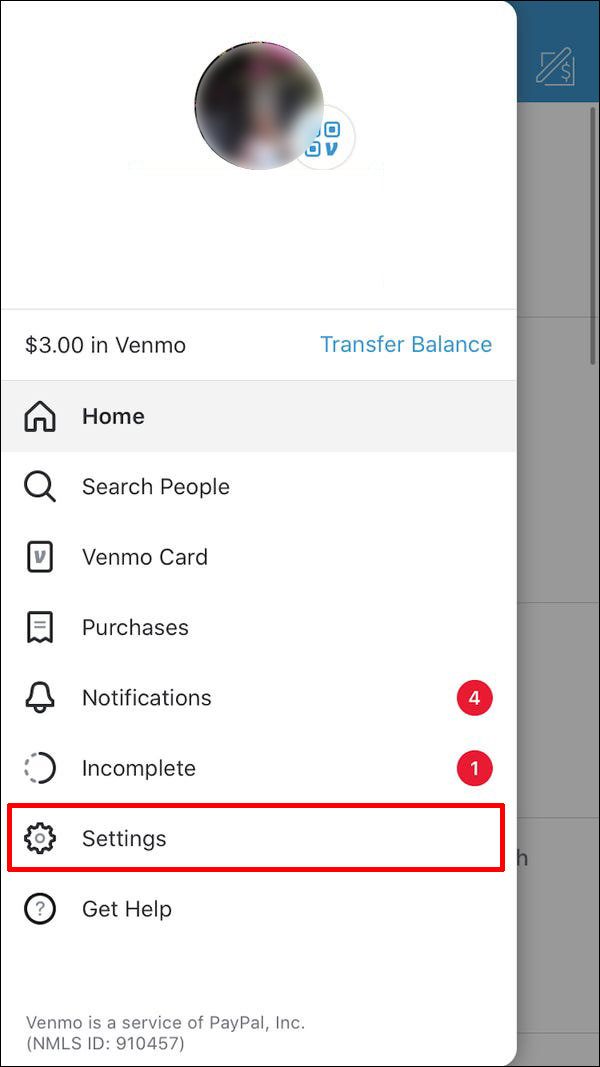
- Default Privacy Settings: Navigate to your app’s “Settings” menu, then “Privacy.” Here, you can set a default privacy level for all future transactions. Changing this to “Friends” or “Private” is a recommended best practice for most users concerned with digital footprint management.
- Past Transaction Privacy: Venmo also allows users to retroactively change the privacy of past transactions. This feature underscores the platform’s commitment to user control over their data and digital interactions, a critical aspect of modern software design.
Understanding and utilizing these privacy controls is paramount for tech-savvy users, allowing them to tailor their Venmo experience to their comfort level regarding data visibility and social interaction.
Streamlining Group Payments: The Technical Advantage
Having a robust network of friends on Venmo significantly enhances the app’s group payment features. For scenarios like splitting restaurant bills, coordinating trip expenses, or managing household utilities, Venmo’s integrated payment tools become incredibly efficient.
- Split a Bill Feature: When sending a payment or request, Venmo often presents an option to “Split” the amount among multiple friends. This leverages the pre-established connections to quickly divide costs, sending individual requests or payments. The underlying algorithm accurately calculates shares, simplifying complex financial divisions.
- Shared QR Codes for Groups: While primarily for individual connections, QR codes can also expedite group payments in real-time. One person can pay, and others can then easily find and pay them back using their QR code, or by being listed as a recipient in a split transaction.
- Impact on Transaction Speed: A well-connected network dramatically reduces the time spent on financial reconciliation. Instead of exchanging cash or multiple bank transfers, group members can settle accounts instantly with a few taps, showcasing the efficiency gains delivered by well-designed payment applications.
Troubleshooting Common Connection Issues
Despite Venmo’s robust design, users might occasionally encounter issues when trying to add friends. Most of these can be resolved with basic troubleshooting steps common to many mobile applications.
- Check Internet Connectivity: Venmo, like all online apps, requires a stable internet connection. Ensure you are connected to Wi-Fi or have sufficient cellular data.
- Verify User Details: Double-check the spelling of usernames, phone numbers, or email addresses. A simple typo is often the culprit for failed searches.
- App Permissions: Ensure Venmo has the necessary permissions (e.g., access to contacts, camera for QR scanning) enabled in your device’s settings. Operating system updates or re-installations can sometimes reset these.
- App Updates: Outdated app versions can lead to glitches. Ensure your Venmo app is updated to the latest version available on your device’s app store.
- Server Issues: Rarely, Venmo’s servers might experience temporary outages. Checking Venmo’s official status page or social media channels can confirm if this is the case. Understanding these common technical hiccups empowers users to quickly diagnose and resolve problems, maintaining a smooth app experience.
The Broader Tech Landscape of Social Payment Apps
Venmo’s approach to friend connections is indicative of broader trends in the fintech and app development sectors. The emphasis on user-friendly interfaces, robust security protocols, and seamless integration with existing digital ecosystems defines the success of modern payment applications.
User Interface and Experience (UI/UX) Design Principles
The ease with which users can add friends on Venmo is a testament to effective UI/UX design. The clear navigation, intuitive search bars, and distinct methods for connection (username, contacts, QR) are all deliberate design choices aimed at reducing cognitive load and improving user satisfaction. This focus on “learnability” and “efficiency” is a hallmark of leading software applications, ensuring that even non-technical users can leverage complex functionalities without friction. The social feed itself is an example of persuasive design, encouraging interaction and visibility, thereby strengthening the network effect.

Future Trends in Digital Social Payments
As technology evolves, the ways we connect and transact financially will undoubtedly become even more integrated. We can anticipate future iterations of social payment apps leveraging advanced technologies such as:
- AI-driven contact suggestions: Proactively suggesting connections based on mutual friends, location data (with consent), or transaction patterns.
- Enhanced biometric authentication for friend verification: Adding layers of security to friend requests, ensuring genuine connections.
- Cross-platform interoperability: Simplifying the process of connecting with users across different payment applications, further blurring the lines between various fintech platforms.
Ultimately, understanding how to add friends on Venmo is more than a simple tutorial; it’s an insight into the technical underpinnings of social payment apps, demonstrating how thoughtful design and robust engineering converge to create a powerful, user-centric financial tool in the digital age.
aViewFromTheCave is a participant in the Amazon Services LLC Associates Program, an affiliate advertising program designed to provide a means for sites to earn advertising fees by advertising and linking to Amazon.com. Amazon, the Amazon logo, AmazonSupply, and the AmazonSupply logo are trademarks of Amazon.com, Inc. or its affiliates. As an Amazon Associate we earn affiliate commissions from qualifying purchases.