
Understanding Cash App and Credit Card Integration
Cash App has emerged as a cornerstone in the digital payment landscape, offering users a streamlined platform for sending, spending, saving, and investing money. At its core, the application facilitates peer-to-peer transactions, but its utility extends significantly through the integration of various payment methods, including credit cards. Understanding how credit cards interface with such applications is crucial for leveraging their full technological potential while maintaining digital security.
The Role of Payment Apps in Modern Transactions
Payment applications like Cash App are fundamentally changing how individuals manage their finances and conduct daily transactions. By digitizing the exchange of money, these platforms offer unparalleled convenience, speed, and accessibility compared to traditional banking methods. They abstract complex financial processes into user-friendly interfaces, making actions like sending money to friends, paying for services, or even managing investments as simple as a few taps on a smartphone. The underlying technology involves secure data transmission, encryption protocols, and real-time processing, ensuring that funds move efficiently and safely between accounts. For many users, these apps serve as a primary financial tool, replacing the need for physical cash or even traditional debit card transactions in many social and retail contexts.
Why Link a Credit Card?
Linking a credit card to Cash App offers several distinct advantages, primarily centered on flexibility and access to funds. While Cash App is often associated with debit card or bank account links for direct transfers, credit card integration provides an alternative funding source. For instance, if a user’s bank account balance is low or they prefer to keep their checking account separate from immediate digital transactions, a credit card can bridge the gap. It allows users to send money to others directly from their credit line, converting a credit transaction into a digital cash transfer. This can be particularly useful in urgent situations or when managing cash flow across different financial instruments. Furthermore, for those who seek to maximize credit card rewards, linking a card to Cash App can sometimes enable earning points or cashback on transactions that might not otherwise qualify, although users should always be mindful of associated fees, which are a critical technological and financial consideration.
Step-by-Step Guide to Adding Your Credit Card
Adding a credit card to Cash App is a straightforward process, designed for user convenience and security. Following these steps ensures a smooth integration of your payment method into the application’s ecosystem.
Initial Access and Navigation
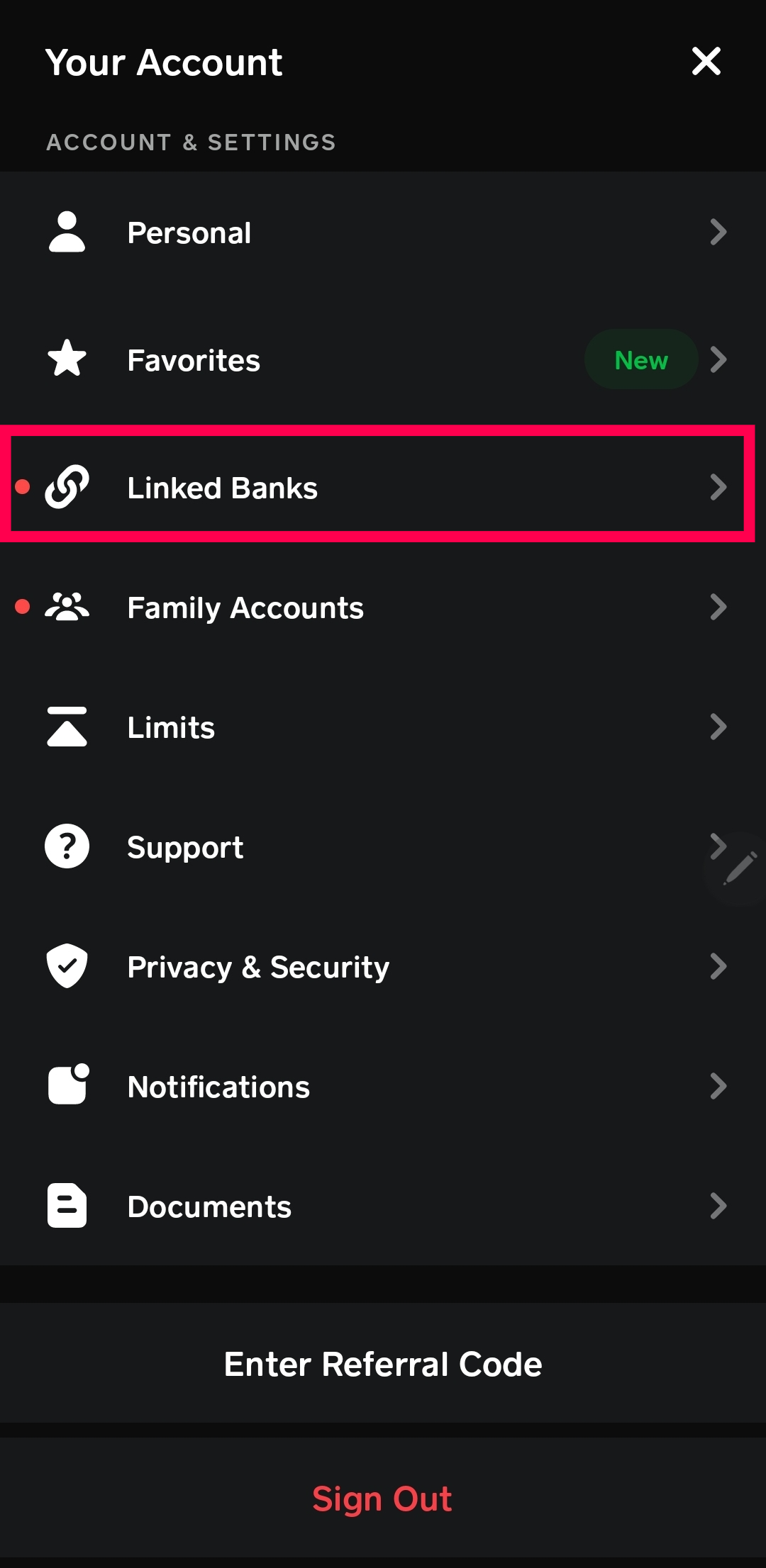
To begin, launch the Cash App on your mobile device. From the main interface, locate and tap on the profile icon, which is typically represented by a circle or a person icon, located in the top-right corner of the screen. This action will open your personal profile menu, providing access to various settings and account management options. Within this menu, scroll down until you find the “Linked Banks” or “Link Bank” section. Tap on this option. While the label primarily mentions “Banks,” this section is the universal gateway for adding all types of payment methods, including debit and credit cards, to your Cash App account.
Entering Card Details
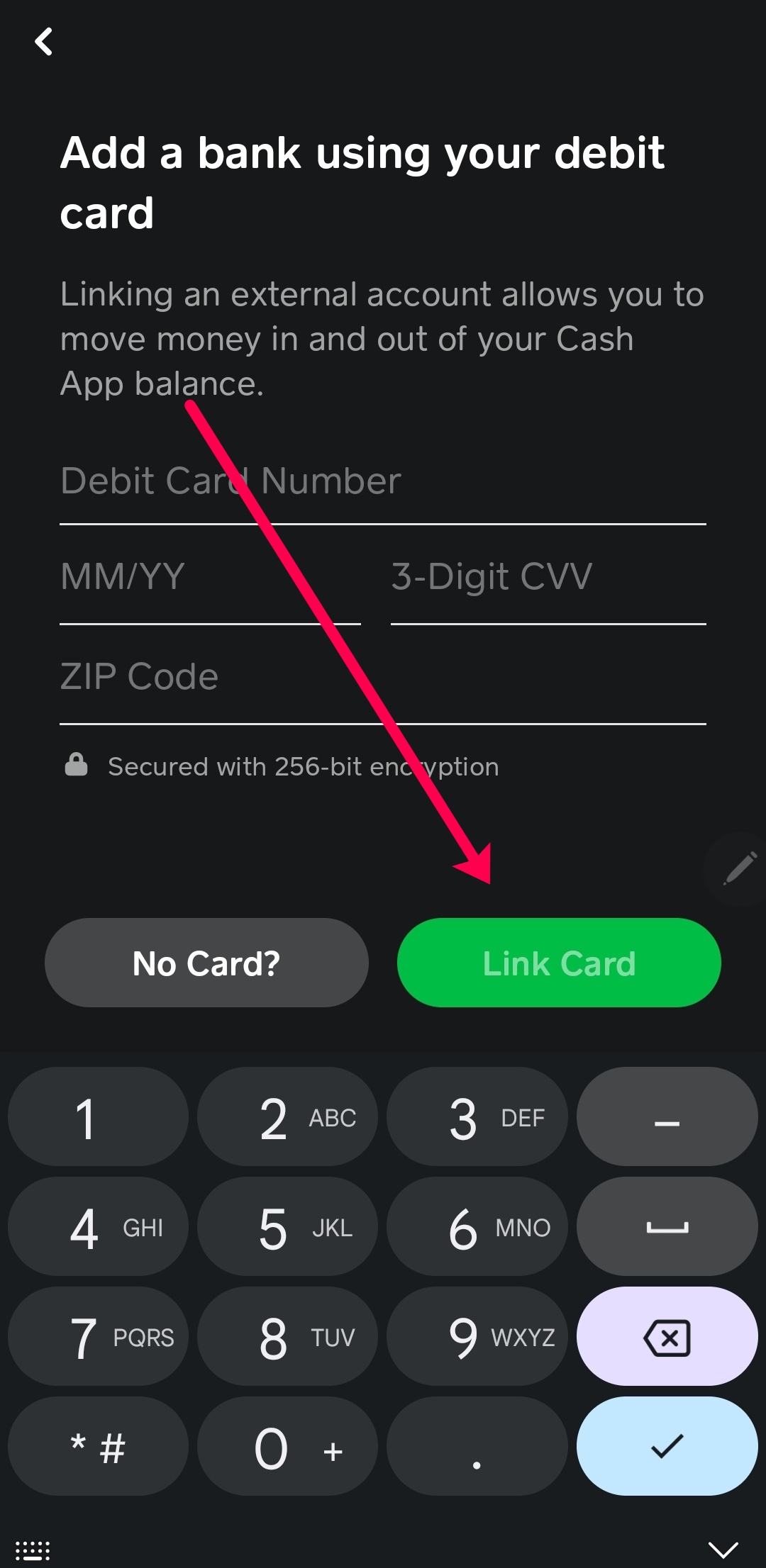
Once in the “Linked Banks” section, you will see options to link different types of accounts. Select “Link Card” to proceed with adding your credit card. The application will then prompt you to enter the necessary details from your physical credit card. This typically includes:
- Card Number: The 16-digit primary account number found on the front of your credit card.
- Expiration Date: The month and year your card is valid until, usually in MM/YY format.
- CVV/CVC: The 3 or 4-digit security code located on the back of most credit cards (or front for some American Express cards).
- ZIP Code: The billing zip code associated with your credit card account. This is a crucial security measure to verify ownership.
Accuracy is paramount when inputting these details. Any discrepancies can lead to validation errors, preventing the card from being successfully linked. Double-check each field before proceeding to the next step.
Verification and Confirmation
After entering all the required credit card details, tap the “Link Card” or “Add Card” button. Cash App will then securely transmit these details to its payment processing partners for verification. This process typically involves a rapid check with your credit card issuer to confirm the card’s validity, active status, and that the provided billing information matches their records. In some cases, for enhanced security, your bank or credit card issuer might send a one-time passcode (OTP) to your registered phone number or email address, or require you to verify a small, temporary charge made to your card. Follow any on-screen prompts or external verification steps your bank may require. Upon successful verification, Cash App will display a confirmation message, indicating that your credit card has been successfully linked to your account. Your new credit card will now appear under your “Linked Banks” or “Linked Cards” section, ready for use.
Security Protocols and Best Practices
Digital payment platforms like Cash App implement robust security measures to protect user data and financial transactions. Understanding these protocols and adopting best practices is essential for a secure experience when linking and using credit cards.
Cash App’s Encryption and Data Protection
Cash App utilizes advanced encryption technologies to safeguard all user data, including sensitive credit card information. When you enter your card details, they are immediately encrypted using industry-standard protocols, typically Transport Layer Security (TLS) or Secure Sockets Layer (SSL). This encryption scrambles the data, rendering it unreadable to unauthorized parties during transmission between your device and Cash App’s servers, as well as when stored. Cash App employs PCI DSS (Payment Card Industry Data Security Standard) compliance, a set of security standards designed to ensure that all companies that process, store, or transmit credit card information maintain a secure environment. This multi-layered approach to security ensures that your financial information is protected from potential breaches and unauthorized access, creating a secure environment for your digital transactions.
Protecting Your Account: Two-Factor Authentication
One of the most critical security features available for Cash App users is Two-Factor Authentication (2FA), also known as login verification. When enabled, 2FA adds an extra layer of security beyond just your password or PIN. After entering your primary login credentials, the system requires a second form of verification, typically a code sent to your registered phone number or email address. This means that even if someone were to gain unauthorized access to your password, they would still be unable to access your Cash App account without also possessing your secondary verification method. Activating 2FA significantly reduces the risk of account takeover and is highly recommended for all users, particularly those who link credit cards or hold significant balances within the app.
Monitoring Transactions and Fraud Prevention
While Cash App employs sophisticated security systems, users play an active role in maintaining the integrity of their accounts. Regularly monitoring your Cash App transaction history and your linked credit card statements is a vital fraud prevention measure. Familiarize yourself with how to view your transaction history within the app and set up notifications for all activities. If you notice any unauthorized transactions, suspicious charges, or unfamiliar activity on your Cash App account or linked credit card statement, it is imperative to act quickly. Immediately contact Cash App support through the application’s dedicated help section and simultaneously notify your credit card issuer. Prompt reporting allows for swift investigation and potential reversal of fraudulent charges, minimizing potential financial loss.
Troubleshooting Common Issues
Despite the seamless design of Cash App, users might occasionally encounter issues when attempting to link a credit card. Understanding common problems and their solutions can expedite the process.
Card Not Accepted or Error Messages
One of the most frequent issues is a “card not accepted” or a generic error message during the linking process. This can stem from several factors. Firstly, Cash App primarily supports Visa, MasterCard, American Express, and Discover credit cards. Certain card types, such as prepaid cards, business credit cards from smaller or lesser-known issuers, or some international credit cards, might not be compatible. Ensure your card belongs to one of the accepted networks. Secondly, a temporary issue with Cash App’s servers or your credit card issuer’s authorization system can cause a denial. In such cases, waiting a few minutes and trying again can resolve the problem. Lastly, incorrect information entry (even a single digit wrong in the card number or an incorrect ZIP code) will lead to immediate rejection. Always double-check all details entered against your physical card.
Expired or Invalid Card Details
An expired credit card is a common oversight that leads to linking failures. Before attempting to add a card, verify its expiration date. If the card has passed its validity period, it cannot be linked or used. Similarly, issues like a recently reported lost or stolen card, or a card that has been temporarily frozen by your issuer due to suspicious activity, will also result in a “card invalid” error. In these scenarios, the solution lies with your credit card issuer. Contact them to confirm the card’s active status or to receive a replacement if it’s expired or compromised. Once a new, valid card is obtained, the linking process should proceed without issue.
Contacting Cash App Support
If you’ve checked all the above possibilities and are still unable to link your credit card, the next step is to contact Cash App support. The in-app support feature is the most efficient way to get assistance. Navigate to your profile icon, then scroll down to “Support” or “Cash App Support.” From there, you can browse FAQs or initiate a chat with a support agent. When contacting support, be prepared to provide details about the specific error message you received, the type of credit card you’re trying to link, and any troubleshooting steps you’ve already attempted. Cash App’s support team can often diagnose more complex issues related to account restrictions, system glitches, or specific card issuer rejections that are not immediately apparent to the user.
Maximizing Your Cash App Experience with Credit Cards
While adding a credit card to Cash App enhances flexibility, it’s important to understand the associated mechanics and potential costs to fully optimize your experience.
Understanding Fees for Credit Card Transactions
A critical aspect of using a credit card with Cash App, from a technological and financial tools perspective, is the transaction fee. Unlike linking a debit card or bank account, which generally incurs no fees for standard transfers, Cash App typically charges a fee for sending money using a linked credit card. This fee, often around 3% of the transaction amount, is levied by Cash App to cover the processing costs imposed by credit card networks and issuers. This is standard practice across many digital payment platforms when a credit card is used as the funding source for peer-to-peer transfers, as credit card transactions are more expensive to process than debit card or bank transfers. Users should be fully aware of this fee, as it can significantly impact the effective cost of a transaction, especially for larger sums. The app usually displays the exact fee before you confirm a credit card-funded payment, allowing for transparency and informed decision-making.

The Convenience Factor
Despite the potential for fees, the convenience offered by linking a credit card to Cash App is undeniable. It provides an immediate, accessible funding source without requiring a direct draw from a bank account. This can be particularly beneficial in situations where a bank account balance is low, or for users who prefer to separate their immediate spending from their core savings or checking accounts. The technological infrastructure of Cash App allows for instant transfers from a credit line, transforming credit into liquid digital cash usable within the app’s ecosystem. This integration enhances the app’s utility as a comprehensive digital wallet, offering users more choices and greater control over how they manage and move their money in various scenarios, from splitting bills with friends to making quick payments. It represents a significant step in the seamless convergence of traditional financial instruments with modern digital payment technology.
aViewFromTheCave is a participant in the Amazon Services LLC Associates Program, an affiliate advertising program designed to provide a means for sites to earn advertising fees by advertising and linking to Amazon.com. Amazon, the Amazon logo, AmazonSupply, and the AmazonSupply logo are trademarks of Amazon.com, Inc. or its affiliates. As an Amazon Associate we earn affiliate commissions from qualifying purchases.