
In the rapidly evolving landscape of digital finance, peer-to-peer payment applications have become indispensable tools for managing personal funds, sending money to friends and family, and even making everyday purchases. Among these, Cash App stands out as a particularly popular and versatile platform, renowned for its user-friendly interface and robust feature set. However, before you can fully leverage Cash App’s capabilities, the fundamental step is to understand how to effectively fund your account. This guide delves deep into the various methods of adding cash to your Cash App, offering a detailed, step-by-step tutorial designed to empower users with the knowledge to manage their digital finances with confidence and ease.
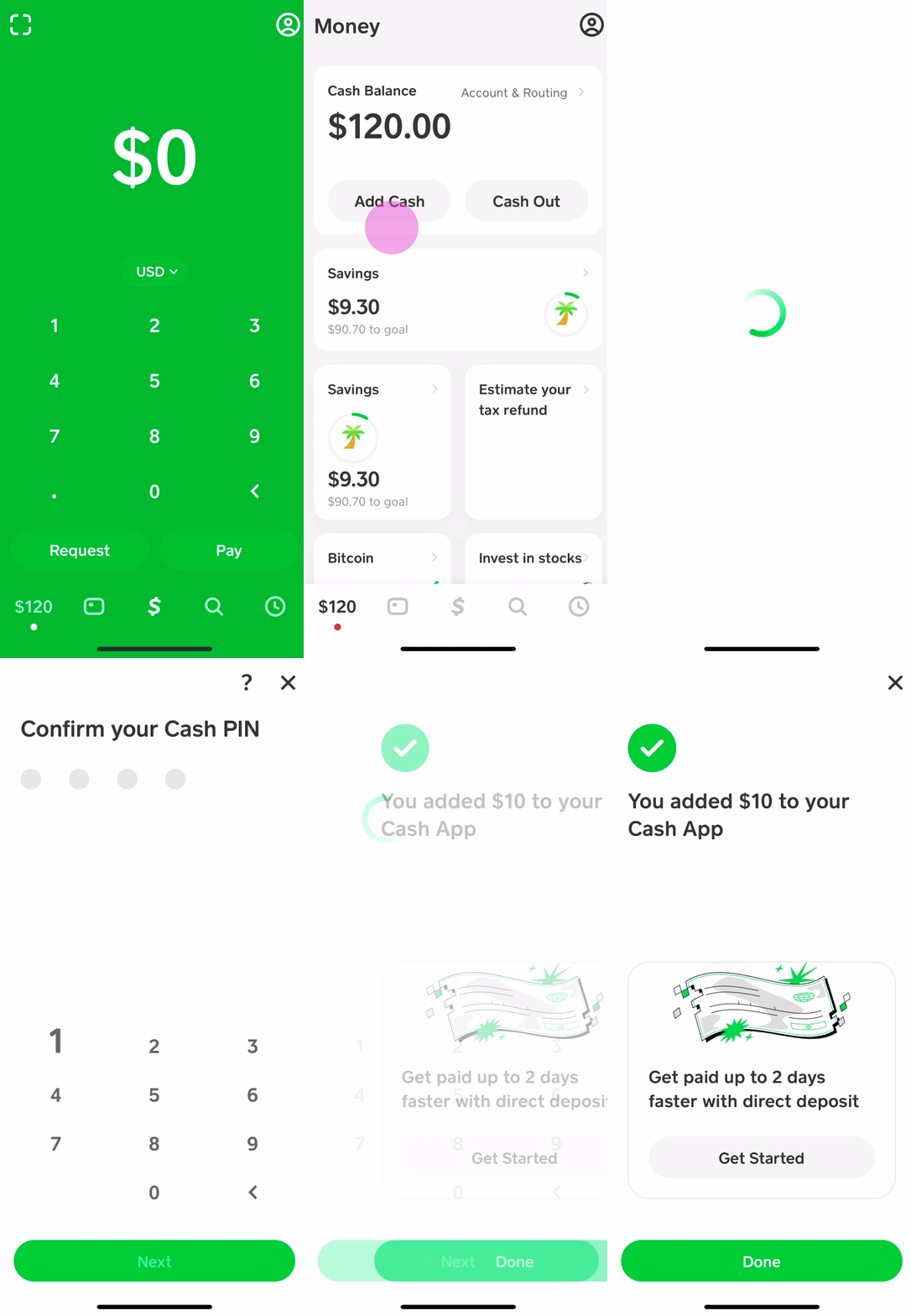
Whether you’re looking to send money instantly, invest in stocks or Bitcoin, or simply maintain a digital wallet for convenience, ensuring your Cash App balance is sufficiently funded is paramount. We will explore everything from linking traditional bank accounts and debit cards to utilizing retail locations for physical cash deposits, alongside crucial security considerations and best practices to optimize your experience.
Understanding Cash App and Its Core Functionality
Before diving into the mechanics of adding funds, it’s beneficial to grasp the essence of Cash App and why it has become such a cornerstone in digital finance for millions. Its design philosophy centers around simplicity, speed, and accessibility, making financial transactions less daunting for a broad spectrum of users.
What is Cash App?
Cash App, developed by Square, Inc. (now Block, Inc.), is a mobile payment service that allows users to send and receive money, invest in stocks and Bitcoin, and bank with a personalized debit card called the “Cash Card.” It operates as a digital wallet, facilitating seamless peer-to-peer transactions and offering a streamlined alternative to traditional banking for many common financial activities. Its intuitive interface has made it a favorite, particularly among younger demographics and those seeking an agile financial tool. Beyond basic transfers, Cash App has expanded its features to include direct deposit, savings, and even tax filing integrations, transforming it into a more comprehensive financial ecosystem.
Why Add Cash to Cash App?
The reasons for adding cash to your Cash App balance are manifold and often dictate the method you choose. Primarily, funding your account enables:
- Peer-to-Peer Payments: The most common use case is sending money to friends, family, or even businesses quickly and effortlessly, often settling debts or splitting bills.
- Cash Card Purchases: With funds in your Cash App balance, you can use your linked Cash Card (a customizable Visa debit card) for online and in-store purchases wherever Visa is accepted, effectively turning your digital balance into spendable currency.
- Investing: Cash App allows users to buy and sell fractional shares of stocks and Bitcoin directly from their balance, making investment accessible even with small amounts.
- Budgeting and Savings: Some users leverage Cash App as a separate budget for specific expenses or as a dedicated savings pot, segmenting funds from their primary bank account.
- Convenience: Having a ready balance on Cash App eliminates the need for repeated bank transfers for every small transaction, streamlining your digital financial interactions.
Understanding these benefits underscores the importance of knowing how to efficiently add money to your account, turning Cash App into a truly versatile financial instrument.
Security Considerations for Funding Your Account
While convenience is a major draw, security should always be paramount when dealing with financial applications. Cash App employs robust security measures, but user vigilance is equally crucial. When adding funds:
- Use Strong Passwords/PINs: Ensure your device and Cash App account are protected with strong, unique passwords or biometric authentication (fingerprint/Face ID).
- Two-Factor Authentication (2FA): Enable 2FA for an added layer of security, making it harder for unauthorized individuals to access your account even if they have your password.
- Beware of Phishing: Be skeptical of unsolicited emails, texts, or calls claiming to be from Cash App, especially if they ask for personal information or urge you to click suspicious links. Cash App will never ask for your PIN or sign-in code outside of the app.
- Secure Wi-Fi: Avoid conducting financial transactions over unsecured public Wi-Fi networks, which can be vulnerable to eavesdropping.
- Monitor Activity: Regularly review your transaction history for any unauthorized activity.
By adhering to these security best practices, you can significantly mitigate risks and enjoy a safer Cash App experience.
Linking Your Bank Account: The Primary Method
For most users, linking a traditional bank account or a debit card is the most straightforward and frequently used method for adding funds to Cash App. This method offers unparalleled convenience, allowing for instant transfers directly from your bank to your digital wallet.
Steps to Link a Bank Account
Connecting your bank account to Cash App is a simple process, designed to be intuitive for all users:
- Open Cash App: Launch the Cash App on your smartphone or tablet.
- Navigate to the Banking Tab: Tap the banking icon (usually represented by a house or a bank building) on the bottom left corner of the home screen.
- Link Bank Option: Under the “Cash Out” or “Linked Banks” section, you’ll see an option to “Link Bank” or “Add Bank.” Tap this.
- Enter Debit Card Information: Cash App typically asks for your debit card number first, as this card is directly tied to your checking account. Enter the 16-digit card number, expiration date, CVV, and zip code. This securely links your card and, by extension, your bank account. If you don’t have a debit card associated with the bank account you wish to link, you might be prompted to search for your bank and log in using your online banking credentials. This is a secure process facilitated by third-party services like Plaid, which encrypts your information.
- Confirm Link: Follow any additional prompts to confirm the link. You may need to verify micro-deposits or use your bank’s authentication methods.
Once linked, your bank account serves as the primary funding source for adding cash to your Cash App balance.
Initiating an Instant Deposit from Your Bank
With your bank account successfully linked, adding money is just a few taps away:
- Go to the Banking Tab: From the Cash App home screen, tap the banking icon.
- Tap “Add Cash”: You’ll see an “Add Cash” button prominently displayed. Tap this.
- Choose Amount: Select one of the pre-set amounts (e.g., $25, $50, $100) or tap “Custom” to enter a specific amount you wish to add.
- Confirm Transfer: Review the amount and tap “Add” to confirm the transfer. The funds will typically appear in your Cash App balance almost instantly.
Cash App charges no fees for standard deposits from a linked bank account. However, your bank might have its own policies regarding transfers, though this is rare for outgoing transactions to services like Cash App.
Troubleshooting Bank Linking Issues
While generally smooth, you might encounter issues when linking your bank account or adding funds. Common problems and solutions include:
- Incorrect Information: Double-check that all debit card details (number, expiration, CVV, zip code) are entered correctly.
- Bank Not Supported: While Cash App supports most major banks, some smaller credit unions or online banks might have compatibility issues. In such cases, contact Cash App support or your bank for clarification.
- Account Restrictions: Your bank might have security restrictions on linking third-party apps. You might need to contact your bank to authorize the connection.
- Insufficient Funds (for transfers): If your bank account doesn’t have sufficient funds for the amount you’re trying to add, the transfer will fail.
- Debit Card Expired/Invalid: Ensure the debit card linked is active and not expired. If you’ve received a new card, update the details in Cash App.
- Temporary Glitches: Sometimes, technical glitches can occur. Try again after a few minutes, restart the app, or even your device.
- Identity Verification: Cash App may require identity verification (e.g., SSN, date of birth) to unlock full functionality, including higher limits for adding funds. Ensure your profile is fully verified.
If problems persist, contacting Cash App Support directly through the app is the best course of action.
Adding Cash at Retail Locations: Convenience Stores and Beyond
For individuals who prefer to deal in physical cash or do not have a linked bank account, Cash App offers a convenient method to deposit cash at various retail locations. This bridges the gap between traditional currency and digital funds, making Cash App accessible to a broader user base.
Finding Participating Retailers
Cash App has partnered with numerous retail chains across the United States, making it easy to find a convenient location near you. Popular participating retailers often include:
- Walmart
- Walgreens
- 7-Eleven
- Dollar General
- Family Dollar
- CVS Pharmacy
- Rite Aid
To find the nearest participating location:
- Open Cash App: Launch the app.
- Go to the Banking Tab: Tap the banking icon.
- Tap “Add Cash”: Select this option.
- Scroll Down/Look for “Deposit Paper Money”: Below the amount options, you’ll usually see an option like “Deposit Paper Money” or “Add Cash at a Store.” Tap this.
- Use the Map Feature: Cash App will typically display a map with nearby participating locations. Allow the app to access your location for accurate results.

This feature is invaluable for those who receive their income in cash or prefer to keep their primary bank accounts separate from their digital wallet.
The In-Store Deposit Process
Once you’ve located a participating retailer, the process for depositing cash is straightforward:
- Generate Deposit Barcode: In the Cash App, after selecting “Deposit Paper Money,” you’ll be prompted to generate a unique barcode. This barcode is essential for the transaction.
- Inform the Cashier: Go to the register and inform the cashier that you wish to “add cash to your Cash App” or “make a barcode deposit.”
- Scan Barcode: Present the barcode on your phone screen to the cashier for scanning.
- Hand Over Cash: Give the cashier the exact amount of cash you wish to deposit. It’s important to note that you cannot receive change; the entire cash amount you hand over will be deposited.
- Confirm Transaction: The cashier will process the transaction, and the funds should appear in your Cash App balance almost instantly, though it can sometimes take a few minutes. You should receive a digital receipt within the app confirming the deposit.
It’s crucial to ensure the cashier processes it correctly. If they are unfamiliar with the process, politely guide them, explaining it’s a barcode-based deposit for a digital wallet.
Limits and Fees for Retail Deposits
While convenient, retail cash deposits come with specific limits and may incur fees:
- Transaction Limits: Cash App typically has a limit on how much cash you can deposit per transaction and per 24-hour period. For example, a common limit might be $500 per deposit and $1,000 per 7-day period. These limits can vary and are often displayed within the app when you generate the barcode.
- Fees: Cash App generally charges a small fee for in-store cash deposits, which is usually a flat fee per transaction (e.g., $1 or $2). This fee covers the operational costs of facilitating the service through retail partners. The fee will be deducted from the total amount you hand over to the cashier, so if you deposit $100 with a $1 fee, $99 will be added to your Cash App balance. Always confirm the fee displayed in the app before proceeding with the deposit.
These limits and fees are important considerations, especially for users who frequently rely on cash deposits.
Alternative and Less Common Funding Methods
Beyond linking bank accounts and retail deposits, Cash App offers a few other ways, direct and indirect, to get funds into your account, catering to a wider array of financial behaviors.
Receiving Funds from Other Cash App Users
One of the most fundamental ways to “add cash” to your Cash App is by simply receiving money from another user. This is the core peer-to-peer functionality:
- Requesting Money: You can send a request for a specific amount to another Cash App user. If they approve, the funds are instantly transferred to your balance.
- Receiving Sent Funds: When another user sends you money directly, it automatically appears in your Cash App balance. This is often the quickest and most common method for day-to-day transactions with friends and family.
There are typically no fees for receiving money from other Cash App users.
Direct Deposit for Paychecks
While not directly “adding cash” in the traditional sense, setting up direct deposit for your paycheck is an excellent way to consistently fund your Cash App balance with your income. This effectively turns Cash App into a primary banking account for many users:
- Obtain Account and Routing Numbers: In the Cash App, go to the Banking tab, and you’ll find your unique Cash App account and routing numbers.
- Provide to Employer: Give these details to your employer’s payroll department, just as you would with a traditional bank account.
- Receive Paychecks: Your paychecks will then be directly deposited into your Cash App balance, often up to two days earlier than with traditional banks.
This method is ideal for regular, recurring funding without any manual intervention.
Adding Funds from a Linked Debit Card
While often linked as part of the bank account setup, you can also specifically add funds directly from a linked debit card that might not be your primary bank account’s card. This can be useful if you have multiple debit cards for different purposes:
- Ensure Debit Card is Linked: Go to the Banking tab > “Linked Banks” > “Link Debit Card” to add any additional debit cards.
- Use “Add Cash” Function: Once linked, you can use the “Add Cash” feature and select the desired debit card as the source, if multiple options are available.
This offers flexibility if you manage funds across different cards or accounts.
Maximizing Your Cash App Experience: Best Practices and Tips
Successfully adding cash to your Cash App is just the first step. To truly optimize your experience and maintain financial security, several best practices should be integrated into your routine.
Monitoring Your Cash App Balance
Regularly checking your Cash App balance and transaction history is crucial for financial oversight and security:
- Daily Checks: Make it a habit to quickly review your balance and recent transactions, especially after making a deposit or sending money.
- Transaction Alerts: Enable push notifications for all transactions (deposits, withdrawals, payments sent/received) to stay informed in real-time. This helps in quickly identifying any unauthorized activity.
- Reconcile Statements: Periodically compare your Cash App transaction history with your bank statements (if applicable) to ensure all transfers are accounted for and accurate.
Proactive monitoring is your best defense against errors or fraud.
Understanding Transaction Limits
Cash App, like most financial platforms, imposes limits on how much money you can send, receive, and add to your account. These limits are typically categorized as:
- Sending Limits: How much you can send per transaction, per week, or per month.
- Receiving Limits: How much you can receive in a given period.
- Adding Cash Limits: As discussed, limits for bank transfers and retail deposits.
Initially, new or unverified accounts will have lower limits. To increase these limits, Cash App requires identity verification, which usually involves providing your full name, date of birth, and the last four digits of your Social Security Number (SSN). Fully verified accounts generally enjoy significantly higher limits, making the app more robust for larger transactions. Always check the current limits within the app’s settings or support section, as they can change.

Enhancing Account Security
Beyond the initial security considerations, ongoing vigilance is key:
- Regular Password Updates: Periodically change your Cash App PIN or password to maintain strong security.
- Device Security: Ensure your smartphone is always secured with a lock screen (PIN, pattern, fingerprint, or facial recognition) to prevent unauthorized access if your phone is lost or stolen.
- Be Skeptical of Offers: If an offer seems too good to be true, especially one involving sending money via Cash App, it likely is. Common scams involve “cash flipping” or fake giveaways.
- Only Send to Trusted Contacts: Verify the recipient’s $Cashtag before sending money, as Cash App transactions are usually irreversible.
- Report Suspicious Activity: If you notice anything unusual or suspect your account has been compromised, immediately contact Cash App support and change your password/PIN.
By integrating these best practices, you can transform Cash App from a simple payment tool into a secure and efficient cornerstone of your digital financial management. Mastering the various ways to add cash is the gateway to unlocking its full potential, ensuring you’re always prepared for whatever financial transactions come your way.
aViewFromTheCave is a participant in the Amazon Services LLC Associates Program, an affiliate advertising program designed to provide a means for sites to earn advertising fees by advertising and linking to Amazon.com. Amazon, the Amazon logo, AmazonSupply, and the AmazonSupply logo are trademarks of Amazon.com, Inc. or its affiliates. As an Amazon Associate we earn affiliate commissions from qualifying purchases.