
In the current landscape of financial technology, the shift from physical currency to digital ecosystems has been nothing short of revolutionary. At the forefront of this transformation is Cash App, a peer-to-peer (P2P) payment service developed by Block, Inc. While the application offers a multitude of features, ranging from direct deposits to bitcoin trading, its core utility remains its ability to facilitate rapid transfers between users and merchants. To unlock this utility, a user must first master the fundamental technical step: linking a funding source.
This guide provides an in-depth technical analysis and tutorial on how to add a card to Cash App, ensuring that your digital wallet is configured for maximum efficiency, security, and connectivity.
The Architecture of Digital Wallets: Understanding Cash App’s Integration
Before diving into the procedural steps, it is essential to understand the underlying technology that allows Cash App to communicate with traditional banking infrastructures. Cash App functions as a “digital wallet” layer that sits atop your existing financial accounts. When you add a card, you are essentially establishing a secure bridge between the app’s software and your bank’s processing network.
The Backend of Linking Financial Instruments
When a user enters their card details into Cash App, the software doesn’t merely “store” the number. Instead, it initiates a series of API (Application Programming Interface) calls. These calls communicate with card networks like Visa, Mastercard, or American Express to verify the validity of the account. This process involves a “pre-authorization” check where a temporary, invisible hold may be placed on the account to ensure the card is active and the credentials match the issuing bank’s records. This technical handshake is what allows for the “instant” nature of modern digital payments.
Security Protocols and Data Encryption
From a technical standpoint, security is the paramount concern when linking financial data. Cash App employs high-level encryption standards to protect user information. When you input your debit or credit card number, the data is encrypted using PCI-DSS (Payment Card Industry Data Security Standard) compliant protocols. Furthermore, Cash App utilizes tokenization. This means that after the initial verification, your actual card number is often replaced by a unique digital identifier (a token). This ensures that even if a data transmission were intercepted, the actual financial credentials remain obscured and unusable to unauthorized parties.
Step-by-Step Tutorial: Linking Your Debit or Credit Card
Navigating the Cash App interface is designed to be intuitive, yet understanding the specific software triggers is vital for a smooth experience. The following steps outline the process of adding a card using the latest version of the mobile application.
Navigating the Cash App User Interface (UI)
To begin, ensure your mobile device is running the most recent version of iOS or Android to prevent software glitches during the verification process.
- Launch the Application: Open Cash App on your smartphone.
- Access the Banking Tab: On the home screen, locate the “Banking” icon, which is situated in the bottom-left corner. Depending on your current balance, this icon may appear as a dollar amount or a stylized house icon.
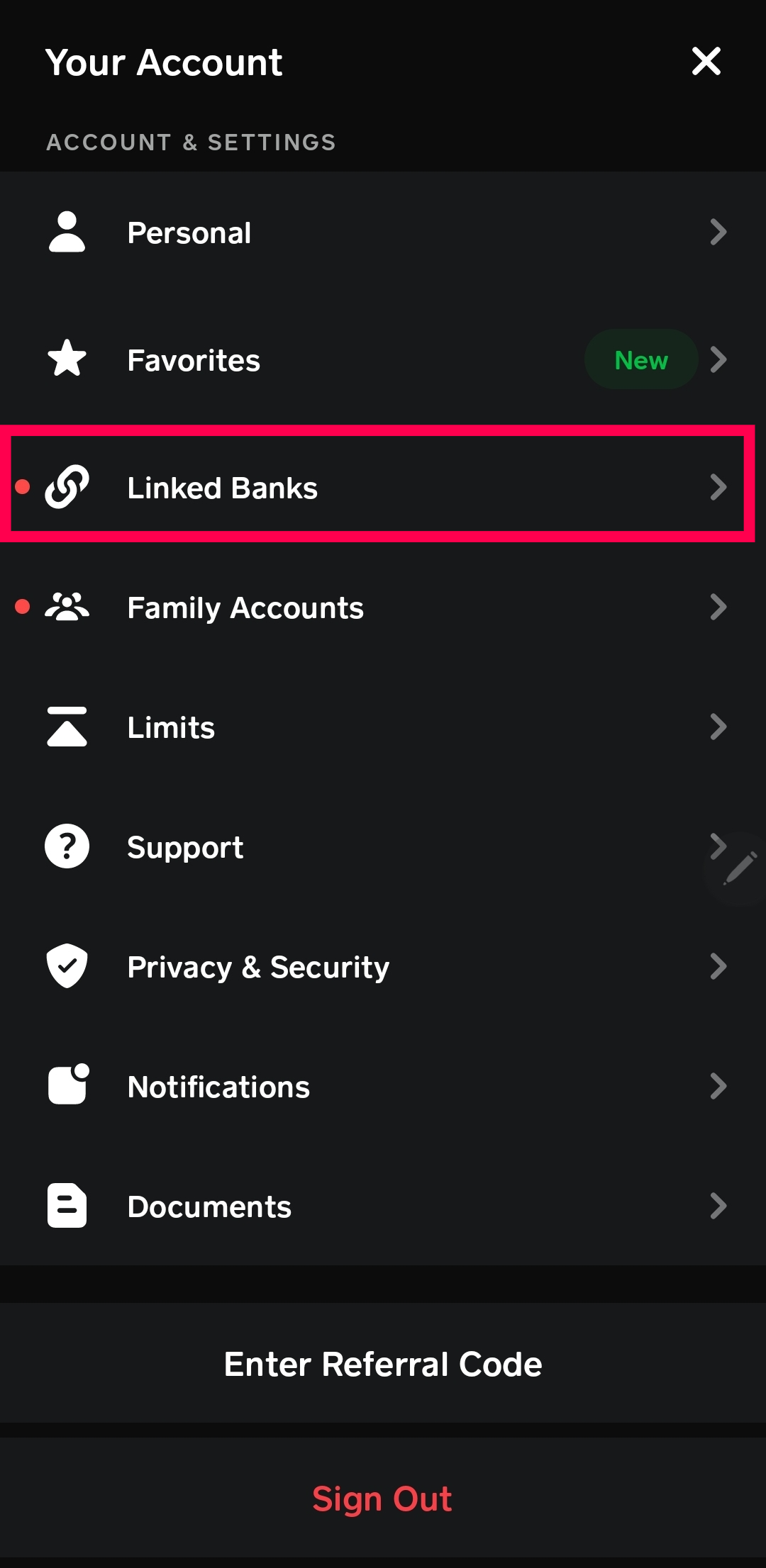
- Locate the “Link Account” Section: Within the Banking dashboard, scroll down to find the “Linked Banks” or “Add Credit Card” option. If you have not yet linked a debit card, the app will typically prompt you to link a debit card first, as this serves as the primary funding source for fee-free transfers.
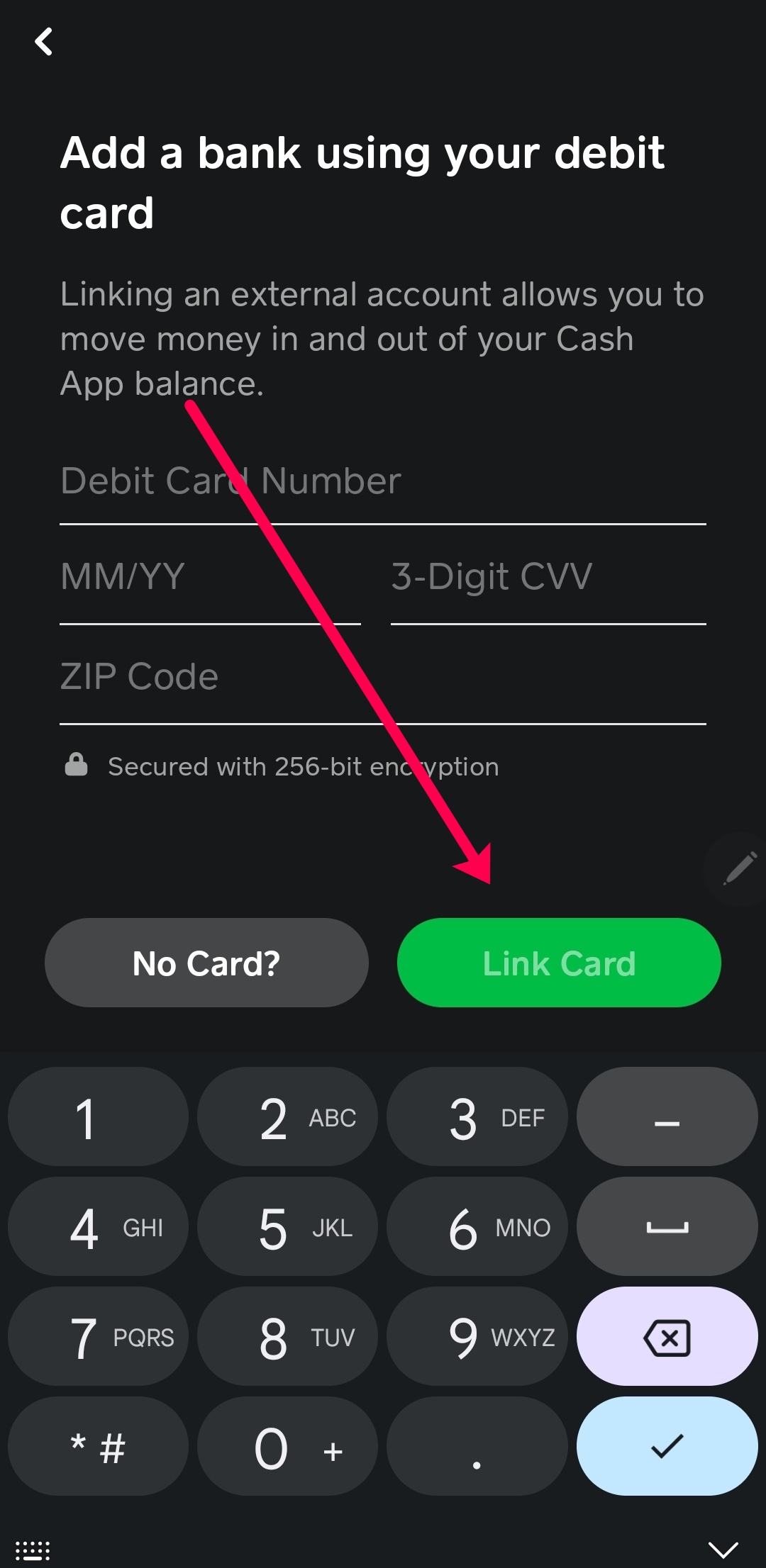
- Inputting Card Data: Select “Link Debit Card.” You will be prompted to enter your 16-digit card number. Once entered, the app will request the expiration date, CVV, and the billing ZIP code associated with the card.
Verification Steps and Common Error Handling
Once the data is submitted, the app’s software initiates the verification sequence mentioned earlier.
- Debit vs. Credit: It is important to note the technical distinction in the app. Cash App prioritizes debit cards because they utilize the ACH (Automated Clearing House) network or debit rails, which allows for lower transaction costs. If you wish to add a credit card, the app usually requires a debit card to be linked first as a primary anchor for the account.
- The ZIP Code Variable: One of the most frequent points of failure during the “Add Card” process is a ZIP code mismatch. The app’s security software cross-references the ZIP code provided with the one on file at the issuing bank. If there is even a minor discrepancy, the software will reject the card to prevent potential fraudulent activity.
Troubleshooting Technical Friction and Connectivity Issues
Even with a robust interface, technical hurdles can arise. These issues often stem from software conflicts, outdated builds, or restrictive security settings at the banking level.
Resolving Card Verification Failures
If you receive an “Invalid Card Number” or “Card Declined” message, the issue may not be the card itself, but rather the communication between the app and the bank’s server.
- Bank-Side Restrictions: Some smaller credit unions or specific prepaid card issuers have security firewalls that block P2P payment services by default. In this case, the technical solution involves contacting the bank’s fraud department to manually “whitelist” Cash App.
- Card Unsupported Status: Cash App does not support all card types. Currently, most prepaid cards are restricted from being added as a primary funding source because they lack the necessary recurring verification protocols required by the app’s software architecture.
- VPN and IP Conflicts: From a digital security perspective, if you are using a VPN (Virtual Private Network), Cash App’s risk-detection algorithms may flag the connection as suspicious. Disabling the VPN during the card-linking process often resolves “Connection Error” prompts.
App Cache and Software Update Optimization
If the app freezes during the input process, the problem likely lies in the device’s local cache. For Android users, navigating to Settings > Apps > Cash App > Storage > Clear Cache can remove corrupted temporary files that hinder the card-linking UI. For iOS users, “Offloading” the app via the General Settings menu and reinstalling it ensures a clean slate without deleting personal account data. Keeping the operating system (OS) updated is equally critical, as Cash App frequently updates its security certificates to align with the latest mobile OS security patches.
Digital Security and Privacy Features in Mobile Fintech
Once a card is successfully added, the technical focus shifts from integration to maintenance and protection. Cash App provides several software-based layers to ensure that your linked card remains secure.
Biometric Authentication and Security Locks
To protect the linked card from unauthorized use if the physical device is compromised, Cash App integrates with the hardware-level security of your smartphone. Users can enable “Security Lock” in the app settings, which requires Touch ID, Face ID, or a unique PIN for every transaction. This creates a multi-factor authentication (MFA) environment where the “something you have” (the phone) and “something you are” (biometrics) must align before the linked card can be charged.
Managing Linked Devices and Authorized Access
A key technical feature often overlooked is the “Authorized Devices” list. Within the profile settings, users can view every hardware instance where their account—and by extension, their linked card—is active. If you add a card while on a temporary device, it is vital to “Sign Out of All Devices” to terminate the session tokens. This prevents “session hijacking,” a technical exploit where a bad actor uses a cached login session to access your financial tools without needing your password.

The Future of Integrated Financial Software
As we look at the trajectory of apps like Cash App, the process of “adding a card” is becoming increasingly automated. With the rise of “Open Banking” and frameworks like Plaid, the manual entry of 16-digit numbers may eventually become obsolete. Future iterations of the app are expected to utilize deeper API integrations that allow users to simply log into their banking portal via a secure Oauth window, instantly syncing all eligible cards and accounts.
Furthermore, the integration of virtual cards and digital-only banks is pushing the boundaries of the Cash App ecosystem. By understanding the technical nuances of how to add and manage cards today, users are better prepared for the future of decentralized and highly integrated digital finance.
In conclusion, adding a card to Cash App is more than a simple administrative task; it is the activation of a sophisticated technical bridge between traditional banking and modern mobile utility. By following the correct UI pathways, understanding the security protocols involved, and knowing how to troubleshoot software friction, users can ensure a seamless and secure financial experience. Whether you are using a standard debit card for daily transfers or a credit card for larger purchases, the technical integrity of your Cash App account remains the foundation of your digital financial life.
aViewFromTheCave is a participant in the Amazon Services LLC Associates Program, an affiliate advertising program designed to provide a means for sites to earn advertising fees by advertising and linking to Amazon.com. Amazon, the Amazon logo, AmazonSupply, and the AmazonSupply logo are trademarks of Amazon.com, Inc. or its affiliates. As an Amazon Associate we earn affiliate commissions from qualifying purchases.