
Understanding Cash App and Its Financial Utility
Cash App has become a ubiquitous financial tool, simplifying the way millions manage their personal finances, from peer-to-peer payments to investing and direct deposits. At its core, Cash App functions as a mobile banking service, enabling users to send and receive money, pay for goods and services, and even engage in basic investment activities with stocks and Bitcoin. Its appeal lies in its user-friendly interface and the speed with which transactions can be executed. However, to fully leverage the capabilities of Cash App and integrate it seamlessly into your financial ecosystem, linking a traditional bank account is not just convenient—it’s essential.
A bank account serves as the primary gateway for funding your Cash App balance and for cashing out funds received. Without a linked bank, your Cash App experience is significantly limited, primarily to receiving money from other users who have funded their accounts differently, or spending any balance accumulated within the app itself. The real power of digital financial platforms like Cash App emerges when they bridge the gap between traditional banking institutions and the speed of modern digital transactions.
The Role of Bank Accounts in Digital Finance
In the realm of personal finance, a bank account remains the bedrock. It’s where most individuals receive their income, pay major bills, and manage their savings. Digital financial tools like Cash App are designed to augment this traditional banking relationship, not entirely replace it. By linking your bank account to Cash App, you create a direct pipeline for your funds, allowing for instant transfers from your bank to your Cash App balance when you need to send money, and equally swift transfers from your Cash App balance back to your bank account when you want to access your funds in a more traditional manner, such as withdrawing cash from an ATM via your debit card or paying bills directly from your bank.
This integration is vital for maintaining liquidity and control over your money across different platforms. It ensures that your Cash App is not an isolated digital wallet but rather a dynamic extension of your primary financial management system. Furthermore, linking a bank account is often a prerequisite for accessing advanced features within Cash App, such as setting up direct deposit for paychecks or government benefits, which inherently require a verified external account for funds transfer. The reliability and security of this link are paramount for sound financial management in the digital age.
Step-by-Step Guide: Linking Your Bank Account to Cash App
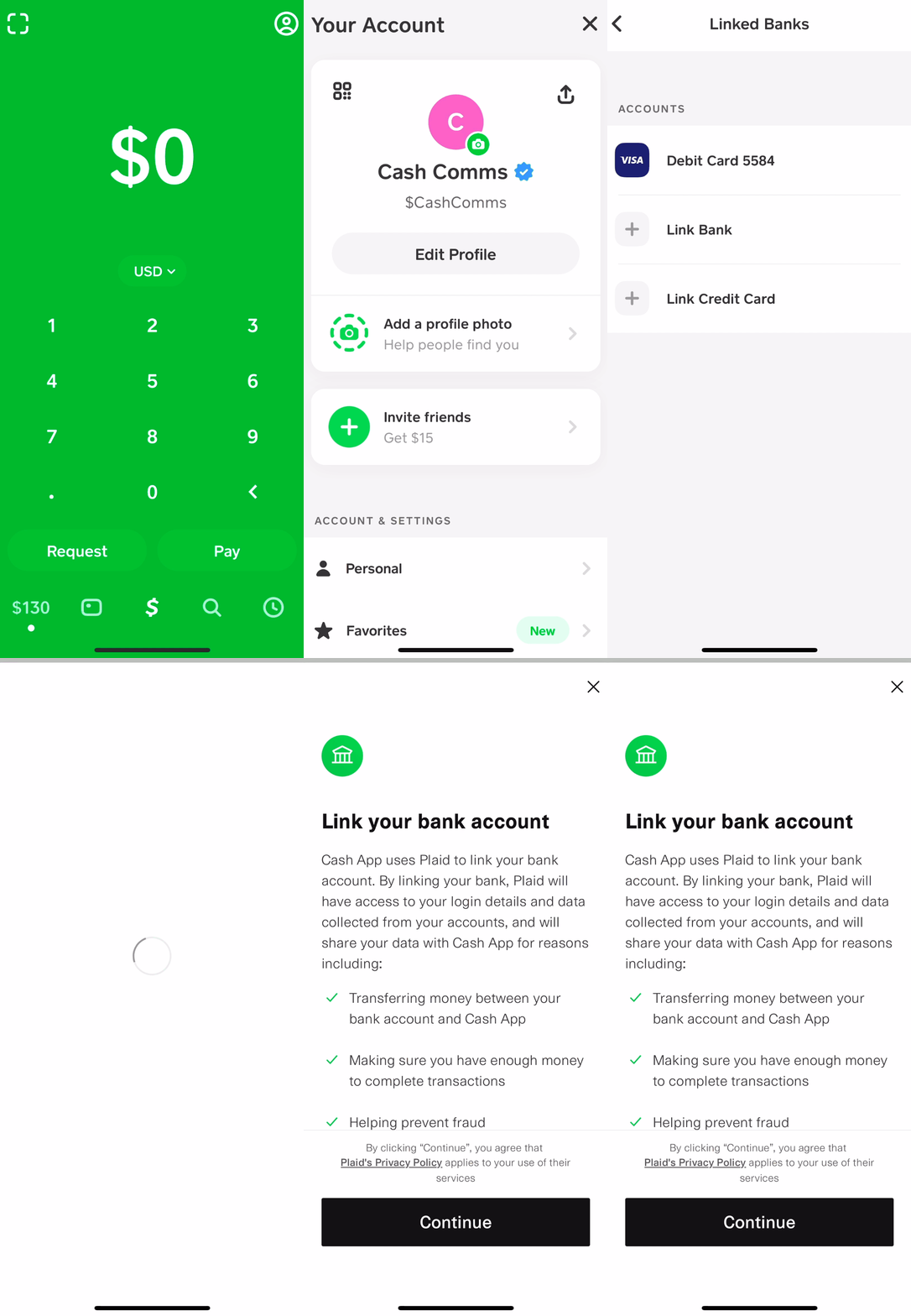
Linking your bank account to Cash App is a straightforward process designed for user convenience and security. It involves a few key steps within the application, ensuring that your financial details are securely integrated.
Initial Setup and Navigation
To begin, ensure you have the latest version of the Cash App installed on your smartphone and that you are logged into your account.
-
Open Cash App: Launch the Cash App on your device.
-
Access the Banking Tab: Look for the “Banking” tab, often represented by a house icon or a bank building icon, usually located on the bottom left corner of the main screen. Tap on it.
-
Link Bank Option: Within the Banking section, you will see options related to your Cash Card, Direct Deposit, and a prominent option to “Link Bank.” Tap on this.
-
Debit Card Prompt: Cash App typically prompts you to link a debit card first. This is a common method for initial bank verification and instant funding. If you haven’t linked a debit card, you will be asked to enter your debit card number, expiration date, CVV, and ZIP code. This debit card must be associated with the bank account you intend to link.
-
Proceed to Link Bank: After linking your debit card (or if you already have one linked), you may be presented with an option to link a bank account directly. Tap “Add Bank” or “Link Bank Account.”
Entering Bank Details and Verification
Once you’ve navigated to the “Link Bank” section, Cash App will guide you through connecting to your financial institution.
-
Select Your Bank: Cash App uses Plaid, a secure third-party service, to connect to thousands of banks and credit unions. You will be presented with a list of popular banks. If your bank isn’t listed, you can use the search bar to find it.
-
Login to Your Bank: After selecting your bank, you will be securely redirected to your bank’s online banking portal within the Cash App interface (powered by Plaid). Here, you will need to enter your online banking username and password. This is a critical step for verification, allowing Cash App (via Plaid) to confirm you are the legitimate owner of the bank account. Plaid uses advanced encryption and security protocols to ensure your credentials are never stored by Cash App and are only used for the verification process.
-
Account Selection: If you have multiple accounts with the same bank (e.g., checking and savings), you will be asked to select which account you wish to link to Cash App. Typically, a checking account is preferred for most transactions.
-
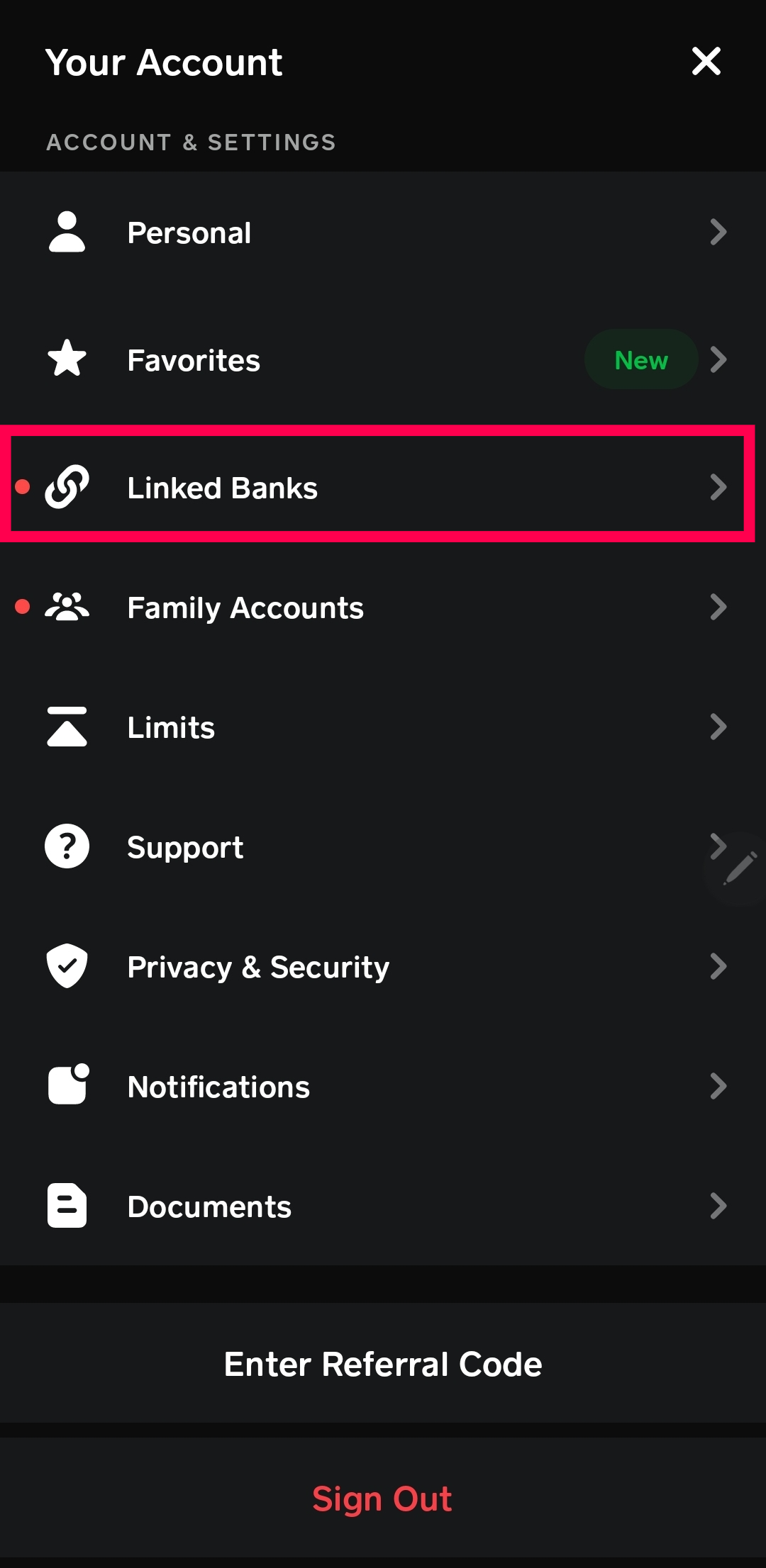
Confirm Link: Once you’ve selected the account and successfully authenticated with your bank, Cash App will display a confirmation that your bank account has been successfully linked. You can usually see your linked bank account listed under the “Linked Banks” or similar section within the Banking tab.
Troubleshooting Common Issues During Linking
While the process is designed to be smooth, you might encounter a few hiccups:
-
Incorrect Login Credentials: Double-check your online banking username and password. These are separate from your Cash App login details. If you’ve forgotten them, you may need to reset them directly with your bank.
-
Unsupported Bank: Although Plaid supports thousands of institutions, some smaller credit unions or obscure banks might not be available for direct linking. In such cases, you might need to rely solely on linking your debit card for funding, or explore alternative methods provided by Cash App support.
-
Security Blocks: Your bank might have security measures that temporarily block third-party access. If you receive an error, contact your bank to ensure there are no restrictions on connecting to third-party financial services.
-
Network Issues: A stable internet connection is crucial. Ensure you are on Wi-Fi or have a strong cellular signal during the linking process.
-
App Glitches: If the app freezes or gives a generic error, try restarting the Cash App or your device. Sometimes, reinstalling the app (after backing up any crucial data) can resolve persistent issues.
Maximizing Cash App’s Potential with a Linked Bank Account
A successfully linked bank account transforms Cash App from a basic peer-to-peer payment tool into a comprehensive personal finance hub. This integration unlocks a suite of features that can streamline your financial management.
Seamless Funds Management: Sending and Receiving Money
With your bank account linked, you can effortlessly add funds to your Cash App balance directly from your bank account when you need to send money to friends, family, or pay for services. This eliminates the need to carry a physical wallet or rely on finding an ATM. Conversely, when you receive money via Cash App, you can instantly transfer that balance back to your linked bank account. Standard transfers typically arrive within 1-3 business days without a fee, while instant transfers incur a small fee but deposit funds immediately into your bank account. This flexibility ensures you have control over where your money resides, whether it’s for immediate spending within Cash App or for traditional bank transactions.
Direct Deposit and Bill Pay Convenience
One of the most powerful features unlocked by a linked bank account is the ability to set up direct deposit. By providing your Cash App routing and account numbers (found in the Banking tab), you can have paychecks, government benefits, or tax refunds directly deposited into your Cash App balance. This can be particularly useful for individuals who prefer managing their budget primarily through their Cash App or who may not have access to a traditional bank account. While Cash App doesn’t offer a traditional bill pay service like a bank, by having your income directly deposited, you can then use your linked bank account to transfer funds for paying bills or use your Cash Card for purchases. This creates a flexible ecosystem where income can be channeled efficiently.
Investing and Savings Opportunities
Cash App extends its financial utility beyond simple payments to include basic investment features. With a linked bank account, you can buy and sell stocks and Bitcoin directly within the app. This makes investing more accessible, especially for those new to the market. Funds for these investments are typically drawn from your Cash App balance, which can be easily replenished from your linked bank account. While Cash App’s investment features are simplified compared to dedicated brokerage platforms, they offer a convenient entry point for managing a portion of your personal investments. Similarly, while Cash App does not offer traditional savings accounts with interest, having a linked bank account allows for quick transfers to and from your primary savings vehicles, facilitating a broader financial strategy.
Security Best Practices for Your Linked Bank Account
Given the sensitive nature of linking financial accounts, prioritizing security is paramount. While Cash App employs robust security measures, user vigilance plays a critical role in protecting your funds and personal information.
Protecting Your Financial Data
Cash App utilizes encryption and fraud detection technology to secure your transactions and data. However, your actions are the first line of defense. Always use a strong, unique password for your Cash App account and enable two-factor authentication (2FA). This adds an extra layer of security, requiring a code from your phone in addition to your password for login. Be wary of phishing attempts: Cash App will never ask for your login details, PIN, or full debit card number via email, text, or social media. Only enter sensitive information directly within the app. Furthermore, ensure your mobile device is secure with a strong passcode or biometric authentication (fingerprint/Face ID), as your phone is the gateway to your Cash App account.
Monitoring Transactions and Account Activity
Regularly review your Cash App transaction history and your linked bank account statements. Discrepancies, no matter how small, should be investigated immediately. Set up notifications for all Cash App transactions (sending and receiving) so you are instantly aware of any activity. Proactive monitoring helps you quickly identify and report any unauthorized transactions, minimizing potential financial losses. Many banks also offer transaction alerts, which can provide an additional layer of oversight for funds moving between your bank and Cash App.

What to Do If You Suspect Fraud
If you suspect unauthorized activity on your Cash App or linked bank account, act quickly:
-
Change Your Cash App PIN: Immediately change your Cash App PIN within the app settings.
-
Contact Cash App Support: Use the in-app support feature to report the suspicious activity. Provide as much detail as possible.
-
Notify Your Bank: If the fraudulent activity involves your linked bank account, contact your bank immediately to report the issue and inquire about potential stop payments or freezing your account to prevent further unauthorized transactions.
-
Review Linked Devices: In your Cash App settings, check the “Sign In & Security” section to review and remove any unrecognized linked devices.
-
Be Vigilant: After reporting, continue to monitor your accounts closely for any further suspicious activity. Keep records of all communications with Cash App support and your bank.
By adhering to these security best practices, you can confidently and securely integrate your bank account with Cash App, leveraging its full financial potential while safeguarding your assets.
aViewFromTheCave is a participant in the Amazon Services LLC Associates Program, an affiliate advertising program designed to provide a means for sites to earn advertising fees by advertising and linking to Amazon.com. Amazon, the Amazon logo, AmazonSupply, and the AmazonSupply logo are trademarks of Amazon.com, Inc. or its affiliates. As an Amazon Associate we earn affiliate commissions from qualifying purchases.