
In the sprawling landscape of digital entertainment, the ability to centralize and streamline your viewing experience has become a highly coveted feature. As streaming services proliferate, managing multiple subscriptions, apps, and billing cycles can quickly become a cumbersome task. Amazon Prime Video Channels offers an elegant solution, allowing subscribers to integrate various premium content providers directly into their Prime Video ecosystem. Among the most sought-after additions is AMC+, a service renowned for its critically acclaimed dramas, horror series, and exclusive content. This article delves into the technical intricacies and user-friendly steps involved in adding AMC+ to your Amazon Prime account, ensuring a seamless transition to an integrated entertainment hub.
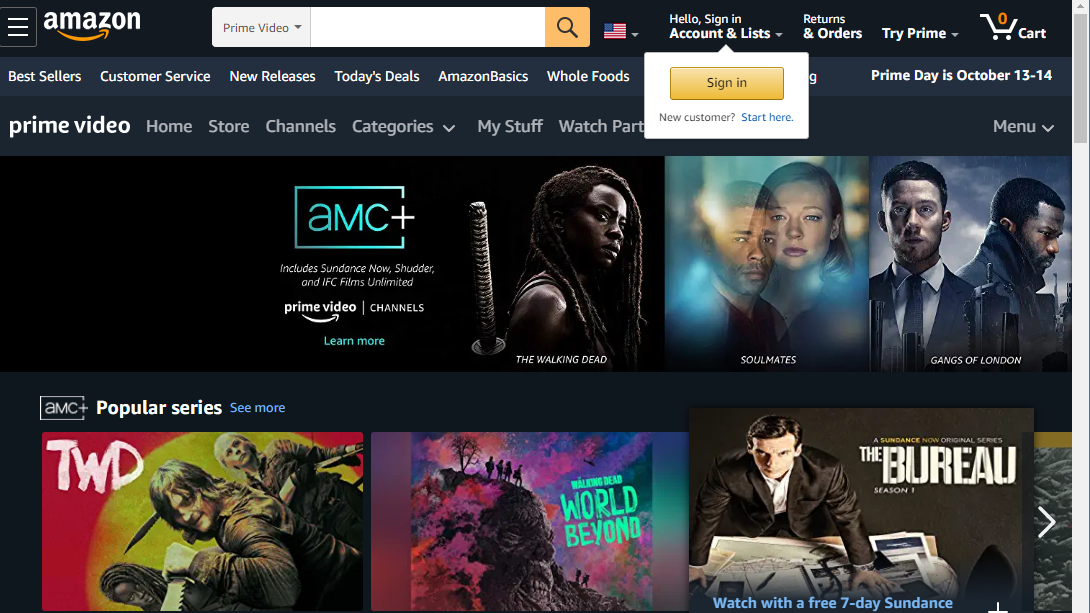
Understanding the Ecosystem: Amazon Prime Video Channels
Before diving into the “how-to,” it’s crucial to grasp the foundational technology that enables this integration. Amazon Prime Video Channels is not merely a collection of links; it’s a sophisticated platform designed to aggregate diverse streaming services under one unified interface and billing system.
What are Prime Video Channels?
Prime Video Channels represent an add-on subscription model offered by Amazon. Instead of signing up for a standalone streaming service directly through its proprietary website or app, you subscribe to it through your existing Amazon Prime account. Functionally, this means the content from services like AMC+, Paramount+, or HBO (where available as a channel) becomes accessible directly within the Prime Video application, whether you’re using a smart TV, a streaming stick, a mobile device, or a web browser. From a technical perspective, Amazon handles the subscription management, content delivery, and user authentication, abstracting away the complexities of interacting with multiple service providers. This architecture simplifies the user journey from discovery to playback.
The Benefits of Centralized Streaming
The primary allure of Prime Video Channels lies in its ability to offer a centralized, frictionless streaming experience. Technologically, this translates into several key advantages:
- Unified User Interface: All your subscribed channels appear within the familiar Prime Video app, eliminating the need to navigate between different applications for different content. This consistency reduces cognitive load and enhances usability.
- Simplified Billing: Instead of receiving separate invoices from numerous services, all your Prime Video Channel subscriptions are consolidated into a single monthly bill from Amazon. This simplifies financial tracking and reduces the likelihood of missed payments or forgotten subscriptions.
- Streamlined Access: Once subscribed, AMC+ content is immediately available within the Prime Video library. There’s no separate login, no second app to download, and no redundant authentication steps. Amazon’s robust backend handles the necessary permissions and content delivery.
- Enhanced Discovery: Amazon’s recommendation algorithms can suggest AMC+ content alongside other Prime Video titles, potentially introducing users to new shows they might enjoy but wouldn’t have discovered through a standalone app.
Why AMC+ Stands Out on Prime Video
AMC+ has carved a significant niche in the streaming market, offering a compelling blend of popular series, exclusive original content, and a deep library of genre-specific programming. Through Prime Video Channels, this rich content becomes even more accessible. Subscribers gain early access to popular AMC series, exclusive originals like Dark Winds and Gangs of London, and an extensive collection of horror and sci-fi from Shudder and Sundance Now, all without ever leaving the Prime Video environment. The integration means Prime members can leverage Amazon’s robust playback capabilities, device compatibility, and user-friendly interface for an optimized AMC+ viewing experience.
Step-by-Step Guide to Subscribing to AMC+ via Amazon Prime
Adding AMC+ to your Amazon Prime account is a straightforward process, designed for user convenience. Follow these precise technical steps to activate your subscription.
Prerequisites: Your Amazon Prime Membership
The fundamental requirement for subscribing to any Prime Video Channel, including AMC+, is an active Amazon Prime membership. This is because Prime Video Channels are an add-on service exclusively available to Prime subscribers. If you do not have an active Prime membership, you will need to sign up for one first. This involves creating an Amazon account (if you don’t already have one), providing payment information, and activating the Prime subscription, which then grants you access to the core Prime Video library and the ability to add channels.
Navigating to Prime Video Channels
Accessing the channels section can be done via various devices:
- Via Web Browser:
- Open your preferred web browser and go to
amazon.com/primevideo. - Ensure you are logged into your Amazon account.
- In the top navigation bar, hover over “Channels” or look for a “Channels” tab/section. Alternatively, search directly for “AMC+” in the Amazon search bar.
- Open your preferred web browser and go to
- Via Prime Video App (Smart TV, Streaming Device, Mobile):
- Launch the Prime Video app on your device (e.g., Fire TV Stick, Roku, Apple TV, smart TV, smartphone, tablet).
- Log in with your Amazon account credentials if prompted.
- Navigate through the app’s menu. Look for sections labeled “Channels,” “Store,” or “Add-ons.” These are typically found on the main navigation bar or in the sidebar menu.
Locating and Selecting AMC+
Once you’re in the Prime Video Channels section:
- Browse or Search: You can either scroll through the list of available channels until you find “AMC+” or use the search functionality within the Prime Video app or website. Typing “AMC+” into the search bar will typically bring up the channel directly.
- Select AMC+: Click or tap on the AMC+ channel tile. This will take you to the dedicated AMC+ landing page within Prime Video, which provides details about the service, popular titles, pricing, and typically an offer for a free trial.
The Subscription and Confirmation Process
This is where the actual activation happens:
- Initiate Free Trial/Subscription: On the AMC+ landing page, you will see an option to “Start your free trial” (if available) or “Subscribe and watch.” Click or tap this button.
- Review Terms and Confirm: Amazon will present a summary of the subscription, including the monthly cost after any trial period, the billing date, and the payment method linked to your Amazon account. Review these details carefully.
- Confirm Purchase: To proceed, you’ll usually be prompted to confirm your purchase. This might involve entering your Amazon password or a PIN for security.
- Confirmation: Upon successful confirmation, you will receive an on-screen notification that your AMC+ subscription is active. An email confirmation detailing your subscription will also be sent to the email address associated with your Amazon account.
Troubleshooting Initial Access Issues
Occasionally, users might encounter minor technical glitches immediately after subscribing:
- Content Not Showing: If AMC+ content doesn’t appear immediately, try fully closing and reopening the Prime Video app. On some devices, a complete restart of the device (e.g., unplugging a smart TV or streaming stick for 30 seconds) can resolve caching issues.
- Login Prompt: Ensure you are logged into the same Amazon account you used to subscribe to AMC+. Using a different profile or account on the same device can prevent access.
- Check Subscription Status: Go to “Your Account” on Amazon, then “Memberships & Subscriptions” to confirm AMC+ is listed as active. If it’s not, contact Amazon customer service.
Maximizing Your AMC+ Experience on Amazon Prime
Once AMC+ is successfully added, leveraging the features available through Prime Video can significantly enhance your viewing pleasure.
Exploring the AMC+ Content Library
The integration means you can browse AMC+ content as seamlessly as you would Prime Video’s own offerings. Navigate to the “Channels” section within Prime Video and select AMC+. You’ll find categories, curated lists, and dedicated pages for hit shows like The Walking Dead, Better Call Saul, Mad Men, and a vast array of horror movies and thrillers. Amazon’s search function will also incorporate AMC+ titles, allowing for easy discovery by title, genre, or actor.
Device Compatibility and Seamless Playback
One of the significant technical advantages is universal device compatibility. Since AMC+ is integrated into Prime Video, any device that supports the Prime Video app will allow you to watch AMC+ content. This includes:
- Smart TVs (Samsung, LG, Sony, Vizio, etc.)
- Streaming Media Players (Amazon Fire TV, Roku, Apple TV, Chromecast)
- Game Consoles (PlayStation, Xbox)
- Mobile Devices (iOS and Android smartphones and tablets)
- Web Browsers (Chrome, Firefox, Safari, Edge)
Playback is handled by Amazon’s robust streaming infrastructure, which typically offers adaptive bitrate streaming for optimal quality based on your internet connection, and features like X-Ray (which provides IMDb data about actors and music) are often available.
Managing Your AMC+ Subscription through Amazon
All subscription management for AMC+ (and other Prime Video Channels) is handled directly through your Amazon account, not via AMC’s website.
- Access Subscription Settings: Go to
amazon.comand log in. - Navigate to Memberships & Subscriptions: Hover over “Accounts & Lists” in the top right corner, then click on “Memberships & Subscriptions.”
- Find AMC+: Locate AMC+ in your list of active subscriptions.
- Manage Options: From here, you can typically:
- Cancel Subscription: Select the option to “Cancel Channel” or “End Subscription.” Amazon will usually prompt you to confirm and may offer to show content until the current billing period ends.
- Review Billing History: See past charges for the channel.
- Modify Payment Method: Change the credit card or payment method used for the subscription.
Parental Controls and Watchlist Features
Leverage Amazon Prime Video’s existing features for AMC+ content:
- Parental Controls: Amazon offers robust parental control settings that can restrict content based on rating, require a PIN for purchases, or even block access to Prime Video Channels entirely. These settings apply universally to all content within the Prime Video app, including AMC+.
- Watchlist: You can add AMC+ shows and movies to your Prime Video Watchlist, creating a unified queue of all the content you want to watch, regardless of its source channel.
The Tech Advantages of Bundling Streaming Services
The aggregation model represented by Prime Video Channels offers profound technical and user experience benefits that extend beyond mere convenience.
Simplified Billing and Account Management
From a technological standpoint, consolidating billing under one entity (Amazon) significantly reduces administrative overhead for the user. Instead of disparate payment dates and varying platform interfaces for managing subscriptions, everything is centralized. This not only minimizes the chance of billing errors but also provides a clear, single point of reference for all entertainment expenditures, simplifying personal budgeting and financial oversight.
Unified User Interface and Recommendation Engine
The technical brilliance of Prime Video Channels lies in its ability to present content from diverse providers within a cohesive user interface. This consistency is not just aesthetic; it’s functional. Amazon’s sophisticated recommendation engine can analyze your viewing habits across all Prime Video content, including your added channels, to provide more accurate and relevant suggestions. This cross-pollination of data leads to a richer discovery experience, helping users uncover content they genuinely enjoy without the need to manually browse multiple separate apps.
Streamlined App Experience Across Devices
The “single app” philosophy is a powerful tech advantage. By accessing AMC+ through the Prime Video app, users bypass the need to download, install, and manage yet another application. This conserves device storage, reduces clutter on home screens, and eliminates the potential for app-specific bugs or incompatibilities. The Prime Video app is generally well-optimized across a multitude of devices, ensuring a consistent and high-quality streaming experience for AMC+ content regardless of the hardware being used.
Future-Proofing Your Entertainment Hub
The trend toward content aggregation is a clear indicator of the future of digital entertainment. Platforms like Prime Video Channels are designed to be adaptable and scalable, capable of integrating new streaming services as they emerge. This approach future-proofs the user’s entertainment hub, ensuring they can continue to consolidate their viewing options as the streaming landscape evolves, all while benefiting from Amazon’s ongoing technological advancements in streaming infrastructure, security, and user experience.
Common Technical Queries and Solutions
Even with a streamlined process, technical questions can arise. Here are some common issues and their solutions specific to AMC+ via Amazon Prime.
Resolving Playback and Buffering Issues
If you experience buffering, low video quality, or playback errors with AMC+ content:
- Check Internet Connection: Ensure your Wi-Fi or wired connection is stable and fast enough for streaming (Amazon recommends at least 1.5 Mbps for SD, 3.5 Mbps for HD, and 15 Mbps for 4K UHD).
- Restart Device/App: Close the Prime Video app completely and reopen it. For persistent issues, restart your streaming device (smart TV, Fire TV Stick, etc.) and your home router/modem.
- Clear Cache: On some devices, you can clear the cache for the Prime Video app through the device’s settings menu. This can resolve corrupted data causing playback problems.
- Update App/Firmware: Ensure your Prime Video app is updated to the latest version and your streaming device’s firmware is current. Outdated software can lead to performance issues.
Dealing with Content Availability Discrepancies
Sometimes, content advertised on the standalone AMC+ service might not immediately appear on the Prime Video Channel. This is usually due to:
- Licensing Agreements: Specific licensing terms can vary between direct subscriptions and third-party aggregators like Amazon Channels.
- Rollout Delays: New content might have a slight delay in appearing on the channel compared to the direct app due to technical integration timelines.
If you believe specific content should be available, check the official AMC+ content page on Amazon for confirmation.
Security and Privacy Considerations
Subscribing through Amazon adds an extra layer of security and privacy:
- Amazon’s Robust Security: Your payment and personal information are managed by Amazon’s highly secure systems.
- Single Sign-On: You avoid creating and managing another set of login credentials, reducing the risk of password fatigue and potential security vulnerabilities.
- Privacy Settings: Utilize Amazon’s privacy settings to control data sharing and ad personalization.

Contacting Support: Amazon vs. AMC+
Knowing who to contact for specific issues is crucial:
- Contact Amazon Customer Service for:
- Billing inquiries or subscription cancellations.
- Issues with the Prime Video app itself (e.g., app crashing, general playback problems not specific to AMC+).
- Login or account access problems.
- Contact AMC+ Customer Service for:
- Specific content availability questions that Amazon support cannot answer.
- Inquiries about AMC+’s programming schedule or future releases.
- While you won’t typically need to contact AMC+ for technical playback issues when subscribed via Prime, they can provide content-related information.
By streamlining your entertainment experience through Prime Video Channels, adding AMC+ becomes a simple, efficient, and technologically integrated process. This approach not only provides easy access to a wealth of premium content but also leverages Amazon’s robust infrastructure to deliver a superior, centralized streaming solution, truly putting the viewer in control of their digital media consumption.
aViewFromTheCave is a participant in the Amazon Services LLC Associates Program, an affiliate advertising program designed to provide a means for sites to earn advertising fees by advertising and linking to Amazon.com. Amazon, the Amazon logo, AmazonSupply, and the AmazonSupply logo are trademarks of Amazon.com, Inc. or its affiliates. As an Amazon Associate we earn affiliate commissions from qualifying purchases.