
In an increasingly fragmented media landscape, consumers are constantly evaluating their entertainment budgets, seeking the optimal balance between content access and cost efficiency. YouTube TV, Google’s flagship live TV streaming service, frequently emerges as a top contender for those looking to cut the cord from traditional cable while retaining access to live sports, news, and popular network programming. However, the crucial question that underpins this consideration for many is, “how much does YouTube TV truly cost?”
The answer, while seemingly straightforward, involves more than just a single monthly fee. A comprehensive financial analysis of YouTube TV requires dissecting the base subscription, exploring potential add-ons, understanding regional variations, and placing its value within the broader context of a household’s overall streaming budget. This article will delve into the financial intricacies of YouTube TV, offering a detailed guide for consumers to make informed budgeting decisions and maximize their streaming investment.

Deconstructing the Core YouTube TV Subscription
At its heart, YouTube TV offers a robust package designed to replicate and often surpass the offerings of basic cable. Understanding the baseline cost is the first step in budgeting for this popular service.
The Standard Plan: What’s Included for the Base Price?
As of late 2023, the standard YouTube TV subscription typically costs $72.99 per month. This base price unlocks a significant array of features and content designed to appeal to a broad audience. For this monthly investment, subscribers gain access to over 100 live channels, encompassing major broadcast networks like ABC, CBS, FOX, and NBC, along with popular cable channels such such as ESPN, CNN, HGTV, TNT, and FX, among many others. The specific channel lineup can vary slightly by geographic market due to local broadcasting agreements, but the core offering remains extensive.
Beyond the sheer volume of channels, the standard plan also includes several key features that contribute significantly to its value proposition. Subscribers benefit from unlimited cloud DVR storage, allowing them to record as many shows as they wish and keep them for nine months. This feature alone can be a substantial cost-saver compared to cable companies that often charge extra for DVR boxes or limit storage capacity. Additionally, the base subscription allows for up to three simultaneous streams, meaning different household members can watch different content on different devices at the same time. This multi-user capability is a critical financial benefit for families or shared households, effectively distributing the cost across multiple viewers without incurring additional fees for extra streams. Furthermore, up to six individual accounts can be created within a single subscription, each with its own personalized library and recommendations, enhancing the overall user experience and perceived value.
Regional Variations and Tax Implications
While the $72.99 monthly fee is largely standard across the United.States, it’s imperative for consumers to account for potential regional variations and local tax implications. The specific lineup of local channels can differ based on your zip code, although this usually doesn’t impact the base price directly. More significantly, state and local sales taxes are applied to streaming services in many jurisdictions. These taxes are often a percentage of the subscription fee and can add several dollars to your monthly bill. For instance, a 5% sales tax on a $72.99 subscription would add approximately $3.65, bringing the total closer to $76.64.
It’s crucial for prospective subscribers to input their specific zip code during the sign-up process on the YouTube TV website to get an exact quote that includes all applicable local broadcast fees and taxes. Overlooking these additional charges can lead to unexpected budget discrepancies, especially for those meticulously tracking their monthly expenditures. These seemingly small additions can accumulate, affecting the perceived affordability of the service over time.
Navigating Introductory Offers and Promotional Pricing
Like many subscription services, YouTube TV frequently offers introductory promotions to entice new subscribers. These can include discounted rates for the first few months, often reducing the monthly cost by $10 to $20 for periods ranging from one to three months. For example, a common offer might be $54.99 for the first three months before reverting to the standard $72.99.
While these promotions offer an excellent opportunity to test the service at a reduced cost, careful financial planning is essential. Consumers must be fully aware of when the promotional period ends and what the full price will be afterward. Failing to account for this price hike can lead to a sudden and unwelcome jump in monthly expenses. It’s advisable to factor in the standard, non-promotional rate when performing long-term budgeting for YouTube TV, viewing the introductory discount as a temporary bonus rather than a permanent fixture. Leveraging these offers wisely means understanding the full financial commitment post-promotion and ensuring it aligns with your long-term budget.
Beyond the Basics: Add-ons and Bundles That Impact Your Bill
While the base YouTube TV package is comprehensive, many users opt for additional content, which can significantly alter the total monthly outlay. Understanding these optional expenses is key to a holistic financial assessment.
Premium Channels and Niche Packs
YouTube TV offers a wide array of premium add-on channels and specialized content packs that cater to diverse interests. These are optional, but for many, they are crucial for a complete viewing experience. Popular premium channels like HBO Max, Showtime, STARZ, and Cinemax can be added for an extra monthly fee, typically ranging from $5 to $15 each. These allow subscribers to consolidate their premium content within a single platform, potentially simplifying billing, but certainly increasing the overall cost.
Beyond individual premium channels, YouTube TV also provides “niche packs” such as the Sports Plus add-on, which includes channels like NFL RedZone, Fox Soccer Plus, and beIN Sports for an additional fee (e.g., $10.99/month). There are also genre-specific packs like the Entertainment Plus add-on or Spanish-language add-ons. Each of these additions, while enhancing content variety, directly adds to the monthly bill. Subscribers must carefully evaluate whether the added value of these packs justifies the increased financial commitment, particularly if they already subscribe to similar services independently or if their usage of the niche content is infrequent. It’s easy for these individual add-ons to accumulate, pushing the total monthly cost well into cable-like territory if not managed judiciously.
4K Plus: Is the Enhanced Viewing Worth the Extra Cost?
For videophiles and sports enthusiasts, YouTube TV offers the “4K Plus” add-on. This premium feature provides access to content in stunning 4K resolution (where available), unlimited simultaneous streams at home (beyond the standard three), and the ability to download DVR recordings for offline viewing. This add-on typically costs an additional $9.99 per month, though introductory offers might reduce this initially.
From a financial perspective, the decision to subscribe to 4K Plus hinges on the perceived value. Do you have a 4K compatible TV and internet speed to truly benefit from the higher resolution? Do you consistently need more than three simultaneous streams? Is offline viewing a frequent necessity? For many, the base 1080p resolution is sufficient, and three streams cover most household needs. However, for large families or those with a strong desire for the absolute best picture quality, especially for major sporting events, the additional $9.99 might be a worthwhile investment. Consumers should assess their viewing habits and equipment setup before committing to this upgrade, ensuring it aligns with their financial priorities and enhances their actual viewing experience meaningfully.
How Bundling with Internet Providers Can Alter the Equation
In some cases, specific internet service providers (ISPs) may offer bundles that include YouTube TV, or at least special promotions for their internet subscribers. These bundles can sometimes present a slight discount on the YouTube TV service or offer a combined bill that appears more streamlined. However, these arrangements are not universally common and often come with their own set of considerations.
Consumers should scrutinize any such bundles carefully. Are you truly saving money, or are you being locked into a longer contract with the ISP? Is the internet plan itself competitively priced, or are you paying a premium for the convenience of a bundle? Sometimes, the “discount” on YouTube TV is minimal, and you might find better overall savings by keeping your internet and streaming services separate and seeking out independent deals for each. Before committing to an ISP bundle, it’s crucial to compare the combined cost with the cost of separate services, factoring in any long-term contract requirements or hidden fees associated with the ISP.
Strategic Financial Considerations for Cord-Cutters
The decision to cut the cord often comes down to financial savings. YouTube TV, while offering a robust alternative, must be evaluated within a broader financial context to ensure it truly delivers on its promise of economy.
Comparing YouTube TV’s Value Against Traditional Cable
One of the primary motivations for adopting YouTube TV is the potential for significant savings compared to traditional cable TV packages. Basic cable bundles, especially those including internet and phone, can easily exceed $100-$150 per month, often laden with hidden fees for equipment rentals, broadcast TV surcharges, and regional sports fees that inflate the advertised price. YouTube TV’s standard $72.99 (plus taxes) offers a transparent, all-inclusive price for a comparable, if not superior, channel lineup and DVR functionality.
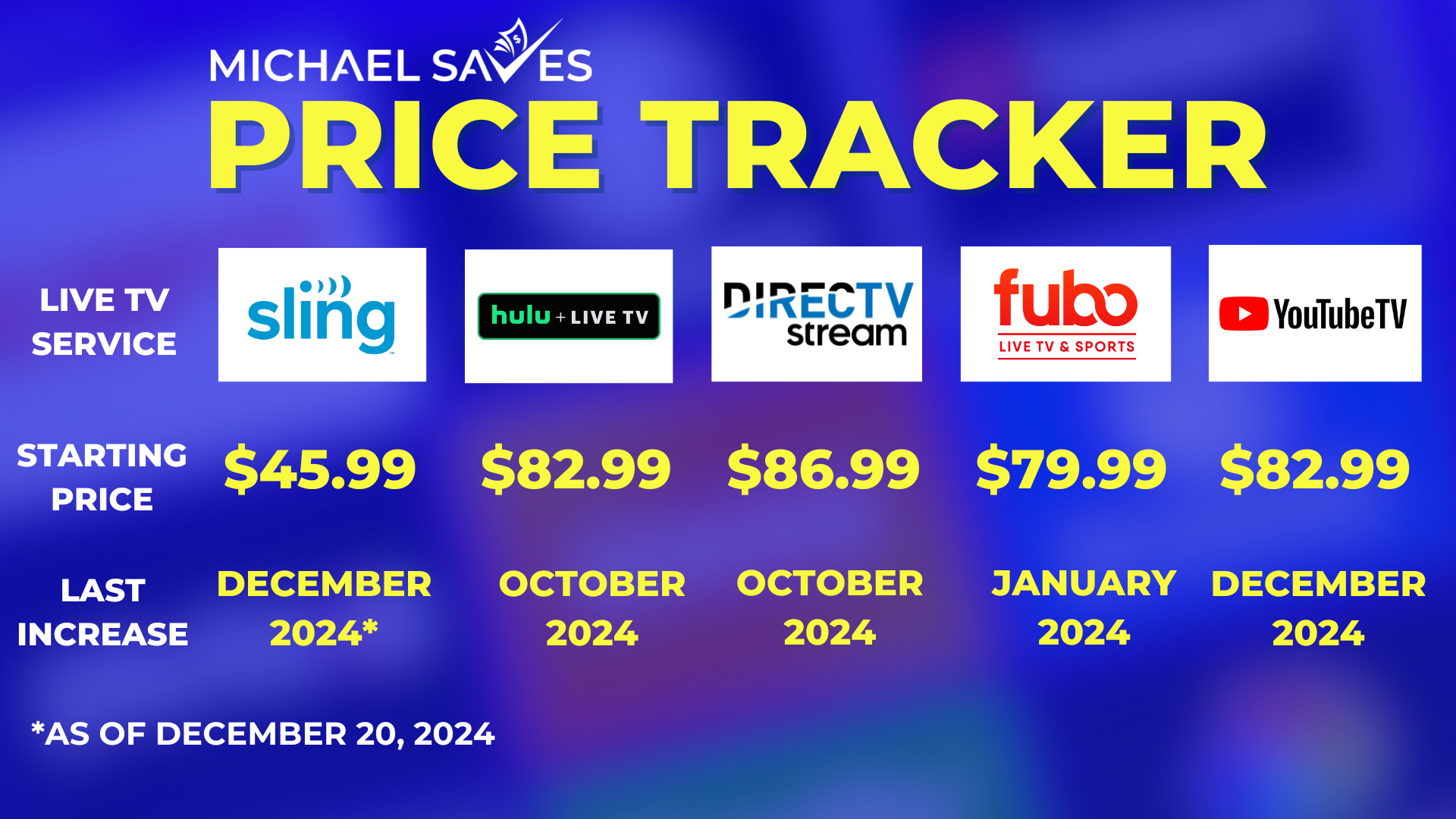
However, a direct “apples-to-apples” comparison requires more nuance. Cable companies often offer introductory rates that are competitive, but these rates typically skyrocket after a promotional period, whereas YouTube TV’s pricing is generally more stable (though price hikes can and do occur periodically). When comparing, factor in all associated costs: cable box rentals, DVR fees, installation charges, and the myriad of surcharges from cable. With YouTube TV, these are largely absent; you just need an internet connection and a compatible device, which most households already possess. The absence of contracts with YouTube TV also provides financial flexibility, allowing subscribers to cancel or pause their service at any time without penalty, a stark contrast to the often restrictive agreements imposed by cable providers.
The “Hidden” Costs of Streaming: Internet, Devices, and Data Caps
While YouTube TV eliminates many cable-related fees, streaming is not entirely without its own set of “hidden” financial considerations. The most significant of these is the cost of a reliable internet connection. YouTube TV requires a stable, high-speed internet connection (Google recommends at least 3 Mbps for standard definition, 7 Mbps for a single 1080p stream, and 13 Mbps for 4K). For households streaming multiple devices simultaneously, even higher speeds are necessary. This internet bill, typically ranging from $50 to $100+ per month, is a non-negotiable expense for any streaming household and must be factored into the overall entertainment budget.
Additionally, while many households already own smart TVs, streaming sticks (like Chromecast, Roku, Fire TV), or gaming consoles, investing in new or additional compatible devices can be an upfront cost. While these are usually one-time expenses, they are still part of the initial investment in a cord-cutting setup. Finally, for internet plans with data caps, heavy streaming, especially in high definition or 4K, can lead to exceeding limits and incurring extra charges. While unlimited data plans are becoming more common, consumers with capped plans must monitor their usage to avoid unexpected fees, turning a seemingly affordable streaming service into a surprisingly expensive one.
Budgeting for Streaming: Is YouTube TV a Sustainable Choice?
Ultimately, the financial sustainability of YouTube TV hinges on an individual or household’s overall entertainment budget. At its base price, YouTube TV represents a significant cost reduction for many coming from traditional cable. However, when combined with other popular streaming services (Netflix, Hulu, Disney+, Spotify, etc.), the cumulative monthly cost can quickly approach or even exceed previous cable bills.
A prudent financial strategy involves a periodic review of all streaming subscriptions. Ask yourself: Are you actively using all the services you pay for? Are there cheaper alternatives for the content you consume most? Could you rotate subscriptions, subscribing to one for a few months to binge content, then canceling and switching to another? For YouTube TV specifically, assess whether you are maximizing its features, such as the unlimited DVR and multiple user profiles. If you primarily watch on-demand content, a bundle of ad-supported services might be a more cost-effective alternative. Building a sustainable streaming budget means being proactive, flexible, and ruthless in cutting services that no longer provide commensurate value.
Maximizing Your YouTube TV Investment: Smart Financial Moves
To truly get the most out of your YouTube TV subscription from a financial perspective, there are several strategies to consider that can help spread the cost or ensure you’re only paying for what you genuinely use.
Sharing the Cost: The Family Plan Advantage
One of the most significant financial benefits of YouTube TV is its robust family sharing feature. A single subscription allows up to six individual Google accounts to be part of a “family group,” each with their own personalized library, recommendations, and DVR recordings. Crucially, up to three simultaneous streams are permitted from a single subscription. This means a household with multiple residents (family members, roommates, etc.) can effectively split the cost of one YouTube TV subscription, significantly reducing the individual per-person expense.
For instance, if three individuals share the standard $72.99/month subscription (plus taxes), the individual cost drops to approximately $24.33 each before taxes. This makes YouTube TV incredibly competitive, especially for those who would otherwise pay for individual streaming services. It’s important to note that YouTube TV’s terms of service generally require all members of a family group to reside in the same household. While some users might bend these rules, it’s a technicality that Google could enforce, so it’s best utilized by legitimate household members to fully leverage the financial advantage legally and ethically.
Leveraging Free Trials and Promotional Periods Wisely
YouTube TV, like many streaming services, frequently offers free trials to new users, typically ranging from 5 to 14 days. These trials are invaluable financial tools, as they allow prospective subscribers to thoroughly test the service, channel lineup, interface, and DVR functionality without any monetary commitment. It’s an opportunity to determine if the service meets your viewing habits and technical requirements before your credit card is charged.
Beyond free trials, as discussed earlier, promotional pricing offers discounted rates for an initial period. To leverage these wisely, make a calendar note for when the promotional period ends. If you decide the service isn’t worth the full price, cancel before the higher rate kicks in. If you plan to continue, ensure the higher price fits comfortably within your budget. Avoid the common pitfall of forgetting about the trial or promotion and incurring charges for a service you no longer wish to use. Smart consumers treat these offers as a risk-free assessment period, not a perpetual discount.
Periodic Subscription Review: When to Re-evaluate and Downgrade/Cancel
The streaming landscape is dynamic, with new services emerging and existing ones evolving. What might be a great value today could be less so tomorrow. Therefore, a critical financial practice for any YouTube TV subscriber is to conduct periodic reviews of their subscription. At least once or twice a year, assess:
- Usage: Are you still watching YouTube TV regularly? Or has your interest shifted to other platforms?
- Channel Value: Are you watching enough of the channels included to justify the cost? Have you added premium channels that you no longer watch?
- Alternative Costs: Are there cheaper bundles of services or even free over-the-air alternatives (with an antenna) that could fulfill your primary viewing needs?
- Price Changes: Has YouTube TV increased its price, and does the new cost still align with your budget and perceived value?
Don’t hesitate to downgrade or cancel add-ons that are no longer necessary. If you’re a seasonal sports fan, consider subscribing to the Sports Plus add-on only during the relevant season and canceling it afterward. If your viewing habits change, or if you find yourself using the service less and less, canceling YouTube TV (or pausing it for a few months, which is an option) can free up significant funds in your monthly budget. The no-contract nature of YouTube TV makes this financial agility possible and highly recommended.
The Long-Term Financial Outlook: Price Hikes and Market Trends
While YouTube TV often starts as a cost-effective alternative, the streaming market is not immune to inflation and evolving business models. Understanding these long-term dynamics is crucial for sustainable financial planning.
Understanding the Dynamics of Streaming Price Adjustments
One of the realities of the live TV streaming market is that prices are not static. YouTube TV, like its competitors (Hulu + Live TV, Sling TV, FuboTV), has increased its subscription fees multiple times since its inception. These price hikes are often attributed to rising content acquisition costs, particularly for live sports and local broadcast agreements. As networks demand more for their programming, streaming providers pass those costs onto consumers.
For consumers, this means that the price you pay today may not be the price you pay in 12 or 18 months. While these increases are usually announced well in advance, they necessitate ongoing financial adjustments. Budgeting for YouTube TV should include an allowance for potential future price increases, even if minor. This proactive approach helps cushion the blow of unexpected bill increases and ensures the service remains within your financial comfort zone over the long term. It highlights the importance of regular subscription reviews mentioned earlier.
Future-Proofing Your Streaming Budget
To truly future-proof your streaming budget, consider strategies that go beyond just YouTube TV. Diversify your content sources:
- Embrace Free Options: Utilize free ad-supported streaming services (FAST channels like Pluto TV, Tubi, Freevee) for casual viewing.
- Antenna for Locals: Invest in a one-time purchase of an over-the-air antenna for reliable access to local broadcast channels, reducing reliance on paid services for these staples.
- Content Rotation: Rather than subscribing to every premium service simultaneously, rotate subscriptions. Subscribe to HBO Max for a month to catch up on a series, then cancel and switch to Disney+ for another month. This strategy allows access to a wide variety of content without the cumulative monthly cost.
- Leverage Library Cards: Many public libraries offer free access to streaming services like Kanopy or Hoopla, providing a wealth of movies and documentaries at no cost.
These strategies empower you to have more control over your entertainment spending, making your overall streaming budget more resilient to individual service price hikes, including those from YouTube TV.
Is YouTube TV Still a Cost-Effective Alternative in the Evolving Landscape?
Despite periodic price increases, YouTube TV generally remains a cost-effective alternative to traditional cable, especially when considering its features like unlimited DVR and multiple streams. Its transparent pricing model, devoid of equipment rental fees and obscure surcharges, simplifies budgeting significantly compared to cable’s complex billing.
However, its position as a “budget” option has somewhat eroded as its price approaches the lower tiers of traditional cable bundles. The increasing cost makes it even more critical for subscribers to analyze their viewing habits closely. For households that primarily watch a handful of channels or are comfortable with on-demand content, a combination of cheaper, ad-supported services or individual premium subscriptions might offer better value. For those who crave the comprehensive channel lineup and convenience of live TV, especially sports and news, YouTube TV continues to present a compelling financial proposition. The “how much YouTube TV” question isn’t just about the dollar figure, but about the perceived value relative to your specific entertainment needs and overall financial strategy in the ever-evolving world of streaming.
aViewFromTheCave is a participant in the Amazon Services LLC Associates Program, an affiliate advertising program designed to provide a means for sites to earn advertising fees by advertising and linking to Amazon.com. Amazon, the Amazon logo, AmazonSupply, and the AmazonSupply logo are trademarks of Amazon.com, Inc. or its affiliates. As an Amazon Associate we earn affiliate commissions from qualifying purchases.