
In an increasingly digital world, the way we consume media has undergone a dramatic transformation. The traditional cable TV model, once a staple in nearly every household, is steadily being supplanted by a myriad of streaming services offering on-demand content and, increasingly, live television. Among these, YouTube TV has emerged as a formidable player, positioning itself as a comprehensive alternative to traditional cable, delivering a robust lineup of live channels, local sports, and unlimited cloud DVR capabilities. However, as with any premium service, understanding the financial commitment involved is paramount for budget-conscious consumers. This article delves deep into the cost structure of a YouTube TV subscription, exploring its base price, potential add-ons, and how its value proposition stacks up against both traditional cable and competing streaming services, all from a purely financial perspective.
Deconstructing the Core YouTube TV Subscription Cost
At the heart of the YouTube TV offering is its base plan, designed to replace the conventional cable subscription with a digital, flexible alternative. Understanding this core cost is the first step in assessing its financial viability for your household.
Understanding the Base Plan
The standard YouTube TV subscription typically features a single, all-encompassing base plan. As of early 2024, this plan generally hovers around the $72.99 per month mark, though prices can be subject to change and vary slightly based on local taxes and promotional offers. This monthly fee grants subscribers access to a wide array of content, designed to mimic and often surpass the offerings of a basic to mid-tier cable package. It’s crucial for consumers to recognize that this is the foundational financial commitment before considering any potential enhancements.
The Allure of Live TV Without Cable Bloat
One of YouTube TV’s most compelling financial arguments is its ability to deliver live TV without the often-criticized “bloat” associated with traditional cable packages. Cable companies frequently bundle hundreds of channels, many of which subscribers never watch, yet still pay for. YouTube TV, while comprehensive, tends to be more curated, offering a strong selection of popular networks across news, sports, entertainment, and children’s programming. From a financial standpoint, this means you’re generally paying for a higher percentage of channels you actually intend to watch, potentially offering better value for money than an unnecessarily large cable bill. The absence of equipment rental fees, installation charges, and long-term contracts (which are common with cable) also contributes significantly to its appeal as a more financially flexible option.
What’s Included in the Standard Package? (Financial Value)
For the base monthly fee, YouTube TV provides an impressive suite of features that contribute to its overall financial value:
- 100+ Live Channels: This includes major broadcast networks (ABC, CBS, FOX, NBC, PBS, The CW, Telemundo, Univision – availability varies by location), popular cable channels (ESPN, CNN, HGTV, TNT, FX, Discovery, Food Network, TLC, AMC, etc.), and local sports networks (RSNs) depending on your region.
- Unlimited Cloud DVR: This is a significant value-add. Unlike many cable DVRs that have storage limits or rental fees, YouTube TV allows you to record as many shows as you want and keep them for nine months, all included in the base price. This eliminates the need for expensive DVR hardware.
- Six Accounts Per Household: The subscription allows for up to six individual accounts, each with its own personalized library and recommendations. This is a substantial financial benefit for families or shared households, as it effectively allows cost-sharing while providing individual user experiences.
- Three Simultaneous Streams: At any given time, up to three devices can be streaming content concurrently. This further enhances its value for multi-person households, ensuring that different family members can watch their preferred shows without interruption.
- Multi-Device Compatibility: Access across smart TVs, streaming sticks, gaming consoles, smartphones, and tablets means you’re not tied to specific hardware, reducing potential equipment costs.
When evaluating the base cost, it’s essential to consider these inclusions, as they collectively represent a significant financial package that often outcompetes the basic offerings of traditional cable providers on a feature-for-feature basis.
Navigating Additional Costs: Add-ons and Enhancements
While the base YouTube TV subscription is comprehensive, many users seek to enhance their viewing experience with specialized content or premium features. These add-ons, while enriching, naturally introduce additional financial considerations.
Premium Channels and Niche Content Packages
Just like with cable, YouTube TV offers a selection of premium channels and niche content packages that can be added to your subscription for an extra monthly fee. These often include:
- HBO Max / Max: Access to a vast library of movies, series, and original content, typically costing an additional $15.99/month.
- SHOWTIME: A popular premium movie and series channel, usually around $10.99/month.
- STARZ: Another premium movie network, often priced at $9.00/month.
- MGM+: For classic films and original series, generally $6.00/month.
- Sports Plus: A dedicated package for various sports channels not included in the base plan (e.g., NFL RedZone, Fox Soccer Plus, beIN Sports), usually around $10.99/month.
- Entertainment Plus: A bundle of various entertainment-focused channels, often around $29.99/month.
- Spanish Plus: A selection of Spanish-language channels for around $14.99/month.
Subscribers must carefully weigh the cost of these additions against their actual viewing habits. While tempting, adding several premium channels can quickly inflate your monthly bill, potentially eroding the financial savings you might have achieved by cutting the cord from traditional cable.
Sports Packages: A Necessary Investment for Fans
For dedicated sports enthusiasts, the base YouTube TV package provides a good starting point with ESPN, Fox Sports, and local RSNs. However, certain niche sports content or enhanced viewing experiences often require specific add-ons. The “Sports Plus” package is a prime example, providing access to channels like NFL RedZone, Fox Soccer Plus, and Stadium for an extra fee. Fans of specific leagues or international sports may find these additions essential, but they are a clear financial decision point. It’s crucial for sports fans to scrutinize the channel lineup of these packages to ensure they are paying only for the content they truly desire.
4K Plus: Is the Premium Upgrade Worth It? (Cost-Benefit Analysis)
YouTube TV offers a “4K Plus” add-on, typically priced around $9.99/month. This upgrade provides several benefits:
- 4K Streaming: Select live and on-demand content (e.g., major sporting events, documentaries) can be viewed in stunning 4K resolution.
- Offline Downloads: The ability to download recorded DVR content to mobile devices for offline viewing.
- Unlimited Simultaneous Streams at Home: While the base plan allows three simultaneous streams, 4K Plus expands this to an unlimited number of streams within your home network (and three outside).
From a financial perspective, the value of the 4K Plus add-on is subjective. If you have a 4K TV, a robust internet connection, and frequently watch content available in 4K, the enhanced visual experience might justify the cost. The unlimited in-home streams are also a significant perk for large households. However, if your TV is not 4K, or if you rarely watch the limited 4K content, this add-on becomes an unnecessary expense. Consumers should conduct a personal cost-benefit analysis before committing to this premium feature.
The Impact of Taxes and Local Fees
A frequently overlooked financial detail for streaming services, including YouTube TV, is the addition of local taxes and fees. Just like cable bills, your YouTube TV bill will likely include various sales taxes, local franchise fees, or regulatory fees, depending on your geographic location. These charges can add a few dollars to your monthly total, pushing the final bill slightly above the advertised base price. While often small individually, these cumulative charges can impact your overall budget and should be factored into your financial planning.
Comparing YouTube TV’s Value Proposition Against Alternatives
To truly understand the financial implications of a YouTube TV subscription, it’s essential to benchmark its costs and features against both its traditional cable predecessors and its direct streaming competitors.
YouTube TV vs. Traditional Cable: A Cost Breakdown
Historically, a primary motivator for cutting the cord has been the promise of significant cost savings. Traditional cable packages often range from $80 to $150+ per month, and this doesn’t always include high-speed internet, equipment rental fees, HD access fees, broadcast TV fees, and local sports surcharges, which can easily push the total monthly bill well over $200.

YouTube TV, with its base price around $73, presents a clear financial advantage. Even with a few premium add-ons, it’s often still more affordable than a comparable cable package, especially when considering:
- No Equipment Rental Fees: A significant recurring saving.
- No Installation Costs: Eliminating upfront expenses.
- No Hidden Fees: While local taxes apply, YouTube TV is generally more transparent about its pricing than cable providers, who often use introductory rates that balloon after a year.
- Flexibility: No long-term contracts mean you can cancel or pause your subscription at any time, providing financial agility.
However, it’s crucial to remember that YouTube TV does not include internet service. You will still need a separate internet provider, which is an additional monthly cost that must be factored into your total entertainment budget.
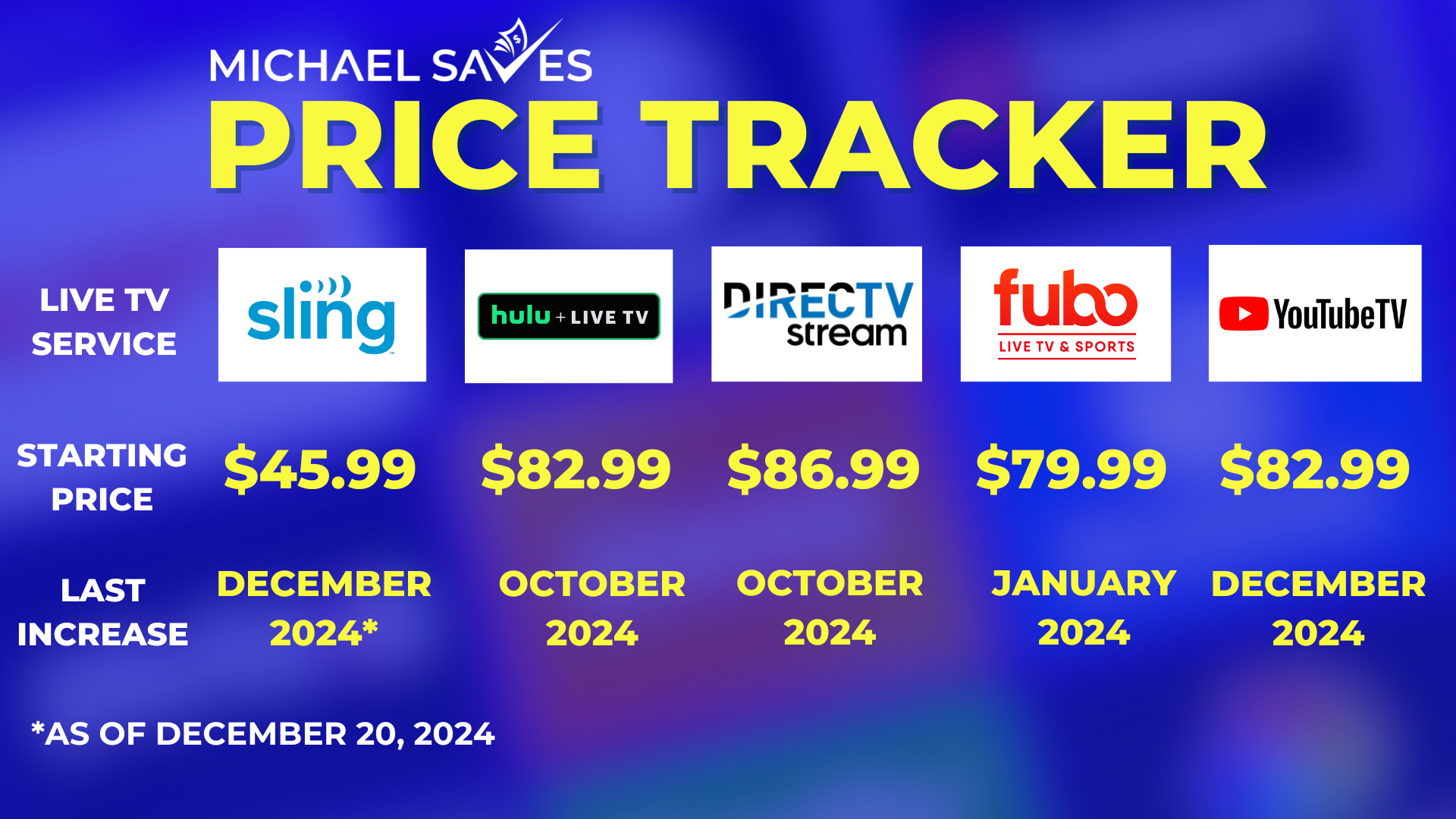
Direct Competitors: Hulu + Live TV, Sling TV, FuboTV (Financial Comparison)
YouTube TV operates in a competitive landscape, with several other live TV streaming services vying for market share. Each has its own pricing structure and channel lineup, making a direct financial comparison essential:
- Hulu + Live TV: Typically priced similarly to YouTube TV (often around $76.99/month for the ad-supported version). It often bundles Disney+ and ESPN+, which can be a huge value if you would subscribe to those services separately. Its base channel count might be slightly lower, but the bundled content makes it a strong financial contender for Disney fans.
- Sling TV: Known for being a more budget-friendly option, with its basic “Orange” or “Blue” packages starting around $40/month, or a combined “Orange + Blue” package for around $55/month. However, Sling TV offers fewer channels in its base plans, and many popular networks are add-ons. It’s a great financial choice for those seeking a leaner package and willing to compromise on channel breadth.
- FuboTV: Primarily targets sports fans, with a strong emphasis on sports channels. Its base plan typically starts around $79.99/month, making it slightly more expensive than YouTube TV. While it excels in sports coverage, it sometimes lacks certain popular entertainment channels (e.g., TBS, TNT, CNN, or truTV). Its financial value is highest for dedicated sports watchers.
When comparing, always look at the specific channels you care about most and then compare the total monthly cost, including any necessary add-ons to get your desired lineup.
The Rise of Bundles and Promotional Offers
Both YouTube TV and its competitors frequently offer promotional pricing, especially for new subscribers. These might include reduced rates for the first few months, free trials, or bundles with other streaming services. While attractive, it’s important to understand the full price after the promotional period ends to avoid budgeting surprises. Keep an eye out for potential bundles from your internet provider that might include a streaming service, as these can sometimes offer a slight financial edge.
Maximizing Your YouTube TV Investment: Smart Financial Strategies
Once you’ve decided to subscribe to YouTube TV, there are several strategies you can employ to ensure you’re getting the most financial value out of your subscription and managing your entertainment budget effectively.
Leveraging Free Trials Effectively
Most streaming services, including YouTube TV, offer free trial periods, often lasting 5-14 days. This is a crucial financial tool. Utilize these trials to:
- Test the User Experience: Ensure you like the interface and functionality.
- Verify Channel Availability: Confirm that all your must-have local and cable channels are indeed available in your area.
- Evaluate Add-ons: If you’re considering a sports package or premium channel, see if there’s a trial for that specifically or if you can test its content during the base trial.
- Check Performance: Assess streaming quality, buffering, and device compatibility.
By fully leveraging the free trial, you can make an informed financial decision before committing any money, preventing unnecessary subscriptions.
Sharing Costs Within Households (Family Plan Implications)
As mentioned earlier, YouTube TV allows for up to six individual accounts within a single subscription and three simultaneous streams (or unlimited with 4K Plus). This presents a significant opportunity for cost-sharing among family members or even housemates. If you can split the roughly $73/month base cost among two or three users, the individual financial burden becomes much more manageable, making it an extremely cost-effective entertainment solution for each person. Clearly define who is paying what percentage to avoid financial disagreements.
Periodically Reviewing Your Subscriptions and Add-ons
It’s easy for subscriptions to accumulate over time, leading to “subscription fatigue” and unnecessary financial drain. Make it a habit to periodically (e.g., quarterly or bi-annually) review all your streaming subscriptions, including YouTube TV and any add-ons. Ask yourself:
- Are you still watching the premium channels you added?
- Are you making full use of the Sports Plus package?
- Is the 4K Plus upgrade still providing value?
If an add-on isn’t being utilized, canceling it immediately can save you significant money over the course of a year. This active management of your subscriptions is a cornerstone of smart personal finance in the digital age.
Budgeting for Your Entertainment Needs
Integrate your YouTube TV subscription, along with any other streaming services and internet costs, into your overall household budget. Treat it as a fixed monthly expense, just like utilities or rent. By allocating a specific amount for entertainment, you can avoid overspending and make conscious decisions about what services are truly worth the investment. Consider if a slightly cheaper alternative like Sling TV might better fit a tighter budget, even if it means sacrificing some channels.
The Long-Term Financial Implications of Streaming
The shift to streaming is not just about current savings; it also has broader long-term financial implications for how we budget for and consume entertainment.
The Shifting Landscape of Entertainment Budgets
The “cord-cutting” phenomenon initially promised significant savings. However, with the proliferation of numerous streaming services (Netflix, Max, Disney+, Apple TV+, Prime Video, Paramount+, Peacock, etc.), many consumers find themselves subscribing to multiple platforms. While each service might be relatively inexpensive on its own, their cumulative cost can sometimes approach or even exceed a traditional cable bill. YouTube TV’s comprehensive live TV offering helps consolidate some of these needs, but consumers must remain vigilant about their total monthly entertainment spending to truly realize financial benefits.
Predicting Future Price Adjustments
It’s important to recognize that streaming service prices are not static. YouTube TV, like its competitors, has adjusted its pricing several times since its inception. As content acquisition costs rise, and as services invest more in original programming and enhanced features, it’s reasonable to anticipate future price increases. Budget-savvy consumers should factor in the possibility of gradual price hikes over time and be prepared to reassess their subscriptions periodically to ensure they remain financially viable.
Is YouTube TV a Sustainable Financial Choice for You?
Ultimately, the question of “how much is YouTube TV subscription” extends beyond a simple dollar figure. It’s about determining whether its cost, features, and flexibility align with your personal financial goals and entertainment needs. For many, YouTube TV represents a compelling and financially advantageous alternative to traditional cable, offering a rich live TV experience without the hefty price tag and rigid contracts. However, careful consideration of add-ons, the impact of taxes, comparisons with competitors, and diligent budget management are all essential to ensure that YouTube TV remains a smart and sustainable financial choice for your household in the long run. By taking a strategic approach to your subscription, you can enjoy all the benefits of modern television while keeping your finances firmly in check.
aViewFromTheCave is a participant in the Amazon Services LLC Associates Program, an affiliate advertising program designed to provide a means for sites to earn advertising fees by advertising and linking to Amazon.com. Amazon, the Amazon logo, AmazonSupply, and the AmazonSupply logo are trademarks of Amazon.com, Inc. or its affiliates. As an Amazon Associate we earn affiliate commissions from qualifying purchases.