
For millions of Americans, tax season is an annual ritual often accompanied by a mix of dread and hopeful anticipation of a refund. In navigating this complex landscape, TurboTax has emerged as a dominant player, offering a spectrum of digital tools designed to simplify the filing process. However, a common question arises for both new and returning users: “How much does TurboTax charge?” The answer, as with many financial tools, is not a simple fixed price but rather a nuanced structure dependent on individual tax situations, chosen features, and filing preferences. Understanding these costs is crucial for making an informed financial decision and ensuring you select the most cost-effective solution for your needs.
This article delves into the various pricing tiers, potential additional fees, and the overall value proposition of TurboTax from a personal finance perspective. By dissecting its offerings, we aim to provide a clear picture of what you can expect to pay and how to optimize your expenditure when filing your federal and state income taxes.
Understanding TurboTax’s Core Offerings and Pricing Tiers
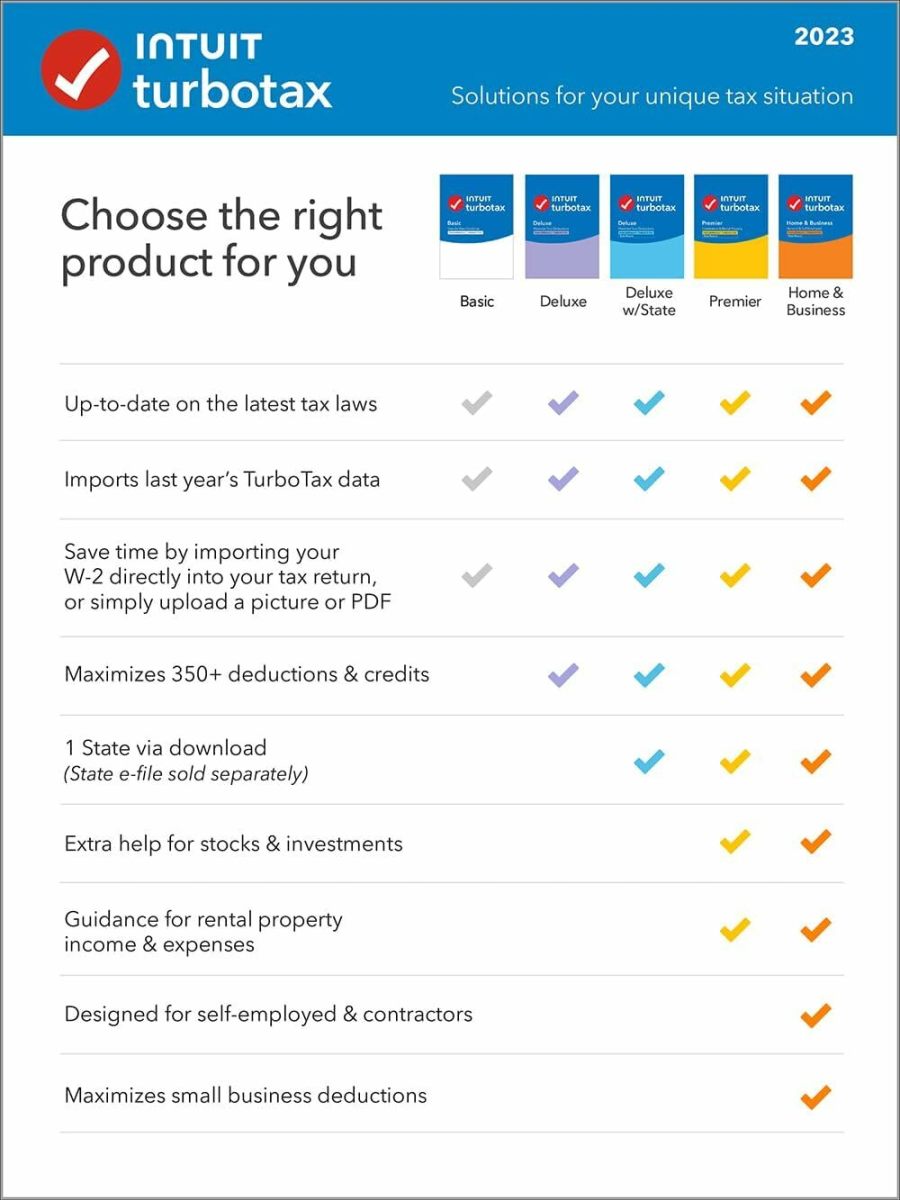
TurboTax structures its offerings into distinct editions, each tailored to different levels of tax complexity and financial situations. The cost increases incrementally with the sophistication of the tax forms and support required. Choosing the right edition upfront can prevent unnecessary upgrades and ensure you’re not overpaying for features you don’t need.
TurboTax Free Edition: For Simple Returns
The TurboTax Free Edition is often the entry point for many taxpayers, and as its name suggests, it’s designed for individuals with very straightforward tax situations. This includes taxpayers filing a Form 1040 without additional schedules, claiming the standard deduction, or reporting W-2 income, unemployment income, and limited interest and dividend income (Form 1099-INT/DIV).
Eligibility and Limitations:
- Income Sources: Primarily W-2 income, unemployment, and some basic interest/dividends.
- Deductions: Standard deduction only.
- Credits: Limited to common credits like the Earned Income Tax Credit (EITC) and Child Tax Credit.
- Cost: Federal filing is generally free. State filing may or may not be free depending on promotions or specific state programs, but often incurs a separate fee.
It’s important to note that “simple” is a specific tax definition. If your situation involves itemized deductions, capital gains, rental property income, or business income, you will quickly find yourself needing to upgrade to a paid version.
TurboTax Deluxe: Maximizing Deductions
TurboTax Deluxe is arguably the most popular paid version, catering to a broad segment of taxpayers who need to go beyond the basics. This edition is ideal for those who own a home, have significant deductions, or manage substantial charitable contributions.
Target Audience and Features:
- Itemized Deductions: The primary advantage is its ability to handle itemized deductions, such as mortgage interest, property taxes, state and local taxes (SALT), and medical expenses. The software guides users through identifying potential deductions to maximize their refund.
- Support for Investments: It can handle some basic investment income, but complex investment scenarios might require a higher tier.
- Cost: This is typically the first paid tier for federal filing, with an additional fee for each state filing. Prices vary year-to-year and based on promotions, usually ranging from $40-$70 for federal and $40-$60 per state.
TurboTax Premier: Investments and Rental Properties
For taxpayers with more complex investment portfolios or rental property income, TurboTax Premier steps in. This tier is designed to handle the intricacies of investment gains and losses, as well as the unique deductions and depreciation associated with rental properties.
Target Audience and Features:
- Investment Income: Handles sales of stocks, bonds, mutual funds (Form 8949, Schedule D), employee stock plans (ESPP, RSU, ISO), and cryptocurrency transactions.
- Rental Property Income: Guides users through reporting rental income and expenses, calculating depreciation, and handling other related schedules (Schedule E).
- Cost: Premier is a step up from Deluxe, often costing between $70-$100 for federal, plus the additional state filing fees.
TurboTax Self-Employed: For Freelancers and Small Business Owners
The rise of the gig economy and independent contractors has made TurboTax Self-Employed an essential tool for a significant portion of the workforce. This edition is specifically designed to handle business income and expenses for sole proprietors, freelancers, and independent contractors who file a Schedule C.
Target Audience and Features:
- Business Income and Expenses: Optimized for Schedule C filers, guiding them through common business deductions, vehicle expenses, home office deductions, and other business-related write-offs.
- Industry-Specific Guidance: Offers tailored advice for various self-employment scenarios.
- Quarterly Tax Planning: Helps estimate and prepare for quarterly estimated tax payments to avoid penalties.
- Cost: This is the highest-priced standard edition, typically ranging from $90-$120 for federal, with state filing costs on top. It offers significant value for self-employed individuals who might otherwise pay an accountant hundreds or even thousands of dollars.
Factors Influencing Your Final TurboTax Bill
Beyond the base price of each edition, several other factors can increase your overall expenditure. Being aware of these additional charges can help you budget accurately and avoid surprises.
State Tax Filings: An Additional Layer of Cost
While the federal filing might be free or included in your chosen edition, state tax filings are almost always an additional charge. Most states have their own tax laws and forms, requiring separate calculations and submissions.
- Per-State Fee: TurboTax typically charges a separate fee for each state return you need to file. This is crucial for individuals who live in one state but work in another, or those who moved states during the tax year, potentially requiring multiple state filings.
- Exceptions: A few states have no income tax, and some promotions might offer free state filing with a paid federal product. Always check the specific offers during tax season.
Live Expert Help: On-Demand Assistance
For those who value professional guidance but still prefer to do their taxes themselves, TurboTax offers “Live” options that connect users with certified tax experts.
- TurboTax Live Assisted: This service provides on-demand access to a tax expert who can answer questions, review your return, and offer guidance as you prepare it. The expert can also sign your return. This is an upgrade that adds a substantial amount to the base price of any edition.
- TurboTax Live Full Service: This is the most comprehensive and expensive option. You hand over all your tax documents to a dedicated tax expert, who then prepares and files your return for you, effectively acting as your personal accountant. This service can significantly increase the cost, often doubling or tripling the price of the software alone, but offers maximum convenience and peace of mind.
Audit Defense and Other Add-ons
TurboTax provides optional add-on services designed to offer extra protection and support.
- Audit Defense: This service, usually offered through a third-party partner like Tax Protection Plus, provides representation and assistance if your return is audited by the IRS. While reassuring, it comes with an additional annual fee.
- Max Benefits: This package bundles several features, potentially including audit defense, identity theft monitoring, and priority support. The cost varies but is designed to offer a comprehensive safety net.
- Prior Year Returns: If you need to file an amendment or a return for a previous tax year, these are typically handled separately and may incur additional charges or require purchasing older software versions.
Software Download vs. Online Filing
TurboTax offers its software both as an online service and as a downloadable desktop product.
- Online Versions: These are subscription-based and are generally what most people refer to when discussing TurboTax pricing. They are updated automatically and accessible from anywhere.
- Desktop Software: Available for purchase at retailers or directly from TurboTax, the desktop software is installed on your computer. While the initial purchase cost might be similar to online versions, desktop versions often allow you to file multiple federal returns (e.g., for family members) from a single purchase, though state e-filing typically still incurs a separate per-state fee. This can be a cost-saving measure for households with multiple filers.

Beyond the Sticker Price: Hidden Value and Potential Savings
While the immediate cost is a primary concern, it’s essential to consider the broader financial implications and potential value TurboTax provides. Sometimes, paying a bit more can lead to greater savings or significant peace of mind.
The Value of Accuracy and Peace of Mind
One of the most significant, albeit intangible, benefits of using reputable tax software like TurboTax is the enhanced accuracy of your return. The guided interview process minimizes common errors that could lead to an audit or missed deductions.
- Reduced Audit Risk: By guiding you through complex questions and performing checks, TurboTax helps ensure your return is complete and accurate, reducing the likelihood of an IRS audit.
- Confidence in Filing: For many, the peace of mind that comes from knowing their taxes have been prepared correctly, potentially reviewed by an expert (if Live is used), is well worth the investment.
Time Savings vs. DIY or Accountant Fees
Time is money, and tax software undeniably saves a substantial amount of time compared to manually filling out forms or researching every deduction.
- Efficiency: TurboTax streamlines the process, often importing W-2s and other forms directly from employers and financial institutions, drastically cutting down data entry time.
- Comparison to Accountants: While the cost of TurboTax can range from free to a few hundred dollars (for full-service options), hiring a human accountant can cost anywhere from $150 for a simple return to several thousands for complex business filings. For many, TurboTax offers a sweet spot between DIY and full-service accounting, providing a professional experience at a fraction of the cost.
Leveraging Discounts and Promotions
Tax software providers, including TurboTax, frequently offer various promotions, especially early in the tax season.
- Early Bird Deals: Filing early often comes with discounts on federal and/or state filing fees.
- Student Discounts: Some programs or partnerships offer reduced rates for students.
- Bank and Financial Institution Offers: Check if your bank or investment firm has partnerships with TurboTax that provide special pricing or free access.
- Affiliate Links: Websites focused on personal finance or deals often share promotional codes.
Free File Alliance: When TurboTax is Truly Free
It’s crucial to distinguish between TurboTax Free Edition and the IRS Free File Program.
- IRS Free File Program: This is a partnership between the IRS and several tax software companies, including TurboTax, to provide free tax preparation and e-filing for eligible taxpayers. Eligibility is based on Adjusted Gross Income (AGI), which changes annually (e.g., under $79,000 for Tax Year 2023). If you qualify for Free File, you can access a truly free version of TurboTax (and state filing) through the IRS Free File website, which is distinct from the main TurboTax website. This can be a significant cost-saving opportunity for millions of Americans who might otherwise pay for the TurboTax Free Edition’s state filing or even a paid federal version if they didn’t realize their eligibility.
Is TurboTax Worth the Cost? A Financial Decision
Deciding whether to use TurboTax, and which version, is ultimately a personal financial decision that weighs cost against convenience, complexity, and confidence.
When to Opt for a Paid TurboTax Version
- Complex Tax Situations: If you have investments, rental properties, self-employment income, or need to itemize deductions, a paid version is almost always necessary and provides the tools to accurately report these.
- Maximizing Deductions and Credits: The guided interviews in paid versions are designed to help you uncover every possible deduction and credit, potentially leading to a larger refund or smaller tax bill that far outweighs the software cost.
- Peace of Mind and Support: If you value the guided experience, error checks, and the option for expert review or full-service preparation, the paid tiers offer significant peace of mind.
Comparing TurboTax to Competitors
While this article focuses on TurboTax, it’s worth noting that other reputable tax software options exist, such as H&R Block, TaxAct, and FreeTaxUSA. Each has its own pricing structure and user experience.
- H&R Block: Offers similar tiers and services, often competing directly on price and expert support.
- TaxAct: Known for being a generally more affordable option, particularly for complex returns, though some users find its interface less intuitive.
- FreeTaxUSA: Often cited as a genuinely free federal filing option for most situations, with a low flat fee for state returns. It lacks the advanced expert support of TurboTax Live but is a strong contender for cost-conscious filers.
A quick comparison of features and pricing across these platforms, based on your specific tax situation, can reveal potential savings.
When to Consider a Human Accountant
Despite the sophistication of tax software, there are scenarios where a human accountant or enrolled agent is the more financially prudent choice.
- Very Complex Scenarios: High net worth individuals, international income, significant business changes, trust funds, or unique investment vehicles often benefit from personalized, in-depth advice.
- Specific Business Needs: Businesses with employees, complex inventory, or those needing specific tax planning strategies for growth may require a dedicated professional.
- Audit Representation: While TurboTax offers audit defense, a dedicated professional who intimately knows your financial situation can be invaluable during a serious IRS audit.
- Time Constraints/Lack of Desire: If you simply don’t have the time or inclination to engage with tax software, outsourcing the entire process to a professional can be a justifiable expense.
Navigating the Tax Season with TurboTax: Financial Best Practices
To make the most of TurboTax and manage your costs effectively, a proactive approach is key.
Early Preparation: A Key to Cost Control
Starting your taxes early offers several financial advantages.
- Avoid Last-Minute Stress: Rushing often leads to errors and can force you into paying for expedited services or premium support you might not otherwise need.
- Access Early-Bird Discounts: As mentioned, many providers offer discounts for early filers.
- Time to Gather Documents: Ample time allows you to collect all necessary documents without panic, potentially avoiding missed deductions or incorrect entries.
Maintaining Organized Records Throughout the Year
The single biggest factor in simplifying tax preparation and minimizing costs (both monetary and time) is meticulous record-keeping.
- Digital or Physical Files: Keep all W-2s, 1099s, receipts for deductions, investment statements, and other relevant documents organized.
- Categorize Expenses: For self-employed individuals, categorizing business expenses throughout the year makes entering them into TurboTax significantly faster and ensures no deduction is overlooked.
- Use Accounting Software: Small business owners or freelancers can benefit from using simple accounting software that integrates with TurboTax, automating much of the data entry.

Understanding Your Tax Situation Before You Start
Before even opening TurboTax, take a few moments to understand your financial landscape for the past year.
- Identify Income Sources: List all sources of income (W-2, 1099-NEC, investment gains, rental income, etc.).
- List Major Life Events: Did you get married, have a child, buy a house, or start a business? These events significantly impact your tax situation.
- Estimate Complexity: Based on these factors, you can get a good idea of which TurboTax edition you’ll likely need, preventing the frustration and potential cost of starting with the free version only to be prompted to upgrade repeatedly.
In conclusion, “how much does TurboTax charge” is a dynamic question with an answer that varies based on individual circumstances. From completely free for simple returns through the IRS Free File program to several hundred dollars for full-service expert assistance, TurboTax offers a tiered pricing model designed to cater to a wide array of financial situations. By understanding these tiers, factoring in potential add-ons, and appreciating the intrinsic value of accuracy and time savings, taxpayers can confidently navigate the tax season, choosing the TurboTax solution that best aligns with their financial goals and tax complexity.
aViewFromTheCave is a participant in the Amazon Services LLC Associates Program, an affiliate advertising program designed to provide a means for sites to earn advertising fees by advertising and linking to Amazon.com. Amazon, the Amazon logo, AmazonSupply, and the AmazonSupply logo are trademarks of Amazon.com, Inc. or its affiliates. As an Amazon Associate we earn affiliate commissions from qualifying purchases.