
Filing taxes is an annual obligation for most, and for millions, TurboTax has become synonymous with simplified self-preparation. However, as tax situations grow more intricate, so too can the cost structures of seemingly straightforward software solutions. The perennial question, “How much does TurboTax charge to file?” isn’t always met with a simple dollar amount. Instead, it often requires a nuanced understanding of various editions, features, and individual tax complexities. This article delves deep into TurboTax’s pricing model, helping you decipher the true cost of using their services to ensure your financial well-being isn’t compromised by unexpected expenses.
The Core Question: Why TurboTax Pricing Matters
The financial landscape of tax preparation is vast and varied, ranging from completely free options to thousands of dollars for professional services. Understanding where TurboTax fits into this spectrum, and how its costs are determined, is crucial for savvy financial planning.
The Landscape of Tax Filing
For many taxpayers, the annual ritual of filing federal and state income taxes can be a source of stress and confusion. The Internal Revenue Service (IRS) continually updates its codes, deductions, and credits, making it challenging for the average individual to stay abreast of all relevant changes. This complexity has fueled the growth of tax preparation software, with TurboTax emerging as a dominant player. Its promise of user-friendly interfaces and step-by-step guidance has attracted a wide audience, from those with simple W-2 income to self-employed individuals and investors. Yet, the initial allure of “free” filing can quickly dissipate as users progress through the software, revealing additional charges for specific forms, state filings, or expert assistance. For consumers keen on managing their personal finances effectively, anticipating these costs is paramount.
TurboTax’s Market Position
TurboTax, developed by Intuit, holds a significant share of the DIY tax preparation market. Its brand recognition, extensive marketing, and continuous product development have solidified its position as a go-to solution. However, this market dominance often comes with a premium. Unlike some newer competitors or non-profit alternatives that offer entirely free federal and state filing for a broader range of tax situations, TurboTax typically employs a tiered pricing strategy. This strategy segments users based on the complexity of their tax returns, essentially charging more for features that address more intricate financial scenarios. From a financial perspective, understanding TurboTax’s market position means acknowledging that while it offers a robust, feature-rich platform, its services are generally not the cheapest on the market, especially for those whose tax situations extend beyond the most basic parameters. Therefore, a careful financial assessment is required to determine if the convenience and functionality justify the cost for your specific needs.
Deconstructing TurboTax’s Pricing Model: Factors at Play
TurboTax’s pricing isn’t a one-size-fits-all figure. It’s a dynamic calculation influenced by several key factors related to your personal financial situation and the level of assistance you require.
Your Tax Situation’s Complexity
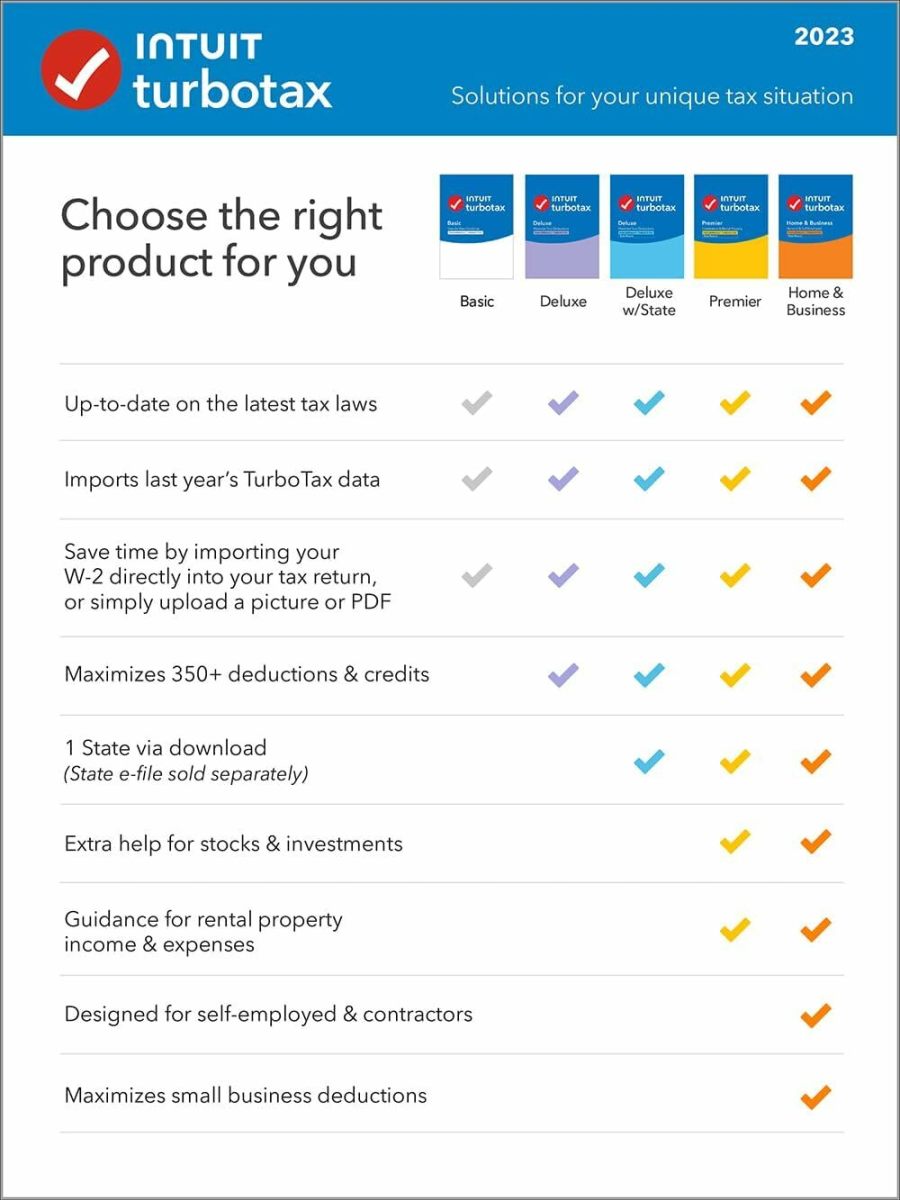
The most significant determinant of your TurboTax cost is the complexity of your tax situation. TurboTax offers several editions, each designed to handle different levels of tax forms and financial scenarios.
- Simple Returns: If you only have W-2 income, take the standard deduction, and don’t have many dependents or complex deductions, you might qualify for the TurboTax Free Edition. This is the entry point, costing nothing for federal filing.
- Moderate Complexity: As soon as you have itemized deductions (e.g., mortgage interest, property taxes), claim certain tax credits (e.g., education credits, child tax credit beyond the basic), or have specific income types like HSA contributions, you’ll likely need to upgrade to the Deluxe edition or higher. This immediately increases your cost.
- High Complexity: For those with investment income (stocks, bonds, mutual funds), rental property income and expenses, or income from pass-through businesses (partnerships, S-corps), the Premier edition becomes necessary.
- Business Owners/Self-Employed: Individuals with 1099-NEC income, Schedule C business income, or significant business expenses will require the Self-Employed edition, which is the most expensive DIY option.
Each jump in complexity corresponds to an upgrade in software edition, and thus, a higher price point. This financial model ensures that users pay for the specific tools and forms relevant to their financial activities.
Federal vs. State Filing
A common point of confusion and additional cost lies in state tax filing. While the federal return might be free or a certain price, state returns are almost always an additional charge with TurboTax, regardless of the federal edition you use. This is a crucial financial detail to remember.
- Separate Fee: For most states with income tax, TurboTax charges a separate fee to prepare and e-file your state return. This fee is added on top of your federal return cost.
- Multiple States: If you lived or worked in multiple states during the tax year, each additional state return will incur its own separate charge, further escalating your overall tax preparation expense. For individuals managing their budgets, factoring in these state-specific fees is essential, as they can significantly impact the total amount spent on tax software.
The Appeal of Expert Assistance
Beyond the software itself, TurboTax offers varying levels of human expert assistance, which can substantially increase the cost. These services cater to individuals who desire professional guidance without necessarily hiring a traditional CPA firm.
- TurboTax Live: This feature allows users to connect with a live tax expert (CPA or Enrolled Agent) via one-way video or chat to get answers to questions as they prepare their return. The cost for TurboTax Live is higher than the standard DIY editions, as you are paying for direct professional consultation. The price also varies by the underlying edition (Live Deluxe, Live Premier, Live Self-Employed).
- TurboTax Live Full Service: This is the premium offering, where a dedicated tax expert actually prepares and files your entire tax return for you, based on documents you provide. This service essentially replicates the experience of going to a traditional tax preparer, but through the TurboTax platform. Naturally, this is the most expensive option, as you are paying for a professional to handle your complete tax preparation from start to finish. For those seeking maximum convenience and assurance, the financial outlay for Full Service can be significant, often comparable to or exceeding the cost of some independent tax preparers.
Understanding these factors empowers you to anticipate costs and select the TurboTax product that aligns with both your financial situation and your comfort level with self-preparation.
A Deep Dive into TurboTax Editions and Their Features
TurboTax offers a spectrum of products tailored to different financial profiles. Each edition unlocks specific forms, features, and levels of support, directly influencing the final price you pay.
TurboTax Free Edition: Simple Returns, Zero Cost
The TurboTax Free Edition is the company’s entry-level offering, designed for individuals with very straightforward tax situations. As the name suggests, it costs nothing for federal filing and often includes a free state filing as well, though eligibility for free state filing can sometimes be more restricted.
- Who it’s for: This edition is ideal for taxpayers who have W-2 income only, take the standard deduction, have no dependents or have basic dependents, and don’t have income from investments, self-employment, or rental properties. It supports common tax forms like Form 1040.
- What it includes: Basic federal tax filing, and sometimes a free state e-file. It guides users through a simple question-and-answer interface.
- Limitations: The key limitation is that if your tax situation involves almost any complexity beyond a basic W-2 and standard deduction, you will be prompted to upgrade to a paid version. This includes itemizing deductions, claiming certain credits (e.g., child and dependent care, education), or reporting income from freelancing, investments, or rental properties. Financial foresight dictates that users with even slightly more complex situations should anticipate needing a paid upgrade.
TurboTax Deluxe: Maximizing Deductions and Credits
TurboTax Deluxe is typically the most popular paid edition, offering a significant step up in functionality for those with more involved financial lives.
- Who it’s for: This edition caters to homeowners, those with charitable contributions, significant medical expenses, or other itemized deductions. It’s also suitable for taxpayers who need to claim various tax credits not covered by the Free Edition.
- What it includes: All features of the Free Edition, plus the ability to itemize deductions (Schedule A), search for over 350 deductions and credits, and handle common tax situations like mortgage interest, property taxes, and health savings accounts (HSAs). It’s designed to help users maximize their refunds or minimize their tax liability by uncovering all eligible deductions and credits.
- Cost: This is a paid federal product, with an additional fee for each state filing. The price can vary depending on promotional offers and when you purchase the software.
TurboTax Premier: For Investors and Rental Property Owners
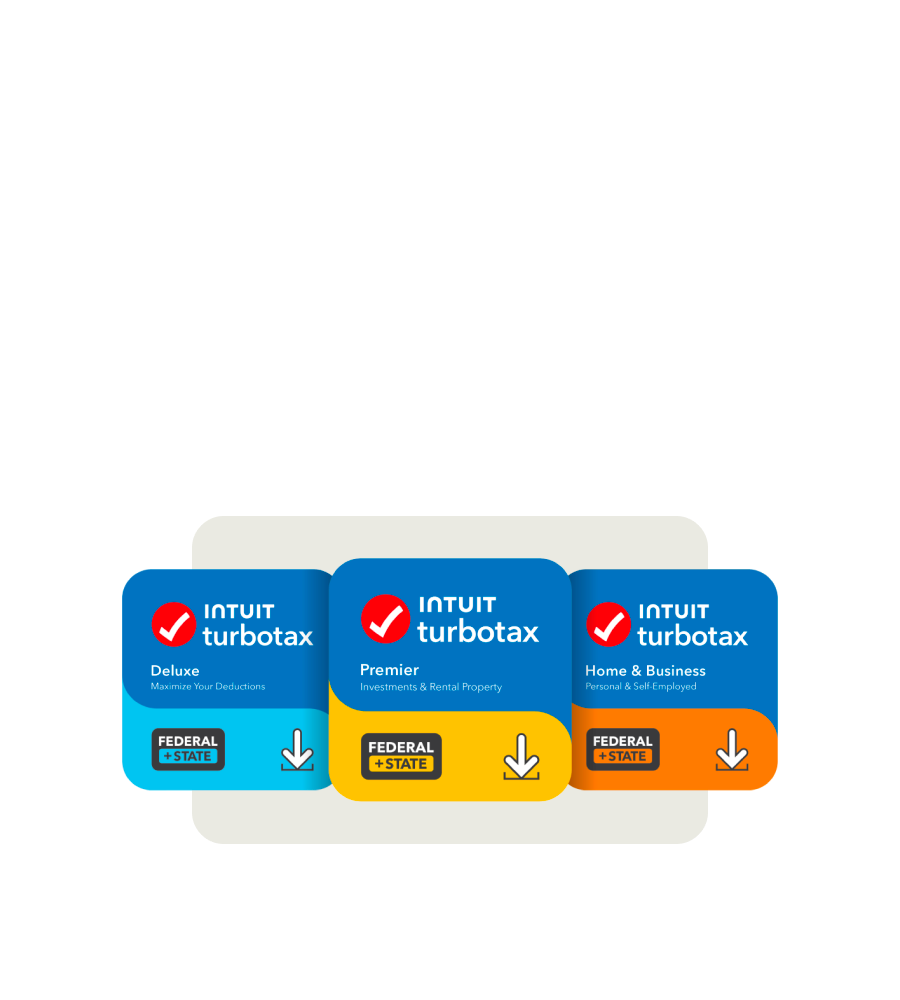
For individuals with investment portfolios or income-generating properties, the Premier edition provides the necessary tools and guidance.
- Who it’s for: This edition is specifically designed for investors who receive K-1s, 1099-B (stock sales), or 1099-DIV (dividends), as well as rental property owners who need to report rental income and expenses (Schedule E).
- What it includes: Everything in Deluxe, plus comprehensive guidance for reporting income from stocks, bonds, mutual funds, employee stock plans, and cryptocurrency. It also helps with calculating capital gains and losses, and properly reporting rental income and expenses. This ensures accurate reporting of complex financial assets.
- Cost: Premier is more expensive than Deluxe, reflecting the added complexity and specialized forms it handles. State filing is extra.
TurboTax Self-Employed: Tailored for Business Owners
The Self-Employed edition is the top-tier DIY offering, built to support freelancers, independent contractors, and small business owners.
- Who it’s for: This edition is essential for anyone with income from self-employment, side hustles, or a small business, typically requiring a Schedule C (Profit or Loss from Business). It’s also suitable for those who need to deduct business expenses, track mileage, or manage estimated taxes.
- What it includes: All features of Premier, plus specialized guidance for maximizing business deductions, calculating self-employment taxes, and understanding industry-specific expenses. It can also help with asset depreciation and quarterly estimated tax payments. For entrepreneurs, this version is a crucial financial tool for optimizing their business’s tax position.
- Cost: This is the most expensive of the DIY TurboTax editions, with state filing as an additional charge. The price reflects the highly specialized functionality for business finance.
TurboTax Live and Full Service: Professional Guidance at Your Fingertips
Beyond the self-preparation software, TurboTax offers services that integrate human tax experts, providing varying degrees of assistance.
- TurboTax Live: Available across Deluxe, Premier, and Self-Employed tiers, this service allows users to get on-demand advice from a CPA or Enrolled Agent (EA) as they prepare their taxes. Before filing, a tax expert also conducts a final review of your return to ensure accuracy. The cost of TurboTax Live is higher than the corresponding DIY edition, as it includes direct professional support and a comprehensive review.
- TurboTax Live Full Service: This is the highest level of service, where a dedicated tax expert handles your entire tax preparation process. You provide your documents, and the expert prepares, signs, and files your federal and state returns. This option is available for all tax complexities and is the most expensive TurboTax offering, essentially acting as a virtual full-service tax preparer. The financial outlay here is significant but provides maximum convenience and professional assurance.
Each edition is strategically priced to match the complexity of the user’s financial life, ensuring that you pay for precisely the features and expertise you need.
Navigating Additional Costs and Potential Savings
While the core software editions form the bulk of the cost, several other factors can influence your final bill with TurboTax. Understanding these can help you manage your financial outlay more effectively.
Understanding State Filing Fees
As mentioned, state filing fees are almost universally an additional charge, regardless of the federal edition you choose. This is a critical point for budget-conscious taxpayers.
- Separate Per State: Each state income tax return you file will incur its own separate fee. If you lived or worked in multiple states, be prepared for multiple state charges. For example, if you use TurboTax Deluxe for federal, and need to file in California and New York, you would pay for Deluxe + California state fee + New York state fee.
- E-file vs. Print & Mail: While e-filing is often recommended for speed and accuracy, the state e-filing fee is typically included in the state charge. If you choose to print and mail your state return, the software may still charge you for its preparation, even if there’s no e-file transmission fee. Always verify the exact breakdown. From a financial planning perspective, these state fees, while seemingly small individually, can accumulate quickly, especially for multi-state filers.
Optional Add-ons and Their Value Proposition
TurboTax offers several optional services that can enhance your filing experience but also add to the overall cost.
- Audit Defense (MAX Assist & Defend): This service, offered through a third party (Tax Protection Plan, Inc.), provides assistance if you receive an IRS inquiry or audit. It includes services like dedicated audit assistance, power of attorney representation, and even identity theft monitoring. While it offers peace of mind for some, it comes at an additional annual fee. For taxpayers concerned about potential audits, the cost versus benefit of this add-on should be carefully considered as part of their financial risk management.
- Refund Processing Service (Pay With My Refund): This feature allows you to pay for your TurboTax products and fees directly from your federal tax refund. While convenient, TurboTax typically charges an additional processing fee for this service. From a financial perspective, if you can pay upfront, you avoid this extra charge. It’s essentially a small convenience fee for deferring payment until your refund arrives.
- Prior Year Returns: If you need to file a prior year’s tax return, you’ll generally need to purchase a separate software package for that specific tax year, incurring an additional cost.
These add-ons are entirely optional, and taxpayers should weigh their perceived value against their personal financial situation to decide if they are truly necessary.
Strategies to Reduce Your Tax Preparation Expenses
For taxpayers looking to minimize their expenditures on tax filing, several strategies can be employed:
- IRS Free File Program: If your Adjusted Gross Income (AGI) is below a certain threshold (which changes annually, often around $79,000), you may be eligible to use the IRS Free File program. This program partners with various tax software providers, including TurboTax, to offer free federal and state tax preparation and e-filing. Importantly, you must access TurboTax via the IRS Free File site to qualify for the completely free version, as directly visiting TurboTax.com might lead to different offers. This is a prime financial opportunity for eligible individuals.
- Credit Karma Tax (now TurboTax Free Edition for Simple Returns): Intuit acquired Credit Karma Tax. For simple returns, the “TurboTax Free Edition” is now the primary free offering. If your tax situation is straightforward, this remains a zero-cost option.
- Employer Discounts or Member Benefits: Some employers, banks, or financial institutions offer discounts or free access to TurboTax products as a benefit. Check with your HR department or financial providers.
- Compare Competitors: Always compare TurboTax’s offerings and pricing with competitors like H&R Block, TaxAct, TaxSlayer, and FreeTaxUSA. Some competitors might offer similar features at a lower price point, or even fully free federal and state filing for a broader range of tax situations. A thorough financial comparison can yield significant savings.
- File Early: Sometimes, early bird discounts are available, especially for desktop software versions or during the initial phase of tax season. Waiting until the last minute might mean missing out on these promotional prices.
By actively exploring these avenues, taxpayers can often reduce or even eliminate their out-of-pocket expenses for tax preparation, thereby optimizing their personal finance management.
Making an Informed Decision for Your Financial Well-being
Choosing the right tax filing solution, particularly when considering a robust platform like TurboTax, is a critical personal finance decision. It’s not just about the lowest price, but about securing the best value for your specific needs, ensuring accuracy, and maximizing your financial outcomes.
Assessing Your Needs vs. Features
The first step in making an informed decision is a thorough self-assessment of your tax situation. Before committing to any TurboTax edition or service, honestly evaluate the complexity of your income, deductions, and credits.
- Simple W-2 Income & Standard Deduction? The TurboTax Free Edition or a truly free alternative accessed via IRS Free File might be perfectly adequate. Paying for more features than you need is a direct financial drain.
- Homeowner, Itemized Deductions? TurboTax Deluxe will likely be your minimum requirement. Consider if the extra cost is justified by the potential for increased deductions it helps you uncover.
- Investments, Rental Properties, or Self-Employment Income? You will need Premier or Self-Employed. Recognize that these specialized versions are investments in ensuring accurate and optimized tax reporting for more complex financial structures. The cost here is often outweighed by the financial implications of incorrect reporting or missed deductions.
- Need Expert Review or Full Service? If you lack confidence, have a highly complex situation, or simply value convenience and professional assurance above all else, TurboTax Live or Full Service could be worth the higher financial investment. For many, the peace of mind from knowing a professional has reviewed or prepared their return is invaluable, especially when dealing with substantial financial assets or liabilities.
An honest assessment helps you avoid unnecessary upgrades while ensuring you don’t inadvertently under-equip yourself, which could lead to errors, missed deductions, or even penalties.

Beyond the Price Tag: Value and Convenience
While cost is undeniably a primary concern for managing personal finances, it shouldn’t be the sole determinant when choosing tax preparation software. The value proposition of TurboTax extends beyond its price.
- Ease of Use: TurboTax is renowned for its intuitive interface, guided questions, and clear explanations. For many, this user-friendliness saves time and reduces stress, which are intangible but significant benefits. The time saved navigating complex tax codes can be repurposed for other financial or personal endeavors.
- Accuracy Guarantees: TurboTax often offers accuracy guarantees, pledging to reimburse users for penalties and interest if the software makes a calculation error. This provides a layer of financial protection.
- Data Import Capabilities: Its ability to import W-2s, 1099s, and other financial data directly from employers and financial institutions can save considerable time and minimize data entry errors, thereby contributing to both convenience and accuracy.
- Year-Over-Year Consistency: For returning users, TurboTax can carry over data from previous years, streamlining the filing process. This consistency builds familiarity and efficiency, which holds significant value for long-term financial planning.
- Resource Access: Even in its DIY versions, TurboTax provides access to a wealth of tax resources, articles, and community forums that can help users understand various tax concepts.
Ultimately, deciding how much you’re willing to pay for TurboTax, or if you should use it at all, boils down to a personal financial calculation. Weigh the financial costs against the features, convenience, accuracy, and support offered. By doing so, you can choose a tax filing solution that not only meets your legal obligations but also supports your broader financial goals and provides peace of mind throughout the tax season.
aViewFromTheCave is a participant in the Amazon Services LLC Associates Program, an affiliate advertising program designed to provide a means for sites to earn advertising fees by advertising and linking to Amazon.com. Amazon, the Amazon logo, AmazonSupply, and the AmazonSupply logo are trademarks of Amazon.com, Inc. or its affiliates. As an Amazon Associate we earn affiliate commissions from qualifying purchases.