
In the rapidly evolving landscape of live TV streaming services, understanding the intricate details of each platform’s offerings is paramount for consumers looking to cut the cord or simply optimize their entertainment experience. Among the prominent players, Sling TV stands out for its flexible, à la carte approach, allowing subscribers to tailor their channel lineups more precisely than traditional cable packages. However, one of the most frequently asked questions, and indeed a critical factor for multi-viewer households, revolves around its simultaneous streaming capabilities: “How many devices can stream on Sling TV?”

This seemingly straightforward question unveils a nuanced policy that directly impacts household harmony, subscription value, and overall user satisfaction. For families with diverse viewing interests, roommates sharing an account, or individuals who frequently switch between devices, knowing these limits is not just convenient—it’s essential for avoiding buffering, error messages, and those all-too-common conflicts over who gets to watch what. This article delves deep into Sling TV’s device policies, explaining the distinctions between its core packages, offering practical scenarios, and providing insights into how to best manage your streaming experience across multiple screens.
Understanding Sling TV’s Simultaneous Stream Policy
Sling TV’s approach to simultaneous streaming is unique, primarily dictated by its two foundational channel packages: Sling Orange and Sling Blue. Unlike some competitors that offer a universal stream limit across all content, Sling differentiates based on the intellectual property rights associated with the channels within each package. This distinction is the cornerstone of understanding how many devices can truly stream simultaneously on your account.
The Core Distinction: Sling Orange vs. Sling Blue
Sling TV’s offerings are built around two distinct base packages, each designed with different content focuses and, crucially, different streaming allowances.
-
Sling Orange: This package is primarily geared towards sports enthusiasts and families, featuring popular channels like ESPN, Disney Channel, Freeform, and AMC. Due to licensing agreements, Sling Orange allows only one simultaneous stream at a time. This means if one person is watching ESPN on their tablet, no one else can stream any Orange-exclusive channel on another device until the first stream ends. This limitation can be a significant consideration for households where multiple viewers frequently want to watch Orange-exclusive content. While restrictive, it ensures access to highly coveted channels that often come with strict single-stream stipulations from content providers.
-
Sling Blue: In contrast, Sling Blue caters more to news and entertainment viewers, including channels like Fox, NBC (in select markets), NFL Network, Bravo, and FX. Sling Blue is far more flexible when it comes to device usage, permitting up to three simultaneous streams. This generous allowance makes Sling Blue a more attractive option for larger households or those with varied viewing habits, as it significantly reduces the likelihood of encountering streaming conflicts. Multiple family members can enjoy different Blue-exclusive channels on different devices without interruption.
The Power of Sling Orange + Blue: Blended Streaming Capabilities
For the ultimate flexibility and channel variety, Sling TV offers a combined package: Sling Orange + Blue. This option bundles both core packages into a single subscription, often at a discounted rate compared to subscribing to each individually. When you opt for Orange + Blue, the streaming rules become a hybrid of the two individual packages, but with an intelligent twist.
If you subscribe to Sling Orange + Blue:
- Orange-exclusive channels (e.g., ESPN, Disney Channel) remain subject to their one-stream limit. No matter how many devices are streaming Blue content, only one device can access an Orange channel at any given time.
- Blue-exclusive channels (e.g., Fox, NBC, NFL Network) can be streamed on up to three devices simultaneously.
- Crucially, any channels that are included in both Orange and Blue (e.g., AMC, Comedy Central, Food Network) fall under the more generous three-stream limit of the Blue package.
This means that in an Orange + Blue household, you could theoretically have one person watching ESPN (an Orange-exclusive channel) while three other people simultaneously watch NFL Network, AMC, or another Blue-exclusive/shared channel on separate devices. This effectively provides up to four distinct streams running concurrently, provided the content selection adheres to the individual package rules. This blended capability offers considerable flexibility, allowing diverse viewing preferences to be met without constant negotiation.
Why Simultaneous Streams Matter in Today’s Digital Household
The concept of simultaneous streaming is far more than a technical specification; it’s a critical component of modern household entertainment, directly impacting convenience, value, and user satisfaction. In an era where every family member has a device and distinct viewing preferences, the ability to stream concurrently is a major selling point for any digital service.
Eliminating Family Conflicts and Device Jockeying
Perhaps the most immediate benefit of ample simultaneous streams is the dramatic reduction in household disputes. Imagine a scenario where one child wants to watch Disney Channel, another wants to stream cartoons on Freeform, and a parent wants to catch a live game on ESPN—all Orange-exclusive channels. With Sling Orange’s single-stream limit, this situation inevitably leads to device jockeying, negotiation, or outright arguments. Sufficient streaming limits, particularly those offered by Sling Blue or the blended Orange + Blue, allow each family member to enjoy their preferred content on their chosen device without stepping on others’ toes. This fosters a more harmonious and enjoyable entertainment environment.
Maximizing Value and Subscription Utility
For many, cutting the cord from traditional cable is driven by the desire for better value and more control over their subscriptions. A streaming service with generous simultaneous stream limits extends the utility and cost-effectiveness of that subscription across multiple users. Instead of needing multiple cable boxes or separate accounts, a single Sling TV subscription can cater to the entire household. This means more people benefit from the same monthly fee, significantly increasing the per-user value proposition and making the investment in a streaming service more justifiable for larger families or shared living situations.
On-the-Go Access and Multi-Location Viewing
Modern life is mobile, and entertainment consumption is no exception. Simultaneous streaming isn’t just about watching on different devices within the same home; it also facilitates access for family members who might be in different locations (e.g., a child at a grandparent’s house, a spouse traveling for work, or someone watching from a backyard patio). While Sling TV’s terms of service typically require domestic IP addresses and generally discourage widespread account sharing, within a reasonable household context, multi-stream capabilities extend the reach of your entertainment beyond the living room TV. This flexibility ensures that your favorite shows, news, or sports are accessible wherever and whenever you choose to watch, provided you have an internet connection and a supported device.
Navigating Common Simultaneous Streaming Scenarios
Understanding the theoretical limits is one thing; navigating the practicalities of a multi-device household is another. Sling TV’s policies, while clear, can still lead to questions when put into real-world scenarios.
The “What If” Scenarios: Overlapping Streams
What happens if you attempt to exceed your allotted stream limit? Sling TV is designed to prevent this by typically displaying an error message (e.g., “Too many devices streaming”) when a new stream tries to initiate beyond the cap. This prevents degradation of service for existing streams. While Sling TV generally doesn’t lock accounts for accidental overages, persistent or egregious violations of their terms of service could theoretically lead to account review. The best practice is to communicate within the household about who is watching what, and if an error occurs, simply log out of an unused device or close a dormant stream. Sling’s app generally allows for easy account management and device deactivation, though not always a live “stream usage” monitor.
Add-Ons and Extra Content: Do They Affect Limits?
Sling TV offers a wide array of add-on packages, such as Sports Extra, Entertainment Extra, and various premium channels like Showtime or STARZ. A common question is whether these add-ons come with their own distinct streaming rules. Generally, add-on channels adhere to the streaming limits of the base package they are associated with. For instance, if you have Sling Blue + Sports Extra, all channels within Sports Extra will follow the three-stream limit of Sling Blue. Similarly, if you have Sling Orange + Movies Extra, the Movie Extra channels will be subject to Sling Orange’s single-stream rule. Channels that are part of both packages (if an add-on applies to both) will typically follow the more generous Blue package rules if you have Orange + Blue. This consistency simplifies the streaming experience, as you don’t need to learn a new set of rules for each individual add-on.
DVR and On-Demand Content: A Different Ballgame?
Many streaming services differentiate between live TV streams and streams of recorded or on-demand content. For Sling TV, the distinction is subtle but important. Streaming DVR recordings or on-demand content does count as one of your simultaneous streams. It’s not that these types of content don’t count; rather, they consume one of your available slots just like a live channel would. So, if you have Sling Orange and one person is watching a live ESPN game, and another tries to watch a previously recorded show from Disney Channel, they will encounter an error because both count as an Orange stream. The key takeaway is that any active stream of content, regardless of whether it’s live, recorded, or on-demand, consumes a slot within your package’s simultaneous viewing limit.
Optimizing Your Sling TV Experience for Multi-Device Households
To truly unlock the potential of Sling TV and ensure a seamless viewing experience for everyone in your home, a strategic approach to package selection and account management is essential.
Choosing the Right Sling Package
The initial decision of which Sling package to subscribe to is perhaps the most critical for multi-device households.
- For single viewers or couples with minimal concurrent viewing needs: Sling Orange might suffice, especially if ESPN and Disney channels are primary interests.
- For larger families, roommates, or households with diverse, concurrent viewing habits (especially news and entertainment-focused): Sling Blue is often the superior choice due to its three-stream allowance.
- For households demanding the broadest channel selection and maximum streaming flexibility (with the understanding of Orange’s single-stream rule): Sling Orange + Blue offers the best of both worlds, providing up to four concurrent streams across different content categories.
Take the time to evaluate your household’s typical viewing patterns, including peak times, preferred genres, and the number of individuals who might want to stream simultaneously. This assessment will guide you toward the most appropriate and cost-effective subscription.
Account Management and Device Monitoring
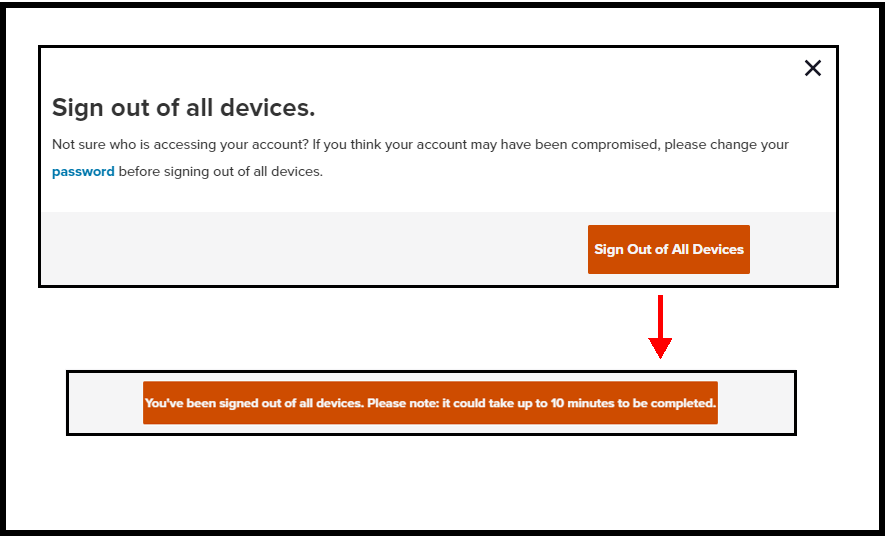
While Sling TV doesn’t typically provide a real-time dashboard showing which devices are actively streaming, it does offer tools for account management. Users can access their account settings via the Sling TV website or app to review logged-in devices and, if necessary, deactivate unused or unknown devices. Regularly reviewing this list is good practice for both security and ensuring that only authorized devices are consuming your valuable stream allowances. If you suspect someone unauthorized is using your account, changing your password and deactivating all devices is a smart immediate step.
Internet Speed Considerations
Finally, while simultaneous stream limits dictate how many devices can access Sling TV content, your internet service provider (ISP) dictates how well they can access it. Streaming multiple HD or 4K streams simultaneously consumes significant bandwidth. Sling TV recommends a minimum of 5 Mbps for a single stream of high-quality video and suggests 25 Mbps or higher for households with multiple devices streaming simultaneously. Ensuring you have adequate internet speed is crucial to prevent buffering, low-resolution streams, and a frustrating viewing experience, even if you are within your simultaneous stream limits. Upgrade your internet plan if your household frequently experiences network congestion during peak viewing hours.
Conclusion
Sling TV’s simultaneous streaming policy, while slightly more complex than a universal number, offers remarkable flexibility and value when understood correctly. The distinction between Sling Orange’s single stream and Sling Blue’s three streams is fundamental, with the Orange + Blue bundle intelligently combining these capabilities to potentially offer up to four concurrent streams across different content categories.
For the modern digital household, grasping these nuances is key to an uninterrupted and satisfying entertainment experience. By carefully selecting the right package, proactively managing your account, and ensuring sufficient internet bandwidth, you can fully leverage Sling TV’s offerings, transforming potential device conflicts into a harmonious multi-screen viewing paradise. Understanding “how many devices on Sling” isn’t just about a number; it’s about empowering your household with control, convenience, and countless hours of personalized entertainment.
aViewFromTheCave is a participant in the Amazon Services LLC Associates Program, an affiliate advertising program designed to provide a means for sites to earn advertising fees by advertising and linking to Amazon.com. Amazon, the Amazon logo, AmazonSupply, and the AmazonSupply logo are trademarks of Amazon.com, Inc. or its affiliates. As an Amazon Associate we earn affiliate commissions from qualifying purchases.