
The landscape of modern television has undergone a seismic shift, migrating from coaxial cables and satellite dishes to the robust infrastructure of the internet. At the forefront of this digital revolution is YouTube TV, Google’s premier over-the-top (OTT) streaming service. For the tech-savvy household, the primary question isn’t just about the channel lineup, but about the technical capacity of the platform: how many devices can stream YouTube TV simultaneously, and how does the service manage those connections across a diverse hardware ecosystem?
Understanding these limits is essential for optimizing a home media setup. Whether you are managing a family of five or a multi-room smart home, the technical constraints and possibilities of YouTube TV’s streaming architecture dictate how you consume content in a high-bandwidth world.
The Core Mechanics of YouTube TV Stream Limits
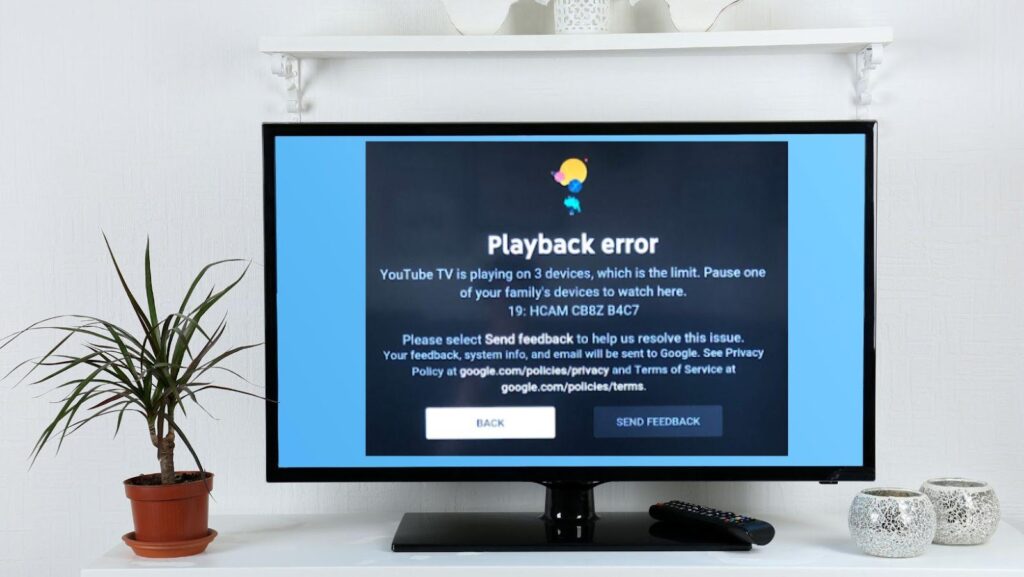
By default, a standard YouTube TV subscription allows for three simultaneous streams. While this might seem straightforward, the technical implementation involves a sophisticated interplay between account authentication, IP verification, and device synchronization.
The Three-Stream Standard
The “three-stream rule” is the baseline for YouTube TV’s service. This means that at any given moment, three different devices can be pulling live or recorded data from the YouTube TV servers using a single subscription. This limit applies regardless of the type of device—be it a smartphone, a smart TV, or a tablet. If a fourth device attempts to initiate a stream, the system will trigger a “too many streams” notification, requiring one of the active sessions to be terminated before access is granted.
The Family Group Architecture
YouTube TV leverages Google’s broader “Family Link” infrastructure. A single subscription allows the primary account holder to invite up to five additional family members to a “Family Group.” Each of these six total members receives their own unique login, personalized DVR library, and individual recommendations.
However, a common technical misconception is that each of these six members can stream simultaneously. In reality, the three-stream limit is shared across the entire family group. If Member A is watching in the living room and Member B is watching on a laptop, only one more stream is available for the remaining four members. This shared resource model requires coordination in high-occupancy households, making the technical management of the account a shared responsibility.
Geographic and IP Tracking
From a digital security and licensing perspective, YouTube TV monitors the location of these streams. The service is designed for a single household. While you can stream on the go, the service periodically checks the “Home Area” via the device’s IP address or GPS data. Tech users should be aware that if streams are detected in drastically different geographic locations simultaneously, it can sometimes trigger security flags or prompt a re-verification of the home network settings.
Expanding Horizons with the 4K Plus Add-on
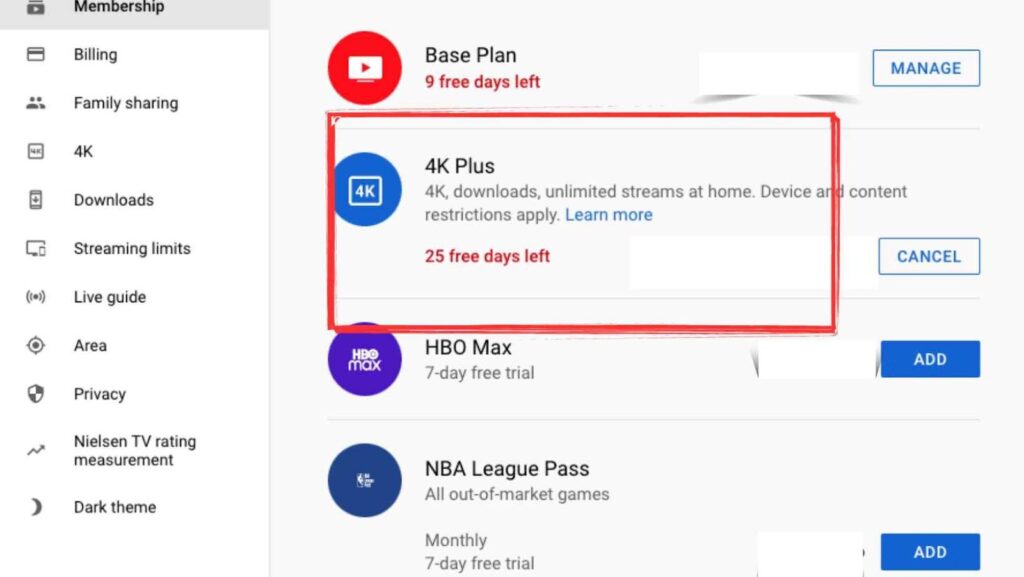
For power users and large households, the standard three-stream limit often proves insufficient. To address this, Google introduced the “4K Plus” add-on. While the name highlights ultra-high-definition content, the most significant technical upgrade provided by this tier is the “Unlimited Streams” feature.
Unlimited Home Streams Explained
The 4K Plus add-on removes the three-stream cap, but only under specific technical conditions. When your devices are connected to your designated “Home Wi-Fi network,” you can stream on as many devices as your local bandwidth can support. This is a game-changer for smart homes equipped with mesh Wi-Fi systems and high-speed fiber optics, allowing for a screen in every room without hitting a software ceiling.
The “On-the-Go” Caveat
It is vital to distinguish between the home network and external connections. Even with the 4K Plus add-on, streaming outside of your home network (on mobile data or a different Wi-Fi network) is still subject to limitations. Typically, you are granted three “out-of-home” streams in addition to your unlimited home streams. This technical nuance ensures that the service remains a household utility rather than a tool for widespread password sharing across different residences.
Technical Requirements for 4K Content
Beyond the stream count, the 4K Plus add-on introduces higher bitrates and more demanding data requirements. To successfully utilize this feature, the hardware must support the VP9 or AV1 codecs used by Google for 4K delivery. Furthermore, the local network must consistently provide at least 25 Mbps per 4K stream to avoid buffering and downscaling.
Hardware Compatibility: Where You Can Watch
YouTube TV’s versatility is rooted in its extensive hardware support. The application is engineered to run on a variety of operating systems, each with its own performance profile and user interface nuances.
Smart TVs and Dedicated Media Players
The most common environment for YouTube TV is the television itself. The service offers native apps for:
-
Android TV / Google TV: Being a Google product, the integration here is seamless, often featuring system-level voice search and deep linking.
-
Samsung & LG: Utilizing Tizen and webOS respectively, these versions are optimized for the specific hardware acceleration capabilities of these manufacturers.
-
Roku and Fire TV: Despite occasional carriage disputes, the YouTube TV app remains a staple on these platforms, requiring relatively low overhead to run efficiently.
-
Apple TV: The tvOS version is known for its high-performance UI and integration with the Apple ecosystem, though it sometimes lags behind in specific features like “Live Previews” due to Apple’s strict sandboxing.
Gaming Consoles and Mobile Devices
For those who use consoles as their primary media hub, YouTube TV is available on the PlayStation 5 and Xbox Series X/S. These devices offer significant processing power, often resulting in the fastest UI navigation and quickest stream-start times.
On the mobile front, the iOS and Android apps are the most feature-rich versions of the platform. They include “Picture-in-Picture” (PiP) mode, which allows users to continue watching while interacting with other apps, and integrated Google Cast support, enabling the mobile device to act as a sophisticated remote for any Chromecast-enabled screen.
Browser-Based Streaming
On desktops and laptops, YouTube TV operates through modern web browsers like Chrome, Firefox, and Safari. From a technical standpoint, the browser version relies heavily on HTML5 and Encrypted Media Extensions (EME) for DRM. This is often the most flexible way to stream, but it can be more CPU-intensive than dedicated apps on mobile or TV hardware.
Network Infrastructure and Bandwidth Management
The ability to stream on multiple devices is ultimately gated by the user’s local network infrastructure. Understanding the technical demands of streaming is crucial for maintaining a high-quality experience across those multiple streams.
Bandwidth Requirements per Stream
YouTube TV uses adaptive bitrate streaming to adjust quality in real-time based on network conditions. However, for a stable, high-definition experience, the following technical benchmarks are recommended:
-
Standard Definition (480p): 3 Mbps per stream.
-
High Definition (1080p): 7–10 Mbps per stream.
-
Ultra High Definition (4K): 25 Mbps per stream.
If a household is running three simultaneous 1080p streams, the network needs to dedicate roughly 30 Mbps of consistent download speed specifically to YouTube TV. When factoring in other household activities—like gaming, video conferencing, or background updates—a 100 Mbps connection is often the baseline for a “buffer-free” multi-device home.
Optimizing Local Connectivity
To maximize the number of concurrent streams without degradation, users should look toward network optimization:
-
Ethernet vs. Wi-Fi: For stationary devices like Smart TVs and consoles, a wired Ethernet connection is always superior. It eliminates the latency and interference inherent in wireless signals, providing a more stable “handshake” with YouTube TV’s servers.
-
Wi-Fi 6 and Mesh Networking: In larger homes, traditional routers may struggle to maintain high bitrates in distant rooms. Upgrading to Wi-Fi 6 (802.11ax) provides better handling of multiple simultaneous connections, while mesh systems ensure that the signal remains strong across all devices.
-
QoS (Quality of Service) Settings: Advanced users can configure their router’s QoS settings to prioritize traffic from YouTube TV servers, ensuring that a large file download on a PC doesn’t cause a live stream to drop into low resolution.
Troubleshooting and Account Security
Managing multiple streams across various devices introduces complexities in account security and technical troubleshooting.
Resolving “Too Many Streams” Errors
When the three-stream limit is exceeded, YouTube TV will block the newest attempt. The most effective way to manage this is via the “Signed-in devices” section of your Google Account security settings. From here, you can remotely sign out of devices that may have been left streaming in another room, effectively “killing” the session and freeing up a slot for the current device.
Digital Rights Management (DRM) and Authentication
YouTube TV utilizes sophisticated DRM to ensure content is not being pirated or accessed outside of authorized regions. Occasionally, a device might fail to stream not because of the limit, but due to a failure in the HDCP (High-bandwidth Digital Content Protection) handshake between the streaming stick and the TV. Ensuring that all HDMI cables are version 2.0 or higher can resolve many of these “phantom” streaming errors.
The Role of the Cloud DVR
One of the most robust technical features of YouTube TV is the unlimited cloud DVR. Because the recording happens on Google’s servers rather than the local device, watching a recorded show does not consume any more local resources than watching live TV. However, it still counts toward the three-stream limit. The advantage here is the seamless synchronization; you can start a stream on a mobile device and “hand it off” to a smart TV as you move through your home, with the service tracking the exact timestamp across devices.

The Future of Multi-Device Consumption
As we look toward the future of the YouTube TV ecosystem, the focus is shifting toward deeper integration and smarter stream management. We are seeing the rise of “Multiview” features, where a single stream can actually display four different live broadcasts (commonly used for sports). This is a technical marvel that allows users to bypass the three-stream limit by consolidating multiple feeds into a single authorized session.
Furthermore, as AI tools become more integrated into the Google Home ecosystem, we can expect smarter bandwidth allocation and more intuitive device hand-offs. The question of “how many devices” will eventually evolve into “how seamlessly can these devices interact,” as YouTube TV continues to push the boundaries of what a cloud-based television service can achieve in a connected world. For now, the three-stream standard (and the 4K Plus expansion) remains the benchmark for a modern, tech-forward media experience.
aViewFromTheCave is a participant in the Amazon Services LLC Associates Program, an affiliate advertising program designed to provide a means for sites to earn advertising fees by advertising and linking to Amazon.com. Amazon, the Amazon logo, AmazonSupply, and the AmazonSupply logo are trademarks of Amazon.com, Inc. or its affiliates. As an Amazon Associate we earn affiliate commissions from qualifying purchases.