
As the landscape of home entertainment shifts from traditional linear cable to Over-the-Top (OTT) streaming services, YouTube TV has emerged as a dominant force. For power users and multi-device households, the most pressing question often revolves around concurrency: how many devices can actually stream at once? Understanding these limits is essential for managing a digital household, optimizing bandwidth, and ensuring that every member of a family group has access to their preferred content without interruption.
YouTube TV’s approach to device limits is a blend of hardware flexibility and software-enforced restrictions. Unlike traditional cable, which relies on physical tuners and set-top boxes, YouTube TV operates via cloud-based authentication. This allows for a theoretically infinite number of “registered” devices, but a very specific number of “active” streams.
Understanding the Standard Stream Limit and Device Concurrents
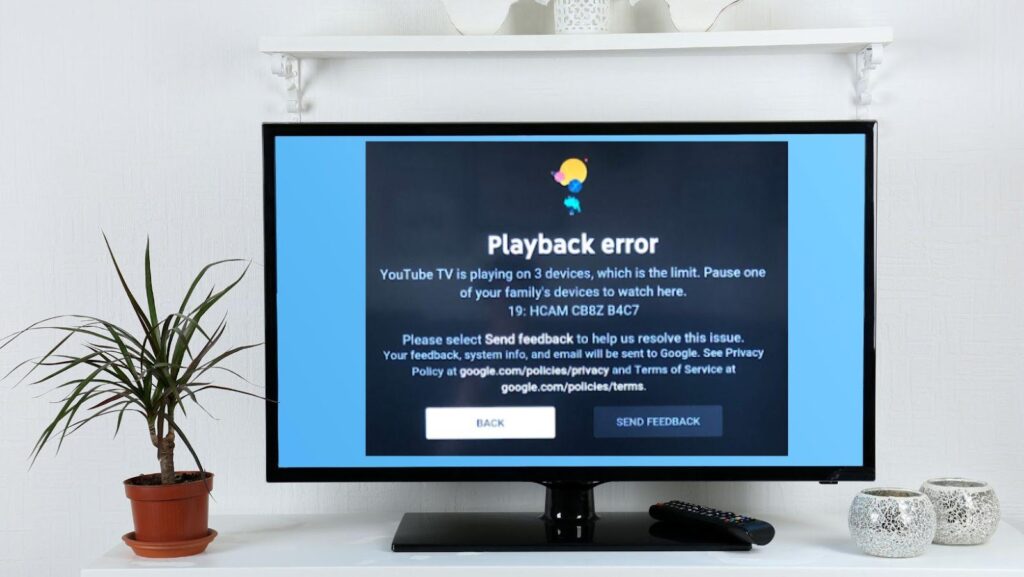
At its core, the standard YouTube TV subscription is designed for a single household. When you sign up for the base plan, the service allows you to stream on up to three devices simultaneously. This is a hard limit enforced by Google’s servers, meaning if a fourth device attempts to access a live stream or a DVR recording, the system will trigger an error message—usually stating that the account is in use on too many devices.
Registered vs. Active Devices
It is important to distinguish between a registered device and an active stream. You can be logged into your YouTube TV account on dozens of devices—your smartphone, several tablets, three different smart TVs, and a laptop—without facing any penalties. The restriction only applies to concurrent playback. This technical architecture allows for high mobility; you can start a show on your living room TV, pause it, and pick it up on your phone while commuting without needing to “de-register” the previous hardware.
The Family Group Dynamic
One of the most robust features of YouTube TV is the ability to create a Family Group. A single subscription allows you to share the service with up to five other family members (six total accounts). Each family member receives their own unique login, personalized recommendations, and an unlimited private DVR.
However, the “three-stream limit” is shared across the entire family group. If your teenager is watching on their phone and your spouse is watching in the bedroom, there is only one stream remaining for the rest of the household. This shared pool of streams is often a point of confusion for new users who expect each of the six accounts to have their own three-stream allotment. From a technical standpoint, the subscription is tied to the “primary” account holder’s billing and home area, which governs the total output.
The 4K Plus Upgrade: Unlocking Unlimited In-Home Streams
For larger households or those with high-end home theater setups, the standard three-stream limit often proves insufficient. To address this, Google introduced the “4K Plus” add-on. While the primary marketing hook for this package is the inclusion of Ultra-High-Definition (UHD) content, the most significant technical benefit is the removal of the streaming cap within the home network.
How Unlimited Home Streams Work
When the 4K Plus add-on is active, YouTube TV identifies your “Home Network” via your IP address and Wi-Fi SSID. While connected to this specific network, you can stream on as many devices as your local bandwidth can handle. This transition from a capped stream model to an “unlimited” model represents a significant shift in how OTT services manage DRM (Digital Rights Management) and concurrency.
Technically, the system uses a “heartbeat” mechanism to verify that devices are indeed on the home network. If you are using a device outside the home—such as a mobile phone on LTE or a laptop at a hotel—different rules apply. Even with 4K Plus, you are restricted to three concurrent streams when outside the home network. This prevents users from “sharing” an unlimited account with friends in different cities, ensuring that the service remains a single-household product.
The Technical Definition of a “Home Area”
The “Home Area” is a critical component of the YouTube TV ecosystem. It determines which local affiliate networks (ABC, NBC, CBS, FOX) you receive. From a technical perspective, your home network is verified every time you log in. If you are a traveler, you must check in from your home network at least once every three months (or every 30 days for MLB content) to maintain access. The 4K Plus unlimited stream feature relies heavily on this geolocation data to distinguish between legitimate household use and account sharing.
Device Compatibility and Hardware Optimization
YouTube TV is built on a highly portable tech stack, but the experience can vary significantly depending on the hardware used. To maximize the value of your device limits, it is important to understand how different gadgets interact with the YouTube TV app.
Smart TVs and Dedicated Streaming Sticks
Most modern smart TVs (running Android TV, Google TV, Samsung Tizen, or LG webOS) have native YouTube TV apps. For the most stable experience, dedicated streaming devices like the Chromecast with Google TV, Apple TV 4K, or Roku Ultra are recommended. These devices often feature better processors and more RAM than the built-in chips in TVs, leading to faster channel switching and smoother 60fps (frames per second) playback.
From a networking standpoint, hardwiring these devices via Ethernet is the gold standard. While YouTube TV’s adaptive bitrate streaming is efficient, multiple concurrent 4K streams can saturate a standard Wi-Fi 5 (802.11ac) network. Upgrading to Wi-Fi 6 or 6E can help manage the high throughput required when four or five devices are streaming simultaneously under the 4K Plus plan.
Mobile and Tablet Integration
YouTube TV’s mobile application is highly optimized for low-latency viewing. It supports features like “Picture-in-Picture” (PiP) on both iOS and Android, allowing users to keep an eye on a game while using other apps. In terms of device limits, mobile devices are often the “off-network” streams. Because mobile devices frequently switch between Wi-Fi and cellular data, they are the most likely to trigger a “location update” prompt within the app.
Gaming Consoles
PlayStation 5 and Xbox Series X|S offer dedicated YouTube TV apps. While these are powerful machines, they consume significantly more power than a small streaming stick. However, for users who already have these consoles connected to their primary display, they provide a seamless way to transition from gaming to live television without switching inputs.
Troubleshooting Multi-Device Connection Issues
Even with a clear understanding of the limits, technical hurdles can arise. “Too many streams” errors are common in active households, and resolving them requires a systematic approach to account management.
Managing Active Sessions
If you encounter a stream limit error but believe you have fewer than three devices active, a “ghost session” may be the culprit. This happens when a device is turned off or the app is closed without the stream being properly terminated. The YouTube TV server may take a few minutes to recognize that the stream has ended. A quick fix is to log out of all sessions via your Google Account security settings, though this requires re-authenticating every device afterward.
Bandwidth and ISP Throttling
Sometimes the issue isn’t the number of devices, but the quality of the connection. YouTube TV requires approximately 3 Mbps for Standard Definition, 7 Mbps for 1080p, and 25 Mbps for 4K. If you are running three 1080p streams, your network needs to consistently provide at least 21 Mbps of dedicated bandwidth just for the video. If your Internet Service Provider (ISP) detects high volumes of sustained video traffic, they may throttle your connection, leading to buffering or a drop in resolution. Using a high-quality router with Quality of Service (QoS) settings can allow you to prioritize YouTube TV traffic over other household data.
Security and Account Integrity
Because YouTube TV is tied to a Google Account, security is paramount. If you notice unfamiliar devices in your “Recently Used Devices” list, it is possible your account credentials have been compromised. Using Two-Factor Authentication (2FA) is a non-negotiable tech requirement for protecting your subscription. Since your YouTube TV login is also your Gmail and Google Photos login, the stakes of sharing your password are much higher than they would be with a standalone service like Netflix.

The Future of Multi-Device Streaming Infrastructure
The technology powering YouTube TV’s device management is constantly evolving. Google’s use of the VP9 and AV1 video codecs allows for higher quality at lower bitrates, which directly impacts how many devices can stream simultaneously on a home network. As 8K content looms on the horizon and VR/AR integration becomes a possibility, the infrastructure of “streams per household” will likely undergo further shifts.
Currently, YouTube TV’s limit of three streams (or unlimited with 4K Plus) is a competitive middle ground. It balances the needs of the consumer with the licensing demands of broadcast networks. By leveraging the power of Google’s global data centers, the service manages to keep latency lower than almost any other live TV provider, ensuring that when you switch channels on your third device, the experience is as instantaneous as it was on the first.
In conclusion, for the average tech-savvy household, the standard three-device limit is often sufficient, especially when combined with the individual profiles of a Family Group. For those who demand more, the technical bridge provided by the 4K Plus upgrade transforms YouTube TV from a mere app into a robust, whole-home media server capable of supporting an entire ecosystem of displays. Understanding these parameters ensures that you can architect your home network to support your viewing habits without ever seeing the dreaded “playback limit reached” screen.
aViewFromTheCave is a participant in the Amazon Services LLC Associates Program, an affiliate advertising program designed to provide a means for sites to earn advertising fees by advertising and linking to Amazon.com. Amazon, the Amazon logo, AmazonSupply, and the AmazonSupply logo are trademarks of Amazon.com, Inc. or its affiliates. As an Amazon Associate we earn affiliate commissions from qualifying purchases.