
As the landscape of digital entertainment shifts from traditional cable infrastructure to cloud-based streaming, YouTube TV has emerged as a frontrunner in the “cord-cutting” revolution. For households transitioning to this model, the most common questions revolve around accessibility: How many people can use the service? How many profiles can be created? And most importantly, how many screens can stream content simultaneously?
The technical architecture of YouTube TV is designed around the concept of a “Family Group,” a system that allows a single subscription to be leveraged across multiple users without compromising individual privacy or viewing preferences. Understanding the specific limits of these accounts—and the distinction between accounts, profiles, and concurrent streams—is essential for optimizing your digital home theater experience.
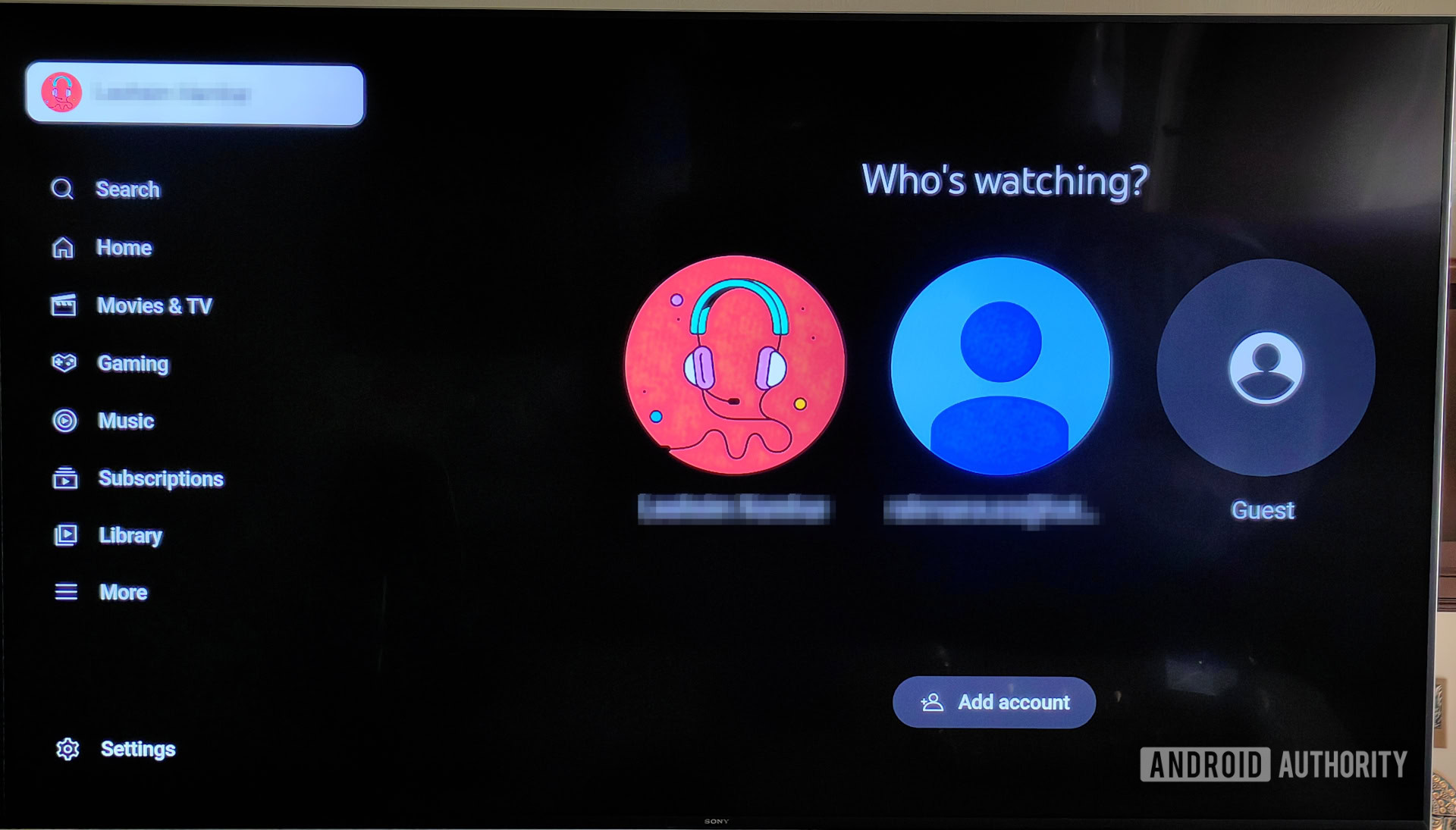
Understanding the YouTube TV Family Group Architecture
At its core, a single YouTube TV subscription is built to accommodate a modern household. The service allows for a total of six accounts per subscription. This includes one “Family Manager” (the primary billing account) and five additional “Family Members.”
The Role of the Family Manager
The Family Manager is the administrative hub of the subscription. This individual is responsible for the payment method, the invitation of new members, and the establishment of the “Home Area.” From a technical standpoint, the Family Manager holds the keys to the kingdom. They are the only ones who can add or remove members, and they must be at least 18 years old.
Individual Accounts and Personalization
One of the most significant technical advantages of YouTube TV’s multi-account system is the separation of data. Each of the six accounts functions as a completely independent entity. This means that each user receives their own:
-
Personalized Recommendations: The algorithm tracks individual viewing habits to suggest shows and movies relevant to that specific user.
-
Individual Library and DVR: This is a critical feature. Each of the six accounts has its own unlimited Cloud DVR. Recordings made by one family member do not appear in the library of another, preventing the clutter that often plagues shared hardware DVRs.
-
Watch History: Progress on a series or a specific movie is saved to the individual account, allowing users to pick up exactly where they left off on any device.
Technical Requirements for Family Members
To join a family group, each member must have their own Google Account. Furthermore, Google implements a geographic restriction: all family members must primarily reside in the same household as the Family Manager. Periodically, the app will require users to check in from the “Home Area” to verify they are still part of the household, a technical hurdle designed to prevent unauthorized subscription sharing across different cities.
Managing Simultaneous Streams: The Three-Device Rule
While YouTube TV allows for six distinct accounts, there is a crucial technical distinction between “accounts” and “concurrent streams.” Having six accounts does not mean six people can watch different channels at the same exact moment under a standard plan.
The Standard Limit
By default, YouTube TV allows for three simultaneous streams. This means that across all six potential accounts, only three devices can be active at once. If a fourth person attempts to log in and watch a live broadcast or a DVR recording, they will typically receive a notification stating that the limit has been reached, requiring one of the other three sessions to be terminated.
Hardware Flexibility
The three-stream limit applies regardless of the hardware being used. You could have one stream running on a Samsung Smart TV, another on an iPad in a different room, and a third on a Google Chromecast. The system monitors these connections server-side, tracking active sessions linked to the subscription ID rather than the specific user ID.
The 4K Plus Add-on Exception
For power users or large families who find the three-stream limit restrictive, YouTube TV offers a technical upgrade known as the “4K Plus” add-on. Beyond providing 4K resolution for supported content and the ability to download recordings for offline viewing, this package significantly alters the streaming limits.
With 4K Plus, users get “Unlimited Streams” while connected to their home Wi-Fi network. This allows every person in the house to watch their own content on their own device simultaneously. However, even with this upgrade, there is still a limit of three concurrent streams when users are outside of the home network (using mobile data or a different Wi-Fi connection).
Technical Setup and Configuration for Multi-User Households

Setting up a multi-account environment requires a few administrative steps within the YouTube TV interface. Because the service is deeply integrated with the broader Google ecosystem, the process is streamlined but requires specific permissions.
Inviting Family Members
The Family Manager initiates the process through the YouTube TV settings. By navigating to the “Family Sharing” section, the manager can send invitations via email or phone number to the other five individuals. Once the invitee accepts the invitation and joins the Google Family Group, they can log into the YouTube TV app using their own credentials.
Managing the “Home Area” and Location Settings
YouTube TV uses a combination of IP address tracking and GPS data (on mobile devices) to establish the “Home Area.” This is vital for local channel delivery (ABC, NBC, CBS, etc.). When a family member travels, they can still access the service, but the available local channels will shift based on their current geographic location.
From a technical perspective, the system requires a “check-in” at the home location at least once every 90 days to maintain active status. For users who frequently travel, this ensures that the account remains tethered to the primary household. If a user does not check in, their access may be restricted until they return to the home network.
Switching Profiles on Shared Devices
In a living room setting where multiple family members use the same Smart TV, YouTube TV provides a “Switch Profile” feature. Upon launching the app, the UI presents the available profiles. Selecting a profile instantly updates the interface with that user’s specific DVR and “Live” guide preferences. This seamless transition is handled via cloud-based API calls that swap the user-specific metadata without requiring a full logout and login.
Optimizing Performance Across Multiple Accounts
Running multiple streams across various accounts places a significant load on a home’s network infrastructure. To ensure that six accounts can coexist without buffering or resolution drops, certain technical optimizations are recommended.
Bandwidth Requirements
YouTube TV recommends a minimum of 3 Mbps for standard definition, 7 Mbps for a single HD stream, and 25 Mbps for 4K content. In a household where three streams are active simultaneously in HD, a consistent download speed of at least 25-50 Mbps is necessary to account for overhead and other background internet activity.
Device Compatibility and App Stability
The YouTube TV app is available on a wide array of platforms, including:
-
Streaming Sticks: Roku, Amazon Fire TV, Apple TV, and Chromecast.
-
Smart TVs: Android TV, Vizio, Samsung, and LG.
-
Consoles: Xbox and PlayStation.
-
Mobile/Web: iOS, Android, and all major web browsers.
For the best multi-account experience, using devices with robust processors (like the Apple TV 4K or Nvidia Shield) ensures that profile switching and menu navigation remain fluid. Older Smart TV interfaces can sometimes struggle with the memory-intensive task of swapping between different user libraries.
Security and Privacy Considerations
Because each member uses their own Google Account, security is decentralized. If one family member’s account is compromised, it does not necessarily grant access to the Family Manager’s billing information or the other members’ DVRs. Each user is encouraged to enable Two-Factor Authentication (2FA) on their Google Account to maintain the integrity of the family group.
The Future of Multi-User Streaming Technology
YouTube TV’s approach to accounts and streaming limits represents a broader trend in the SaaS (Software as a Service) industry: moving away from device-locked licenses toward user-centric identities.
Competition and Benchmarking
When compared to competitors like Hulu + Live TV or Fubo, YouTube TV’s six-account/three-stream model is highly competitive. Hulu offers two simultaneous streams by default, while Fubo often permits more but has a more complex pricing structure for additional profiles. YouTube TV’s inclusion of six independent DVRs remains its strongest technical differentiator in the market.
AI and Personalization at Scale
As machine learning becomes more integrated into streaming services, the value of having separate accounts increases. The “Tech” behind YouTube TV is increasingly focused on predictive loading—using AI to anticipate what a specific profile will watch next based on their history and pre-loading those data packets to reduce latency. This type of deep personalization is only possible when users maintain separate accounts rather than sharing a single profile.

Conclusion
The architecture of YouTube TV is a sophisticated blend of cloud storage, identity management, and geographic verification. By allowing six accounts per subscription, Google has created a system that respects individual user data and viewing habits while maintaining a cohesive household billing unit. While the three-stream limit serves as a technical bottleneck for some, the flexibility of the 4K Plus add-on and the seamless integration of individual Google Accounts make it one of the most robust multi-user platforms in the digital streaming era. For the modern tech-savvy household, mastering these account limits and configurations is the key to a frictionless entertainment experience.
aViewFromTheCave is a participant in the Amazon Services LLC Associates Program, an affiliate advertising program designed to provide a means for sites to earn advertising fees by advertising and linking to Amazon.com. Amazon, the Amazon logo, AmazonSupply, and the AmazonSupply logo are trademarks of Amazon.com, Inc. or its affiliates. As an Amazon Associate we earn affiliate commissions from qualifying purchases.