
In the rapidly evolving landscape of personal finance, Venmo has become a ubiquitous name, synonymous with quick, casual money transfers between friends, family, and even for small business transactions. Its user-friendly interface and social feed have made splitting bills, paying back a friend, or contributing to a group gift incredibly convenient. However, beneath the veneer of instant gratification, a common and critical question arises for users: “How long does it take for Venmo to transfer funds?” The answer, as many discover, isn’t always a simple one-liner. It depends on various factors, including the type of transfer initiated, the linked financial institutions, and even the day of the week.

Understanding the nuances of Venmo’s transfer speeds is essential for effective personal financial management, ensuring you can access your money when you need it most, and avoid any unwelcome surprises. This comprehensive guide will delve into the different transfer options Venmo offers, demystifying the timelines, associated costs, and best practices for managing your funds within the platform. By the end, you’ll have a clear picture of what to expect from your Venmo transactions and how to leverage its features for optimal financial control.
The Standard Venmo Transfer: Free and Familiar
For the vast majority of Venmo users, the “standard” transfer is the go-to method for moving funds from their Venmo balance to a linked bank account. This option, while the most common, also comes with the most variability in terms of processing time. It’s crucial to distinguish between money moving within Venmo and money moving out of Venmo to an external bank.
Instant Transfers Between Venmo Accounts
When you send money to another Venmo user, or receive money from one, that transaction is typically instant. The funds appear in the recipient’s Venmo balance almost immediately. This is the core functionality that has made Venmo so popular for peer-to-peer payments. The money resides within the Venmo ecosystem, readily available for spending via a Venmo Debit Card, or for further transfer out of the platform. There’s no waiting period for these in-app transfers, making it incredibly convenient for real-time payments among users.
Standard Bank Transfers: What to Expect
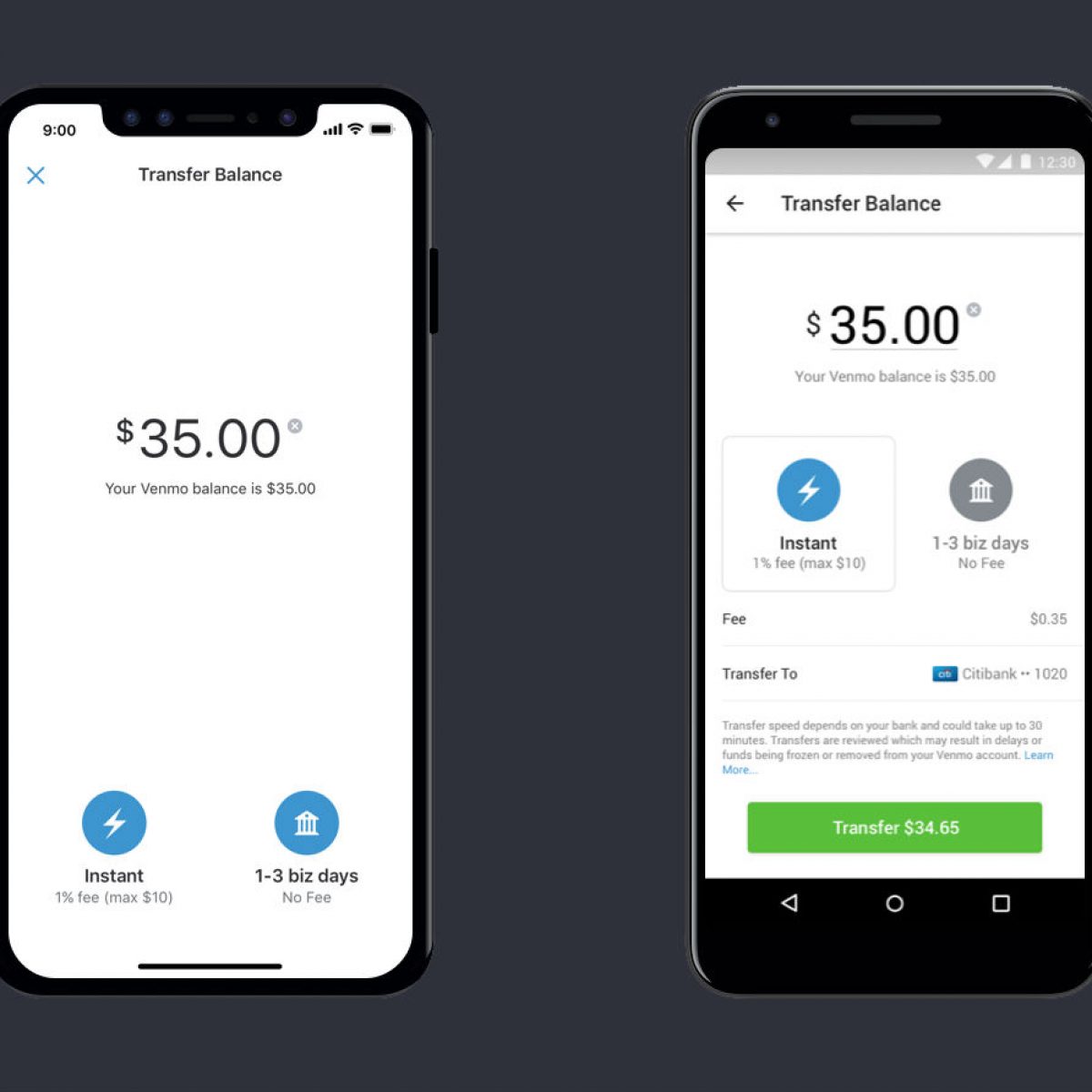
The real question of “how long does it take” arises when you want to move money from your Venmo balance to your personal bank account. Venmo offers a standard transfer option that is entirely free of charge. However, this convenience comes with a trade-off in speed. A standard bank transfer typically takes 1 to 3 business days to complete.
This timeframe isn’t unique to Venmo; it’s a standard processing window for most ACH (Automated Clearing House) transfers, which are the electronic network used to process financial transactions between banks in the United States. While Venmo initiates the transfer promptly, the receiving bank still needs to process and post the funds to your account, a step that can take several business hours or even a full day depending on the bank’s internal systems and cut-off times.
Factors Affecting Standard Transfer Times
Several factors can influence the exact duration of a standard Venmo bank transfer, sometimes extending it beyond the typical 1-3 business day window:
- Weekends and Holidays: Banks do not process ACH transfers on weekends or federal holidays. If you initiate a standard transfer on a Friday, Saturday, Sunday, or the day before a holiday, the processing will only begin on the next business day. This can effectively add several days to the transfer time. For instance, a transfer initiated on Friday might not appear in your bank account until Tuesday or even Wednesday of the following week.
- Bank Processing Times: Different banks have varying processing schedules. Some banks might post funds faster than others. While Venmo might send the funds, your bank might hold them for a short period before making them available in your account.
- Time of Day: Transfers initiated late in the day (after a bank’s cut-off time, which is often in the late afternoon) might not be processed until the next business day, effectively adding an extra day to the timeline.
For those planning their finances, it’s crucial to factor in these variables and not rely on a standard transfer for immediate access to funds, especially during weekends or near holidays.
Expediting Your Funds: Instant Transfers to Your Bank
Recognizing the user demand for quicker access to funds, Venmo introduced an “Instant Transfer” option. This feature allows users to bypass the 1-3 business day waiting period for a standard transfer, providing near-immediate access to their money.
How Instant Transfers Work
An Instant Transfer moves funds from your Venmo balance directly to a linked eligible debit card or bank account, typically arriving within minutes, though it can sometimes take up to 30 minutes. This speed is achieved by utilizing real-time payment networks, which operate outside the standard ACH system. Once initiated, the funds are usually available in your linked account almost immediately, allowing you to use them for spending, bill payments, or other financial needs without delay.
The Cost of Speed: Venmo’s Instant Transfer Fee
While incredibly convenient, the speed of an Instant Transfer comes with a small cost. Venmo charges a fee for this service. As of the current policies, the fee is typically 1.75% of the transferred amount, with a minimum fee of $0.25 and a maximum fee of $25.00.
This fee is deducted directly from the amount you are transferring. For example, if you transfer $100 instantly, $1.75 will be deducted, and $98.25 will arrive in your bank account. It’s an important consideration for budget-conscious users, as these small fees can add up over time, especially for frequent transfers of smaller amounts. For larger transfers, the fee cap provides some relief, ensuring you don’t pay an exorbitant amount for very large sums.
Limitations and Eligibility for Instant Transfers
Not all bank accounts or debit cards are eligible for Instant Transfers. Generally, only valid, eligible U.S. debit cards (Visa or Mastercard) and certain U.S. bank accounts (that support faster payments) can receive Instant Transfers. Credit cards are not supported for this type of transfer.
Additionally, Venmo may have daily or weekly limits on the amount that can be transferred instantly, which can vary based on account verification status. Unverified accounts typically have lower limits. It’s always advisable to check your account’s specific limits within the Venmo app if you plan to transfer large sums.
Venmo Debit Card and Credit Card: Instant Access to Your Balance

Beyond transferring funds to an external bank account, Venmo offers financial products that provide direct, instant access to your Venmo balance, essentially bypassing the need for a bank transfer altogether.
Using the Venmo Debit Card for Instant Spending
The Venmo Debit Card, issued by Mastercard, is perhaps the most direct way to use the funds in your Venmo balance. When you have a balance in your Venmo account, the debit card allows you to spend that money anywhere Mastercard is accepted, instantly. There’s no waiting for a transfer to clear, as the funds are already “at hand” within the Venmo system.
If your Venmo balance isn’t sufficient for a purchase, the card can automatically draw from a linked bank account or debit card to cover the difference, acting as a convenient backup. This feature essentially turns your Venmo balance into a fully functional checking account for everyday spending, making questions about transfer times irrelevant for most immediate needs.
Venmo Credit Card Benefits and Balance Access
The Venmo Credit Card, issued by Synchrony Bank, offers another layer of financial functionality, although it operates differently from the debit card. While it doesn’t directly spend from your Venmo balance (it’s a traditional credit card with a credit limit), it integrates deeply with the Venmo app. Rewards earned on the Venmo Credit Card are automatically deposited into your Venmo account, providing an instant boost to your Venmo balance. This means you can then instantly use these rewards via your Venmo Debit Card or transfer them out as described above. It’s a way for Venmo to be a central hub for various financial activities and rewards.
Understanding Venmo’s Review Process and Potential Delays
While Venmo strives for efficiency, certain circumstances can lead to delays in transfers, regardless of whether they are standard or instant. These delays are often in place for the security of users and the integrity of the financial system.
Security Measures and Fraud Prevention
Venmo, like all financial platforms, employs robust security measures to protect users from fraud and unauthorized transactions. Occasionally, a transfer may be flagged for review if it appears unusual or suspicious. This could happen due to a large sum, an unfamiliar recipient, or activity that deviates from your normal patterns. During a security review, the transfer might be temporarily held, causing a delay until Venmo’s security team can verify its legitimacy. While inconvenient, these measures are vital for safeguarding your funds.
Account Verification and Limits
Unverified Venmo accounts typically have lower weekly sending and transfer limits. If you attempt to transfer an amount that exceeds your current limits, the transaction will likely be held or declined. To increase limits and potentially smooth out future transfers, Venmo encourages users to verify their identity by providing information such as their date of birth, mailing address, and the last four digits of their Social Security number. A fully verified account generally experiences fewer interruptions and has access to higher transfer thresholds.
What to Do If Your Transfer is Delayed
If you experience an unexpected delay with your Venmo transfer, here are the steps you should take:
- Check Your Venmo App: Review your transfer history in the Venmo app. The status should indicate whether the transfer is pending, completed, or if there was an issue.
- Verify Bank Information: Double-check that the linked bank account or debit card information is correct. Even a minor typo can cause a transfer to fail or be delayed.
- Contact Your Bank: If the transfer shows as “completed” in Venmo but hasn’t appeared in your bank account after the expected timeframe (especially for standard transfers), contact your bank directly. They can confirm whether they have received the funds and if there’s any internal processing hold.
- Contact Venmo Support: If your bank cannot provide a solution or if the delay seems unusual, reach out to Venmo’s customer support. Provide them with all relevant transaction details, and they can investigate the issue from their end.
Maximizing Your Venmo Experience: Tips for Efficient Transfers
To ensure smooth and timely transfers with Venmo, incorporating a few best practices can make a significant difference in your financial planning.
Link and Verify Your Bank Account
The first and most crucial step is to ensure your primary bank account is correctly linked and verified with Venmo. Verification typically involves Venmo making two small deposits to your bank account, which you then confirm in the app. This process confirms you own the account and helps increase your transaction limits, reducing potential delays down the line. Using an eligible debit card for instant transfers also requires it to be properly linked and validated.
Monitor Your Transfer History
Regularly reviewing your transfer history in the Venmo app keeps you informed about the status of your transactions. This allows you to quickly identify any pending transfers, spot potential issues, or track when funds have successfully reached your bank account. Proactive monitoring can help you address delays sooner rather than later.
Plan Ahead for Large or Time-Sensitive Transfers
Given the varying transfer times, especially for standard bank transfers, it’s wise to plan ahead when dealing with larger sums or funds that are needed by a specific deadline. If you know you’ll need a significant amount from your Venmo balance by a certain day, initiate the transfer well in advance using the standard free option. For urgent needs, understand the fees and limitations of the Instant Transfer option and use it judiciously. Avoid waiting until the last minute, especially when weekends or holidays are approaching.
Conclusion
Understanding “how long does it take for Venmo to transfer” is fundamental to effectively managing your personal finances within the digital realm. While instant peer-to-peer payments are Venmo’s hallmark, moving funds out of the platform requires a clear comprehension of the standard (1-3 business days, free) and instant (minutes, fee-based) transfer options. By factoring in weekends, holidays, and bank processing times, and by utilizing features like the Venmo Debit Card for direct spending, users can optimize their financial flow. Always verify your account, be mindful of fees for expedited services, and plan ahead for critical transfers to ensure your money is precisely where you need it, exactly when you need it.
aViewFromTheCave is a participant in the Amazon Services LLC Associates Program, an affiliate advertising program designed to provide a means for sites to earn advertising fees by advertising and linking to Amazon.com. Amazon, the Amazon logo, AmazonSupply, and the AmazonSupply logo are trademarks of Amazon.com, Inc. or its affiliates. As an Amazon Associate we earn affiliate commissions from qualifying purchases.