
In the realm of personal finance, data is the most valuable currency, but that data is rarely presented in simple raw numbers. Instead, the language of wealth is written in percentages. Whether you are evaluating the annual percentage rate (APR) on a new credit card, determining the yield on a high-dividend stock, or simply trying to calculate the impact of inflation on your savings, understanding how to work out a percentage on a calculator is a fundamental skill.
While modern smartphones and digital tools have made these calculations more accessible than ever, many individuals still struggle with the mechanics of the “percentage button” or the underlying formulas required to derive meaningful financial insights. This guide serves as a comprehensive masterclass in utilizing financial tools—specifically the calculator—to navigate the complexities of percentages in your economic life.

The Fundamental Mechanics of Percentage Calculations in Finance
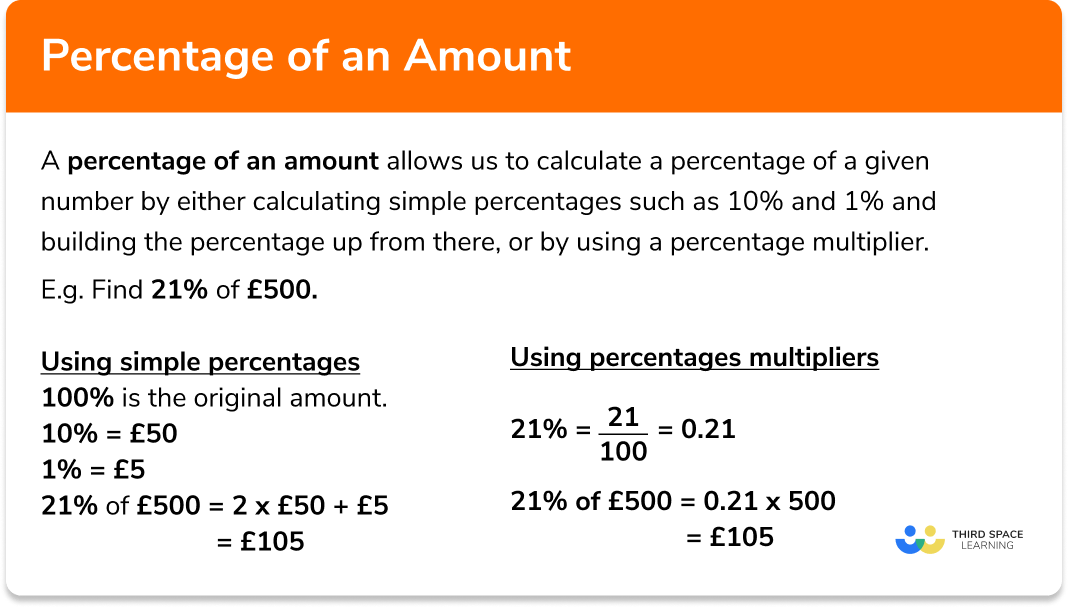
Before diving into complex investment strategies, one must master the basic operation of the calculator in a financial context. At its core, a percentage is a ratio of a number to 100. When you see a percentage, you are seeing a fraction where the denominator is always 100.
Using the Dedicated Percentage Button
Most standard and financial calculators feature a % button. While it seems straightforward, its behavior varies depending on the device. On a basic four-function calculator, the percentage button often acts as a command to divide the preceding number by 100 and then multiply it by the base figure.
For example, if you want to find 15% of $200:
- Type
200. - Press the multiplication key
×. - Type
15. - Press the
%key. - The display should immediately show
30.
The Decimal Conversion Method
In professional financial modeling, many experts prefer the decimal method because it reduces the risk of input error and works consistently across all software, including Excel and Google Sheets. To convert a percentage to a decimal, you simply move the decimal point two places to the left.
If you are looking for 7.5% of an investment amount, you would treat 7.5% as 0.075. On your calculator, you would simply input Investment Amount × 0.075. This method is particularly useful when working with scientific calculators that may not have a dedicated percentage key.
Calculating the Percentage Difference
In money management, you often need to find the percentage increase or decrease between two values—such as last year’s salary versus this year’s. The formula for this is: ((New Value - Old Value) / Old Value) × 100.
On a calculator:
- Subtract the old value from the new value.
- Press
=. - Divide by the old value.
- Multiply by
100.
Practical Applications: Discounts, Sales Tax, and Budgeting
Financial literacy is most impactful when applied to daily spending. Being able to quickly run numbers on a calculator allows you to make informed decisions at the point of sale and during monthly budget reviews.
Calculating Discounts and Savings
When a retailer offers “30% off,” the goal is to find the final price. There are two ways to do this on a calculator. The first is to find the discount amount and subtract it. The second, more efficient way for savvy shoppers, is the “inverse method.” If an item is 30% off, you are paying 70% of the price (100% – 30% = 70%).
To find the final price of a $120 jacket at 30% off:
- Input
120. - Multiply by
0.70. - The result,
$84, is your final price.
Factoring in Sales Tax and Gratuity
Tax and tips are additions to a base cost. To add a percentage, such as a 15% tip on a $60 dinner, you can multiply the base by 1.15. The “1” represents the original 100% of the bill, and the “.15” represents the additional tip.
Calculator steps: 60 × 1.15 = 69. This one-step calculation is faster and more accurate during a busy evening out than calculating the tip separately and adding it back to the total.
Budgetary Allocation Using Percentages
Financial advisors often recommend the 50/30/20 rule: 50% for needs, 30% for wants, and 20% for savings and debt repayment. To apply this to your monthly net income of, say, $4,500, use your calculator to define your boundaries:
- Needs:
4500 × 0.50 = 2250 - Wants:
4500 × 0.30 = 1350 - Savings:
4500 × 0.20 = 900
Advanced Financial Percentages: Interest Rates and ROI
When we move from spending to growing wealth, the stakes for calculation accuracy increase. Percentages in investing are often compounded, meaning the math requires a more nuanced approach than simple retail discounts.
Calculating Return on Investment (ROI)
ROI is the ultimate metric for any side hustle, stock purchase, or real estate venture. It tells you how much profit or loss you’ve made relative to the money you invested.
To calculate ROI on a calculator:
- Subtract the Initial Cost of the investment from the Current Value.
- Divide that number by the Initial Cost.
- Multiply by
100.
If you bought a stock for $1,000 and sold it for $1,250, your calculator would show: (1250 - 1000) / 1000 = 0.25. Multiply by 100 to get a 25% ROI.
Understanding the Impact of Inflation
Inflation is expressed as an annual percentage. It represents the loss of purchasing power over time. If inflation is at 4%, your $100 today will effectively buy what $96 would have bought a year ago. To calculate what a future cost might be based on inflation, you treat it like an interest rate. To see what a $5,000 vacation might cost in three years with 3% annual inflation, you would multiply $5,000 by 1.03 three times on your calculator.
The Power of Compound Interest
Unlike simple interest, compound interest is calculated on the principal amount and the accumulated interest of previous periods. While complex spreadsheets are often used for this, you can perform basic compounding on a standard calculator using the power function (usually denoted as x^y or ^).
The formula is: A = P(1 + r/n)^(nt).
- A = the amount of money accumulated.
- P = principal.
- r = annual interest rate (decimal).
- n = number of times interest compounds per year.
- t = time in years.
On a smartphone calculator (in landscape mode), calculating a 5% interest rate compounded annually for 10 years on $10,000 looks like this: 10000 × (1.05 ^ 10).
Navigating Different Calculator Interfaces (Standard vs. Financial)
Not all calculators are created equal. Depending on your financial goals, the tool you choose will dictate how you input your percentage data.
Smartphone Calculators and Apps
The calculator on your iPhone or Android device is surprisingly powerful. In portrait mode, it is a basic calculator. However, rotating it to landscape mode unlocks scientific functions. For money management, the most important feature here is the ability to use parentheses. Using parentheses allows you to calculate complex percentage formulas—like the ROI formula mentioned earlier—in a single string of input, reducing the chance of forgetting a mid-step result.
Dedicated Financial Calculators (HP 12C / TI BA II Plus)
For those serious about real estate or professional finance, a dedicated financial calculator is essential. These devices do not just have a percentage button; they have dedicated keys for “Time Value of Money” (TVM).
On these devices, percentages are often entered as whole numbers. To find an interest rate, you might press 5 and then the I/YR (Interest per Year) key. These tools are designed to calculate the percentage cost of a mortgage or the internal rate of return (IRR) of a business venture with far fewer keystrokes than a standard calculator.
Online Financial Tools and AI
In the modern era, “calculators” have evolved into sophisticated web-based tools. From mortgage amortization calculators to retirement planners, these tools perform the percentage math behind the scenes. However, the user must still understand the input. When an online tool asks for your “expected rate of return,” knowing how to derive that percentage from historical data using your own manual calculator ensures that the data you feed into the software is accurate.

Conclusion: The Strategic Advantage of Mathematical Precision
Understanding how to work out a percentage on a calculator is more than just a schoolhouse skill; it is a vital component of financial sovereignty. In a world where “small” 1% fees on investment accounts can compound into hundreds of thousands of dollars in lost wealth over a lifetime, the ability to check the math yourself is your first line of defense.
By mastering the various ways to calculate percentages—from the simple % button to the decimal method and compound interest formulas—you move from being a passive consumer of financial information to an active participant in your own wealth creation. The next time you see a percentage in a financial contract or on a store shelf, you won’t have to guess the impact on your wallet. You will have the tools and the knowledge to calculate it with professional precision.