
YouTube has evolved far beyond its origins as a simple video-sharing repository. Today, it stands as the world’s second-largest search engine and a sophisticated software ecosystem that integrates artificial intelligence, high-definition streaming protocols, and complex data synchronization across a multitude of hardware. To truly understand how to use YouTube in a modern context, one must look past the play button and explore the intricate technical layers that define the user experience. Whether you are accessing the platform via a mobile application, a desktop browser, or an integrated smart home device, mastering YouTube requires a deep dive into its interface, its algorithmic drivers, and its robust privacy controls.
Mastering the Interface: Navigating the Core YouTube Infrastructure
The way a user interacts with YouTube begins with the User Interface (UI). While the platform appears intuitive, the underlying software architecture is designed to manage billions of hours of content with minimal latency. For the technical user, navigating this interface involves more than just scrolling through a feed; it requires an understanding of how data is categorized and retrieved.
Optimization of the Desktop and Mobile UI
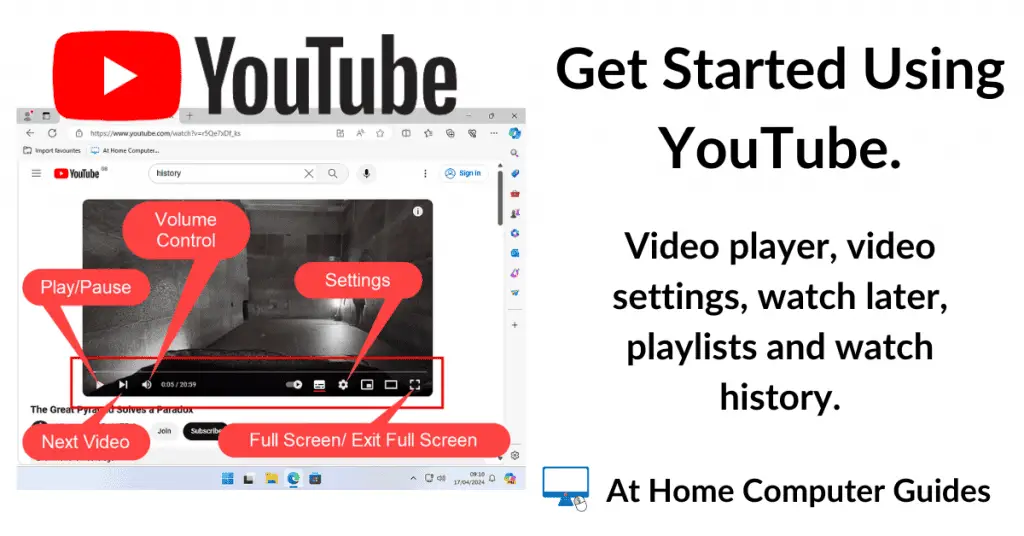
On a desktop environment, the interface is built for high-density information. The left-hand sidebar serves as the central nervous system for your account, housing your subscriptions, history, and library. Using the “Theater Mode” and “Full Screen” functions allows the software to adjust the bitrate and aspect ratio dynamically based on your monitor’s resolution. On the mobile side, the app is optimized for touch-based gestures. Swiping down on a video minimizes it into a mini-player, allowing for uninterrupted browsing while the current stream continues via Picture-in-Picture (PiP) technology.
The Power of Search and Metadata
To use YouTube effectively, one must understand how the search engine processes queries. When you type a search term, the platform’s algorithm cross-references your keywords with video titles, descriptions, tags, and even the automated transcripts generated by its speech-to-text AI. Advanced users leverage search filters—sorting by upload date, view count, or duration—to bypass the general recommendation engine and find specific technical documentation or high-fidelity media.
Managing the Library and Watch History
The “Library” tab is essentially a personal database of your interactions. It archives your “Watch Later” list, playlists, and history. From a technical perspective, managing this history is vital because it feeds the machine learning models that generate your recommendations. By periodically auditing your history or using the “Pause Watch History” feature in the settings, you can prevent the algorithm from skewing your feed based on temporary interests or accidental clicks.
Leveraging Advanced Features for an Enhanced User Experience
Beyond basic playback, YouTube offers a suite of advanced software features designed to enhance the viewing experience and streamline how we consume digital media. These features often rely on deep integration with the operating system of the device being used.
YouTube Premium and Background Play
For power users, YouTube Premium provides a significant shift in the software’s utility. The most notable technical advantage is background play, which allows the audio stream to continue even when the application is minimized or the screen is locked. This transforms YouTube from a video platform into a versatile background utility, similar to a high-bandwidth podcast or music streaming service. Additionally, the ability to download videos for offline viewing involves the app encrypting and storing data locally, allowing for seamless playback in environments with zero connectivity.
Picture-in-Picture (PiP) and Multitasking
On both Android and iOS, YouTube utilizes the operating system’s PiP API. This allows the video player to float over other applications. Using this feature effectively means you can take notes, respond to emails, or navigate via GPS while maintaining a visual link to the content. To enable this, users must navigate through the app’s general settings to ensure the overlay permissions are granted at the system level.
High-Fidelity Settings and “Stats for Nerds”
For those interested in the technical performance of their stream, YouTube includes a “Stats for Nerds” overlay. This feature provides real-time data on the video’s resolution, the codec being used (such as VP9 or AV1), connection speed, and frame drops. Understanding these metrics allows users to troubleshoot playback issues. For instance, if a 4K video is buffering, checking the “Connection Speed” in the stats overlay can help determine if the bottleneck is the local Wi-Fi or the ISP’s bandwidth.
Privacy, Security, and Data Management
As a Google-owned entity, YouTube is deeply integrated into the broader Google account ecosystem. This integration brings convenience but also necessitates a sophisticated approach to digital security and privacy management. Knowing how to use YouTube safely is as important as knowing how to use it functionally.
Managing Google Account Integration and Security
Every interaction on YouTube is logged under your Google identity. To secure this data, users should utilize Two-Factor Authentication (2FA) and regularly review the “Third-party apps with account access” section in their security settings. This ensures that no unauthorized software is scraping your viewing data or managing your channel without your explicit consent.
Incognito Mode and Digital Footprints
YouTube offers an “Incognito Mode” within its mobile app, which functions similarly to a private browsing window. While active, the app does not save your search or watch history to your account. This is a crucial tool for users who share devices or who want to explore a topic without permanently altering their recommendation algorithm. From a data perspective, this creates a temporary session that is purged once the mode is deactivated, keeping your primary digital footprint clean.
Customizing Privacy for Uploads and Playlists
Not all usage of YouTube is passive. For those who use the platform to host personal content, understanding the hierarchy of privacy settings is essential. “Public” videos are indexed by search engines; “Unlisted” videos are only accessible via a direct link and do not appear in searches; and “Private” videos are restricted to the uploader and specifically invited Google accounts. Utilizing these settings allows users to use YouTube as a secure, private cloud storage for personal memories or internal corporate training videos.
Integrating YouTube into Your Hardware Ecosystem
Modern YouTube usage extends far beyond the computer screen. The platform is designed to act as a cross-device service that synchronizes state and content across a diverse hardware ecosystem.
Casting and Smart TV Integration
The “Cast” protocol (Chromecast) and the “Link with TV Code” feature are the primary methods for moving content from a mobile device to a larger display. When you “cast” a video, your phone does not actually stream the video to the TV; instead, it sends a command to the TV’s YouTube app to fetch the data directly from the cloud. This preserves your phone’s battery life and allows the TV to pull the highest possible resolution and HDR (High Dynamic Range) metadata directly.
Wearable Integration and Voice Commands
As AI assistants like Google Assistant and Siri become more prevalent, voice-controlled YouTube usage has become a standard. By using natural language processing, users can command their smart speakers or watches to “Play tech reviews on the Living Room TV.” This triggers a complex chain of software events where the voice command is parsed, matched to your YouTube account, and then pushed to the relevant hardware.
Cross-Platform Continuity
One of the most powerful technical aspects of the YouTube ecosystem is its state-synchronization. If you begin watching a video on your desktop during a lunch break, the platform saves your exact timestamp (down to the millisecond). When you open the app on your mobile device later, the “Continue Watching” feature allows you to resume exactly where you left off. This is handled by a centralized database that updates your account metadata in real-time across all authenticated devices.
Understanding the Algorithm: Personalizing Your Discovery Feed
At the heart of the YouTube experience is a recommendation engine powered by neural networks. To use YouTube effectively, one must learn how to “train” this algorithm to serve content that is relevant, educational, or entertaining, rather than allowing it to default to generic trending topics.
Fine-Tuning Recommendations
The algorithm relies on signals. Every time you “Like” a video, subscribe to a channel, or even hover over a thumbnail, you are sending a signal to the neural network. Conversely, users can actively prune their feed by selecting the “Not Interested” or “Don’t Recommend Channel” options. This tells the software to de-prioritize specific clusters of content in your future Discovery feeds.
The Role of the Notification Bell
The subscription model has changed over the years. Simply subscribing to a channel no longer guarantees you will see every upload. The “Notification Bell” is the technical toggle that determines the priority of a channel’s alerts. Setting this to “All” ensures that the app pushes a system-level notification to your device the moment new content is indexed, bypassing the standard algorithmic filtering of the “Subscriptions” feed.

Utilizing Shorts and Community Posts
YouTube has expanded into short-form vertical video (Shorts) and text-based updates (Community Tab). Using these features requires a shift in how you consume data. Shorts are designed for rapid, high-frequency interaction, utilizing a different recommendation logic than long-form content. Meanwhile, the Community Tab allows for interaction with creators via polls and images, turning the video platform into a more traditional social media software suite. By engaging with these diverse content formats, users can develop a more well-rounded and interactive digital profile.
aViewFromTheCave is a participant in the Amazon Services LLC Associates Program, an affiliate advertising program designed to provide a means for sites to earn advertising fees by advertising and linking to Amazon.com. Amazon, the Amazon logo, AmazonSupply, and the AmazonSupply logo are trademarks of Amazon.com, Inc. or its affiliates. As an Amazon Associate we earn affiliate commissions from qualifying purchases.