
In an increasingly digital world, where smartphones and advanced software often overshadow dedicated gadgets, the scientific calculator remains an indispensable piece of technology. Far from being a relic of the past, this specialized tool is a powerhouse of computational capability, a silent workhorse for students, engineers, scientists, and anyone grappling with complex mathematical and scientific concepts. Understanding how to effectively use a scientific calculator isn’t just about punching numbers; it’s about unlocking a suite of powerful functions that can streamline problem-solving, enhance accuracy, and deepen comprehension in subjects ranging from algebra and calculus to physics and statistics. This guide delves into the nuances of this essential gadget, transforming it from a mysterious array of buttons into a trusted companion for academic and professional success.

The Essential Tool for STEM Success
At its core, a scientific calculator is a compact computing device designed to perform a vast array of mathematical operations beyond basic arithmetic. While a standard four-function calculator handles addition, subtraction, multiplication, and division, its scientific counterpart integrates functions crucial for advanced mathematics, science, and engineering disciplines. For anyone pursuing or working in STEM fields, proficiency with a scientific calculator is not merely advantageous; it’s often a prerequisite.
Beyond Basic Arithmetic: What Sets It Apart?
The distinction between a basic and a scientific calculator lies in its functional depth. Scientific calculators come equipped with dedicated buttons and algorithms for trigonometric functions (sine, cosine, tangent), logarithmic and exponential operations, powers, roots, factorials, and statistical computations. Many also offer features for handling fractions, unit conversions, and even basic programming capabilities. This comprehensive suite of tools allows users to tackle complex equations, analyze data, and perform calculations that would be tedious or impossible to do manually, all within a portable, user-friendly device. It’s a dedicated piece of hardware optimized for specific computational tasks, unlike general-purpose computers which handle a broader range of applications.
Who Needs a Scientific Calculator?
The user base for scientific calculators is incredibly broad. High school students preparing for standardized tests like the SAT or ACT, as well as those taking advanced placement (AP) courses in math and science, rely heavily on these devices. College students in engineering, physics, chemistry, biology, mathematics, and computer science programs find them indispensable for coursework and laboratory calculations. Professionals in fields such as civil engineering, electrical engineering, data analysis, and research also utilize scientific calculators for quick, on-the-go computations that don’t require the full power of a computer. Essentially, anyone who regularly encounters non-linear equations, statistical analysis, or advanced mathematical modeling benefits immensely from this specialized gadget.
Mastering the Fundamentals: Getting Started
Before diving into advanced functions, a solid grasp of the calculator’s basic operation and conventions is crucial. Even seemingly simple tasks have specific methodologies on a scientific calculator that differ from basic models or even computer software.
Powering Up and Basic Operations
Most scientific calculators power on with a dedicated “ON” button, often located in the top left or right corner. An “OFF” button or a combination like “2nd” + “ON” typically shuts it down. Battery life is generally excellent, often lasting for months or years, thanks to efficient power management. Inputting numbers and performing basic operations (+, -, ×, ÷) is intuitive, generally following the order of operation (PEMDAS/BODMAS) automatically. For example, to calculate $5 + 3 times 2$, you would input 5 + 3 × 2 = and the calculator should yield 11, not 16, demonstrating its built-in understanding of operator precedence. Parentheses ( and ) are vital for overriding this default order or grouping complex expressions.
Understanding Modes: DEG, RAD, GRAD
One of the most frequent sources of error for beginners is incorrect mode settings, particularly when dealing with trigonometric functions. Scientific calculators typically offer three angular modes:
-
DEG (Degrees): The most common unit for angles, where a full circle is 360 degrees. This is the default for most everyday calculations involving angles in geometry or introductory physics.
-
RAD (Radians): A standard unit in higher mathematics and physics, particularly calculus, where angles are measured by the ratio of arc length to radius. A full circle is $2pi$ radians.
-
GRAD (Gradians): Less common, where a full circle is 400 gradians.
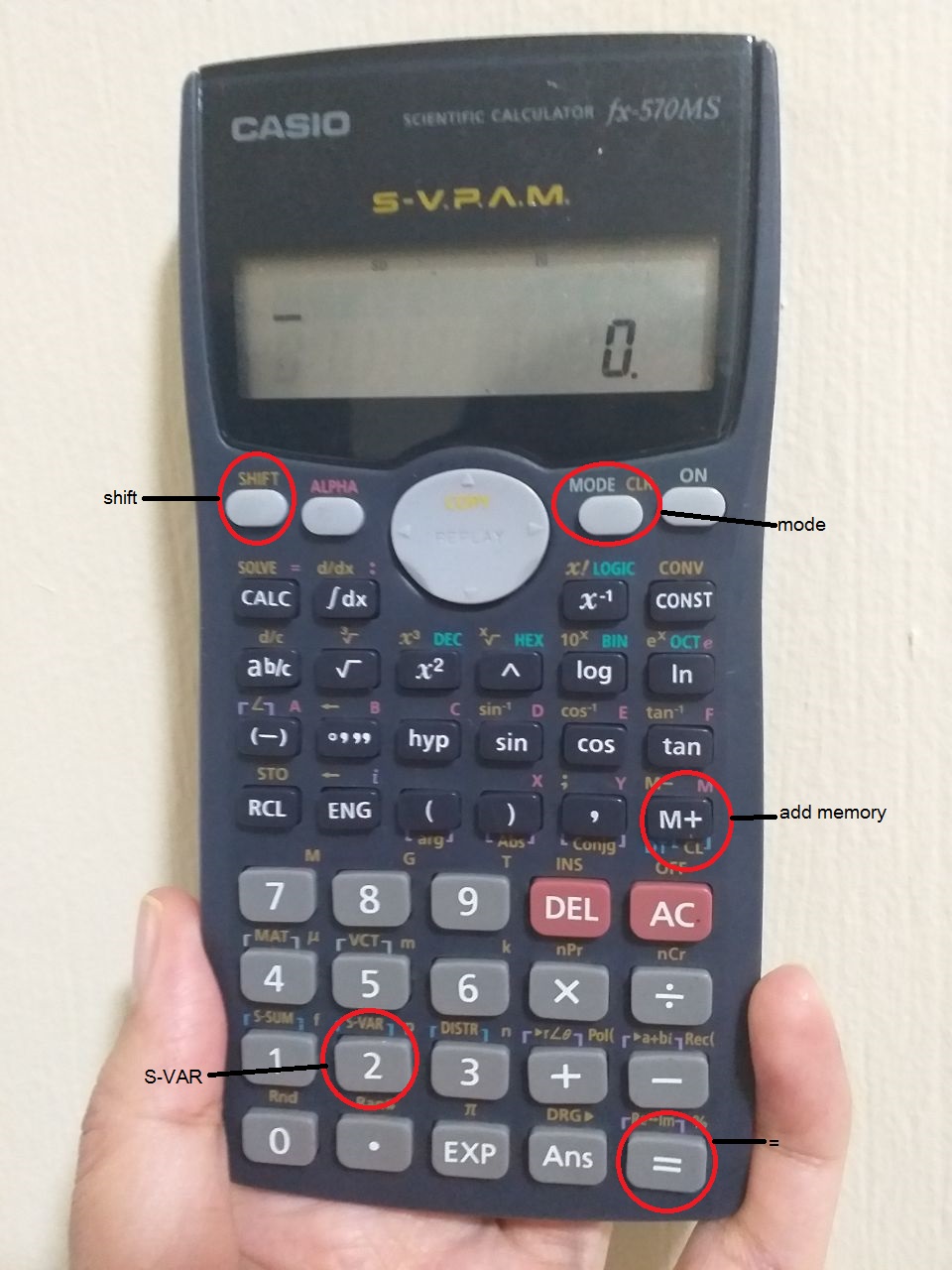
Always ensure your calculator is in the correct mode for the problem you are solving. There’s usually a dedicated “MODE” button or a 2nd function to cycle through or select these settings, often indicated by a small “D”, “R”, or “G” on the display.
Inputting Complex Expressions: Order of Operations
Scientific calculators strictly adhere to the order of operations. This means multiplication and division are performed before addition and subtraction. Exponents and roots are typically handled before multiplication/division. When you need to deviate from this order, or when an expression needs to be calculated as a unit, parentheses are your best friend. For instance, to calculate the average of three numbers, (5 + 7 + 9) / 3, the parentheses ensure the sum is computed first before division. Mastering parentheses is key to inputting multi-step formulas accurately and efficiently, preventing errors that can arise from misinterpreting a formula.
Unlocking Advanced Functions
The real power of a scientific calculator lies in its ability to perform advanced mathematical operations with a single button press. These functions are typically accessed directly or via a “2nd” (or “Shift”) key, which activates the secondary function printed above certain buttons.
Trigonometry: Sine, Cosine, Tangent, and Inverses
Trigonometric functions (sin, cos, tan) are fundamental for working with angles and triangles. To find the sine of an angle, for example, ensure your calculator is in the correct angle mode (DEG or RAD), then simply press the sin button followed by the angle value and Enter or =. For inverse trigonometric functions (arcsin, arccos, arctan), which find the angle given the ratio, you’ll typically use the 2nd or Shift key in conjunction with the sin, cos, or tan buttons (e.g., 2nd sin for $sin^{-1}$). These functions are essential in fields like surveying, navigation, physics, and engineering.
Logarithms and Exponents: Base e and Base 10
Logarithms and exponential functions are critical in many scientific domains, from chemistry (pH calculations) to finance (compound interest) to engineering (signal processing).
-
Log (Base 10): The
logbutton typically calculates the base-10 logarithm. To find $log_{10}(100)$, you’d presslog100=. -
Ln (Natural Logarithm – Base e): The
lnbutton calculates the natural logarithm (base $e$, Euler’s number). To find $ln(e^2)$, you’d pressln(e^x)2=. The constant ‘e’ often has its own button or is accessed via2ndln. -
Exponents: The
^(caret) ory^xbutton is used for raising a number to any power. For example, to calculate $2^3$, you’d input2^3=. For $e^x$, there’s usually a dedicatede^xbutton (often2ndln).
Powers, Roots, and Factorials

-
Square Roots: The
√button (often2ndx^2) calculates the square root of a number. For example,√9=yields3. -
Cube Roots and Nth Roots: Cube roots and other nth roots (like the 4th root) are typically accessed using a
2ndfunction in conjunction with the^orx√ybutton. For example, to calculate the cube root of 27, you might input32nd^27=. -
Factorials: The
!button (often2ndxor2ndn) calculates the factorial of a non-negative integer. For example,5!=yields120($5 times 4 times 3 times 2 times 1$).
Memory Functions and Constants
Scientific calculators include memory functions to store and recall numbers, which is incredibly useful for multi-step calculations to avoid re-entering values.
-
M+ / STO (Store): Adds the current display value to the memory or stores it.
-
MR / RCL (Recall): Recalls the value stored in memory to the display.
-
MC / Clear Memory: Clears the memory.
Additionally, many calculators have pre-programmed constants like $pi$ (pi) and $e$ (Euler’s number), accessible via 2nd functions, which ensures greater accuracy in calculations compared to manual approximations.
Advanced Features and Problem Solving
Beyond the core functions, many scientific calculators offer specialized features that further enhance their utility for complex problem-solving. These features transform the device from a mere calculator into a powerful analytical tool.
Working with Fractions and Mixed Numbers
For those who find decimals cumbersome or need exact fractional answers, many scientific calculators include a dedicated fraction button (often labeled a b/c or d/c). This allows users to input fractions directly, perform operations, and convert between improper fractions, mixed numbers, and decimals. This feature is particularly useful in algebra, pre-calculus, and in certain engineering applications where precision is paramount.
Statistical Calculations: Mean, Standard Deviation
Modern scientific calculators often have a “STAT” mode that enables them to perform basic statistical analysis. In this mode, you can input a series of data points and then calculate various statistics, including:
-
Mean ($bar{x}$): The average of the data set.
-
Standard Deviation ($sigmax$ or $sx$): A measure of the spread or dispersion of the data.
-
Sum of values ($Sigma x$) and Sum of squares ($Sigma x^2$).
These functions are invaluable for students and professionals in fields like biology, psychology, economics, and quality control, providing quick insights into data sets without needing complex software.
Solving Equations: The SOLVE Function
Some advanced scientific calculators, and certainly graphing calculators, include a “SOLVE” function. This feature allows you to input an equation and have the calculator find the value of a variable that makes the equation true. While not as robust as dedicated symbolic calculators or computer algebra systems, it can be a quick way to find roots of polynomials or solutions to complex algebraic expressions, especially for single-variable equations. This pushes the calculator beyond mere computation into a basic problem-solving engine.
Unit Conversions and Engineering Notation
Many scientific calculators incorporate built-in unit conversion capabilities, allowing you to convert between different units of measurement (e.g., centimeters to inches, Fahrenheit to Celsius, joules to calories). This is extremely helpful in physics, chemistry, and engineering contexts. Furthermore, “Engineering Notation” (often ENG button) allows numbers to be displayed with exponents that are multiples of three, making it easier to work with SI prefixes (e.g., $10^3$ for kilo, $10^{-6}$ for micro). This simplifies reading and writing large or small numbers in a scientific context.
Tips for Efficient and Effective Use
While the scientific calculator is a marvel of miniaturized technology, its effectiveness hinges on how well the user understands and leverages its capabilities. Developing good habits and practices will ensure you get the most out of your device.
Read Your Manual (Seriously!)
This cannot be stressed enough. Every scientific calculator model, even within the same brand, has slight variations in button layout, function access, and specific features. The user manual is the definitive guide to your particular device. It explains how to access every function, troubleshoot common errors, and understand specific conventions (e.g., how to input complex numbers if supported, or how to use specific statistical tests). Taking an hour to review the manual can save countless hours of frustration and erroneous calculations down the line. It’s an often-overlooked first step in truly mastering this tech gadget.
Practice, Practice, Practice
Like any skill, proficiency with a scientific calculator comes with practice. Don’t wait until an exam or critical project to familiarize yourself with its functions. Work through examples from your textbooks, re-do homework problems using the calculator, and experiment with different functions. The more you use it, the more intuitive the button presses will become, and the faster you’ll be able to perform complex computations accurately. Regular practice builds muscle memory and confidence, making the calculator a natural extension of your problem-solving process.
Choose the Right Calculator for Your Needs
Not all scientific calculators are created equal. Basic scientific models are sufficient for high school algebra and trigonometry. More advanced models might offer features like equation solvers, matrix operations, or complex number support, which are crucial for college-level engineering or pure mathematics. Graphing calculators, while technically a subset of scientific calculators, offer visual representations of functions and are often required for calculus and advanced statistics. Assess your current and future academic or professional needs before purchasing. Consider battery type (solar, AAA, rechargeable), screen size, and button tactile feel as well – these small details can significantly impact user experience.
Maintaining Your Device
Scientific calculators are robust but not indestructible. Keep them in a protective case to prevent screen scratches and button wear. Avoid exposing them to extreme temperatures or moisture. Clean the screen and buttons gently with a soft, dry cloth. If your calculator runs on replaceable batteries, be mindful of their life span and replace them as needed to avoid data loss (though most have a small backup battery for memory). A well-maintained calculator will serve you reliably for years, proving its value as a long-term technological investment.
In conclusion, the scientific calculator is much more than a simple number-crunching machine; it is a sophisticated piece of digital technology that empowers users to explore, analyze, and solve complex mathematical and scientific problems with unparalleled efficiency and precision. From its foundational arithmetic capabilities to its advanced trigonometric, logarithmic, and statistical functions, mastering this gadget is a pivotal step for anyone navigating the intricate landscapes of STEM. By understanding its modes, leveraging its specialized features, and practicing diligently, you can transform your scientific calculator from a mere tool into an indispensable intellectual partner, opening doors to deeper understanding and greater academic and professional achievement.
aViewFromTheCave is a participant in the Amazon Services LLC Associates Program, an affiliate advertising program designed to provide a means for sites to earn advertising fees by advertising and linking to Amazon.com. Amazon, the Amazon logo, AmazonSupply, and the AmazonSupply logo are trademarks of Amazon.com, Inc. or its affiliates. As an Amazon Associate we earn affiliate commissions from qualifying purchases.