
In today’s digital age, peer-to-peer payment platforms like Venmo have revolutionized how we send and receive money, making splitting bills, paying friends, or receiving payments for services incredibly convenient. However, this ease of digital transaction often leads to a common question: how do you seamlessly move funds from your Venmo balance into your traditional bank account? This process is a fundamental aspect of personal finance management, bridging the gap between digital wallets and conventional banking. Understanding the mechanics, costs, and strategic considerations of Venmo-to-bank transfers is crucial for maintaining control over your finances and ensuring liquidity when you need it most.

Understanding Venmo Balances and Their Role in Personal Finance
Before delving into the transfer process, it’s essential to grasp what a Venmo balance represents and why moving it to your bank might be a necessary financial maneuver. Your Venmo balance is essentially a digital pot of money held within the Venmo ecosystem, comprising funds you’ve received from others or money you’ve added yourself. While convenient for in-app transactions, it’s not a substitute for a fully-fledged bank account, nor does it typically accrue interest.
The Function of Your Venmo Balance
Your Venmo balance serves as an intermediary holding place for funds. It allows for instant payments within the Venmo network, often leveraging the social aspect of transactions. Many users accumulate funds in their Venmo balance through casual transactions, such as splitting dinner costs, receiving payments for freelance work, or collecting money for group gifts. For smaller, frequent transactions among friends or family, maintaining a balance can be highly efficient, avoiding direct bank account debits for every minor payment.
Why Move Money from Venmo to Your Bank Account?
Despite the convenience of an in-app balance, there are several compelling financial reasons to transfer these funds to your primary bank account:
- Access to Cash: A Venmo balance is digital; transferring it to your bank allows you to withdraw physical cash if needed from an ATM.
- Consolidation of Funds: For effective budgeting and financial planning, it’s often best to consolidate all your accessible funds into one or a few primary accounts. This provides a clearer picture of your overall financial standing.
- Bill Payments and Investments: Most major bills (rent, utilities, loans) require payments from a linked bank account, not a Venmo balance. Similarly, investing platforms typically pull funds directly from a bank.
- Security and FDIC Insurance: While Venmo employs robust security measures, funds held directly in a bank account (especially checking or savings) are generally FDIC insured up to legal limits, offering an additional layer of protection that Venmo balances do not inherently carry in the same way.
- Earning Interest: Funds sitting in a Venmo balance do not typically earn interest. Moving them to a high-yield savings account or an investment vehicle can make your money work harder for you.
- Avoiding Overspending: Some users find it easier to manage spending when funds are in their bank account, as it requires a conscious decision to transfer, rather than a casual tap within Venmo.
The Two Primary Methods for Venmo Bank Transfers
Venmo offers users two distinct options for transferring money to a linked bank account, each with its own speed and associated costs. Understanding these options is key to making financially informed decisions based on your urgency and budget.
Standard Bank Transfer: The Cost-Effective Option
The standard bank transfer is Venmo’s default and most common method for moving funds.
- Cost: This method is free. There are no fees charged by Venmo for standard transfers.
- Speed: Funds typically arrive in your linked bank account within 1-3 business days. It’s important to note that “business days” exclude weekends and bank holidays. If you initiate a transfer on a Friday, for instance, the funds might not appear until the following Tuesday or Wednesday, depending on bank processing times.
- Best Use Case: This option is ideal when you’re not in an immediate rush for the funds. It’s perfect for regular consolidation of your Venmo balance into your primary bank account for budgeting or savings purposes. It prioritizes cost savings over speed, aligning with prudent financial management for non-urgent funds.
Instant Transfer: Speed at a Price
For situations requiring immediate access to your funds, Venmo provides an instant transfer option.
- Cost: Venmo charges a fee for instant transfers. This fee is typically 1.75% of the transferred amount, with a minimum fee of $0.25 and a maximum fee of $25.00. This fee is deducted from the transfer amount, so you’ll receive slightly less than what you requested to transfer.
- Speed: As the name suggests, funds are usually transferred to your linked bank account within minutes, often appearing almost immediately. This service is available 24/7, including weekends and holidays.
- Best Use Case: Instant transfers are a valuable financial tool for urgent situations. If you need to cover an unexpected expense, pay a bill immediately, or require cash quickly, the fee might be a worthwhile trade-off for the rapid access to your money. However, for routine transfers, the fees can quickly add up, eating into your funds and making it a less financially efficient choice. Always weigh the cost against the necessity before opting for an instant transfer.
A Step-by-Step Guide to Initiating a Transfer
The process of transferring money from your Venmo balance to your bank account is straightforward and user-friendly. By following a few simple steps within the Venmo app, you can ensure your funds are moved securely and efficiently.
Linking Your Bank Account (If Not Already Done)
Before you can transfer money, your bank account must be linked and verified with Venmo. If you haven’t done this already:
- Navigate to Settings: Open the Venmo app and tap the “Me” tab (usually your profile icon) or the menu icon (three lines/dots).
- Select “Payment Methods”: Under “Preferences,” choose “Payment Methods.”
- Add a Bank Account: Tap “Add a bank or card” and then select “Bank.”
- Instant Verification (Recommended): Venmo will typically prompt you to link your bank instantly using your online banking credentials (provided by Plaid, a secure third-party service). This is the fastest way to verify.
- Manual Verification: If instant verification isn’t an option or you prefer not to use it, you can opt for manual verification. Venmo will send two small deposits (a few cents) to your bank account within 1-3 business days. Once these appear, you’ll return to the Venmo app and enter the exact amounts to confirm your account.
Navigating the Venmo App for Transfers
Once your bank account is linked, initiating a transfer is simple:
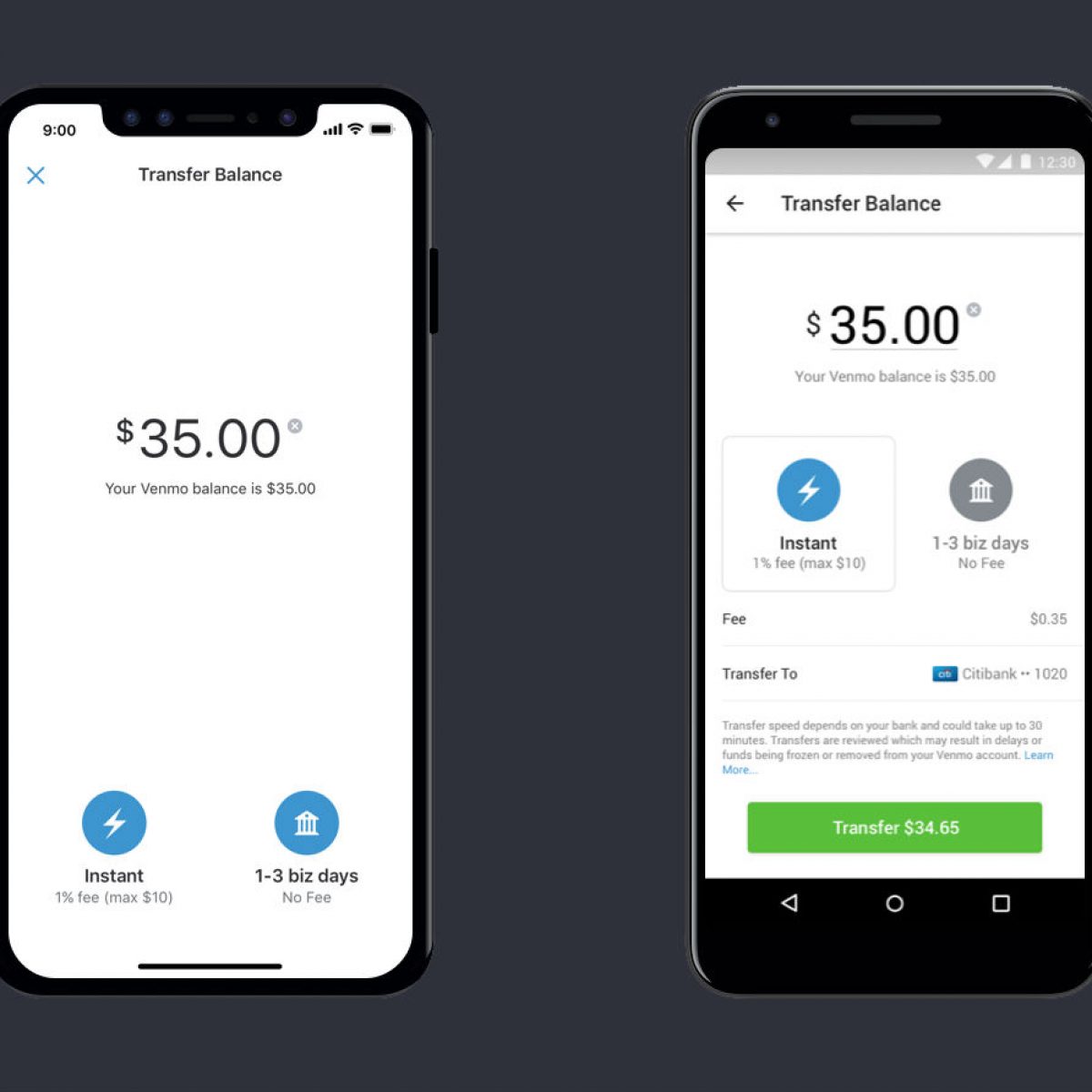
- Access “Manage Balance”: From the Venmo app’s home screen, tap on your profile picture or the “Me” tab. You’ll see your current Venmo balance displayed.
- Tap “Transfer Balance”: Beneath your balance, you’ll find an option that says “Transfer Balance” or “Manage Balance” and then “Transfer to Bank.” Tap this.
- Enter Amount: Input the exact amount you wish to transfer from your Venmo balance. Ensure you have sufficient funds available.
- Choose Transfer Method: Select either “Instant” (with the associated fee clearly displayed) or “1-3 Biz Days” (the free standard option).
- Select Destination Bank: Confirm that the correct linked bank account is selected as the destination for the funds.
- Confirm Transfer: Review all details – amount, method, and destination bank. Once satisfied, tap the final “Transfer” button.
Confirming Your Transaction Details
After initiating the transfer, Venmo will provide a confirmation message. For instant transfers, you should see the funds appear in your bank account very quickly. For standard transfers, keep an eye on your bank statement or online banking portal over the next few business days. Venmo will also log the transfer in your transaction history within the app, providing a record for your financial tracking.
Financial Considerations and Best Practices for Venmo Transfers
While convenient, managing transfers between Venmo and your bank account requires a degree of financial awareness to ensure efficiency, security, and alignment with your broader financial goals.
Understanding Transfer Fees and Their Impact
The most significant financial consideration is the fee structure for instant transfers. A 1.75% fee might seem small on a $10 transfer ($0.25), but it can become substantial for larger amounts. For example, transferring $1,000 instantly would cost $17.50. Over time, frequent instant transfers can significantly diminish the total amount you effectively receive.
- Tip: Develop a habit of planning your transfers in advance. If you know you’ll need Venmo funds in your bank account for upcoming expenses, initiate a free standard transfer a few days ahead of time. This simple practice can save you a considerable amount in fees over a year.
Managing Transfer Limits and Daily Caps
Venmo imposes limits on how much you can transfer from your balance to your bank account, both per transaction and over a rolling weekly period. These limits vary based on whether your identity is verified and your transaction history. Generally, verified users have higher limits.
- Tip: Be aware of your specific transfer limits. If you need to move a large sum, you might need to do so in multiple smaller transfers over several days, especially with standard transfers, or plan to initiate the transfer well in advance. Check Venmo’s official support pages for the most up-to-date and personalized limits.
Security Measures for Your Financial Transfers
Venmo employs encryption and fraud monitoring to protect your transactions, but personal vigilance is paramount for digital financial security.
- Link Securely: Always link your bank account using instant verification or by carefully entering deposit amounts for manual verification. Never share your bank login credentials directly with anyone or input them on unverified sites.
- Monitor Transactions: Regularly check your Venmo transaction history and your bank statements for any unauthorized activity.
- Strong Passwords and 2FA: Use a strong, unique password for your Venmo account and enable two-factor authentication (2FA) for an added layer of security. This makes it much harder for unauthorized users to access your account, even if they somehow obtain your password.
- Beware of Scams: Be cautious of phishing attempts or requests for money from unknown sources. Venmo transfers are typically irreversible, so ensure you know and trust the recipient before sending funds.

Integrating Venmo Transfers into Your Budgeting
For many, Venmo is more than just a payment app; it’s a part of their personal finance ecosystem. Integrating Venmo transfers into your budgeting strategy can provide a clearer financial picture.
- Regular Sweeps: Consider a weekly or bi-weekly “sweep” of your Venmo balance, transferring any accumulated funds to your primary checking or savings account. This ensures your money is where it can best serve your financial goals, whether it’s for budgeting, debt repayment, or savings goals.
- Categorize Income: If you receive income via Venmo (e.g., from freelance work), treat it as a distinct income stream in your budget. Plan to transfer these funds to your main bank account promptly to allocate them according to your financial plan.
- Emergency Fund Consideration: While having money in Venmo is convenient, it’s not ideal for an emergency fund due to slower access (for free transfers) and potential fees (for instant ones). Prioritize keeping your emergency savings in a dedicated, easily accessible bank account.
By understanding how to transfer money from Venmo to your bank account, and by applying these financial best practices, you empower yourself with greater control over your digital funds. This integration between your peer-to-peer wallet and traditional banking is a key step in managing your personal finances effectively in a connected world.
aViewFromTheCave is a participant in the Amazon Services LLC Associates Program, an affiliate advertising program designed to provide a means for sites to earn advertising fees by advertising and linking to Amazon.com. Amazon, the Amazon logo, AmazonSupply, and the AmazonSupply logo are trademarks of Amazon.com, Inc. or its affiliates. As an Amazon Associate we earn affiliate commissions from qualifying purchases.