
In the rapidly evolving landscape of digital transactions, PayPal stands as a ubiquitous and often indispensable platform for individuals and businesses alike. More than just a payment processor, it’s a sophisticated software ecosystem designed to facilitate secure and efficient money transfers across borders and between various online entities. For anyone venturing into e-commerce, managing online subscriptions, or simply seeking a streamlined way to send and receive funds digitally, understanding the technical process of setting up a PayPal account is a fundamental skill. This guide delves into the step-by-step configuration, security protocols, and operational nuances of establishing your PayPal presence, ensuring you harness its capabilities effectively and securely within the tech sphere.

Understanding PayPal’s Core Functionality and Account Types
Before diving into the setup process, it’s crucial to grasp what PayPal is from a technological perspective and to identify which account type best suits your needs. This initial understanding lays the groundwork for a more efficient and appropriate configuration.
What is PayPal? A Digital Payment Platform Explained
At its heart, PayPal is a global technology platform that enables digital and mobile payments between parties. It operates as an intermediary, allowing users to send and receive money without directly sharing sensitive financial information with each other. Technically, it functions as a digital wallet service that securely stores your payment instruments (bank accounts, credit cards) and facilitates transactions using only your PayPal login credentials. This abstraction layer significantly enhances security, making it a cornerstone of modern online commerce and peer-to-peer transfers. Its architecture is built to handle massive volumes of transactions, incorporating advanced encryption and fraud detection algorithms to protect user data and financial assets. From a software perspective, it’s an intricate system of APIs, user interfaces (both web and mobile), and backend processing units that work in concert to provide a seamless payment experience.
Personal vs. Business Accounts: Choosing the Right Digital Solution
PayPal offers two primary account types, each tailored to different user profiles and their corresponding technical requirements. Selecting the correct one from the outset is vital for optimizing functionality and compliance.
- Personal Accounts: These are designed for individual users who primarily engage in sending money to friends and family, making online purchases, or occasionally receiving payments for goods or services. The setup process is simpler, and the interface is streamlined for personal use. From a technical standpoint, personal accounts offer core payment functionalities, transaction history tracking, and basic dispute resolution mechanisms. They are ideal for consumers interacting with online vendors or for casual peer-to-peer exchanges.
- Business Accounts: Geared towards merchants, freelancers, e-commerce stores, and other commercial entities, business accounts offer a more robust suite of features. These include the ability to accept payments from customers via various methods, generate invoices, manage multiple users, integrate with e-commerce platforms (via APIs), and access advanced reporting tools. Technically, business accounts provide access to specialized tools like PayPal checkout integrations, mass payment functionalities, and detailed analytics dashboards. They are designed to scale with a business’s operational needs, offering comprehensive solutions for payment processing, inventory management, and financial reconciliation.
The choice between a personal and business account largely depends on the frequency and nature of transactions you anticipate. While a personal account can sometimes receive payments for goods, consistent commercial activity often necessitates the upgrade to a business account for better features, compliance, and reporting capabilities.
The Step-by-Step Technical Setup Process
Once you’ve identified the appropriate account type, the technical setup process is remarkably straightforward, guided by intuitive user interfaces designed for accessibility. Adhering to each step ensures a fully functional and secure account.
Initiating Your Account: Website or Mobile App
The journey begins by accessing the PayPal platform, either through a web browser or its dedicated mobile application.
- Navigating to PayPal.com or Downloading the Official App: For desktop users, the official website (paypal.com) is the gateway. Ensure you’re on the legitimate domain to avoid phishing scams. Mobile users can download the PayPal app from their respective app stores (Google Play Store for Android, Apple App Store for iOS). Using the official app provides an optimized, secure experience on mobile devices, often leveraging device-specific security features like biometrics.
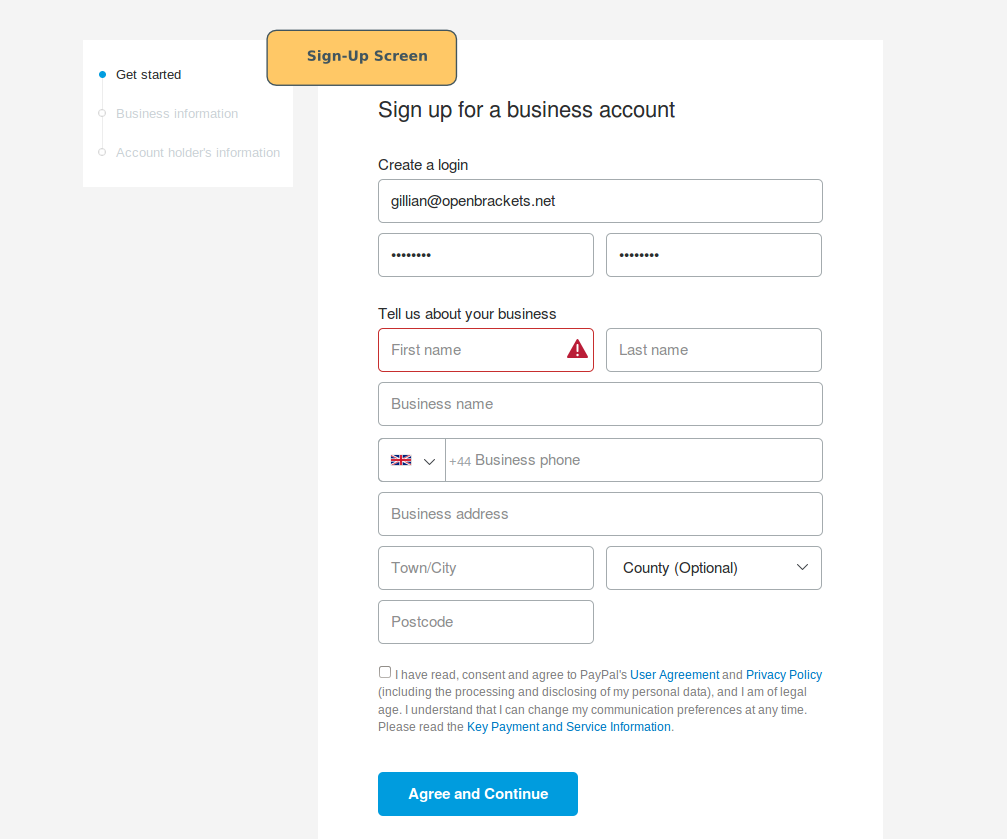
- Starting the “Sign Up” Process: On the homepage or within the app, locate and click the “Sign Up” or “Get Started” button. This initiates the account creation wizard, guiding you through a series of prompts. At this stage, you’ll typically be asked to choose between a “Personal Account” or “Business Account” if you haven’t already considered it.
Providing Essential Information for Digital Identity Verification
The next phase involves inputting your personal or business details. This is crucial for identity verification and adherence to financial regulations (Know Your Customer – KYC policies).
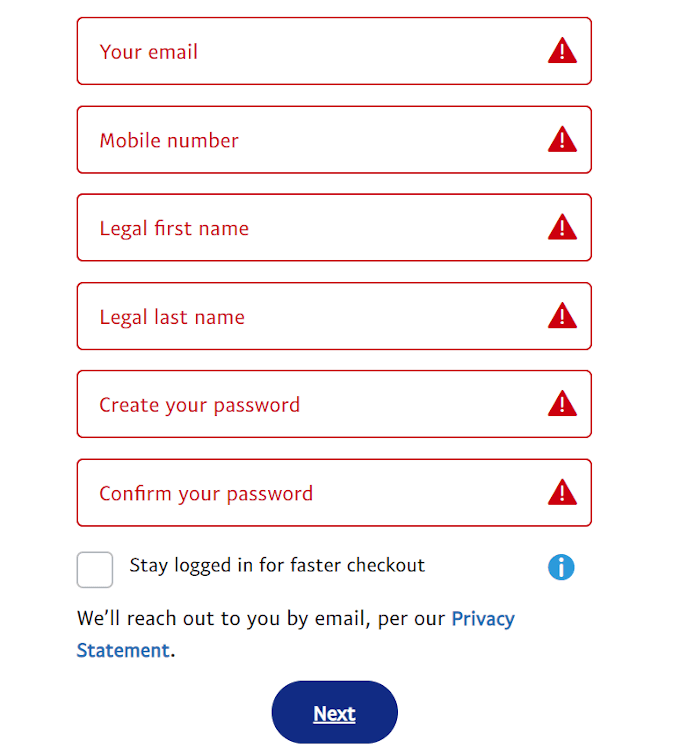
- Entering Personal Details: For a personal account, you’ll need to provide your legal name, email address, mobile phone number, and a physical address. For business accounts, this will extend to business name, contact person, business address, and potentially business registration details. Accuracy is paramount here, as this information will be used for verification and in case of any account recovery needs.
- Setting Up Secure Login Credentials: You will be prompted to create a password. PayPal enforces strong password policies, typically requiring a mix of uppercase and lowercase letters, numbers, and special characters. It’s imperative to create a unique, robust password that you do not use for any other online service. This password, combined with your email address or phone number, forms your primary access key to the PayPal digital ecosystem.
Verifying Your Account and Email Address
Email verification is a critical security step that activates your account and confirms the legitimacy of your provided contact information.
- The Importance of Email Verification for Account Activation: After submitting your initial details, PayPal will send an activation email to the address you provided. This step ensures that the email address truly belongs to you and can be used for communication, notifications, and account recovery. Without this verification, your account may remain in a limited state, restricting certain functionalities.
- Accessing and Clicking the Verification Link: Navigate to your email inbox, locate the email from PayPal (check spam/junk folders if not immediately visible), and click on the embedded verification link. This action confirms your email address with PayPal’s systems and typically redirects you back to the PayPal website or app, signifying that your basic account is now active.
Linking Payment Methods: Integrating Financial Software
To truly leverage PayPal for transactions, you must connect a funding source. This integrates your PayPal digital wallet with your existing banking infrastructure.
- Connecting Bank Accounts: To link a bank account, you’ll typically need to provide your bank’s routing number and your account number. PayPal uses these details to initiate small, verifiable deposits (usually two, under $0.50 each) into your bank account. You’ll then need to confirm these exact amounts back on your PayPal account, proving ownership of the bank account. This is a standard security protocol to prevent unauthorized linkages.
- Adding Debit/Credit Cards: Linking a debit or credit card is generally quicker. You’ll enter the card number, expiration date, and the CVV (Card Verification Value) code from the back of the card. PayPal may perform a small, temporary authorization charge (e.g., $1.00) to verify the card’s validity, which is typically reversed within a few business days.
- Understanding the Verification Process for Linked Methods: Both bank accounts and cards undergo a verification process. For bank accounts, it’s the small deposit confirmation. For cards, it might involve a code appearing on your bank statement alongside a small charge, which you then input into PayPal. This ensures that only you can link and use your financial instruments with your PayPal account.
Enhancing Your Account’s Digital Security and Usability
Setting up your account is just the beginning. Proactively strengthening its security posture and understanding its features are essential for a safe and effective digital payment experience.
Implementing Two-Factor Authentication (2FA)
Two-Factor Authentication (2FA), also known as multi-factor authentication, is a critical layer of security that should be enabled immediately after setup.
- Why 2FA is Crucial for Digital Security: 2FA adds an extra verification step beyond just your password. Typically, after entering your password, you’ll be prompted to enter a code sent to your registered mobile phone or generated by an authenticator app. This means that even if a malicious actor obtains your password, they cannot access your account without also having access to your secondary verification method. This significantly mitigates the risk of unauthorized access.
- Steps to Enable and Configure 2FA: Navigate to your PayPal “Settings” or “Security” section. Look for an option like “2-step verification” or “Two-Factor Authentication.” Follow the prompts to link your mobile number for SMS codes or set up an authenticator app (like Google Authenticator or Authy). Store any backup codes securely, as these are vital if you lose access to your primary 2FA device.
Understanding PayPal’s Security Measures and User Responsibilities
PayPal employs sophisticated technical measures to protect its users, but user vigilance is equally important.
- Encryption, Fraud Monitoring, and Seller/Buyer Protection: PayPal utilizes advanced encryption protocols (like TLS) to secure data transmission. Their systems employ real-time fraud monitoring to detect suspicious activities. Furthermore, PayPal offers Buyer Protection for eligible purchases and Seller Protection for eligible transactions, providing a safety net in case of disputes, reinforcing the platform’s reliability as a digital transaction tool.
- Phishing Awareness, Strong Passwords, and Regular Security Checks: As a user, your responsibilities include being constantly aware of phishing attempts (emails or messages pretending to be from PayPal) that try to trick you into revealing login credentials. Always verify the sender and the URL before clicking any links. Regularly changing your strong, unique password and reviewing your account activity for any unfamiliar transactions are also crucial security practices. Enabling login notifications can also alert you to any access attempts.
Navigating Your New PayPal Dashboard: First Steps and Features
Once your account is set up and secured, familiarizing yourself with the PayPal dashboard is the next logical step to fully utilize its technical capabilities.
- Sending and Receiving Money: The core functionality. The dashboard provides clear options to “Send Money” (requiring the recipient’s email or phone number) and to manage incoming funds. Understanding the fees associated with different transaction types (especially for international transfers or commercial payments) is also important.
- Managing Transactions and Recurring Payments: Your “Activity” section provides a comprehensive log of all transactions, allowing you to track payments, verify receipts, and initiate disputes if necessary. For subscriptions or regular bill payments, PayPal allows you to set up and manage recurring payments, offering a convenient automated solution.
- Exploring Additional Features: PayPal continuously evolves its platform, adding new functionalities. Explore features like invoicing tools (for business accounts), QR code payments (for contactless transactions), and integration options for various e-commerce platforms. These features expand PayPal’s utility beyond simple money transfers, making it a versatile technical tool for diverse financial interactions.
Troubleshooting Common Setup Issues and Optimizing Performance
Even with a streamlined setup process, users may encounter minor technical hurdles. Knowing how to address these can save time and frustration.
Resolving Verification Delays and Information Discrepancies
- Tips for Accurate Data Entry: The most common issues stem from incorrect information. Double-check all entered data, especially names, addresses, and bank account/card numbers. Even a single digit error can lead to verification failures.
- Contacting Support for Persistent Issues: If verification links don’t arrive, bank deposits don’t appear, or card linkages fail repeatedly, it’s best to contact PayPal’s customer support. They can access your account details and provide specific guidance or manually expedite verification processes. Their support channels typically include phone, email, and live chat, accessible via the “Contact Us” section of the website or app.
Ensuring Compatibility and Browser/App Performance
- Minimum System Requirements: While PayPal is designed for broad accessibility, ensure your device and browser meet basic compatibility standards. Outdated operating systems or browsers might experience compatibility issues, leading to slow performance or rendering errors.
- Clearing Cache and Using Supported Browsers: If you encounter slow loading times or display issues on the website, try clearing your browser’s cache and cookies. Ensure you are using a modern, supported web browser (Chrome, Firefox, Edge, Safari) and that it is updated to the latest version for optimal performance and security. For the mobile app, ensure it is updated to the latest version to benefit from bug fixes and new features.
The Future of Digital Payments: PayPal’s Evolving Role in Technology
PayPal’s journey is far from over. As technology advances, so too does the platform, continuously integrating new innovations to stay at the forefront of digital finance.
Innovations in Payment Technology
PayPal has historically been a pioneer in online payments, and it continues to innovate. This includes exploring blockchain technology for faster, more secure transactions, integrating with emerging payment methods like cryptocurrencies, and enhancing AI-driven fraud detection to combat increasingly sophisticated cyber threats. The platform’s commitment to API development also ensures seamless integration with a growing ecosystem of third-party applications and services, making it a more versatile and powerful tool for developers and businesses.
Secure Online Transactions for a Connected World
As global connectivity increases, the demand for secure, borderless payment solutions will only grow. PayPal’s technical infrastructure is constantly being refined to meet these demands, providing robust digital security measures, scalable processing capabilities, and a user-friendly interface that empowers individuals and businesses to transact with confidence in an increasingly interconnected digital world. Mastering the setup and usage of a PayPal account is not just about convenience; it’s about embracing a crucial piece of the modern technological landscape.
aViewFromTheCave is a participant in the Amazon Services LLC Associates Program, an affiliate advertising program designed to provide a means for sites to earn advertising fees by advertising and linking to Amazon.com. Amazon, the Amazon logo, AmazonSupply, and the AmazonSupply logo are trademarks of Amazon.com, Inc. or its affiliates. As an Amazon Associate we earn affiliate commissions from qualifying purchases.