
In an increasingly interconnected world, an Amazon account is far more than just a passport to online shopping; it’s a comprehensive digital identity that unlocks a vast ecosystem of technology services, from e-commerce and streaming entertainment to cloud storage and smart home integration. For many, it serves as a primary hub for digital consumption and interaction. Understanding how to properly set up and manage this account is the crucial first step for anyone looking to navigate the modern digital landscape effectively. This guide will walk you through the process, focusing on the technical steps, security considerations, and the array of technological capabilities an Amazon account provides, ensuring you can harness its full potential from day one.

The Foundational Steps: Creating Your Amazon Account
Opening an Amazon account is a straightforward process designed to be user-friendly, yet it involves several critical steps to ensure security and proper access. These initial stages lay the groundwork for your entire Amazon experience, linking your personal details to a powerful digital profile.
Navigating to the Amazon Registration Page
The journey begins by accessing the Amazon website or mobile application. If using a web browser, type “amazon.com” (or your regional Amazon domain like “amazon.co.uk,” “amazon.ca,” etc.) into your address bar. Once on the homepage, look for the “Account & Lists” dropdown menu, typically located in the top right corner. Hovering over this will reveal options, including “Sign in.” Below the sign-in button, you’ll usually find a link that says “Start here” or “New customer? Start here.” Clicking this will redirect you to the account creation page. For those preferring mobile, download the official Amazon Shopping app from your device’s app store (Google Play Store for Android, Apple App Store for iOS). Upon opening the app, you’ll be prompted to sign in or create a new account, where you’ll select the “Create account” option.
Providing Essential Information
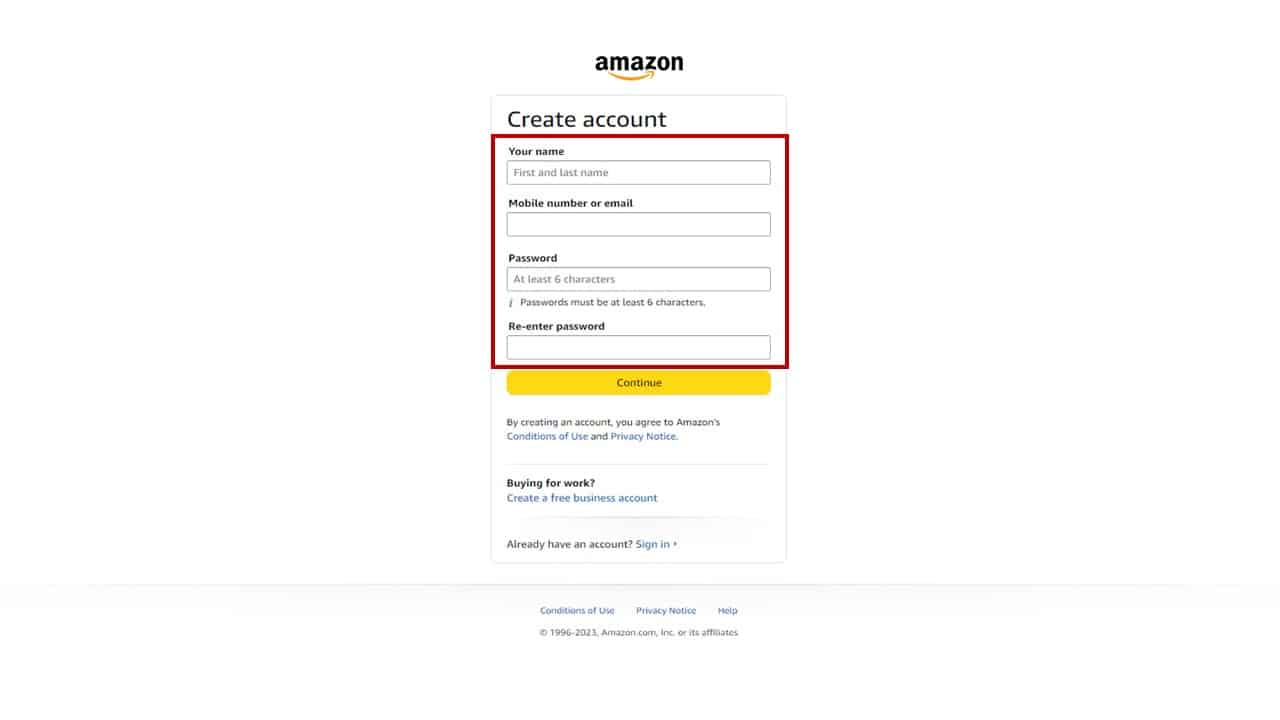
On the account creation page, Amazon will request a few pieces of key information. You’ll need to enter your full name, which will be used for shipping and personalization. Next, you’ll provide either an email address or a mobile phone number. This will serve as your primary login identifier and a crucial point of contact for account notifications, order updates, and password recovery. It’s imperative to use an active and secure email address or phone number that you regularly access. Finally, you’ll be prompted to create a strong password. This is perhaps the most critical step for digital security. A robust password should be at least 8 characters long, ideally combining uppercase and lowercase letters, numbers, and symbols. Avoid easily guessable information like birthdays or common words. Utilizing a unique password for your Amazon account, distinct from those used on other platforms, is a fundamental best practice in digital security to prevent credential stuffing attacks.
Verifying Your Account
After submitting your information, Amazon implements a verification step to confirm your identity and ensure the email address or phone number provided is indeed yours. This usually involves sending a One-Time Password (OTP) or a verification link to the email address or mobile number you registered. You will then need to retrieve this code or click the link and enter it back into the Amazon registration page. This process is a vital security measure, preventing unauthorized individuals from creating accounts using your contact information and adding an extra layer of protection to your digital identity. Successfully completing this step confirms your ownership of the contact method and moves you closer to finalizing your account setup.
Accepting Terms and Conditions
Before your account is fully activated, you’ll typically be presented with Amazon’s Conditions of Use & Sale and Privacy Notice. While it’s common for users to quickly click “Agree” without reading, it’s advisable to at least skim these documents. They outline your rights and obligations as an Amazon user, Amazon’s data handling practices, and the legal framework governing your interactions with the platform. Understanding these terms can be beneficial, particularly regarding data privacy and how your information is used within Amazon’s vast tech ecosystem. Once you agree, your basic Amazon account is officially created, ready for personalization and exploration.
Beyond Basic Setup: Optimizing Your Amazon Account for a Seamless Tech Experience
Creating an account is just the beginning. To truly leverage the full suite of technological conveniences Amazon offers, optimizing your account settings and exploring its integrated features is essential. This involves more than just shopping; it’s about tailoring your digital environment for efficiency, security, and enjoyment.
Adding Payment Methods and Shipping Addresses
For most users, the primary interaction with Amazon revolves around e-commerce. To facilitate seamless transactions, you’ll need to add one or more payment methods. Navigate to “Your Account” from the “Account & Lists” dropdown, then select “Your Payments.” Here, you can add credit/debit cards, link bank accounts, or set up gift card balances. Amazon employs robust encryption and security protocols to protect your financial information, but it’s always wise to review your stored payment methods periodically. Similarly, adding and managing shipping addresses under “Your Addresses” ensures that your purchases reach the correct destination quickly. You can store multiple addresses, making it easy to send gifts or order items to different locations.
Exploring Amazon Prime: Unlocking Enhanced Digital Services
Amazon Prime represents a significant upgrade to the standard Amazon account, transforming it into a hub for premium tech services. For a monthly or annual fee, Prime membership unlocks a plethora of benefits that extend far beyond expedited shipping. These include access to Prime Video (a vast library of streaming movies and TV shows, competing directly with other major streaming platforms), Amazon Music (ad-free music streaming), Prime Reading (a rotating selection of free e-books and magazines), and Twitch Prime (gaming benefits). Furthermore, Prime members gain access to unlimited photo storage with Amazon Photos, exclusive deals, and early access to lightning deals. For users heavily invested in digital content and frequent online shopping, Prime membership significantly enhances the technological utility and value of their Amazon account.
Managing Security Settings and Privacy
In the digital age, account security and privacy are paramount. Amazon provides several tools to protect your account. Under “Your Account,” navigate to “Login & security.” Here, you can change your password, update your contact information, and, crucially, set up Two-Factor Authentication (2FA). 2FA adds an extra layer of security by requiring a second form of verification (like a code sent to your phone) in addition to your password, making it significantly harder for unauthorized users to access your account even if they obtain your password. You can also review “Your Devices” to see where your account is logged in and remove any unrecognized devices. For privacy, explore the “Privacy Notice” and “Advertising Preferences” sections to understand and manage how Amazon collects and uses your data for personalized recommendations and advertising. Regularly reviewing these settings is a critical component of responsible digital citizenship.
Personalizing Your Amazon Experience
Amazon utilizes sophisticated algorithms and machine learning (AI tools) to personalize your experience. Your browsing history, purchase patterns, and interactions across Amazon’s services contribute to tailored recommendations for products, movies, music, and books. You can influence this by maintaining wish lists, marking items you own, or even hiding recommendations you’re not interested in. Additionally, managing your notification preferences allows you to control the types of emails or app notifications you receive, ensuring you’re informed about relevant deals and updates without being overwhelmed. This level of personalization, driven by underlying software and AI, makes the Amazon platform more intuitive and responsive to your individual needs.
Leveraging Your Amazon Account Across the Digital Ecosystem
An Amazon account is not a standalone entity; it’s a central node connecting you to a sprawling network of Amazon’s diverse technological offerings, from physical products to advanced AI-driven services and digital content.
Beyond Shopping: Exploring Digital Content and Services
While rooted in e-commerce, Amazon has strategically expanded into various digital content domains. Your Amazon account is the key to accessing Prime Video, which offers a rich selection of movies, TV series, and original productions, directly competing with platforms like Netflix and Hulu. Similarly, Amazon Music provides a vast library of songs for streaming, while Kindle devices and the Kindle app allow you to purchase, download, and read e-books. Your account seamlessly syncs your progress across devices, ensuring you can pick up a movie or book exactly where you left off. This integration showcases Amazon’s ambition to be a comprehensive digital entertainment provider.
Integrating with Amazon Devices: Alexa, Fire TV, and More
Perhaps one of the most powerful aspects of an Amazon account is its integration with the company’s hardware ecosystem. Your account serves as the central control for Alexa, Amazon’s AI-powered virtual assistant, found in Echo smart speakers and smart displays. By linking your account, Alexa can access your shopping lists, play your Amazon Music playlists, manage your smart home devices, and even place orders. Similarly, your Fire TV devices (streaming sticks, cubes, and smart TVs) are linked to your Amazon account, providing access to your Prime Video library, downloaded apps, and personalized content. Even Kindle e-readers, Fire tablets, and Ring security devices are all tied to your Amazon account, creating a unified and interconnected smart home and personal entertainment experience. This deep integration is a prime example of Amazon’s “gadgets” strategy.
Managing Your Digital Library and Subscriptions
With an Amazon account, you gain access to a personal digital library for all your purchased content. Under “Your Account,” sections like “Your Video Library,” “Your Music Library,” and “Manage Your Content and Devices” allow you to view, download, and manage your purchased movies, music, e-books, and apps. This also extends to managing your various digital subscriptions, from Prime itself to other channel subscriptions within Prime Video or third-party services linked through Amazon. This centralized management ensures that all your digital assets are easily accessible and organized, providing a coherent user experience across different Amazon platforms and devices.
Common Issues and Troubleshooting During Account Creation
While the process is generally smooth, users might occasionally encounter technical hurdles. Knowing how to troubleshoot these common issues ensures a frustration-free account setup.
Password Reset and Recovery
Forgetting your password is a common occurrence. If you’ve forgotten your Amazon password, navigate to the “Sign In” page and click on the “Forgot your password?” link. You’ll be prompted to enter the email address or phone number associated with your account. Amazon will then send a verification code or a password reset link to your registered contact method. Follow the instructions to create a new, strong password. This recovery process is designed to be secure, ensuring only the legitimate account owner can regain access.
Email/Phone Verification Glitches
Occasionally, the verification OTP or link might not arrive immediately. First, check your spam or junk mail folder, as emails can sometimes be miscategorized. For phone verification, ensure your mobile signal is strong. If there’s a significant delay, try requesting a new code. If issues persist, double-check that you entered the correct email address or phone number during registration. Incorrect input is a frequent cause of verification failures. In extreme cases, Amazon’s customer support can assist in manual verification.
Account Security Concerns
If you suspect unauthorized activity on your account or receive suspicious communications that appear to be from Amazon (phishing attempts), do not click on any links in the email. Instead, directly visit the Amazon website and log in to check your order history, payment methods, and account settings for any changes. If you find discrepancies or believe your account has been compromised, immediately change your password and contact Amazon customer service. Reporting such incidents promptly helps Amazon maintain a secure environment for all users and combats digital threats.
The Future of Your Amazon Account: Continuous Evolution in Tech
Your Amazon account is not static; it’s a dynamic digital profile that evolves with Amazon’s relentless pursuit of technological innovation. As the company continues to expand its offerings, your account will remain the central conduit for accessing these advancements.
Emerging Features and Services
Amazon is constantly introducing new features, services, and hardware. From advancements in AI for personalized shopping and voice commands to new ventures in health tech or augmented reality shopping experiences, your Amazon account will be the gateway to these innovations. Staying updated with Amazon’s announcements ensures you can take advantage of the latest technological conveniences as they become available, further enriching your digital life.

Data Security and Privacy in the Age of AI
As Amazon’s use of artificial intelligence and data analytics grows, so does the importance of understanding and managing your data. The company is continually refining its security protocols and privacy settings to adapt to evolving digital threats and regulatory landscapes. Users are encouraged to regularly review their security settings, enable advanced features like 2FA, and educate themselves on best practices for online privacy. Your proactive engagement with these features ensures that your Amazon account remains a secure and trustworthy part of your personal technology ecosystem.
In conclusion, opening an Amazon account is more than a simple registration; it’s an initiation into a vast and continuously expanding world of digital technology. By understanding the foundational steps, optimizing your settings, and leveraging the diverse services it unlocks, you can transform a basic account into a powerful tool that enhances convenience, entertainment, and productivity in your daily life. Welcome to the connected world powered by your Amazon account.
aViewFromTheCave is a participant in the Amazon Services LLC Associates Program, an affiliate advertising program designed to provide a means for sites to earn advertising fees by advertising and linking to Amazon.com. Amazon, the Amazon logo, AmazonSupply, and the AmazonSupply logo are trademarks of Amazon.com, Inc. or its affiliates. As an Amazon Associate we earn affiliate commissions from qualifying purchases.