
In an increasingly digital financial landscape, a PayPal account has become an indispensable tool for managing personal finances, engaging in online commerce, and facilitating a myriad of financial transactions. Far beyond a mere payment gateway, PayPal serves as a bridge connecting individuals and businesses to the global economy, enabling seamless money transfers, secure online purchases, and efficient payment processing for freelancers and entrepreneurs. Understanding how to establish and optimize a PayPal account is not just about navigating a website; it’s about unlocking a powerful financial instrument that can significantly impact your online income streams, budget management, and overall financial agility. This guide will walk you through the essential steps to create your PayPal account, framed within the broader context of its financial utility and strategic importance in modern money management.
The Financial Imperative: Why a PayPal Account Matters
In today’s interconnected world, the ability to send and receive money digitally is no longer a luxury but a fundamental necessity for robust financial health. PayPal stands at the forefront of this digital revolution, offering a versatile platform that caters to a wide spectrum of financial needs. Its widespread acceptance and comprehensive features make it a cornerstone for anyone looking to navigate the complexities of online financial transactions with ease and security.
Unlocking Online Income Streams
For many, PayPal is the conduit through which online earnings flow. Whether you’re a freelancer receiving payments from international clients, an e-commerce seller processing transactions, or someone earning through affiliate marketing and online surveys, PayPal provides a reliable and accessible method for receiving funds. It eliminates geographical barriers and often simplifies currency conversions, ensuring that your hard-earned money from diverse online ventures can be consolidated and managed effectively. For gig workers and side hustlers, PayPal’s ubiquity means less time worrying about payment logistics and more time focusing on generating income.
Streamlining Personal Financial Transactions
Beyond income generation, PayPal profoundly simplifies everyday personal financial management. It empowers users to make secure online purchases without directly exposing credit card details, fostering a safer shopping experience. Splitting bills with friends, sending money to family across borders, or making donations to charities become effortless with just a few clicks. This level of convenience and security helps individuals maintain better control over their spending and ensures timely, hassle-free money transfers for various personal obligations, integrating seamlessly into a modern budgeting strategy.
Essential Tool for Small Businesses & Side Hustles
For entrepreneurs, small business owners, and individuals running side hustles, PayPal transcends being a personal tool to become a critical business asset. Its Business Accounts offer features like invoicing, recurring payments, and streamlined checkout solutions, which are vital for operational efficiency. It enables sole proprietors and budding enterprises to accept payments from customers worldwide, expand their market reach, and manage their cash flow more effectively. For anyone looking to monetize their skills or products online, PayPal provides the foundational financial infrastructure to do so professionally and securely, without the overhead of traditional merchant accounts.
Preparing for Your PayPal Account Creation
Before embarking on the sign-up process, a bit of preparation can ensure a smooth experience and help you choose the account type best suited for your financial objectives. Gathering the necessary information beforehand and understanding the nuances of PayPal’s offerings will set the stage for optimal utilization of its financial tools.
Gathering Essential Financial Information
To create a PayPal account, you’ll need several pieces of key personal and financial information. This typically includes your full legal name, a valid email address, a current phone number, and a physical address. For security and verification purposes, PayPal will also require you to link a financial instrument. This could be a bank account (checking or savings) or a credit/debit card. Having the account numbers and routing information for your bank account, or the card number, expiration date, and security code for your card, readily available will expedite the linking process, which is crucial for funding your PayPal account and withdrawing funds.
Understanding Account Types: Personal vs. Business
PayPal offers two primary account types: Personal and Business. Your choice should align with your primary financial activities.
- Personal Accounts are ideal for individuals who primarily send and receive money from friends and family, make online purchases, or occasionally receive payments for small personal sales. They are designed for casual use and direct personal financial management.
- Business Accounts are tailored for merchants, freelancers, and businesses of all sizes that regularly send invoices, accept customer payments, and need access to features like multi-user access, advanced reporting, and dispute resolution tools. Choosing a Business Account allows you to operate under a company name and provides a suite of financial management tools crucial for commercial operations. It’s important to select the right type from the outset to ensure compliance and leverage the most appropriate financial features for your needs.
Security Fundamentals Before You Begin
Digital security is paramount when dealing with financial accounts. Before you even start the sign-up process, ensure your computer or mobile device is secure. Use a strong, unique password for your email address, as this will be your primary identifier for PayPal. Be wary of phishing attempts; always ensure you are on the official PayPal website (paypal.com) when creating your account or entering sensitive information. Activating two-factor authentication (2FA) on your email and potentially on your PayPal account immediately after creation is a critical step in safeguarding your financial data from unauthorized access. Proactive security measures protect your financial assets from potential threats.
Step-by-Step Guide to Creating Your PayPal Account
The process of setting up a PayPal account is designed to be straightforward, guiding you through each necessary step to establish your digital financial presence. Paying close attention to detail during this phase ensures your account is properly configured for all your financial transactions.
Navigating the Sign-Up Process
- Visit the Official PayPal Website: Open your web browser and go to www.paypal.com. Look for the “Sign Up” button, typically located in the top right corner of the homepage.
- Choose Your Account Type: As discussed, you’ll be prompted to select either a “Personal Account” or a “Business Account.” Make your selection based on your financial needs and click “Next.”
- Enter Your Phone Number: PayPal requires a valid mobile number for verification. Enter your number, and PayPal will send a verification code via SMS. Enter this code on the website to proceed.
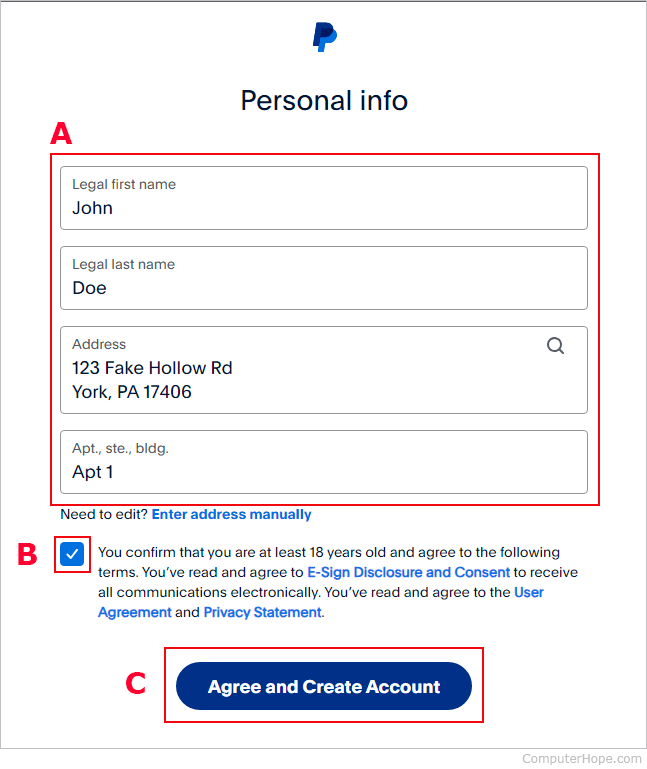
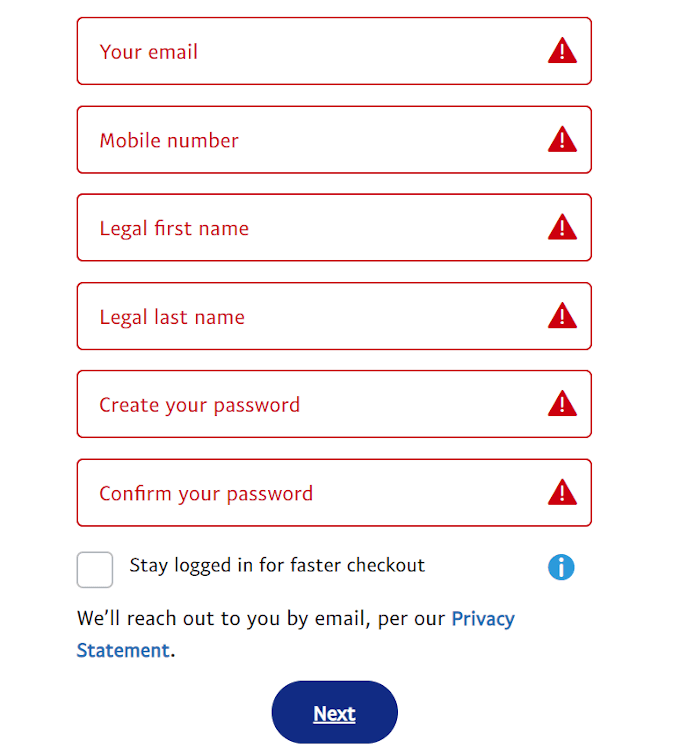
- Provide Personal Details: For a Personal Account, you’ll enter your email address, create a strong password, and provide your legal name and address. For a Business Account, you’ll enter your business email, create a password, provide your business name, and then detail the business type and relevant financial identifiers.
- Agree to Terms and Conditions: Read through PayPal’s User Agreement and Privacy Policy. It’s crucial to understand these terms, as they govern your financial relationship with PayPal. Check the box to agree and click “Agree and Create Account.”

Linking Your Financial Instruments
Once your basic account is created, the next vital step is to link a funding source. This allows you to add money to your PayPal balance, send payments, and withdraw funds.
- Link a Bank Account: You can typically link a bank account instantly by logging into your online banking portal through PayPal’s secure interface. Alternatively, you can manually enter your bank’s routing number and your account number. PayPal will usually send two small deposits (micro-deposits) to your bank account within a few business days. You’ll then need to confirm these amounts on your PayPal account to verify ownership, solidifying the financial link.
- Link a Credit or Debit Card: To link a card, you’ll enter the card number, expiration date, and the 3 or 4-digit security code. PayPal may make a small, temporary charge to verify the card, which will be refunded. This step is essential for making purchases and can serve as a backup funding source.
Verifying Your Account for Enhanced Financial Access
Account verification is a critical step that unlocks higher transaction limits, enables withdrawals to your bank account, and adds a layer of security to your financial activities.
- Confirm Your Email Address: PayPal will send a verification email to the address you provided. Click the link within this email to confirm your address. This is a fundamental step for securing your account and communications.
- Confirm Your Phone Number: You’ve already done this during initial sign-up, but ensure it’s linked and verified.
- Complete Identity Verification (if required): For higher limits or certain financial services, PayPal might require additional identity verification, such as uploading a copy of a government-issued ID (driver’s license, passport) or proof of address. This is a standard Know Your Customer (KYC) procedure designed to prevent financial fraud and money laundering. Completing these steps ensures full access to PayPal’s suite of financial tools without limitations.
Maximizing Your PayPal Account for Financial Advantage
Creating your PayPal account is just the beginning. To truly leverage its financial power, it’s crucial to understand how to manage your funds, transact securely, and utilize its specialized features for optimal financial advantage.
Managing Your Money Effectively
Your PayPal balance acts as a digital wallet, allowing you to hold funds, send payments, and make purchases. Keep an eye on your balance, especially if you’re frequently receiving income or making payments. You can transfer funds from your PayPal balance to your linked bank account, typically within 1-3 business days, providing a seamless way to move digital earnings into your traditional banking system. For those involved in international transactions, PayPal’s multi-currency features allow you to hold balances in different currencies, potentially saving on conversion fees when dealing with foreign clients or markets. Understanding these tools is key to integrating PayPal into your overall financial strategy.
Secure Online Transactions and Dispute Resolution
One of PayPal’s most significant financial advantages is its robust buyer and seller protection policies. When making purchases, PayPal acts as an intermediary, shielding your direct financial details from merchants. If an item doesn’t arrive or isn’t as described, PayPal’s Buyer Protection can help you recover your funds, offering a powerful safety net for online shopping. Similarly, Seller Protection guards against fraudulent claims for eligible transactions, providing peace of mind for those accepting payments. Familiarize yourself with these policies, as they are crucial for protecting your financial interests in the digital marketplace. Knowing how to open a dispute or respond to a claim is an essential financial skill when using the platform.
Leveraging PayPal for International Payments and Currency Exchange
For individuals and businesses operating globally, PayPal is an invaluable tool for international financial transactions. It simplifies sending and receiving money across borders, often with competitive exchange rates and transparent fees compared to traditional wire transfers. You can choose to pay in your local currency or the recipient’s currency, and PayPal handles the conversion. While fees exist for international transfers and currency conversions, they are often lower and more clearly communicated than those from traditional banks. Understanding these costs and how to manage multi-currency balances can significantly impact your profitability when engaging in global commerce or supporting family abroad.
Common Financial Considerations & Troubleshooting
While PayPal is designed for ease of use, you might encounter specific financial questions or challenges. Knowing how to address these can prevent disruptions to your financial flow and ensure continued smooth operation.
Addressing Account Limits and Verification Challenges
New PayPal accounts often come with initial sending, receiving, and withdrawal limits. These are put in place for security and regulatory compliance. To lift these limits, you’ll typically need to complete the full verification process, which includes confirming your email, linking and confirming a bank account, and sometimes providing additional identity documents. If you experience challenges with verification or hit a limit, review the “Resolution Center” in your PayPal account dashboard for specific instructions or contact support directly. Proactively addressing these ensures uninterrupted access to your funds and financial services.
Protecting Your Financial Information from Scams
PayPal’s financial utility also makes it a target for scammers. Phishing emails, fake invoices, and fraudulent payment requests are common tactics. Always verify the sender of any email claiming to be from PayPal; legitimate emails will always address you by your name, not “Dear User.” Never click on suspicious links or provide personal financial information in response to unsolicited requests. Log directly into your PayPal account to check for activity or messages. Learning to recognize and report these scams is crucial for safeguarding your financial assets and maintaining the integrity of your account.
When to Contact PayPal Support for Financial Inquiries
For issues that cannot be resolved through your account’s self-help resources, contacting PayPal’s customer support is essential. This includes disputes, unauthorized transactions, issues with linking bank accounts, or questions about specific financial services like invoicing or recurring payments. PayPal offers various support channels, including phone, email, and a message center within your account. Having your account details and any relevant transaction IDs ready will help expedite the resolution of your financial queries, ensuring your money matters are handled efficiently and correctly.
Creating a PayPal account is a strategic move for anyone looking to optimize their personal finances, expand their online income opportunities, or manage a small business with efficiency. By understanding its financial implications, carefully setting up your account, and leveraging its features responsibly, you gain access to a powerful digital tool that simplifies transactions and enhances your financial freedom in the modern economy.
aViewFromTheCave is a participant in the Amazon Services LLC Associates Program, an affiliate advertising program designed to provide a means for sites to earn advertising fees by advertising and linking to Amazon.com. Amazon, the Amazon logo, AmazonSupply, and the AmazonSupply logo are trademarks of Amazon.com, Inc. or its affiliates. As an Amazon Associate we earn affiliate commissions from qualifying purchases.