
In the modern digital landscape, subscription-based services have become the standard for consuming media, managing logistics, and accessing software. Among these, Amazon Prime stands as one of the most complex and feature-rich ecosystems in existence. Because Prime is no longer just a shipping incentive but a multifaceted tech suite encompassing streaming, cloud storage, and AI-driven shopping tools, users often find themselves questioning their current membership status. Whether you are auditing your digital expenses, troubleshooting access to Prime Video, or setting up a new device, understanding how to verify and manage your Prime status is an essential skill in digital literacy.

Understanding Your Digital Status: Verifying Your Prime Subscription
The primary challenge in identifying whether an account holds an active Prime membership lies in the sheer number of entry points to the Amazon ecosystem. From smart TVs and mobile apps to Kindle e-readers and desktop browsers, the interface changes depending on the hardware. However, the underlying database remains the same, and there are several definitive ways to confirm your status through the user interface (UI).
Navigating the Amazon Desktop and Mobile Interface
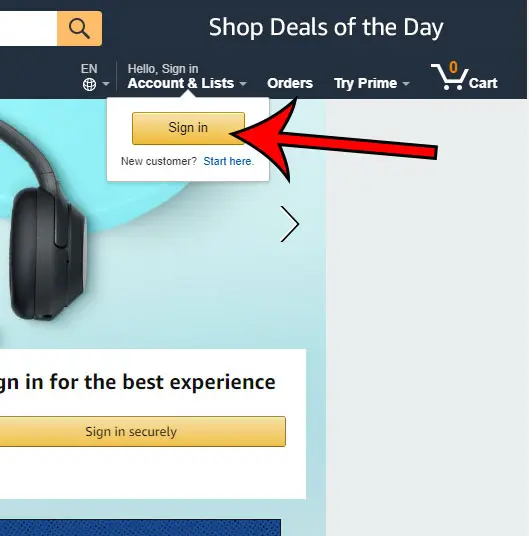
On a desktop browser, the most immediate indicator is the presence of the Prime logo. When logged in, the top-right navigation bar—typically near the “Accounts & Lists” dropdown—will feature a “Prime” badge if the account is active. To get a granular view, users should navigate to “Your Account” and select the “Prime” tile. This dashboard is the central hub for subscription data, displaying the renewal date, the payment method on file, and a breakdown of the specific benefits currently being utilized.
On the Amazon mobile app, the process is streamlined for touch interfaces. By tapping the user icon (the person silhouette at the bottom of the screen) and selecting “Your Account,” you can scroll to “Account Settings” and find “Manage Prime Membership.” This mobile view often provides a more concise summary of the “Prime membership plan,” which is particularly useful for distinguishing between monthly, annual, or student tiers.
Identifying Indicators Across Integrated Apps
Amazon Prime is not a singular app; it is a credential that unlocks a constellation of software. Often, the easiest way to know if you have Prime is to check the peripheral applications.
-
Prime Video: If you can stream “Amazon Original” content without a “Rent” or “Buy” prompt, your membership is active. The UI usually includes a “Prime” checkmark on thumbnails that are included at no extra cost.
-
Amazon Music: While there is a standalone “Unlimited” tier, Prime members have access to a curated version of the service. If the app allows you to play millions of songs ad-free in shuffle mode without a dedicated Music Unlimited subscription, you are likely authenticated through Prime.
-
Amazon Photos: One of the most overlooked tech perks of Prime is unlimited full-resolution photo storage. If your app is successfully backing up high-resolution files beyond the standard 5GB limit afforded to free accounts, your Prime status is confirmed.
The Role of Automated Confirmation and Digital Receipts
From a data management perspective, the most “truthful” source of information is your digital paper trail. Searching your primary email inbox for “Your Amazon Prime Membership” or “Amazon Prime Renewal” will reveal the transactional history of the account. Because Amazon uses an automated billing system, these receipts contain the exact timestamp of your last renewal and the expiration date of your current cycle. If you are part of a “Free Trial,” these emails are critical for tracking the transition from a promotional period to a paid subscription.
The Technical Architecture of Prime: Why Verification Matters
Verifying your Prime status is more than a matter of convenience; it is a necessity for managing the technical architecture of your smart home and digital life. Amazon Prime operates on a Single Sign-On (SSO) framework. This means that your Prime credentials serve as a master key for a variety of hardware integrations, including Alexa-enabled devices, Fire TV sticks, and Ring security systems.
Single Sign-On (SSO) and Cross-Platform Integration
The SSO architecture ensures that once you sign into an Amazon-owned device, your Prime benefits should propagate across the entire network. However, technical friction can occur when multiple accounts are used on a single device. For instance, if a Fire TV is registered to a household member who does not have Prime, but the Prime Video app is signed in with a Prime-enabled account, the UI may become inconsistent. Understanding which account holds the “Master” Prime status is crucial for ensuring that features like “Free One-Day Delivery” or “Prime Early Access” are applied during the checkout process on shared devices.
Device Synchronization and Access Permissions
Amazon’s backend servers use your Prime status to determine access permissions for high-bandwidth services. For example, Prime Video’s 4K UHD streaming requires a specific entitlement check. If your account status is “Pending” due to a lapsed credit card or a processing delay at the bank, the server may default your stream to Standard Definition (SD) or restrict access entirely. Knowing how to verify your status allows you to troubleshoot these quality-of-service issues by identifying whether the problem lies with your internet hardware or your subscription entitlements.
Auditing Your Digital Subscriptions for Optimization
In an era of “subscription fatigue,” many users inadvertently pay for Prime without realizing it, or conversely, they believe they have it when they are actually only accessing shared benefits. Auditing your status is a vital step in optimizing your digital footprint and ensuring you aren’t overpaying for redundant services.
Hidden Subscriptions and Family Sharing (Amazon Household)
A common point of confusion is “Amazon Household.” This feature allows two adults to share Prime benefits while keeping their accounts separate. If you have “Prime” but don’t see a charge on your specific bank statement, you may be the secondary member of a Household. Technically, the “Primary” account holder pays the fee, but the “Secondary” account holder receives the shipping and streaming perks. To verify this, check the “Manage Your Household” section under account settings. This will show who is linked to the membership and which digital assets (like Kindle books or apps) are being shared.
Third-Party Integrations and Mobile Carrier Bundles
The tech industry has seen a massive rise in “bundled” subscriptions. Many mobile carriers and internet service providers (ISPs) include Amazon Prime as a value-added service in their premium data plans. In these cases, your Prime status isn’t managed through Amazon directly but through a third-party portal (such as Verizon, T-Mobile, or EE). If you suspect you have Prime through a carrier, your Amazon “Manage Prime” page will state “Managed by [Partner Name].” This is a crucial distinction, as canceling your phone plan could result in an immediate loss of Prime benefits.
Troubleshooting Access Issues and Technical Discrepancies
Sometimes, you might “have” Prime according to your bank statement, but the software fails to recognize it. These technical discrepancies are often rooted in regional settings or app-level authentication errors.
Regional Restrictions and Account Migration
Amazon operates as a series of regional silos (Amazon.com, Amazon.co.uk, Amazon.de, etc.). A Prime membership is typically locked to the region where it was purchased. If you have a Prime membership on Amazon.co.uk but are currently logged into the Amazon.com (US) storefront, the system will not recognize your Prime status for shipping or streaming. Tech-savvy users must ensure that their “Country/Region Settings” in the “Content and Devices” section match the storefront they are currently browsing.
App Cache and Authentication Errors
On devices like Smart TVs and gaming consoles, the Prime Video app may “remember” an old session token even after a membership has been renewed or updated. This leads to a situation where the app tells you to “Go to amazon.com/mytv” despite you already having an active subscription. The technical solution is to perform a “de-registration” of the device and a fresh login. This forces the app to pull the latest entitlement data from Amazon’s servers, refreshing your Prime status locally.
Maximizing the Value of a Valid Prime Membership
Once you have confirmed that you have an active Prime membership, the focus shifts from verification to utilization. In the current tech climate, Prime has evolved to include AI-driven features and niche digital services that many users fail to exploit.
Beyond Fast Shipping: Digital Perks and AI-Driven Features
Amazon has recently integrated its AI assistant, Rufus, into the shopping experience for Prime members. This generative AI tool uses your Prime status to prioritize results that are eligible for “Buy with Prime” on external websites and to provide personalized recommendations based on your Prime-exclusive viewing and purchasing history. Furthermore, Prime members gain access to “Prime Gaming,” which offers free monthly PC games and a free monthly Twitch subscription—a significant value for the gaming community that often goes unclaimed.

Securing Your Account Against Subscription Fraud
Knowing exactly when and how you have Prime is also a security measure. Phishing attacks often target Prime members with “Your account will be suspended” or “Verify your Prime payment” emails. By knowing the exact status of your membership—visible only through the secure “Your Account” dashboard—you can easily identify these fraudulent attempts. If an email claims your Prime has expired, but your dashboard shows an active renewal date three months away, you have successfully avoided a digital security threat.
In conclusion, knowing if you have Prime is a gateway to managing a broader digital ecosystem. It involves navigating complex UIs, understanding the mechanics of SSO and third-party bundles, and troubleshooting the technical hurdles of regional silos and app authentication. By maintaining a clear view of your membership status, you not only ensure uninterrupted access to your digital tools but also protect your financial and data security in an increasingly subscription-dependent world.
aViewFromTheCave is a participant in the Amazon Services LLC Associates Program, an affiliate advertising program designed to provide a means for sites to earn advertising fees by advertising and linking to Amazon.com. Amazon, the Amazon logo, AmazonSupply, and the AmazonSupply logo are trademarks of Amazon.com, Inc. or its affiliates. As an Amazon Associate we earn affiliate commissions from qualifying purchases.