
In an increasingly digital world, the humble printer still holds an indispensable place in homes and offices globally. From printing important documents and family photos to creating marketing materials for a burgeoning side hustle, a reliable printer is a cornerstone of productivity. Among the myriad of brands, Canon stands out for its diverse range of printers, celebrated for their print quality, reliability, and innovative features. However, even the most advanced piece of technology requires proper maintenance and operation to perform at its peak. One of the most common, yet sometimes daunting, tasks for any printer owner is replacing ink cartridges.
While seemingly a straightforward process, correctly installing ink cartridges in a Canon printer is crucial not only for achieving optimal print quality but also for safeguarding the longevity and performance of your device. A botched installation can lead to a host of issues, from frustrating error messages and streaky prints to potential damage to the print head itself – a costly repair that could easily be avoided. This comprehensive guide aims to demystify the process, providing Canon printer owners with the knowledge and confidence to seamlessly replace their ink cartridges, ensuring their technological investment continues to serve their needs efficiently, whether for personal use, a growing brand, or meticulous financial record-keeping. By following these expert steps, you’ll not only guarantee a smooth printing experience but also extend the life of your Canon device, reinforcing the idea that proper tech maintenance is key to both productivity and financial prudence.
Understanding Your Canon Printer’s Ink System
Before diving into the mechanics of ink cartridge installation, it’s vital to understand the various ink systems Canon printers employ. This knowledge empowers you to make informed decisions about your printer and its consumables, impacting everything from print quality to long-term operational costs – a critical consideration for both personal finance and business budgeting.
Types of Canon Ink Cartridges
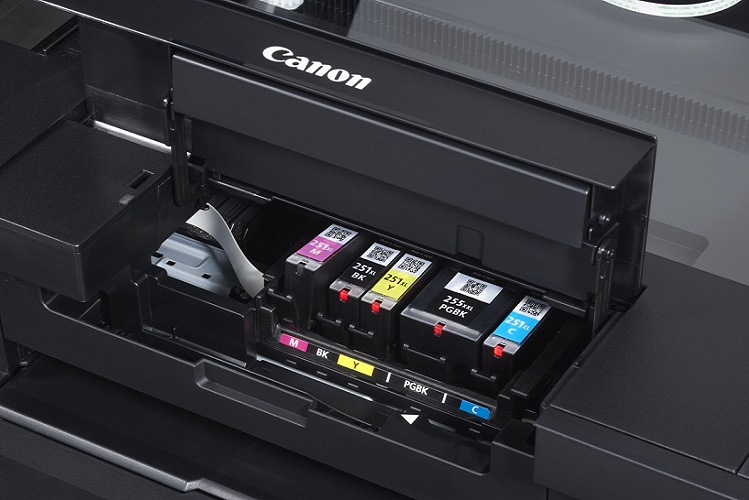
Canon printers typically utilize one of two primary ink cartridge systems:
- FINE Cartridges (Full-Photolithography Inkjet Nozzle Engineering): Often found in many of Canon’s entry-level and mid-range PIXMA models, FINE cartridges integrate the ink tank and the print head into a single unit. You’ll typically find two of these: one black and one tri-color (cyan, magenta, yellow).
- Pros: Simplicity in design, lower initial printer cost, replacing a cartridge also means replacing the print head, which can resolve some print quality issues like minor clogs.
- Cons: Can be less economical in the long run. If only one color in the tri-color cartridge runs out, you have to replace the entire unit, potentially wasting usable ink from other colors.
- Individual Ink Tanks: Prevalent in Canon’s higher-end PIXMA, MAXIFY, and imagePROGRAF models, these systems feature separate tanks for each color (e.g., black, cyan, magenta, yellow, and sometimes additional photo colors like photo black, grey, etc.). The print head is typically a separate, permanent component within the printer.
- Pros: More economical as you only replace the specific color that runs out, reducing waste and potentially lowering running costs over time. This approach aligns well with smart financial management, particularly for businesses that print frequently. Allows for greater control over color accuracy, which is crucial for brand consistency in printed materials.
- Cons: More cartridges to manage, and the initial cost of printers using this system can be higher.
Understanding which type of system your Canon printer uses is the first step toward efficient and cost-effective ink management. Always refer to your printer’s manual or Canon’s official website for precise cartridge compatibility.
Why Proper Cartridge Installation Matters
The seemingly simple act of installing an ink cartridge has far-reaching implications for your printer’s performance and longevity. Overlooking the correct procedure can lead to a cascade of problems, impacting productivity, print quality, and potentially incurring unnecessary expenses.
- Optimal Print Quality: Correctly installed cartridges ensure that ink flows properly to the print head, resulting in crisp text, vibrant colors, and accurate image reproduction. Misaligned or improperly sealed cartridges can lead to streaky prints, faded output, or incorrect color representation, severely compromising the quality of your documents and images, which can be detrimental for brand presentation.
- Printer Longevity and Health: The print head is a delicate and critical component of your printer. Incorrect cartridge installation can cause air bubbles to enter the print head, leading to clogs. It can also cause physical damage if cartridges are forced into place or if protective films are not removed properly. Such damage can significantly shorten your printer’s lifespan and necessitate expensive repairs or even replacement, directly impacting your budget.
- Avoiding Error Messages and Downtime: Many modern Canon printers are equipped with sensors to detect properly installed cartridges. Incorrect installation often triggers error messages, preventing the printer from functioning until the issue is resolved. This downtime can be a major productivity killer, especially in a professional setting where deadlines are tight.
- Warranty Considerations: Using genuine Canon cartridges and following proper installation procedures helps maintain your printer’s warranty. While third-party cartridges are often marketed as a cheaper alternative, they can sometimes cause damage that voids your warranty, leading to significant financial risk if your printer malfunctions. For brand-conscious users and budget-aware individuals, sticking to recommended practices ensures peace of mind and protection for your tech investment.
In essence, proper ink cartridge installation is not just about getting ink into the printer; it’s about maintaining a crucial piece of technology, preserving print quality, ensuring operational efficiency, and protecting your financial investment.
Step-by-Step Guide to Installing Canon Ink Cartridges
Replacing ink cartridges doesn’t have to be a frustrating chore. By following a methodical approach, you can ensure a smooth process and avoid common pitfalls. This section provides a general, yet detailed, walkthrough, applicable to most Canon inkjet printers. However, always consult your specific printer’s manual for model-specific nuances.
Preparation is Key
A successful installation begins with thorough preparation. Taking a few moments to set the stage can save you considerable time and frustration later.
- Gather Your Supplies: Before you begin, ensure you have all necessary items at hand. This includes your new Canon genuine ink cartridges (ensure they are the correct model number for your printer), and a soft, lint-free cloth.
- Ensure Printer Stability and Power: Your printer should be powered on and placed on a stable, level surface. It’s crucial for the print head carriage to move freely during the process.
- Read Your Printer’s Manual: While this guide provides general steps, specific Canon models may have unique quirks. Your printer’s user manual is an invaluable resource for precise instructions, diagrams, and troubleshooting tips tailored to your device. This aligns with good tech literacy – understanding your specific tools.
- Work in a Clean, Well-Lit Area: A clean environment prevents dust or debris from contaminating the sensitive components of the cartridges or the printer itself. Good lighting helps you see clearly, reducing the chances of errors.
The Installation Process (General Steps)
Once prepared, you can proceed with the installation. Remember to handle cartridges carefully, avoiding contact with electrical contacts or nozzles.
- Power On the Printer: Ensure your printer is turned on. This allows the print head carriage to move to the correct replacement position. Never attempt to manually move the print head carriage, as this can cause damage.
- Open the Printer Cover/Access Door: The method for accessing the ink cartridges varies by printer model.
- For many PIXMA models, you simply lift the top cover of the printer.
- For some MAXIFY models, there might be a dedicated front panel or a small door.
- Refer to your manual if you’re unsure. Once opened, the print head carriage, which holds the ink cartridges, will typically move to the center access position. Wait for it to stop completely before proceeding.
- Removing Old Cartridges:
- FINE Cartridges: Gently push down on the tab or lever at the front of the cartridge until it clicks and releases. Then, lift the cartridge out.
- Individual Ink Tanks: Each tank usually has a small lever or button that you press or push down. Once released, lift the cartridge straight out of its slot.
- Immediately place the old cartridges into a bag or on a paper towel to prevent any residual ink from staining your workspace. Consider responsible recycling of old cartridges, as part of sustainable tech practices.
- Unpacking New Cartridges:
- Carefully remove the new cartridge from its packaging. Avoid shaking or dropping it.
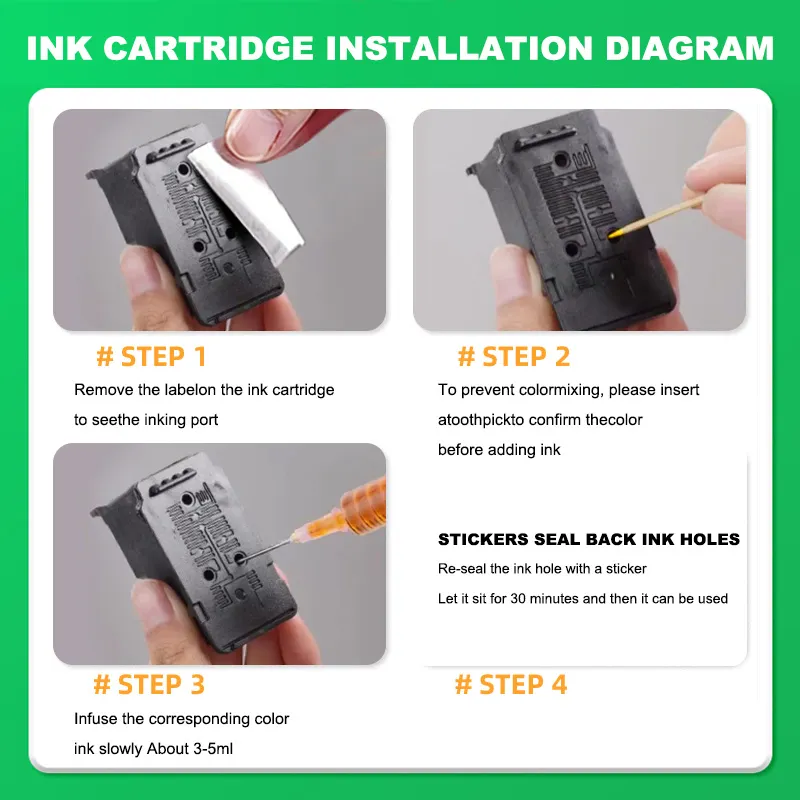
- Locate the orange protective tape or film. This tape seals the ink port and must be removed before installation. Gently peel it off. Crucially, do not touch the gold electrical contacts or the ink nozzles (if visible) on the cartridge. Oils from your skin can impede ink flow or cause connectivity issues.
- Inserting New Cartridges:
- Match Colors and Slots: Each cartridge slot is typically color-coded or labeled. Ensure you are inserting the correct color cartridge into the corresponding slot.
- Position Correctly: Hold the new cartridge with the contacts facing the correct direction (usually forward or down, depending on the model). Slide it into the empty slot at a slight angle until it’s seated.
- Secure the Cartridge: Push down firmly but gently on the top or front of the cartridge until it clicks securely into place. For individual ink tanks, the LED light on the cartridge will typically illuminate (usually red or white) once correctly installed.
- Repeat this process for all new cartridges you are installing.
- Close the Cover: Once all cartridges are securely installed, close the printer cover or access door. The print head carriage will return to its home position, and the printer will typically begin an initialization process.
Post-Installation Procedures
The installation doesn’t quite end when the cover closes. A few final steps ensure your printer is ready for optimal use.
- Printer Initialization: Your Canon printer will automatically detect the new cartridges and go through a brief initialization cycle. During this time, the printer might make some noises as it primes the ink system. Do not interrupt this process.
- Perform a Print Head Alignment (Recommended): This step ensures that the print head nozzles are perfectly aligned, which is critical for sharp text and accurate image rendering.
- Access this function through your printer’s control panel menu or through the Canon printer utility software on your computer.
- The printer will print a test pattern, and you may be prompted to select the best pattern for alignment or the printer will automatically scan it. This is a key step in maintaining quality output for your brand’s printed materials.
- Run a Nozzle Check: This utility prints a pattern that reveals if any nozzles are clogged or if there are any issues with ink delivery. If you see breaks in the lines or missing colors, run a print head cleaning cycle from your printer’s maintenance menu.
- Troubleshooting Common Immediate Issues:
- Cartridge Not Recognized: Double-check that all protective tapes have been removed and that the cartridge is seated firmly until it clicks. Ensure you’re using genuine Canon cartridges compatible with your model.
- Error Messages: Refer to your printer’s manual or Canon’s support website for specific error code meanings and resolutions. Often, re-seating the cartridge resolves the issue.
By diligently following these steps, you minimize the risk of print quality issues, extend the life of your printer, and ensure your tech investment consistently delivers high-quality results.
Advanced Tips for Optimal Printer Performance and Longevity
Beyond the basic installation, there are several practices that can significantly enhance your Canon printer’s performance, prolong its lifespan, and even save you money in the long run. These tips delve deeper into the technological and financial aspects of printer ownership, aligning perfectly with smart tech management and fiscal responsibility.
Choosing the Right Ink: Genuine vs. Third-Party
The choice of ink cartridge is perhaps the most significant decision impacting your printer’s health and print quality.
- The Canon Brand Advantage: Genuine Canon ink cartridges are meticulously engineered to work in harmony with Canon printers. They contain proprietary ink formulations (some pigment-based for sharp text, others dye-based for vibrant photos) designed to deliver precise droplet size, consistent color accuracy, and fade resistance. This seamless integration ensures optimal performance, reliability, and print longevity, upholding Canon’s brand promise.
- The Risks of Third-Party/Refilled Cartridges: While often tempting due to their lower upfront cost, non-genuine cartridges pose several risks.
- Print Quality Degradation: Inconsistent ink quality can lead to streaky prints, inaccurate colors, premature fading, and document smearing. This can severely undermine the professional appearance of your printed materials, negatively impacting your brand identity.
- Printer Damage and Warranty Voidance: Third-party inks may have different chemical compositions, potentially leading to print head clogs, corrosion, or even electrical damage. Canon’s warranty often specifies that damage caused by non-genuine cartridges is not covered, turning a supposed cost-saving into a significant financial burden.
- Unreliable Ink Levels: Many non-genuine cartridges struggle to communicate accurate ink levels to the printer, leading to unexpected outages or wasted ink.
- The “Money” Argument: While genuine Canon cartridges may seem more expensive initially, their consistent quality, reliability, and protection against costly printer damage offer superior value over the lifespan of the printer. Investing in genuine cartridges is a smart financial decision that safeguards your technology investment and ensures uninterrupted productivity. Always purchase from reputable retailers or Canon’s official website to avoid counterfeits.
Printer Maintenance Beyond Cartridge Replacement
Regular maintenance extends far beyond just swapping out empty ink tanks. Proactive care ensures your printer remains a reliable workhorse.
- Utilize Built-in Cleaning Cycles: Canon printers come with internal maintenance functions such as “Print Head Cleaning” and “Deep Cleaning.” Use these proactively if you notice print quality issues like streaks or missing lines, or if the printer has been idle for an extended period. This keeps the delicate nozzles clear.
- Keep the Printer Clean Externally: Dust and debris can infiltrate the printer’s interior, causing mechanical issues. Regularly wipe down the exterior with a soft, lint-free cloth. Be especially careful around paper trays and output areas.
- Proper Shutdown Procedures: Always use the printer’s power button to turn it off. This allows the print head to return to its capped position, preventing ink from drying out and clogging the nozzles. Simply unplugging the printer can bypass this protective measure.
- Firmware Updates: Periodically check Canon’s support website for firmware updates for your printer model. Firmware updates often include performance enhancements, bug fixes, and improved compatibility, ensuring your device operates with the latest technological advancements. This is a crucial aspect of keeping your “Tech” tools optimized.
- Monitor Ink Levels: Pay attention to your printer’s ink level indicators. Replacing cartridges before they completely run dry can prevent air from entering the print head, which can cause clogs and requires more intensive cleaning cycles.
Troubleshooting Common Ink-Related Issues
Even with proper installation and maintenance, occasional issues may arise. Knowing how to diagnose and address them quickly can prevent prolonged downtime.
- Faded Prints or Streaks: First, perform a nozzle check to identify specific color issues. If problems exist, run a print head cleaning cycle (standard or deep cleaning) and then a print head alignment. Ensure you haven’t recently changed paper types without adjusting printer settings.
- Cartridge Not Recognized: This is often due to the protective tape not being fully removed or the cartridge not being seated correctly. Remove, inspect, and re-seat the cartridge firmly. If the problem persists, ensure it’s a genuine, compatible Canon cartridge. Clean the electrical contacts on the cartridge and in the printer with a lint-free cloth lightly dampened with distilled water (allow to dry completely).
- Error Codes: Canon printers display specific error codes to indicate problems. Consult your printer’s manual or Canon’s online support for the meaning of the code and recommended solutions. Many common errors have simple fixes.
- When to Seek Professional Help: If you’ve exhausted all troubleshooting steps and your printer still isn’t functioning correctly, it might be time to contact Canon customer support or a certified repair technician. Knowing when to escalate an issue saves you time and prevents potentially greater damage.

The Broader Impact: Productivity, Brand, and Budget
In today’s fast-paced environment, the seamless operation of technology is intrinsically linked to personal and professional success. The seemingly minor act of installing ink cartridges correctly in your Canon printer echoes throughout broader spheres of productivity, brand integrity, and financial management.
For Productivity, a properly maintained printer ensures uninterrupted workflow. Imagine the frustration of a project deadline looming, only for your printer to malfunction due to a preventable issue like an incorrectly installed cartridge or dried-up nozzles. Efficient tech maintenance, including diligent ink management, minimizes downtime, prevents last-minute scrambles, and ensures that your output, whether it’s a critical report or a vibrant presentation, is always ready when you need it. This reliability is paramount for individuals juggling multiple tasks and for businesses striving for operational excellence.
From a Brand perspective, consistent quality prints are non-negotiable. Whether you’re printing invoices, marketing flyers, or professional photographs, the visual representation of your work directly reflects on your brand’s professionalism and attention to detail. Canon, as a brand, stands for imaging excellence and reliability. By using genuine Canon cartridges and adhering to proper installation and maintenance guidelines, you are not just operating a device; you are upholding the standard of quality that the Canon brand promises. Subpar prints from neglected maintenance or incompatible inks can subtly erode client confidence and weaken your brand’s visual identity.
Finally, the Money implications are significant. While the upfront cost of genuine Canon ink cartridges might seem higher than third-party alternatives, they represent a sound financial investment. Preventing printer damage, avoiding costly repairs, and extending the lifespan of your device ultimately lead to substantial savings. A printer that consistently performs well means fewer replacements, less wasted paper and ink on failed prints, and no lost revenue due to operational halts. Furthermore, by being mindful of maintenance and choosing high-quality consumables, you treat your printer as a valuable asset – a technological investment that, when cared for, yields returns in efficiency and cost-effectiveness. It’s a testament to the principle that proactive financial planning extends to every aspect of your tech ecosystem.
In conclusion, installing ink cartridges in your Canon printer is more than just a routine chore; it’s a critical step in a larger ecosystem of tech maintenance that underpins your productivity, safeguards your brand’s image, and contributes to sound financial management. By understanding the nuances of your printer’s ink system, meticulously following installation procedures, and adopting proactive maintenance habits, you ensure your Canon printer remains a dependable and high-performing asset. Treat your technology with care, and it will serve you reliably for years to come, consistently delivering the quality output you expect and deserve.
aViewFromTheCave is a participant in the Amazon Services LLC Associates Program, an affiliate advertising program designed to provide a means for sites to earn advertising fees by advertising and linking to Amazon.com. Amazon, the Amazon logo, AmazonSupply, and the AmazonSupply logo are trademarks of Amazon.com, Inc. or its affiliates. As an Amazon Associate we earn affiliate commissions from qualifying purchases.