
Understanding Venmo: A Digital Wallet Essential
In the rapidly evolving landscape of digital finance, Venmo has emerged as a quintessential peer-to-peer (P2P) payment application, fundamentally transforming how individuals send and receive money. More than just a simple transaction tool, Venmo integrates a social layer, making financial interactions intuitive and often public among friends, though robust privacy controls are available. At its core, Venmo functions as a mobile digital wallet, facilitating instant transfers between users linked to their bank accounts, debit cards, or credit cards. The application prioritizes user experience, designing an interface that is both streamlined for efficiency and rich with features, cementing its place as a leader in mobile payment technology. Its widespread adoption underscores a broader societal shift towards cashless transactions and the convenience afforded by smartphone-based financial services.

What is Venmo and How it Works
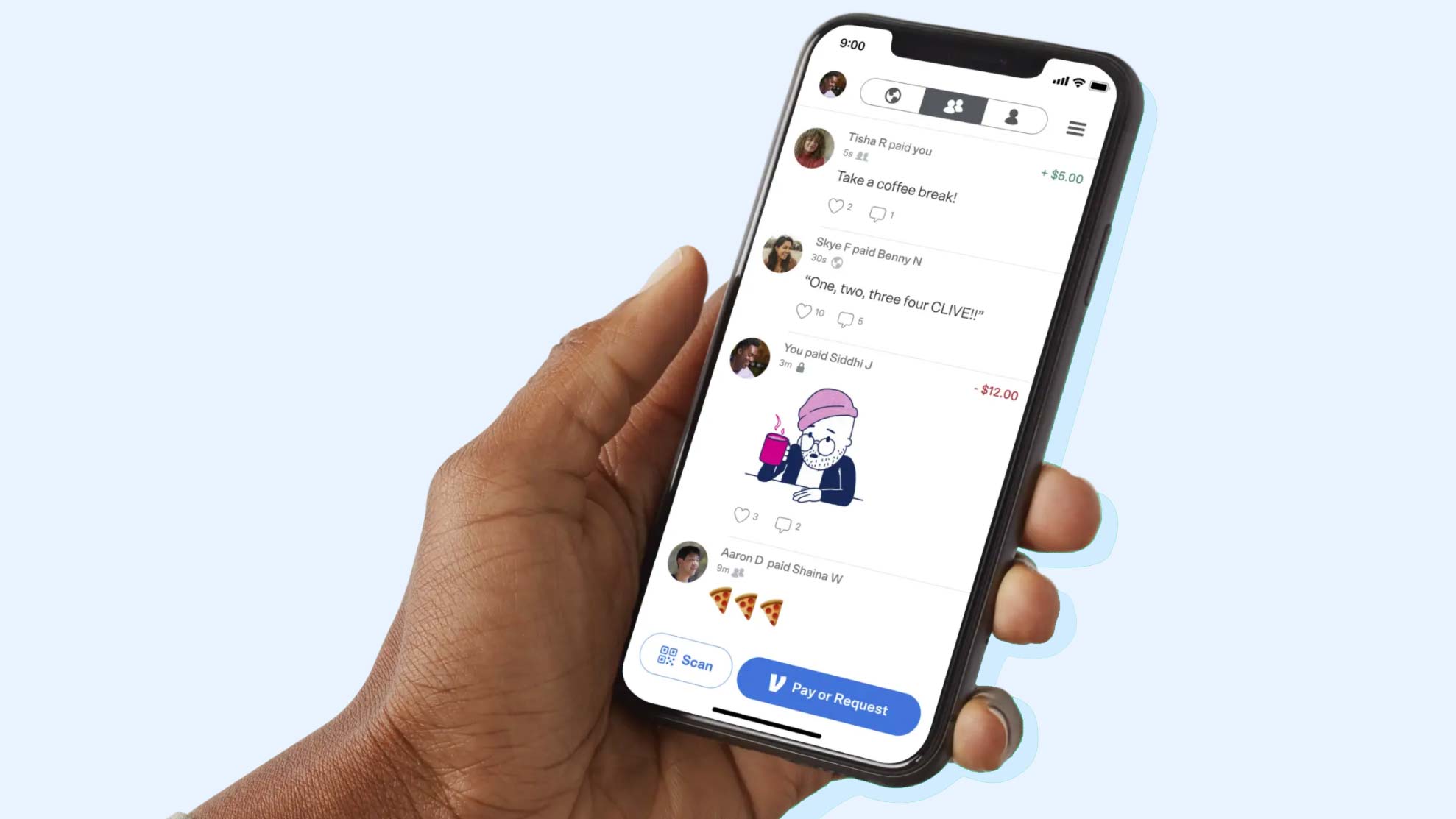
Venmo operates on a simple premise: enabling fast, secure, and user-friendly money transfers between individuals via a mobile application. Once a user has linked a valid funding source, such as a bank account or debit card, they can send money to or request money from other Venmo users with just a few taps. The funds typically appear in the recipient’s Venmo balance almost instantly, making it an ideal solution for splitting bills, sharing rent, or contributing to group expenses. Transactions are often accompanied by emojis or short descriptions, visible on a customizable social feed. While most transfers within Venmo using a linked bank account or debit card are free, a small fee applies for credit card transactions and instant transfers to a bank account. Venmo employs sophisticated encryption and security protocols to safeguard user data and financial information, aligning with industry standards for digital payment platforms.
Why Venmo is a Popular Choice for Digital Transactions
Venmo’s popularity stems from a confluence of factors, primarily its ease of use, speed, and social integration. The app’s intuitive design makes it accessible even for those less familiar with digital financial tools, abstracting away the complexities of traditional bank transfers. The instantaneous nature of transfers eliminates the waiting periods often associated with other payment methods, providing immediate liquidity within the Venmo ecosystem. Furthermore, Venmo’s optional social feed, where users can see anonymized or public transactions among their network, adds a unique dimension, fostering a sense of community and transparency (within user-defined privacy settings). This social aspect, coupled with its convenience for splitting costs without needing cash or exact change, has made Venmo an indispensable tool for a generation accustomed to on-demand services and digital connectivity.
The Step-by-Step Guide to Getting Started with Venmo
Embarking on your Venmo journey is a straightforward process, meticulously designed for user accessibility. The initial setup involves acquiring the application, creating a personalized account, and undergoing identity verification — crucial steps that lay the foundation for secure and compliant digital transactions. Each stage is guided by clear prompts within the application, ensuring a smooth onboarding experience from download to the first successful transaction. Understanding these initial steps is vital for unlocking Venmo’s full suite of functionalities and integrating it seamlessly into your digital financial toolkit. This foundational process not only grants access to its core features but also reinforces the platform’s commitment to maintaining a secure environment for all users.
Downloading the Venmo App
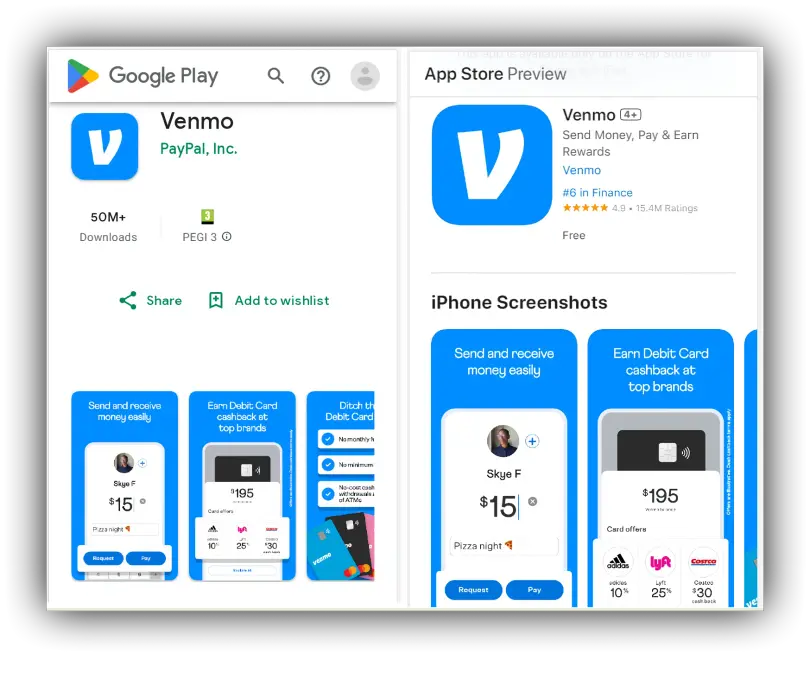
The first and most fundamental step to getting Venmo is downloading the application onto your smartphone. Venmo is available for both iOS and Android devices, ensuring broad compatibility across the majority of modern mobile phones. To download, navigate to your device’s respective app store: the Apple App Store for iPhones and the Google Play Store for Android devices. In the search bar, type “Venmo” and initiate the search. Once located, the Venmo app will typically be accompanied by its distinctive blue logo. Tap the “Get” or “Install” button to begin the download and installation process. Ensure you are connected to a stable Wi-Fi network to avoid data charges and facilitate a quicker download. Once installed, the Venmo icon will appear on your phone’s home screen or app drawer, signaling readiness for the next stage.
Creating Your Account
With the Venmo app successfully installed, the next step involves creating your personal account. Open the Venmo application. You will be prompted to sign up, typically through your phone number, email address, or via Facebook. While signing up with Facebook can be quicker as it pre-populates some personal details, using your phone number or email provides a more direct and often preferred method for privacy-conscious users. Regardless of the method chosen, you will be required to provide basic personal information, including your legal first and last name, email address, phone number, and to create a secure password. It is crucial to use your official legal name as it appears on government-issued identification, as this will be vital for identity verification later. Carefully review the terms of service and privacy policy before agreeing to them to finalize the account creation process.
Verifying Your Identity and Securing Your Account
Identity verification is a critical security measure mandated by financial regulations and implemented by Venmo to protect against fraud and ensure compliance. While you can often send a small amount of money before full verification, higher transaction limits and access to all features (like withdrawing funds to your bank) require this step. Venmo will typically request your date of birth, the last four digits of your Social Security Number (SSN), and sometimes a full SSN if transaction volumes are high or specific features are desired. In some cases, you might be asked to upload a photo of a government-issued ID. Providing accurate and consistent information is paramount. Beyond verification, securing your account involves setting up a strong, unique password and enabling multi-factor authentication (MFA), such as a PIN or biometric login (fingerprint or facial recognition), which adds an extra layer of protection against unauthorized access. Regularly updating your password and reviewing your privacy settings within the app are also recommended best practices.
Connecting Your Financial Instruments to Venmo
To leverage Venmo’s capabilities fully, linking your personal financial instruments is a mandatory step. This process enables the flow of funds between your bank accounts, debit cards, or credit cards and your Venmo balance, facilitating both payments and withdrawals. Venmo’s system is designed to integrate seamlessly with various financial institutions, providing users with flexibility in how they fund their transactions. Understanding the differences and implications of linking each type of instrument is key to optimizing your Venmo experience and managing your digital finances effectively. The platform prioritizes the security of this data, employing robust encryption to protect sensitive banking information from unauthorized access.
Linking Bank Accounts and Debit Cards
Linking a bank account is often the preferred method for funding Venmo transactions due to its zero-fee policy for standard transfers. To link a bank account, navigate to the “Settings” menu within the Venmo app, then select “Payment Methods.” Here, you’ll find an option to “Add a bank or card.” Choose “Bank” and you’ll typically be prompted to either log in directly to your bank’s online portal through Venmo’s secure third-party integration (e.g., Plaid) or manually enter your bank’s routing number and account number. The direct login method is generally faster and verifies your account instantly. If choosing manual entry, Venmo will conduct a micro-deposit verification, sending two small deposits (a few cents) to your bank account, which you will then need to confirm within the Venmo app a day or two later. Linking a debit card follows a similar process, requiring you to enter the card number, expiration date, and security code (CVV). Debit card transactions are also generally free for standard payments, making them another convenient option.
Adding Credit Cards
While linking a credit card to Venmo is an option, it comes with a critical distinction: Venmo charges a 3% fee for payments funded by a credit card. This fee is standard across most digital payment platforms for credit card transactions due to the processing costs incurred by the merchant. To add a credit card, go to “Settings” > “Payment Methods” > “Add a bank or card,” and select “Card.” You’ll then enter your credit card number, expiration date, and CVV. Despite the fee, credit cards offer an alternative funding source, particularly useful if you need to make a payment and your bank account or debit card funds are low, or if you wish to earn credit card rewards points on transactions where the fee might be offset. It is important to be mindful of this 3% charge when choosing a credit card as your payment method.
Understanding Venmo Balances and Funds Management
Your Venmo balance represents the money you have received from other users or added yourself, which resides within the Venmo ecosystem. This balance can be used to send payments to others, or it can be withdrawn to your linked bank account. Funds typically remain in your Venmo balance until you choose to transfer them out. Standard transfers to your linked bank account are free but can take 1-3 business days to process. For those requiring immediate access to their funds, Venmo offers an “Instant Transfer” option, which moves money to your linked debit card or eligible bank account within minutes, for a fee (typically 1.75% of the transfer amount, with a minimum fee of $0.25 and a maximum fee of $25). Effectively managing your Venmo balance involves regularly checking it, deciding whether to keep funds for future payments, or withdrawing them to your primary bank account for broader financial access.
Mastering Venmo Features and Functionality
Beyond the basic ability to send and receive money, Venmo is equipped with a rich array of features designed to enhance user convenience, control privacy, and even support commercial transactions. Navigating these functionalities effectively allows users to fully harness the power of this digital wallet, transforming it from a simple payment app into a comprehensive financial tool for everyday interactions. From managing social visibility to making purchases at businesses, mastering these features expands the utility of Venmo far beyond its initial purpose.
Sending and Requesting Money
The core functionality of Venmo revolves around sending and requesting money. To send money, tap the “Pay/Request” button (often a pencil and paper icon or a dollar sign icon) in the app. Select the recipient from your Venmo contacts or search for them by username, phone number, or email. Enter the amount, add a note (which can include emojis for context), and choose your preferred funding source (Venmo balance, bank account, debit card, or credit card). Confirm the transaction. To request money, follow a similar path, selecting “Request” instead of “Pay,” entering the amount, and adding a note. This intuitive process makes settling debts or collecting contributions remarkably simple.
Exploring the Social Feed and Privacy Settings
Venmo’s distinguishing social feed allows users to see a stream of anonymized or public transactions within their network. While many find this engaging, it’s crucial to understand and manage privacy settings. By default, transactions are often set to “Friends” or “Public,” but users can easily change the privacy for individual transactions or set a default privacy level for all future transactions to “Private” in their settings. This ensures that only the sender and receiver can view transaction details, offering full control over personal financial visibility. Regular review of these settings is recommended to maintain desired levels of privacy.
Utilizing Venmo for Business Transactions
Venmo has expanded its utility to support business transactions, allowing users to pay merchants directly through the app. Many online retailers and physical stores now accept Venmo as a payment option, either through QR codes at checkout, Venmo’s in-app business profile feature, or by selecting Venmo at online checkouts. This extends the app’s convenience beyond P2P payments, enabling purchases from participating businesses without needing to use a separate card. Businesses can create Venmo profiles to accept payments, offering a streamlined digital alternative to traditional point-of-sale systems.
Venmo Debit Card and Credit Card Options
Further integrating into the broader financial ecosystem, Venmo offers a physical debit card and a credit card. The Venmo Debit Card is directly linked to your Venmo balance, allowing you to spend money from your balance anywhere Mastercard is accepted, and even withdraw cash from ATMs. This provides a tangible link to your digital funds. The Venmo Credit Card, issued by Synchrony Bank, offers cashback rewards on eligible purchases, with categories automatically adapting to where you spend the most. Both options provide additional flexibility and utility for managing and spending your Venmo funds, expanding the platform’s reach beyond mere app-to-app transfers.
Ensuring Digital Security and Troubleshooting Common Issues
While Venmo offers unparalleled convenience, maintaining digital security is paramount for protecting your financial data and preventing unauthorized access. The platform itself employs robust security measures, but user vigilance plays an equally crucial role. Furthermore, understanding how to address common technical glitches or transaction issues ensures a smooth and reliable experience. Proactive measures combined with effective troubleshooting strategies allow users to fully trust and utilize Venmo with confidence.
Best Practices for Venmo Security
Adhering to security best practices is essential for safeguarding your Venmo account. Always use a strong, unique password and enable multi-factor authentication (MFA), such as a PIN, fingerprint, or facial recognition, which adds an indispensable layer of defense. Be wary of phishing attempts via email or text messages that mimic Venmo; always access your account directly through the official app or website. Never share your password or sensitive information with anyone. Regularly review your transaction history for any unauthorized activity. When linking payment methods, ensure your devices are secure and your internet connection is private. If you sell goods or services, be cautious of payment scams and always verify that funds have genuinely arrived in your Venmo balance before releasing items or services.
What to Do If You Encounter Problems (e.g., failed transactions, unauthorized activity)
Despite robust systems, users may occasionally encounter issues such as failed transactions, missing funds, or suspicious activity. If a transaction fails, first check your linked payment method (bank account, debit card, or credit card) for sufficient funds or correct details. Sometimes, issues can be resolved by retrying the transaction or ensuring the recipient’s information is accurate. For more persistent problems or if you suspect unauthorized activity, immediately contact Venmo Support. The app typically offers an in-app help center or a direct contact option. If unauthorized activity is confirmed, reporting it promptly allows Venmo to investigate, secure your account, and potentially reverse fraudulent charges. It’s crucial not to delay reporting such incidents.
Staying Updated with Venmo’s Latest Features
The digital landscape is constantly evolving, and Venmo frequently releases updates to its app, introducing new features, enhancing security protocols, and improving user experience. Staying updated ensures you benefit from the latest functionalities and security patches. Enable automatic app updates on your smartphone or manually check for and install updates regularly through your device’s app store. These updates often include critical security improvements that protect your data against emerging threats. Furthermore, keeping abreast of new features, like enhanced privacy controls or business payment options, allows you to maximize your Venmo utility and adapt your usage to its expanding capabilities.
aViewFromTheCave is a participant in the Amazon Services LLC Associates Program, an affiliate advertising program designed to provide a means for sites to earn advertising fees by advertising and linking to Amazon.com. Amazon, the Amazon logo, AmazonSupply, and the AmazonSupply logo are trademarks of Amazon.com, Inc. or its affiliates. As an Amazon Associate we earn affiliate commissions from qualifying purchases.