
In the vast digital marketplace that is Amazon, transactions are typically smooth, seamless, and incredibly efficient. Millions of products change hands daily, underpinned by sophisticated logistical and digital infrastructure. However, even with the most advanced technology, issues can arise. A package might go missing, an item could arrive damaged, or a product might simply not be what was advertised by a third-party seller. When these situations occur, knowing “how to file a claim on Amazon” isn’t just about seeking a refund; it’s about navigating a complex digital resolution ecosystem designed to protect consumers within a sprawling e-commerce platform. This guide serves as a comprehensive tech tutorial, dissecting the process, the digital tools involved, and the underlying technological principles that facilitate dispute resolution on Amazon.

Understanding Amazon’s Claim Ecosystem: Beyond a Simple Return
At its core, filing a claim on Amazon is an exercise in leveraging a sophisticated digital framework for consumer protection. It’s distinct from a standard return, which typically involves a straightforward process for items that meet return eligibility criteria. Claims often arise when there’s a dispute, a significant deviation from the expected service, or a failure in the delivery chain that necessitates a deeper investigation and potentially arbitration.
What Constitutes an Amazon Claim?
An Amazon claim typically falls under the umbrella of the A-to-z Guarantee, Amazon’s primary mechanism for ensuring customer satisfaction with items purchased from third-party sellers. This guarantee protects buyers when:
-
The item was not received: The digital tracking shows non-delivery, or the item was lost in transit.
-
The item received was damaged, defective, or materially different: The physical product deviates significantly from its digital description or arrived in a non-functional state.
-
The seller failed to refund a return: A buyer returned an item, but the seller did not process the refund within the specified timeframe.
-
The seller did not respond to return requests: The seller’s digital communication channels for returns remained silent.
-
Unauthorized charges: Instances where a user’s payment method was charged without their consent, often requiring advanced digital forensics by Amazon.
Each of these scenarios triggers a specific workflow within Amazon’s resolution software, requiring different inputs and evidence from the user.
The Digital Architecture Behind Amazon’s Resolution Process
Amazon’s claim system is an intricate web of algorithms, databases, and user interfaces. When you initiate a claim, you’re interacting with a carefully designed software application. This system integrates:
-
Order Management Systems: To cross-reference purchase details, shipping information, and communication logs.
-
Seller Performance Metrics: Claims directly impact a seller’s digital reputation and ability to operate on the platform.
-
Automated Decision-Making Engines: For initial screening and sometimes immediate resolutions based on predefined rules.
-
Human Adjudication Interfaces: For Amazon customer service representatives to review evidence and make final decisions.
-
Secure Communication Channels: To facilitate encrypted exchanges between buyers, sellers, and Amazon support.
Understanding this underlying digital architecture helps users navigate the system more effectively, knowing that their inputs feed into a larger, interconnected data processing environment.
Why Navigating the Claim System is a Core Digital Skill
In an increasingly digital-first economy, the ability to effectively resolve disputes online is a crucial digital literacy skill. It goes beyond simply clicking buttons; it involves critical thinking, evidence gathering, and clear communication within a structured digital environment. Mastering Amazon’s claim process empowers consumers to protect their digital transactions and ensures accountability within the vast e-commerce landscape. It’s a practical application of digital security and consumer rights in a virtual setting.
Step-by-Step Guide to Initiating a Claim on Amazon
Filing a claim on Amazon, particularly an A-to-z Guarantee claim, follows a structured digital pathway. It requires careful attention to detail and a methodical approach.
Pre-Claim Checks: Harnessing Digital Order History
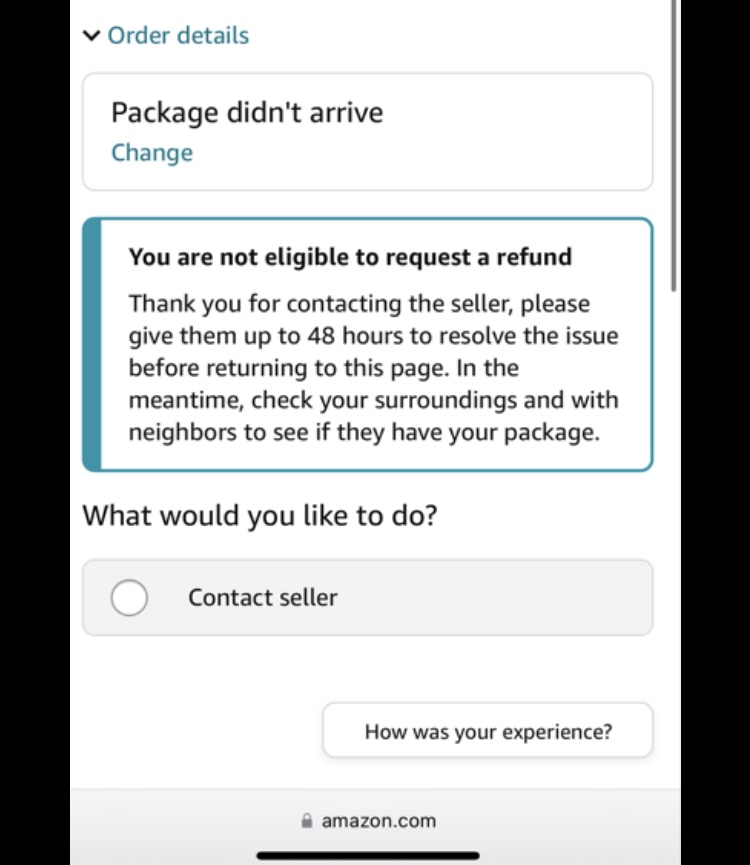
Before initiating a formal claim, Amazon’s system encourages users to first attempt to resolve the issue directly with the seller. This is a critical first step in the digital resolution hierarchy.
-
Access Your Order History: Navigate to “Your Orders” on the Amazon website or app. This digital archive contains every transaction, providing vital data points.
-
Locate the Order: Find the specific item in question.
-
Contact Seller: Utilize the “Contact Seller” button, which opens an integrated messaging interface. Clearly state the issue and propose a solution (e.g., refund, replacement). This digital paper trail is crucial evidence if escalation is needed.
-
Wait for Seller Response: Amazon typically gives sellers 48 hours to respond. The system digitally timestamps all communications.
The Initial Contact: Utilizing Amazon’s Customer Service Portal
If direct seller communication fails or isn’t appropriate (e.g., suspected fraud), the next step is to engage Amazon Customer Service.
-
Access Customer Service: Go to “Customer Service” on the Amazon website/app.
-
Describe Your Issue: Use the search bar or guided prompts to describe your problem. The AI-powered assistant often directs you to relevant help pages or allows you to request a call-back, email, or chat session.
-
Provide Order Details: Have your order number and relevant information ready. The customer service representative will access your digital order data.
This step serves as a preliminary review by Amazon’s internal support team, who may resolve the issue directly or guide you towards an A-to-z claim if it meets the criteria.
Escalating to an A-to-z Guarantee Claim: When and How
If the issue remains unresolved after contacting the seller and Amazon customer service, or if specific conditions are met, you can file an A-to-z claim.
-
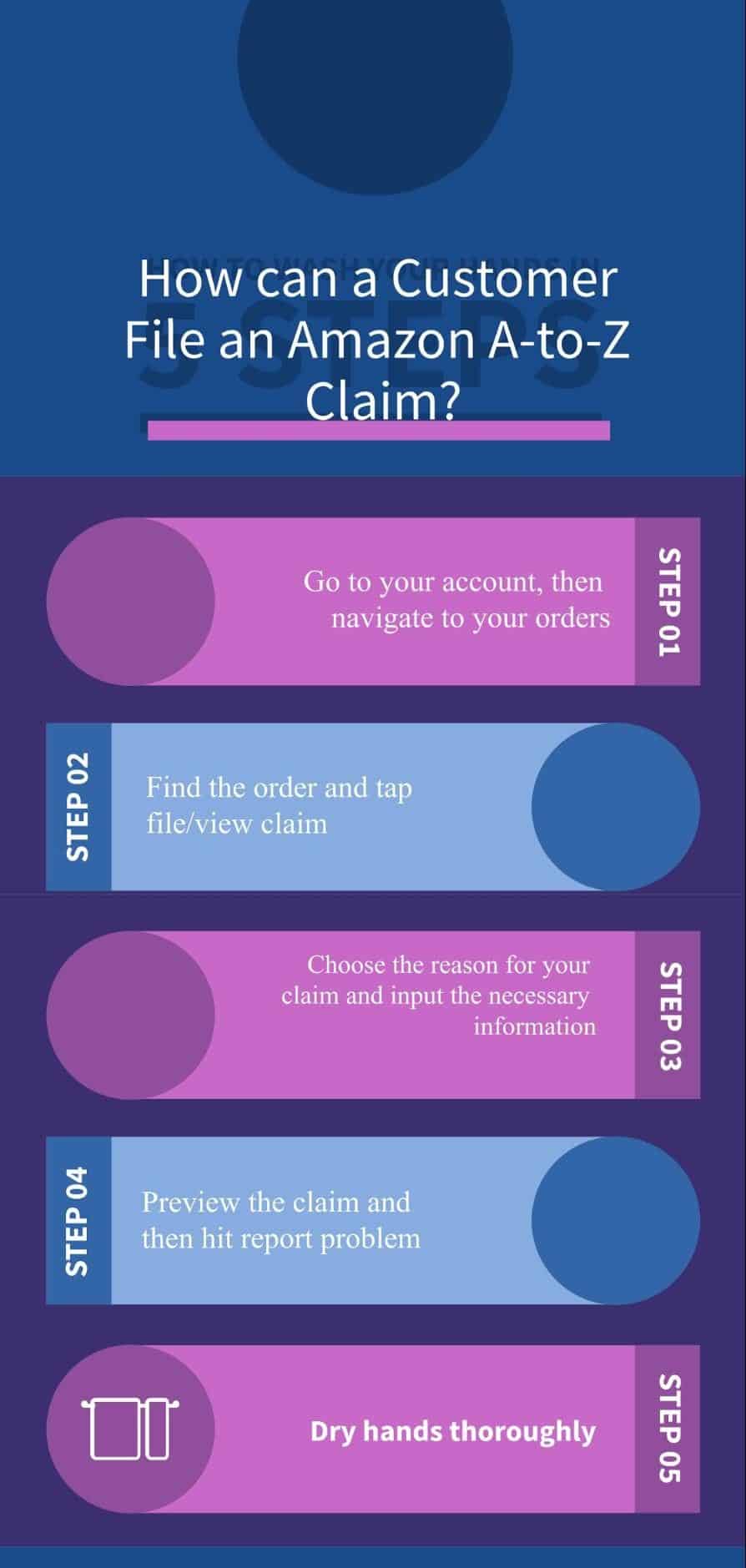
Access A-to-z Guarantee Page: This can often be found through the help pages or by navigating from your “Your Orders” section.
-
Select the Order: Identify the order for which you want to file a claim.
-
Choose Reason: Select the reason for your claim from the provided digital dropdown menu (e.g., “Item not received,” “Item materially different”). This selection dictates the subsequent information required.
-
Provide Details: Clearly and concisely describe the issue in the provided text box. Reference previous communications with the seller and any attempts at resolution.
-
Submit Claim: Review all information before digitally submitting.
Crucially, A-to-z claims have specific timeframes: you must typically wait at least 3 days after the maximum estimated delivery date or 30 days from the order date, and you must file within 90 days of the maximum estimated delivery date. Adhering to these digital deadlines is paramount.
Providing Digital Evidence: Photos, Screenshots, and Communication Logs
The strength of your claim often hinges on the quality and quantity of digital evidence you provide.
-
Photographs: For damaged or “materially different” items, high-resolution digital photos are essential. Upload them directly to the claim interface.
-
Screenshots: If the seller made specific promises in their listing or communications, capture screenshots. Ensure they include timestamps or relevant context.
-
Communication Logs: All messages exchanged through Amazon’s platform are automatically logged. Referencing these in your claim strengthens your case, as Amazon’s system can easily retrieve them.
-
Tracking Information: For non-delivery claims, provide any tracking numbers or shipping carrier information that was not automatically integrated.
This reliance on digital artifacts underscores the technological nature of the claim process, where data integrity and accessibility are key.
Leveraging Amazon’s Digital Tools for Effective Claim Management
Once a claim is filed, Amazon provides a suite of digital tools to monitor its progress and facilitate further interaction.
Tracking Your Claim: The Digital Dashboard
Amazon offers a dedicated “Your A-to-z Guarantee Claims” dashboard. This digital hub allows you to:
-
View Status: See the current state of your claim (e.g., “Under Review,” “Waiting for Seller Response,” “Claim Granted”).
-
Review Details: Revisit the details of your submitted claim, including the reason and any evidence provided.
-
Add Information: If Amazon requests additional information, this dashboard often provides a secure portal for uploading documents or adding further textual explanations.
This dashboard provides real-time visibility, reducing the need for constant manual inquiries and promoting transparency in the resolution process.
Communicating with Sellers/Support: The Integrated Messaging System
Amazon’s internal messaging system is a secure, auditable channel for all communications related to an order or claim.
-
Claim-Specific Threads: When a claim is active, any communication between you, the seller, and Amazon support is typically consolidated into a specific thread accessible through the claim dashboard.
-
Notifications: You’ll receive digital notifications (email or app push notifications) when there are updates or new messages.
-
Official Record: Every message sent through this system becomes part of the official digital record, which Amazon adjudicators can access, ensuring accountability.
This integrated system eliminates the need for external email exchanges, centralizing all relevant data in one secure location.
Understanding Claim Status Notifications: Push and Email Alerts
Amazon heavily relies on automated digital notifications to keep users informed.
-
Email Alerts: You will receive emails notifying you of status changes, requests for more information, or the final decision on your claim. These emails often contain direct links back to your claim dashboard.
-
Push Notifications: If you use the Amazon app, push notifications provide instant updates, allowing for timely responses if further action is required from your end.
These automated communication channels are critical components of Amazon’s operational technology, ensuring that users are never left in the dark about the progress of their claims.
Common Pitfalls and Best Practices in the Digital Claim Process
While Amazon’s system is designed for user-friendliness, certain missteps can hinder a claim’s success. Adhering to best practices, especially concerning digital interaction, is crucial.
The Importance of Timeliness in Digital Submissions
Digital deadlines are firm in Amazon’s ecosystem.
-
Filing Window: Adhere strictly to the 90-day window for A-to-z claims. Missing this window, regardless of the validity of your issue, will likely result in a denied claim.
-
Response Times: If Amazon or the seller requests additional information, respond promptly. Delays can lead to the claim being closed in the seller’s favor. The system digitally logs all interaction times.
Ensuring Accuracy: The Role of Detailed Digital Records
-
Concise Descriptions: Provide clear, factual, and concise descriptions of the problem. Avoid emotional language; stick to verifiable details.
-
Consistent Information: Ensure that all information provided (order numbers, dates, descriptions) is consistent across all communications and claim forms. Inconsistencies can lead to confusion and delays.
-
Retain Evidence: Keep all digital evidence (photos, screenshots, communication logs) saved locally even after uploading them, as a backup.
Avoiding Common Errors: Misdirection and Incomplete Information
-
Wrong Claim Type: Submitting a claim under the wrong category can delay processing or lead to denial. For instance, don’t file an A-to-z claim for a product defect if you haven’t attempted a return first.
-
Insufficient Detail: Claims with vague descriptions or a lack of supporting digital evidence are significantly weaker.
-
Not Following Protocol: Bypassing direct seller contact or Amazon customer service when required can invalidate your claim. Amazon’s system is hierarchical.
The Broader Tech Implications of Amazon’s Resolution System
The mechanisms for filing a claim on Amazon are not just isolated features; they reflect broader technological trends and societal impacts within e-commerce.
Consumer Trust and Platform Reliability in E-commerce
Amazon’s robust claim system is a cornerstone of its overall strategy to build and maintain consumer trust. The knowledge that a digital safety net exists encourages more transactions and reduces friction in online shopping. This reliability, engineered through sophisticated software and process design, is critical for the sustained growth of the e-commerce giant and for the broader adoption of online retail. It demonstrates how technology directly underpins market confidence.
Data Security and Privacy During Claim Submission
When filing a claim, users inevitably share personal and transactional data. Amazon’s responsibility in managing this sensitive information securely is paramount. The platform employs encryption, secure servers, and strict access controls to protect user data, ensuring that evidence, communication logs, and personal details remain confidential and are only used for claim adjudication. This commitment to digital security reinforces trust in the platform’s handling of consumer issues.
Future Trends in AI-Powered Customer Support and Dispute Resolution
The current claim system, while effective, still involves human intervention. Future trends point towards an even greater reliance on Artificial Intelligence (AI) and machine learning for dispute resolution. Imagine AI algorithms that can:
-
Proactively Identify Issues: Automatically detect potential delivery problems or product discrepancies before a user even files a claim.
-
Automated Evidence Analysis: Use computer vision to analyze photos of damaged goods or natural language processing to review communication logs, making quicker, more consistent decisions.
-
Personalized Resolution Paths: Guide users through tailored resolution processes based on their specific issue and historical data.
These advancements promise to make the claim process even more efficient, accurate, and user-friendly, further cementing technology’s role at the forefront of consumer protection in the digital marketplace.
In conclusion, knowing how to file a claim on Amazon is more than just a procedural task; it’s an essential digital skill for navigating the modern e-commerce landscape. By understanding the technological framework, following the prescribed digital steps, and adhering to best practices, consumers can effectively leverage Amazon’s sophisticated resolution systems to protect their interests and ensure a fair and reliable online shopping experience.
aViewFromTheCave is a participant in the Amazon Services LLC Associates Program, an affiliate advertising program designed to provide a means for sites to earn advertising fees by advertising and linking to Amazon.com. Amazon, the Amazon logo, AmazonSupply, and the AmazonSupply logo are trademarks of Amazon.com, Inc. or its affiliates. As an Amazon Associate we earn affiliate commissions from qualifying purchases.