
In an increasingly digital world, the ability to send and receive money with the tap of a finger has become less of a luxury and more of an expectation. Leading this charge is Venmo, a ubiquitous peer-to-peer (P2P) payment application that has redefined how millions manage their daily transactions. From splitting dinner bills with friends to paying your share of rent, Venmo has seamlessly integrated itself into the fabric of modern financial interactions. But for those new to the platform, or even seasoned users looking to unlock its full potential, the question remains: “How do you do Venmo?” This comprehensive guide will demystify the app, walking you through its core functionalities, security protocols, and advanced features, ensuring you can navigate the digital payment landscape with confidence and technological prowess.

Unpacking the Venmo Experience: What is it and How Does it Work?
At its heart, Venmo is a mobile payment service owned by PayPal, designed to simplify the exchange of money between individuals. Its intuitive interface and social feed have made it particularly popular among younger demographics, transforming often mundane transactions into engaging social interactions.
The Core Functionality: Sending and Receiving Money
The fundamental purpose of Venmo is to enable quick, digital money transfers. Instead of exchanging cash or checks, users can link their bank accounts, debit cards, or credit cards directly to the app.
- Linking Funding Sources: To get started, you’ll connect a funding source. While you can link credit cards, using a debit card or bank account typically incurs no fees for standard payments. Credit card payments, however, often come with a standard 3% fee.
- Sending Money: The process is straightforward: open the app, tap the “Pay & Request” button, select the recipient from your contacts or search for their Venmo username, enter the amount, add a descriptive note (often accompanied by emojis), and hit “Pay.” Funds are typically transferred instantly.
- Receiving Money: When someone sends you money, it lands in your Venmo balance. From there, you can choose to keep it in the app for future payments or transfer it to your linked bank account. Standard bank transfers are free but can take 1-3 business days, while instant transfers incur a small fee.
Beyond Basic Transactions: Social & Interactive Features
What truly sets Venmo apart from traditional banking apps is its integrated social element. Each transaction can be accompanied by a note and shared with a public, friends-only, or private audience.
- The Social Feed: The default setting for transactions is “public,” meaning your friends (and the wider Venmo community, if you allow) can see who you paid and for what (though amounts are never public). This social feed provides a glimpse into friends’ activities, making the often-dry process of money transfer surprisingly engaging.
- Emojis and Notes: The use of emojis and playful notes encourages a more personal touch, turning transaction logs into mini-stories of shared experiences.
- Splitting Bills and Requesting Money: Venmo excels at group payments. You can easily request money from one or multiple friends, making it ideal for splitting restaurant tabs, concert tickets, or shared expenses. The “Request” feature works similarly to “Pay,” allowing you to specify who owes what.
Venmo for Business: Expanding Horizons
While primarily a P2P app, Venmo has evolved to serve small businesses and freelancers. Users can create a business profile, allowing customers to pay them directly through the app, often via QR codes, streamlining transactions for vendors at markets, independent artists, or service providers. This expansion reflects Venmo’s technological adaptability and its growing ambition beyond casual social payments.
Navigating the App: A Step-by-Step Tutorial
Getting started with Venmo is a simple, guided process. Mastering its interface ensures smooth and secure transactions.
Getting Started: Account Creation and Setup
Your journey with Venmo begins with setting up your account.
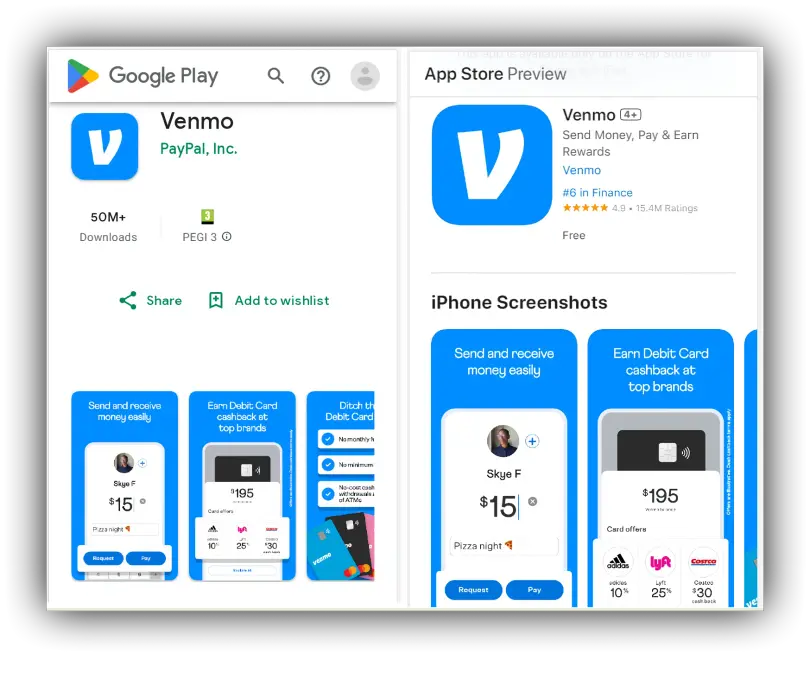
- Downloading the App: First, download the Venmo app from your smartphone’s app store (Apple App Store for iOS, Google Play Store for Android).
- Sign-Up Process: You’ll be prompted to sign up using your phone number or email, create a secure password, and verify your identity. This typically involves providing your full legal name, date of birth, and the last four digits of your Social Security number—standard Know Your Customer (KYC) requirements for financial services.
- Linking a Funding Source: The most crucial step is linking a funding source. You can connect your bank account (using your bank’s login credentials or manually entering routing and account numbers) or a debit card. This source will be used to fund payments if your Venmo balance is insufficient or if you choose to bypass your balance.
Making and Receiving Payments: Your First Transaction
Once set up, sending and receiving money becomes intuitive.
- Finding Friends/Users: Venmo allows you to find contacts by syncing your phone’s contact list, searching by username, or scanning a unique Venmo QR code.
- Initiating a Payment: Tap the “Pay & Request” icon (usually a pencil and paper or a universal payment symbol). Select the recipient(s), enter the amount, and add a detailed, fun, or private note. Before confirming, review the transaction details carefully to ensure accuracy.
- Accepting Incoming Payments: When someone sends you money, you’ll receive a notification. The funds automatically appear in your Venmo balance, ready for use or transfer.
Managing Your Venmo Balance and Transfers
Your Venmo balance acts like a digital wallet within the app.
- Checking Your Balance: Your current Venmo balance is prominently displayed on the home screen.
- Transferring to Bank: To move money from your Venmo balance to your bank account, go to the “Me” tab, tap “Transfer Balance,” enter the amount, and choose between “Instant Transfer” (for a fee) or “Standard Transfer” (free, 1-3 business days).
- Adding Money to Venmo Balance: You can also add funds directly to your Venmo balance from your linked bank account, providing an additional layer of flexibility for managing your digital cash.
Essential Digital Security & Privacy on Venmo
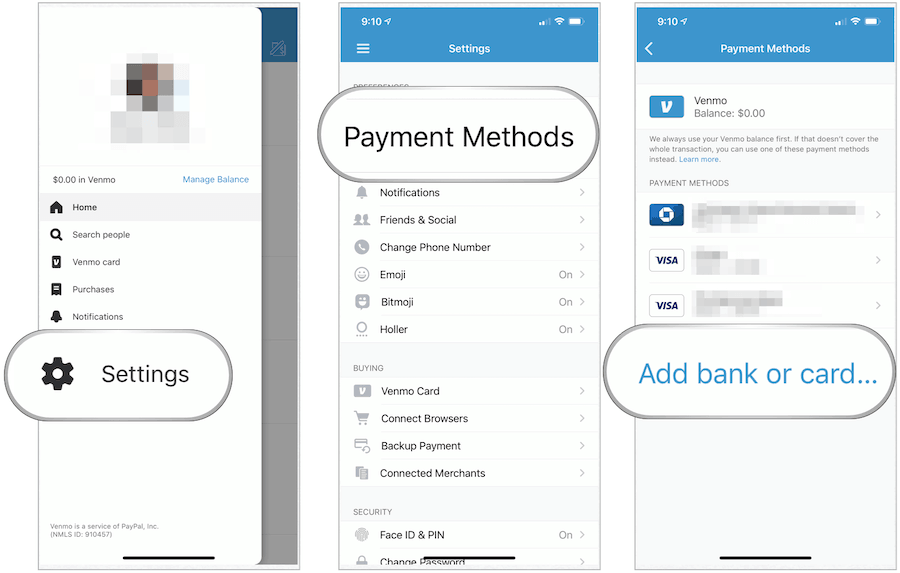
Given that Venmo deals with your money, understanding and implementing robust digital security and privacy measures is paramount. The platform itself employs encryption and fraud detection, but user vigilance is equally critical.
Protecting Your Account: Best Practices
Your personal security habits are the first line of defense.
- Strong, Unique Passwords and 2FA: Always use a complex, unique password for your Venmo account. Enable two-factor authentication (2FA) for an extra layer of security, requiring a code sent to your phone in addition to your password for login.
- Recognizing Phishing Attempts: Be wary of suspicious emails, texts, or calls claiming to be from Venmo. Venmo will never ask for your password or full SSN via email or text. Always verify the sender and URL before clicking links.
- Secure Wi-Fi: Avoid making Venmo transactions on unsecured public Wi-Fi networks, which can be vulnerable to eavesdropping. Use a VPN or wait until you’re on a trusted network.
- Lost/Stolen Phone Protocol: If your phone is lost or stolen, immediately log into Venmo on another device or through a web browser to revoke access and change your password. Contact Venmo support if you suspect unauthorized activity.
Understanding Privacy Settings
Venmo’s social feed is a core feature, but it’s crucial to understand and manage your privacy settings.
- Public, Friends, Private: For each transaction, you can choose its audience: “Public” (visible to everyone on Venmo), “Friends” (visible only to your Venmo friends), or “Private” (visible only to you and the recipient).
- Default Settings: Be aware that Venmo’s default setting for transactions is often “Public.” It’s good practice to adjust this to “Friends” or “Private” in your settings if you prefer more discretion for all future payments. You can always override this for individual transactions.
- Implications of Public Feed: While fun, a public feed can inadvertently reveal information about your habits, location, or social circle. Regularly review your privacy settings to ensure they align with your comfort level.
Recognizing and Avoiding Common Scams
Unfortunately, the popularity of P2P apps also attracts fraudsters.
- Overpayment Scams: A common scam involves a buyer sending more money than agreed upon for an item, then asking for the excess back. The initial “payment” may be from a stolen account and later reversed, leaving you out of pocket. Always verify payments before refunding any amount.
- Fake Customer Support: Scammers may impersonate Venmo support, asking for account details or passwords. Always initiate contact with Venmo through their official channels.
- Transactions with Strangers: Venmo is designed for transactions between trusted friends and family. It does not offer buyer/seller protection for goods and services as robustly as its parent company, PayPal. Exercise extreme caution when using Venmo for purchases from unknown individuals.
Advanced Venmo Features & Troubleshooting Tips
Beyond basic P2P transfers, Venmo has expanded its technological offerings to provide more comprehensive financial tools.
Expanding Your Venmo Toolkit: Cards and Crypto
Venmo’s ecosystem now includes physical cards and even cryptocurrency trading.
- Venmo Debit Card: This card is directly linked to your Venmo balance, allowing you to spend your balance anywhere Mastercard is accepted, offering an ATM network, and often cashback rewards. It essentially extends your Venmo balance into the physical world.
- Venmo Credit Card: A traditional credit card that integrates with your Venmo profile, offering customized cashback rewards and a unique tracking experience within the app.
- Exploring Venmo’s Crypto Offering: Staying abreast of financial technology trends, Venmo has introduced the ability to buy, sell, and hold cryptocurrencies like Bitcoin, Ethereum, Litecoin, and Bitcoin Cash directly within the app, making digital asset management more accessible to its user base.
Common Issues and Quick Solutions
Even with advanced technology, issues can arise. Knowing how to troubleshoot can save time and frustration.
- Troubleshooting Failed Payments: If a payment fails, check your internet connection, ensure your linked funding source has sufficient funds, and verify that the recipient’s details are correct. Venmo will usually provide an error message with a hint as to the problem.
- Contacting Support: For persistent issues or suspected fraud, access Venmo’s official help center within the app or on their website. They offer FAQs, chat support, and phone lines.
- Understanding Transaction Limits: Venmo has weekly spending and transfer limits for security reasons. These limits increase once your identity is verified. If a transaction exceeds your limit, it will be declined.
The Future of P2P Payments: Venmo’s Place in the Tech Landscape
Venmo isn’t just an app; it’s a significant player in the evolving digital wallet ecosystem, constantly adapting to user needs and technological advancements.
Venmo in the Digital Wallet Ecosystem
Venmo operates alongside other major players in the P2P space, each with its unique strengths.
- Comparison with Other Payment Apps: While similar to Zelle (often integrated with traditional banks) and Cash App (known for its investing features and Bitcoin trading), Venmo distinguishes itself with its social feed and broader merchant adoption capabilities. PayPal, its parent company, offers more comprehensive buyer/seller protection.
- Integration with Other Platforms: Venmo’s technology is increasingly integrated into various online checkout processes, allowing users to pay directly from their Venmo balance on participating e-commerce sites, further solidifying its position as a versatile digital payment solution.
Evolving Features and User Experience
The technology behind Venmo is not static; it’s constantly being refined.
- Anticipating Future Updates: Venmo regularly rolls out updates, introducing new features, improving security, and enhancing user experience. This continuous development ensures the app remains competitive and relevant in a fast-paced tech environment.
- The Role of User Feedback: User feedback plays a critical role in shaping these updates, influencing everything from interface design to new service offerings, demonstrating a user-centric approach to software development.
In conclusion, “doing Venmo” means more than just sending money; it’s about leveraging a sophisticated piece of financial technology to streamline your daily life. By understanding its core functionalities, mastering its interface, prioritizing digital security, and exploring its expanding features, you can confidently navigate the world of peer-to-peer payments. Venmo stands as a testament to the power of intuitive software design, connecting individuals through seamless transactions and fostering a new era of digital financial interaction.
aViewFromTheCave is a participant in the Amazon Services LLC Associates Program, an affiliate advertising program designed to provide a means for sites to earn advertising fees by advertising and linking to Amazon.com. Amazon, the Amazon logo, AmazonSupply, and the AmazonSupply logo are trademarks of Amazon.com, Inc. or its affiliates. As an Amazon Associate we earn affiliate commissions from qualifying purchases.