
In an increasingly digitized world, the ability to effortlessly translate complex numerical values into more intuitive forms is paramount. One such common yet often perplexing task for many is converting decimals into fractions. While the underlying mathematics is fundamental, the sheer volume of calculations or the need for precision across various disciplines has spurred the development of specialized tools: the decimal to fraction calculator. This article delves into the intricacies of these digital marvels, exploring their purpose, functionality, and how they streamline mathematical operations for everyone from students to seasoned professionals.

Understanding the Core Need: Why Convert Decimals to Fractions?
The seemingly simple act of converting a decimal to a fraction carries significant weight across numerous fields, bridging the gap between abstract mathematical concepts and tangible real-world applications. Decimals, while excellent for quick comparison and standardized measurements, often fall short when exact precision or a clear representation of parts of a whole is required.
Bridging Mathematical Concepts
From a purely mathematical standpoint, decimals and fractions are two sides of the same coin, representing parts of a whole. However, fractions offer a unique advantage in revealing the underlying ratio and structure of a number. For instance, knowing a value is “1/3” instantly conveys its relationship to the whole in a way that “0.333…” can only approximate. Converting between these forms strengthens numerical fluency, aiding in a deeper understanding of rational numbers, proportionality, and the principles of divisibility. For students, mastering this conversion is a cornerstone of algebraic readiness and advanced mathematical thinking.
Practical Applications in Various Fields
Beyond the classroom, the need for converting decimals to fractions permeates diverse professional landscapes. In engineering and manufacturing, precise measurements are critical. A tolerance of “1/64th of an inch” is far more practical and manufacturable than “0.015625 inches” when designing parts or specifying materials. Woodworking and construction similarly rely on fractional measurements, where rulers and blueprints often feature divisions like 1/2, 1/4, 1/8, and 1/16.
Even in finance, while most transactions occur with decimals, understanding the fractional components can be crucial for complex asset allocation or interpreting stock splits. In computer science and coding, especially when dealing with graphics or specific data structures, fractional representations might be preferred for memory efficiency or algorithmic simplicity. For everyday users, converting a decimal like 0.75 to 3/4 makes it easier to visualize quantities, whether it’s understanding a recipe or a discount percentage. The ability to switch between these formats empowers clearer communication and more accurate execution in practical scenarios where approximate values simply won’t suffice.
The Limitations of Manual Conversion
While the mathematical process for converting decimals to fractions (identifying place value, writing as a fraction over a power of 10, then simplifying) is straightforward for terminating decimals, it quickly becomes cumbersome and error-prone for larger numbers, decimals with many places, or especially for repeating decimals. Imagine manually converting 0.015625 or 0.1666… to its simplest fractional form under time pressure. The manual process demands careful calculation of the greatest common divisor (GCD) to reduce the fraction, a step that can be tedious and prone to arithmetic errors. This inherent inefficiency and the potential for mistakes highlight the pressing need for automated solutions, setting the stage for the rise of the digital decimal to fraction calculator.
The Evolution of Calculation Tools: From Abacus to Digital Wizards
The human quest to simplify and accelerate calculations is a narrative stretching back millennia, marking a fascinating progression from rudimentary counting aids to today’s sophisticated digital instruments. The decimal to fraction calculator is a direct descendant of this long evolutionary line, embodying the peak of accessible computational power.
Early Mechanical Aids
Long before the advent of electricity, humanity devised ingenious mechanical aids to tackle numerical challenges. The abacus, with its beads representing values, offered a tactile and efficient way to perform addition, subtraction, multiplication, and division. Later, in the 17th century, pioneers like John Napier developed Napier’s bones for multiplication, and Blaise Pascal invented the Pascaline, one of the first mechanical calculators capable of addition and subtraction. These early machines, while groundbreaking, were limited in their scope and often required significant manual intervention and understanding of the underlying arithmetic. They laid the conceptual groundwork for automated calculation but were far from handling complex conversions or representing fractional forms directly.
The Dawn of Electronic Calculators
The mid-20th century witnessed a revolution with the birth of electronic computers, and soon after, the miniaturization that led to personal electronic calculators. Texas Instruments introduced one of the first handheld electronic calculators in the early 1970s, marking a pivotal moment. These early electronic devices could perform basic arithmetic much faster and more reliably than their mechanical predecessors. As technology advanced, their capabilities expanded to include scientific functions like trigonometry, logarithms, and roots. However, even these advanced scientific calculators initially struggled with direct decimal-to-fraction conversions, often requiring users to implement multi-step manual procedures using reciprocals or approximation methods. The shift towards direct conversion required more sophisticated internal algorithms and display capabilities.
Software and Online Calculators: Accessibility and Power
The advent of personal computers and the internet truly democratized access to advanced computational tools. With software development, calculators transitioned from dedicated hardware devices to applications running on general-purpose computers. This brought unprecedented power and flexibility. Online calculators emerged as a dominant force, offering instant access to specialized functions without the need for dedicated hardware or software installation. These web-based tools leverage powerful server-side processing to perform complex calculations rapidly.
Decimal to fraction calculators, whether as standalone apps, features within larger mathematical software suites, or dedicated online utilities, represent a significant leap. They combine sophisticated algorithms (like Euclidean algorithm for GCD) with user-friendly interfaces, making the conversion of even recurring decimals almost instantaneous. The accessibility provided by smartphones and tablets further cemented their role, placing a powerful computational tool in nearly every pocket. This evolution from a basic counting frame to an advanced digital fraction converter underscores humanity’s relentless pursuit of efficiency and accuracy in numerical manipulation, directly leading to the seamless conversion experience we have today.
Deconstructing the “Decimal to Fraction Calculator”: How They Work
At its heart, a decimal to fraction calculator is an algorithmic marvel designed to automate a process that can be mathematically intricate for humans. It takes a decimal input and, through a series of logical steps, outputs its simplest fractional equivalent. Understanding its internal workings demystifies its magic and highlights the elegance of its design within the tech landscape.
The Underlying Algorithm: From Decimal Input to Fractional Output
The core intelligence of a decimal to fraction calculator lies in its algorithm, which varies slightly depending on whether the decimal is terminating or repeating.
For terminating decimals (e.g., 0.75, 0.125):
-
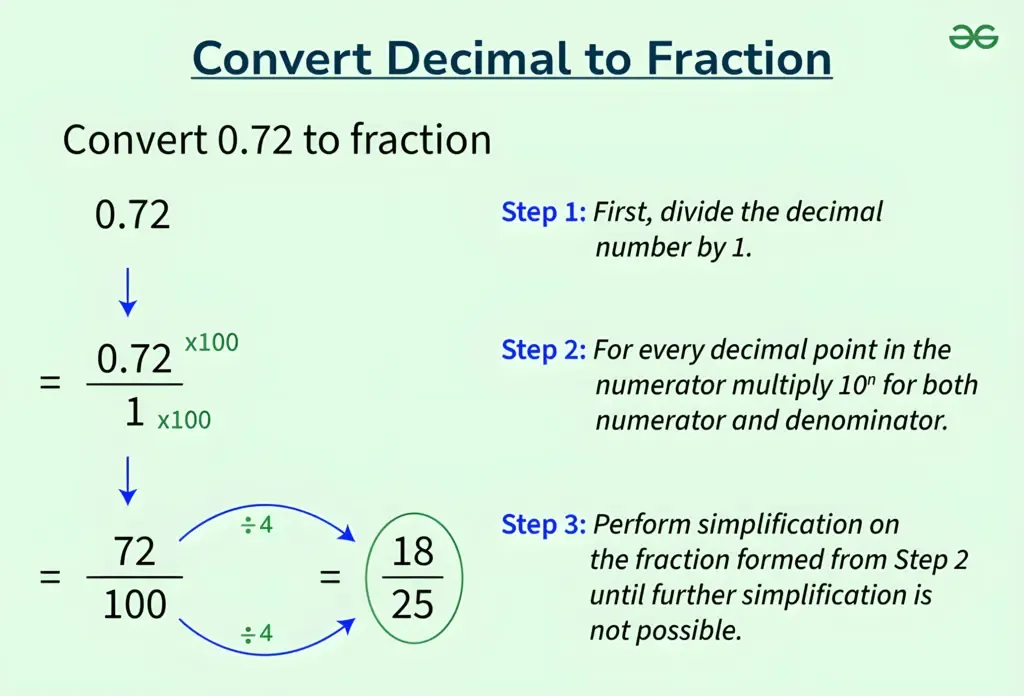
Identify Place Value: The calculator first determines the smallest place value represented in the decimal. For 0.75, it’s hundredths; for 0.125, it’s thousandths.
-
Form an Initial Fraction: It then expresses the decimal as a fraction where the numerator is the decimal part (without the decimal point) and the denominator is the corresponding power of 10. So, 0.75 becomes 75/100, and 0.125 becomes 125/1000.
-
Simplify the Fraction: This is the crucial step. The calculator finds the Greatest Common Divisor (GCD) of the numerator and the denominator. The Euclidean algorithm is commonly used for this, as it’s highly efficient. Once the GCD is found, both the numerator and denominator are divided by the GCD to reduce the fraction to its simplest form. For 75/100, GCD(75, 100) = 25, so 75/100 simplifies to 3/4. For 125/1000, GCD(125, 1000) = 125, simplifying to 1/8.

For repeating decimals (e.g., 0.333…, 0.142857142857…):
This process is more complex. The calculator typically employs algebraic methods. For 0.333… (let x = 0.333…), it would multiply by 10 (10x = 3.333…), then subtract the original equation (10x – x = 3.333… – 0.333… => 9x = 3 => x = 3/9 = 1/3). For more complex repeating patterns, the multiplication factor would be a higher power of 10. The system needs to accurately identify the repeating block, which can be challenging, especially with floating-point inaccuracies in computer representations. Sophisticated algorithms are designed to detect repeating patterns and perform the algebraic manipulation to arrive at the exact fractional form.
User Interface and Experience: Simplifying Complex Operations
Beyond the algorithms, a key aspect of these calculators within the tech sphere is their user interface (UI) and user experience (UX). A good calculator aims to be intuitive, even for complex operations.
-
Clear Input Fields: Users expect a straightforward way to enter the decimal number, typically through a numerical keypad or a single input box.
-
Instant Feedback: Many online or app-based calculators provide immediate results as the user types, or upon pressing an “equals” or “convert” button.
-
Readability of Output: The fractional output should be clearly displayed, often showing the simplified fraction, and sometimes the mixed number equivalent (e.g., 1 1/2 instead of 3/2).
-
Error Handling: The calculator should handle invalid inputs gracefully, providing helpful messages rather than crashing.
-
Accessibility: Modern calculators are often designed with accessibility in mind, offering keyboard navigation, sufficient contrast, and compatibility with screen readers.
The goal is to abstract away the underlying mathematical complexity, presenting a clean and efficient tool that allows users to focus on their problem, not the mechanics of conversion.
Types of Calculators: Standalone Apps, Web Tools, Integrated Software
Decimal to fraction conversion functionality is available in various technological forms:
-
Standalone Apps: Dedicated mobile applications for smartphones and tablets provide offline functionality and often integrate with other system features.
-
Web Tools: Browser-based online calculators are ubiquitous, offering immediate access from any device with an internet connection, often free of charge, and updated regularly. They are highly convenient for quick lookups.
-
Integrated Software: Many scientific and graphing calculators (both physical and software-based like Desmos, GeoGebra, or Wolfram Alpha) include decimal-to-fraction conversion as one of their many advanced features, often alongside symbolic manipulation and graphing capabilities. Programming languages and libraries (e.g., Python’s
fractionsmodule) also offer this functionality, allowing developers to integrate it into custom applications.
This diversity ensures that users can find a suitable tool, whether they need a quick web-based conversion, a robust mobile app, or a feature within a professional mathematical suite, all leveraging sophisticated algorithms to perform the seemingly simple task of numerical transformation.
A Step-by-Step Guide to Using a Decimal to Fraction Calculator
Leveraging a digital decimal to fraction calculator is remarkably straightforward, designed for efficiency and ease of use. This guide will walk you through the typical process, ensuring you can confidently convert any decimal value into its fractional equivalent.
Selecting the Right Tool for Your Needs
The first step is choosing the calculator that best fits your context:
-
Online Calculators: Best for quick, one-off conversions, easily accessible via any web browser on a computer or mobile device. Many reputable educational and mathematical websites host them (e.g., Calculator.net, Mathway).
-
Mobile Apps: Ideal for frequent use on the go, often offering offline functionality and a streamlined user interface. Search your device’s app store for “decimal to fraction converter.”
-
Scientific/Graphing Calculators (Physical or Software): If you already own a physical scientific calculator (like TI, Casio) or use a powerful software suite (like Desmos, GeoGebra), check its manual or online documentation; they often have a dedicated function for this. This is suitable for students or professionals who need a comprehensive tool for various mathematical operations.
-
Integrated Spreadsheet Functions: For bulk conversions in data analysis, spreadsheet software like Microsoft Excel or Google Sheets can sometimes perform this, though it might require custom formulas or specific formatting depending on the exact requirements.
Consider factors like ease of access, additional features you might need, and whether you require offline capabilities when making your choice.
Inputting Your Decimal Value
Once you’ve selected your tool, inputting the decimal is usually the simplest part:
-
Locate the Input Field: Most calculators will have a prominent text box or a numerical keypad area where you can type your number.
-
Type the Decimal: Enter your decimal number using the numerical keys. For example, if you want to convert “0.625”, type
0, then., then6,2,5. -
Handle Negative Numbers: If your decimal is negative (e.g., -1.5), simply include the minus sign before the number (
-1.5). -
Recurring Decimals: For recurring decimals, different calculators have different conventions. Some allow you to type a sufficient number of repeating digits (e.g.,
0.333333), and their internal algorithms will infer the repetition. Others might have a specific notation, like a bar over the repeating part, or expect a certain input pattern (though this is less common in simple web calculators). Most basic calculators will approximate if you don’t input enough digits or if they don’t have a specific feature for recurring decimals. For exact results with recurring decimals, specialized math software is often more reliable. -
Trigger Conversion: After typing, you might need to press an “Enter,” “Equals” (
=), or “Convert” button. Many online tools provide real-time conversion as you type.
Interpreting the Fractional Output
The calculator will display the result, typically in its simplest fractional form:
-
Proper Fractions: If the decimal is between 0 and 1, the output will be a proper fraction (e.g., 0.75 becomes 3/4).
-
Improper Fractions: If the decimal is greater than 1 (e.g., 1.5), the output might be an improper fraction (e.g., 3/2).
-
Mixed Numbers: Many calculators will also provide the mixed number equivalent (e.g., 1.5 might be shown as “3/2 or 1 1/2”). Choose the format that is most useful for your context.
-
Negative Fractions: For negative decimals, the fraction will also be negative (e.g., -0.25 becomes -1/4).
-
Precision: Be mindful of the calculator’s precision. If you input a very long decimal that isn’t truly terminating or repeating in a way the calculator can detect, it might provide an approximation. Always ensure the output makes sense in the context of your original input.
Advanced Features and Settings
Some advanced decimal to fraction calculators offer additional functionalities:
-
Rounding: Options to round the fraction to a certain denominator (e.g., to the nearest 1/16th or 1/32nd).
-
History: A log of previous conversions for easy reference.
-
Multiple Formats: Displaying the result in both improper fraction and mixed number formats simultaneously.
-
Fraction Simplification: Sometimes a calculator might offer to show the intermediate steps of how it simplified the fraction, which can be valuable for learning.
By following these steps, anyone can effectively utilize a decimal to fraction calculator to achieve quick, accurate, and simplified numerical conversions, enhancing productivity and understanding across various tasks.
Beyond Simple Conversions: The Broader Impact of Specialized Calculators
While the immediate utility of a decimal to fraction calculator is evident in streamlining specific mathematical conversions, its existence and proliferation within the tech ecosystem signify a broader impact. These tools are not merely computational aids; they are enablers, fostering greater mathematical literacy, boosting efficiency, and pushing the boundaries of how we interact with numbers.
Enhancing Educational Outcomes
For students, decimal to fraction calculators are more than just answer-generating machines; they are powerful learning tools. By providing instant verification, students can experiment with numbers, test their understanding of place value and fraction simplification, and grasp abstract concepts with concrete feedback. This reduces the frustration often associated with manual calculation errors, allowing them to focus on why the conversion is important and what the different representations mean, rather than getting bogged down in arithmetic. Educators can integrate these tools to teach concepts like equivalence, proportionality, and number theory more effectively, transforming rote memorization into an interactive learning experience. The availability of diverse online and app-based calculators ensures that educational resources are accessible, bridging gaps and supporting diverse learning styles.
Boosting Professional Productivity
In professional environments—be it engineering, architecture, finance, or even culinary arts—time is money, and accuracy is paramount. Specialized calculators dramatically cut down the time spent on manual conversions, freeing professionals to concentrate on higher-level problem-solving and decision-making. Imagine an architect needing to convert numerous precise decimal measurements into standard fractional dimensions for construction blueprints; a calculator ensures consistency and prevents costly errors. A financial analyst might use it to quickly reconcile data presented in different formats. For software developers, integrating such conversion logic can simplify code and improve application robustness. By automating tedious yet critical mathematical tasks, these tools directly contribute to increased efficiency, reduced error rates, and ultimately, enhanced productivity across various industries where numerical precision is a daily requirement.
The Future of Calculation Tools: AI and Predictive Capabilities
The trajectory of calculation tools points towards even greater sophistication, driven by advancements in artificial intelligence and machine learning. Future decimal to fraction calculators, perhaps integrated into broader AI-powered personal assistants or smart interfaces, could offer:
-
Contextual Awareness: Understanding the context of your input (e.g., knowing you’re in a woodworking project) to automatically suggest the most relevant fractional precision (e.g., converting to the nearest 1/16th).
-
Predictive Input: Anticipating the number you’re about to type based on historical usage or pattern recognition.
-
Natural Language Processing: Allowing users to simply ask, “What’s 0.875 as a fraction?” and receiving an immediate, accurate answer.
-
Error Diagnosis and Tutoring: Not just providing the answer, but explaining why a particular conversion is correct, perhaps even pinpointing common mistakes in manual attempts and offering tailored educational feedback.
-
Integration with IoT: Imagine smart measurement devices that not only provide decimal readings but automatically convert and display them in preferred fractional units based on user or industry standards.
These advancements signify a future where calculation tools are not just passive converters but active intelligent assistants, further blurring the lines between computation, education, and practical application. The humble decimal to fraction calculator, in its current form, is a testament to the power of technology to simplify complexity, and its future iterations promise an even more integrated and intuitive numerical experience.
aViewFromTheCave is a participant in the Amazon Services LLC Associates Program, an affiliate advertising program designed to provide a means for sites to earn advertising fees by advertising and linking to Amazon.com. Amazon, the Amazon logo, AmazonSupply, and the AmazonSupply logo are trademarks of Amazon.com, Inc. or its affiliates. As an Amazon Associate we earn affiliate commissions from qualifying purchases.