
In the current era of digital consolidation, managing one’s “digital footprint” has become as essential as physical security. Among the various platforms that define our online presence, fintech applications like PayPal sit at the intersection of our financial lives and our digital identities. Whether you are migrating to a more decentralized payment architecture, consolidating your software stack, or simply practicing rigorous digital hygiene by removing dormant accounts, knowing how to properly decommission a PayPal account is a critical technical skill.
Closing a PayPal account is more than just clicking a “delete” button. It involves a systematic deconstruction of linked services, data extraction, and the revocation of API permissions. This guide provides a comprehensive technical walkthrough for users looking to exit the PayPal ecosystem while ensuring their data remains secure and their digital transition is seamless.
1. Pre-Closure Checklist: Managing Your Digital Assets and Subscriptions
Before initiating the final deletion sequence, a user must perform a technical audit of their account. Unlike a social media profile, a financial platform like PayPal is often deeply integrated with other software-as-a-service (SaaS) providers and digital storefronts.
Auditing Active Digital Subscriptions
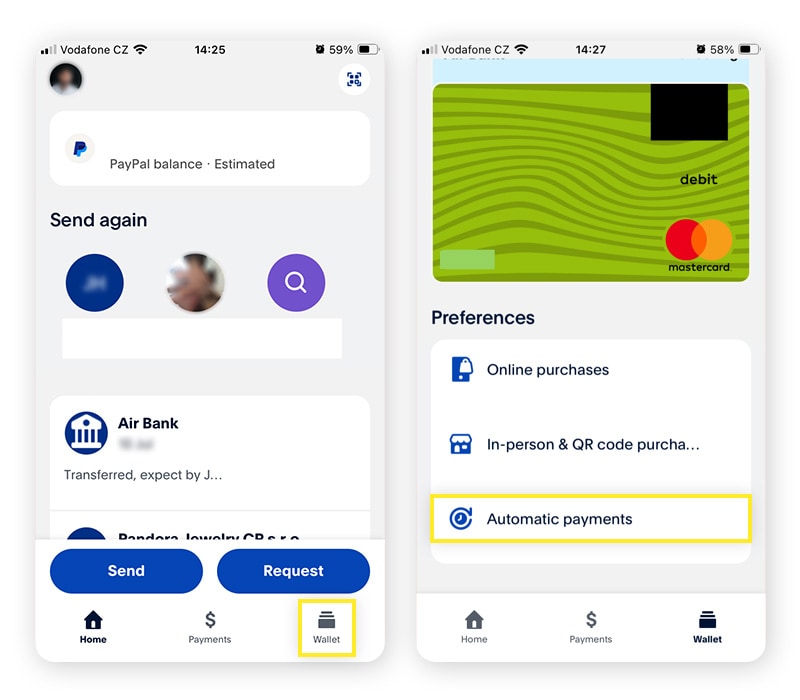
One of the most common technical failures when closing a PayPal account is the “orphaned subscription.” Because PayPal often acts as a bridge between your bank and service providers (like Netflix, Spotify, or Adobe), closing the account without re-routing these payments can lead to service interruptions or failed-payment penalties. You must navigate to the ‘Automatic Payments’ section within your settings to identify every active merchant agreement. Each of these must be manually updated with a new payment method within the respective third-party apps before you proceed.
Resolving Pending Transactions and Disputes
The PayPal backend will programmatically block any account closure if there are “open” items. This includes pending transfers to your bank, uncleared e-checks, or active disputes in the Resolution Center. From a technical standpoint, the database cannot reconcile a “deleted” status for a User ID that is still tied to an active transaction ledger. Ensure your balance is exactly $0.00. If you have a remaining balance, you must initiate a withdrawal to a linked bank account or card, which typically takes 1–3 business days to clear the clearinghouse network.
Exporting Your Financial Data History
Once an account is closed, your access to the platform’s interface is permanently revoked. For tax compliance and personal record-keeping, you must export your transaction history. PayPal allows users to download detailed reports in CSV, TAB, PDF, or Quicken formats. This is a vital step for your digital archive, as it provides a verifiable paper trail of your historical digital commerce that would otherwise be lost in the database purge.
2. The Step-by-Step Technical Process of Account Deletion
The process of closing an account is designed to be straightforward, yet it is tucked away within the user interface to prevent accidental deletion. The procedure differs slightly between the web-based dashboard and the mobile application interface.
Navigating the Desktop Interface
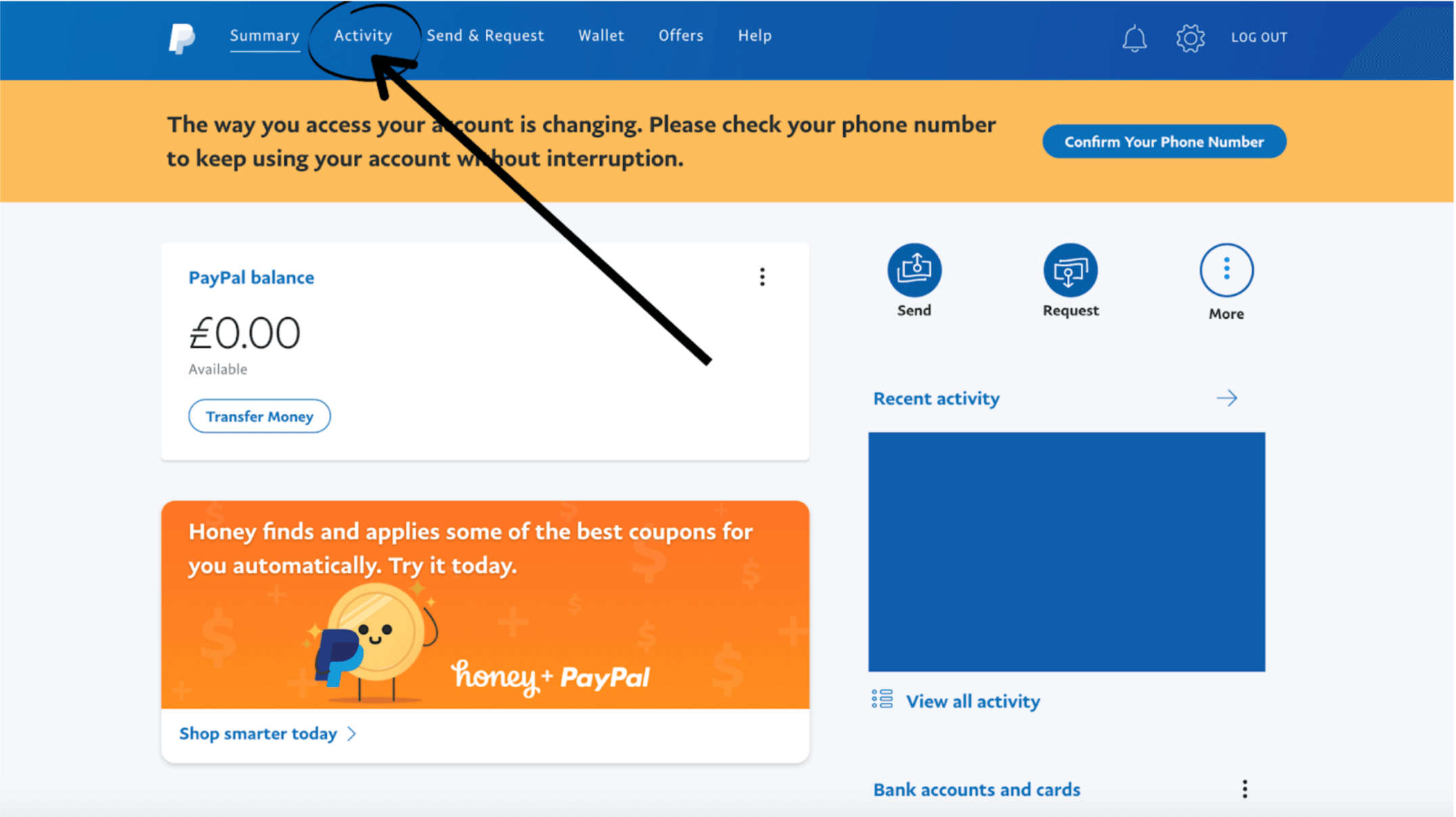
The most robust way to close your account is via a secure desktop browser. Once logged in, you must click on the Settings (cogwheel) icon. Under the ‘Account’ tab, scroll to the bottom of the page where the “Close your account” option is located. The system will prompt a final security challenge, often requiring a One-Time Password (OTP) sent to your registered mobile device. This multi-factor authentication (MFA) step is crucial to prevent unauthorized account terminations by malicious actors who may have gained temporary access to a session.
Closing Your Account via the Mobile App
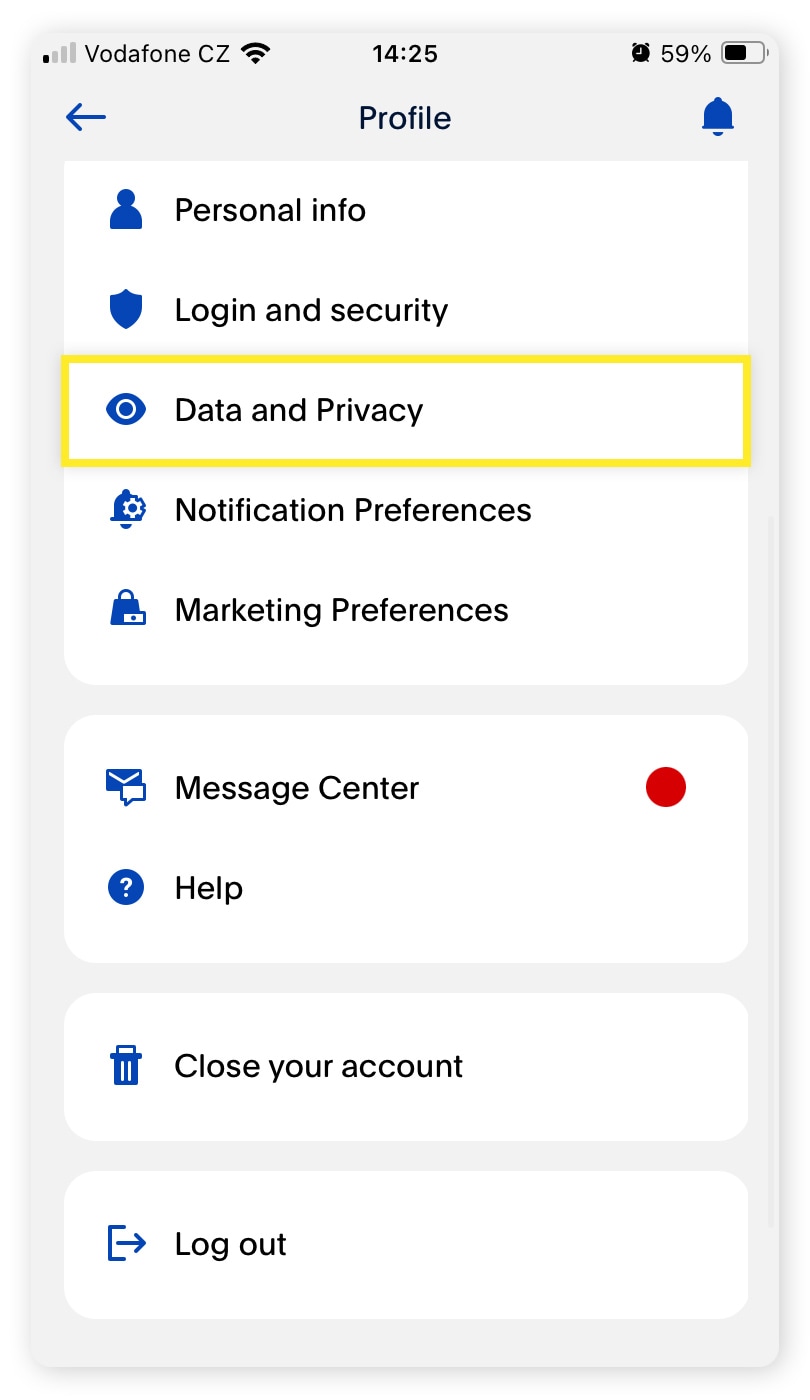
For those utilizing the PayPal app on iOS or Android, the UI/UX path is slightly different. You must tap the ‘User Profile’ icon and navigate to ‘Account Info.’ While the mobile app allows for account closure, technical glitches can occasionally occur if the app’s cache is outdated. It is recommended to ensure you are running the latest version of the application before attempting deletion to ensure the API call to the server is executed correctly.
Overcoming Common Technical Obstacles
There are several “flags” that might prevent the closure button from functioning. If you receive an error message, it is usually due to one of three things: an unverified email address, an outstanding “limitation” placed on the account by PayPal’s risk-mitigation algorithms, or a linked PayPal Credit or Mastercard balance. These are technical safeguards designed to protect both the platform and the user. If a limitation exists, you must provide the requested documentation (such as a photo ID or proof of address) to clear the flag before the system permits the account to be scrubbed.
3. Digital Security and Privacy Implications
Closing your account is a significant step in enhancing your digital security. However, it is important to understand the technical nuances of how data is handled post-deletion.
What Happens to Your Data Post-Deletion?
A common misconception is that “closing” an account results in the immediate and total erasure of all personal data. From a technical and legal standpoint, this is not the case. Under financial regulations and “Know Your Customer” (KYC) laws, PayPal is required to retain certain data points for a specific duration—often up to seven years. This includes your transaction history and identification details. However, while the data exists in an archival state for regulatory compliance, it is no longer “active” or accessible via the front-end UI, significantly reducing your active attack surface for hackers.
Revoking Third-Party App Permissions
Over years of use, many users link their PayPal account to various third-party apps, websites, and “Login with PayPal” services. While closing your account technically breaks the link, it is a best practice to manually revoke these permissions within your “Security” settings before the final closure. This ensures that the OAuth tokens used to connect these services are properly invalidated. This prevents “ghost” requests from third-party servers attempting to ping your now-defunct PayPal ID, which can occasionally trigger automated security alerts.
Mitigating Identity Theft Risks
By closing a dormant PayPal account, you are effectively removing one of the most high-value targets for identity thieves. Financial accounts are prime targets for “credential stuffing” attacks, where hackers use leaked passwords from other site breaches to gain access. By systematically deleting accounts you no longer use, you utilize a “zero-trust” approach to your own digital architecture, ensuring that even if a password is compromised, there is no active financial portal for an attacker to exploit.
4. Post-PayPal: Securing Your Next Digital Payment Ecosystem
Once you have successfully closed your PayPal account, the focus shifts to maintaining a secure and efficient technical environment for your future transactions.
Evaluating High-Security Alternatives
The transition away from PayPal often leads users toward more modern fintech solutions that offer enhanced security features. When selecting a new platform, look for those that support hardware security keys (like YubiKey) for MFA, rather than just SMS-based codes. Platforms that utilize “virtual card numbers” or “tokenization” offer a superior technical layer of protection, as they never expose your actual banking details to the merchant during a transaction.
Best Practices for Digital Wallet Hygiene
Moving forward, your goal should be to maintain “digital wallet hygiene.” This involves auditing your financial apps every six months. If a service is no longer serving a technical or financial purpose, it should be decommissioned using the same rigorous steps outlined in this guide. Furthermore, always ensure that your primary email address—the one used as the “username” for these platforms—is protected by a unique, complex password and a non-SMS based second factor of authentication.
Conclusion
Closing a PayPal account is a definitive statement in your journey toward better digital asset management. By understanding the technical requirements—from clearing the ledger and exporting data to revoking OAuth tokens and navigating the UI—you ensure that your exit is clean and secure. In an age where data is the most valuable currency, taking control of your financial platforms is not just a matter of convenience; it is a fundamental component of modern digital security and software literacy. Once the “Account Closed” confirmation appears, you can proceed with the peace of mind that your digital footprint has been strategically minimized.
aViewFromTheCave is a participant in the Amazon Services LLC Associates Program, an affiliate advertising program designed to provide a means for sites to earn advertising fees by advertising and linking to Amazon.com. Amazon, the Amazon logo, AmazonSupply, and the AmazonSupply logo are trademarks of Amazon.com, Inc. or its affiliates. As an Amazon Associate we earn affiliate commissions from qualifying purchases.