
In the digital age, gift cards have become a ubiquitous form of currency, offering flexibility and convenience for both givers and recipients. Among the most popular are American Express (Amex) gift cards, renowned for their wide acceptance. However, when it comes to utilizing these versatile cards on e-commerce giants like Amazon, many consumers encounter a curious hurdle. While Amex gift cards function much like credit cards in most retail environments, Amazon’s system has specific quirks that can make direct usage challenging. This article delves into the financial intricacies and practical strategies required to successfully deploy your Amex gift card on Amazon, ensuring you can make the most of its value without unnecessary frustration.
Understanding the mechanisms behind online payment processing, particularly concerning pre-authorization holds and the exact balance nature of gift cards, is key to unlocking a seamless shopping experience. We will explore the common pitfalls, dissect the most reliable workarounds, and offer insights into best practices for managing these financial instruments. Whether you’re looking to spend a recent gift or clear out a lingering balance, mastering the art of using an Amex gift card on Amazon is a valuable skill for any financially savvy online shopper.
Understanding the Nuances of Amex Gift Cards and Amazon
The perceived simplicity of a gift card often masks a layer of financial and technical complexities, especially when bridging different payment systems. An Amex gift card, while carrying the trusted American Express brand, operates under a different set of rules compared to a traditional Amex credit or debit card. Recognizing these distinctions is the first step toward successful utilization on Amazon.
The Core Challenge: Why Direct Use Can Be Tricky
The primary reason many users struggle to use their Amex gift cards directly on Amazon lies in the nature of online transaction processing, particularly regarding pre-authorization holds. When you initiate a purchase, most online retailers, including Amazon, perform a pre-authorization to ensure the payment method is valid and has sufficient funds. For credit and debit cards, this is usually a temporary hold that matches or slightly exceeds the purchase amount. However, with an Amex gift card, which holds a fixed, exact balance, any pre-authorization that exceeds the exact amount available—even by a dollar—can cause the transaction to fail.
Moreover, Amazon’s system might sometimes interpret a gift card as a prepaid debit card, which can have different processing protocols than standard credit cards. This often leads to declines, even if the balance appears sufficient, due to system mismatches or the retailer’s inability to place a pre-authorization hold without overdrawing the exact, finite balance.
Distinguishing Gift Cards from Credit Cards
From a financial perspective, a credit card represents a line of credit, allowing for spending up to a limit, often with a buffer for temporary holds. A gift card, by contrast, is a closed-loop or open-loop prepaid instrument with a finite, non-reloadable balance. Amex gift cards are open-loop, meaning they can be used wherever American Express is accepted, but they lack the dynamic flexibility of a credit line.
This distinction is crucial for online transactions. Credit card companies can temporarily hold a certain amount, and the final charge will adjust. Gift cards, however, must have the exact funds available for the final charge, and any temporary hold that isn’t precisely matched can lead to rejection. This is particularly problematic for transactions where the final amount might slightly differ from the initial quote (e.g., due to shipping calculations, taxes, or minor adjustments), as is common in online retail.
The Role of Pre-authorization Holds in Online Transactions
Pre-authorization is a temporary hold placed on funds by a merchant to verify the validity of a payment method and ensure sufficient funds are available for a transaction. While standard for credit cards, it poses a challenge for gift cards due to their fixed balance. If Amazon’s system attempts a pre-authorization for an amount greater than the gift card’s exact balance (e.g., to cover potential incidental charges or simply as a standard protocol), the transaction will likely be declined. Even a small difference, like an authorization for $50.01 on a card with a $50.00 balance, will lead to failure. This financial safeguarding mechanism, designed to protect merchants, inadvertently complicates the use of finite balance gift cards.
The Most Reliable Strategy: Converting to Amazon Gift Card Credit
Given the inherent challenges of direct use, the most foolproof and widely recommended method to deploy your Amex gift card balance on Amazon is to convert it into an Amazon.com Gift Card. This circumvents all the pre-authorization and balance exactitude issues, transforming your Amex gift card into spendable Amazon credit.
Step-by-Step Guide to Purchasing an Amazon Gift Card with Your Amex Gift Card
This strategy involves treating your Amex gift card as the payment method to purchase an Amazon-branded gift card. Here’s a detailed breakdown of the process:
- Check Your Amex Gift Card Balance: Before anything else, visit the Amex gift card website (usually found on the back of the card) or call the number provided to check the exact remaining balance. This is paramount. Remember that online purchases sometimes incur a slight hold, so it’s always best to have the exact, verified amount.
- Navigate to Amazon’s Gift Card Section: Go to Amazon.com and search for “Amazon.com Gift Card.” You’ll want to purchase a digital gift card (eGift card) as it’s the quickest and easiest to apply to your account.
- Select the Exact Amount: This is a critical step. Choose an Amazon eGift card with a value equal to or less than the exact balance on your Amex gift card. If your Amex card has $47.52, purchase an Amazon gift card for $47.52. Do not attempt to purchase a higher value or round up, as this will trigger a decline.
- Enter Your Amex Gift Card as Payment: During checkout, when prompted for payment information, select “Add a new credit or debit card.” Enter the Amex gift card number, expiration date, and the CVV code (usually a 4-digit code on the front of Amex cards, or a 3-digit code on the back for Visa/Mastercard gift cards). For the billing address, use your personal billing address. While it’s a gift card, some systems require a billing address match for transaction approval.
- Complete the Purchase: Review your order carefully to ensure the amount is correct. Complete the purchase.
- Receive and Apply the Amazon Gift Card: The Amazon eGift card will typically be sent to your email address within minutes. Once received, copy the claim code.
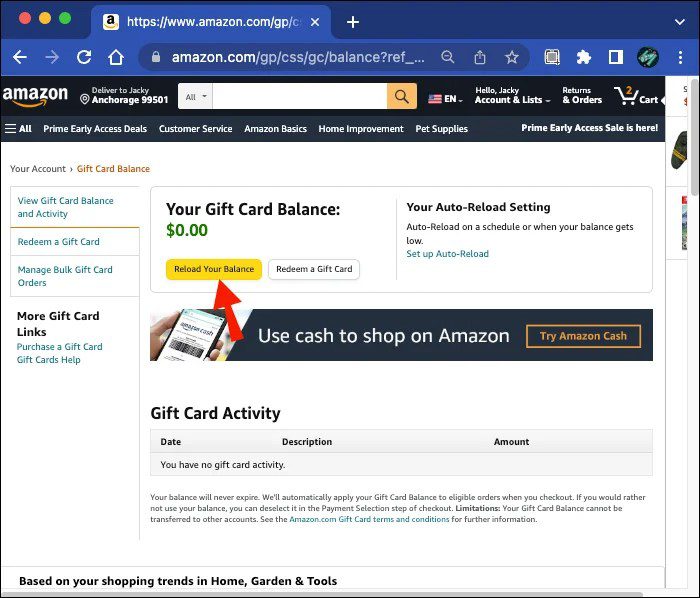
- Add to Your Amazon Account Balance: Go to Amazon.com, navigate to “Accounts & Lists” -> “Your Account” -> “Gift Cards” -> “Redeem a Gift Card.” Paste the claim code and click “Apply to Your Balance.” The funds will now be available as Amazon credit, ready for any future purchases.
Maximizing Your Card’s Value: Why This Method Works Best
This conversion strategy is superior because it entirely bypasses the issues that cause direct Amex gift card rejections. Once the funds are converted to Amazon credit, they are treated as internal Amazon currency, free from external payment gateway rules, pre-authorization holds, or specific card type validations. This method ensures that every cent of your Amex gift card balance can be utilized efficiently on Amazon, eliminating frustrating declines and ensuring you don’t lose value due to technical incompatibilities. It’s a clean, financially sound workaround that optimizes your spending power.
Handling Remaining Balances After Conversion
What if your Amex gift card has a very small, odd balance left after purchasing an Amazon gift card? For instance, if you had $50 on your Amex gift card, and you bought a $50 Amazon gift card, your Amex card should have a zero balance. However, if you had $50.05 and could only buy a $50 Amazon gift card, you’re left with $0.05.
Small residual balances are common with gift cards. For such tiny amounts, direct online use is almost impossible. Consider using it in person for a small purchase (e.g., a coffee at a local store that accepts Amex) or combining it with another payment method for a slightly larger purchase where split payments are accepted. Some people even donate these small remaining balances to charity if the platform allows. The key is to acknowledge that recovering every last cent from very small leftover balances can sometimes be more effort than it’s worth, financially speaking.
Alternative Approaches and Practical Considerations
While converting to an Amazon gift card is the most reliable method, it’s worth exploring other potential avenues and essential checks to ensure smooth financial transactions with your Amex gift card.
Attempting Direct Checkout: When It Might (or Might Not) Work
Some users report occasional success using their Amex gift cards directly on Amazon, particularly for purchases that are exactly the value of the card or slightly less, with no complex shipping or tax calculations that might throw off the pre-authorization. If you choose to try this method:
- Ensure Exact Match: Make a purchase that is exactly the amount on your Amex gift card, or slightly less, leaving no room for Amazon’s system to attempt an over-authorization. This often requires careful selection of items.
- Avoid Subscriptions or Digital Services: These types of purchases often involve recurring billing or dynamic pricing, which are ill-suited for fixed-balance gift cards.
- Use Your Billing Address: When adding the Amex gift card as a payment method, use your personal billing address as the billing address for the card.
- Expect Potential Failure: Be prepared for the transaction to be declined. If it fails, revert to the Amazon gift card conversion method. Direct use is more of an exception than a rule for Amex gift cards on Amazon.
Split Payments on Amazon: A Detailed Look
Amazon’s policy on split payments is somewhat restrictive. You generally cannot split a single purchase across multiple credit/debit cards or even multiple Amazon gift cards directly at checkout for a single item. However, there are two primary ways to approach a “split payment” scenario with a gift card:
- Using Amazon Gift Card Balance + Another Payment Method: Once your Amex gift card balance is converted into Amazon credit (as described in the reliable strategy section), you can easily use your Amazon gift card balance for part of a purchase and then pay the remainder with a separate credit card or debit card. This is Amazon’s preferred method for combining different payment types.
- Purchasing Multiple Items Separately: If you have an Amex gift card and want to buy multiple items, you could potentially buy one item that matches the Amex gift card’s exact balance directly, and then use a different payment method for other items in separate transactions. This is less convenient but avoids the split payment issue for a single order.
Understanding these limitations is crucial for managing your budget and expectations when using gift cards for larger purchases on Amazon.
Essential Pre-Purchase Checks: Knowing Your Balance
Regardless of the method you choose, always verify the exact balance on your Amex gift card immediately before attempting a purchase. Gift card balances can sometimes be depleted by small, legitimate fees (though less common with Amex gift cards), or if you’ve tried to use them elsewhere. An accurate balance is the cornerstone of successful gift card redemption.
To check your Amex gift card balance:
- Visit the Website: The back of your physical card will list a website (e.g., americanexpress.com/gift). Enter your card number and security code.
- Call the Number: A customer service number is also usually provided on the back of the card.
Keeping track of your gift card balances is a fundamental aspect of personal finance, ensuring you don’t lose out on funds or encounter unexpected declines.
Beyond Amazon: Maximizing Your Amex Gift Card’s Utility
While this guide primarily focuses on Amazon, understanding the broader utility of your Amex gift card can enhance your financial flexibility and ensure no value goes unspent.
Exploring Other Online and In-Store Spending Opportunities
Amex gift cards are widely accepted wherever American Express cards are honored. This includes most major retailers, restaurants, and service providers, both online and in brick-and-mortar stores. If you find the Amazon conversion process too cumbersome or prefer to spend the card elsewhere, consider:
- Groceries and Everyday Essentials: Use it at supermarkets or drugstores.
- Dining Out: Pay for meals at restaurants.
- Other Online Retailers: Many other e-commerce sites might be less strict with pre-authorizations or have different payment processing systems, potentially allowing direct use.
- Gas Stations (with caution): When using at a gas pump, it’s best to pre-pay inside with the exact amount, as gas pumps often initiate large pre-authorization holds that can drain or decline a gift card with a limited balance.
This diversification of spending options ensures that your Amex gift card remains a valuable financial tool, even if Amazon presents specific challenges.
Financial Discipline and Gift Card Management
Gift cards, while seemingly simple, are a form of stored value that requires a degree of financial discipline. Treating them as cash ensures they are not misplaced or forgotten. Here are some tips for managing them effectively:
- Spend Promptly: Don’t let gift cards sit for too long. While Amex gift cards generally don’t expire for funds, some fee structures might apply after a year of inactivity. The sooner you use it, the less likely you are to forget about it or lose the physical card.
- Keep Records: Note down the card number and customer service number in a secure place. If the physical card is lost or stolen, these details might be necessary to recover or replace the balance, though gift cards typically offer less protection than credit cards.
- Integrate into Budgeting: If you receive multiple gift cards, factor them into your personal budget. They can free up cash for other expenses or allow for guilt-free discretionary spending.
- Understand Terms and Conditions: Always read the fine print associated with any gift card, including potential fees, expiration dates (for non-Amex cards), and dispute resolution processes.
Troubleshooting Common Issues and What to Do
If your Amex gift card is repeatedly declined, even after trying the recommended methods, consider these steps:
- Double-Check Balance and Card Details: Ensure you have the exact balance, and that the card number, expiration date, and CVV are entered correctly.
- Verify Merchant Acceptance: Confirm that the merchant (Amazon, in this case) explicitly accepts American Express.
- Contact Amex Gift Card Customer Service: If all else fails, call the customer service number on the back of your card. They can provide insights into specific transaction declines, explain holds, or offer solutions.
- Confirm Activation: Some gift cards require activation before first use. Ensure yours was properly activated.
Conclusion
Using an Amex gift card on Amazon, while not always a straightforward direct transaction, is entirely achievable with the right strategy. The key lies in understanding the financial distinctions between gift cards and credit cards, particularly regarding pre-authorization holds and exact balances. By far, the most reliable and efficient method is to convert your Amex gift card balance into an Amazon.com Gift Card. This ingenious workaround eliminates potential friction points, allowing you to seamlessly integrate your gift funds into your Amazon account credit.
Beyond the practical steps, this scenario underscores broader principles of personal finance: diligent balance checking, understanding payment system mechanics, and proactive problem-solving. By adopting these insights, you not only successfully spend your Amex gift card on Amazon but also enhance your overall financial literacy and confidence in navigating the complexities of modern digital transactions. So go ahead, unlock the value of your Amex gift card and enjoy your Amazon shopping experience.
aViewFromTheCave is a participant in the Amazon Services LLC Associates Program, an affiliate advertising program designed to provide a means for sites to earn advertising fees by advertising and linking to Amazon.com. Amazon, the Amazon logo, AmazonSupply, and the AmazonSupply logo are trademarks of Amazon.com, Inc. or its affiliates. As an Amazon Associate we earn affiliate commissions from qualifying purchases.