
In an increasingly data-driven world, the ability to manipulate and represent numbers in various formats is a fundamental skill. While decimals often dominate digital displays and calculations, fractions remain indispensable in many fields, from engineering and finance to culinary arts and educational contexts. Understanding how to convert a number into a fraction – and, more importantly, how to leverage technology to do so efficiently and accurately – is a valuable asset. This guide delves into the digital methodologies for transforming decimals, whole numbers, and mixed numbers into their fractional counterparts, equipping you with the tools and insights to navigate this often-overlooked aspect of numerical representation.

Understanding the Fundamentals: Why Fractions Still Matter in a Digital Age
Before diving into the “how-to” of digital conversion, it’s crucial to appreciate why fractions continue to hold relevance amidst the prevalence of decimal systems and sophisticated digital calculators. Fractions offer an exact representation of quantities that decimals can only approximate. For instance, 1/3 is precisely 0.333… an infinitely repeating decimal. In scenarios demanding absolute precision, such as manufacturing tolerances, musical intervals, or the accurate measurement of ingredients, fractions eliminate rounding errors inherent in truncated decimals.
Furthermore, fractions often convey relationships and proportions more intuitively than decimals. “Half a cup” or “three-quarters of an inch” are common, easily understood terms. In data visualization, representing parts of a whole (like market share or survey responses) can sometimes be clearer with fractions, especially when dealing with smaller, discrete units. The digital age, with its emphasis on data integrity and precise computation, actually amplifies the need for tools that can seamlessly transition between these numerical formats. Our focus here will be on leveraging software and programming to bridge this gap.
The Core Concept: From Decimal to Fraction Logic
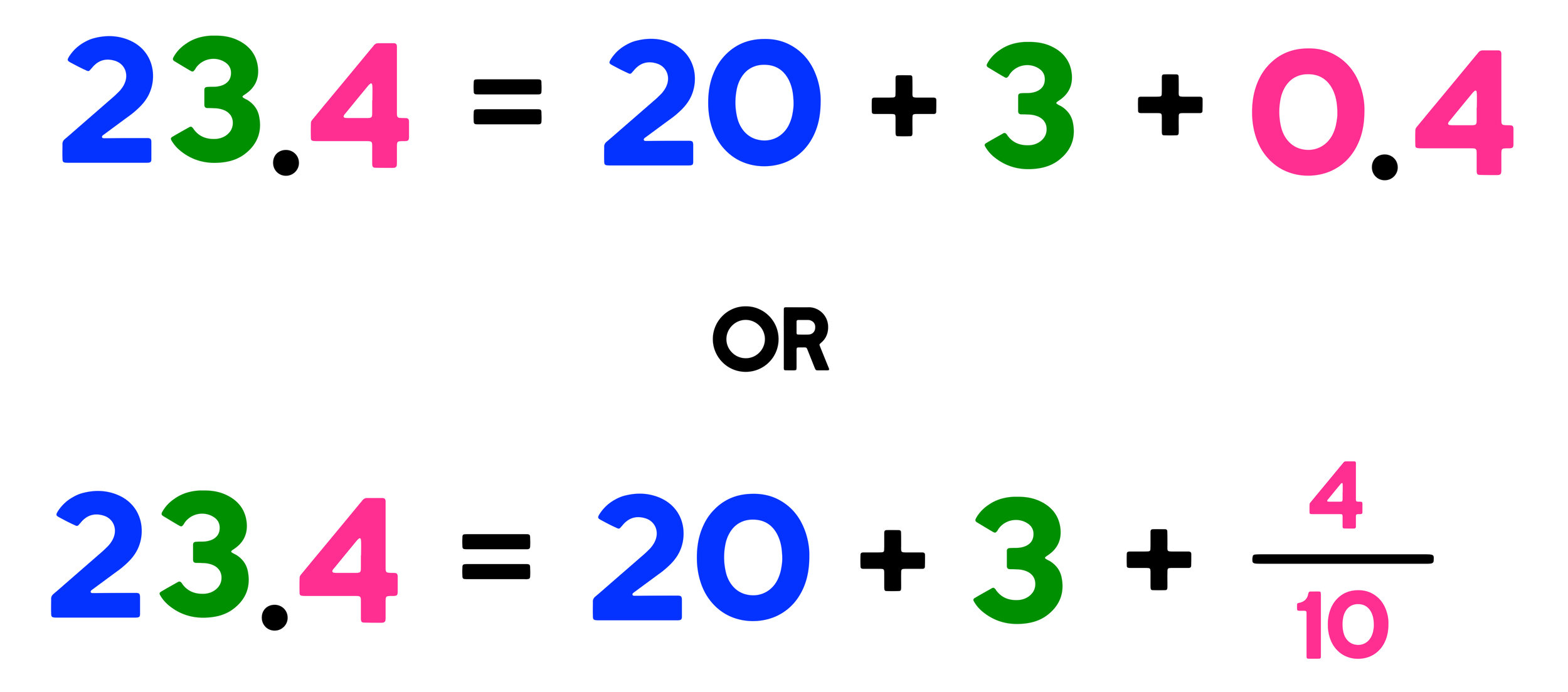
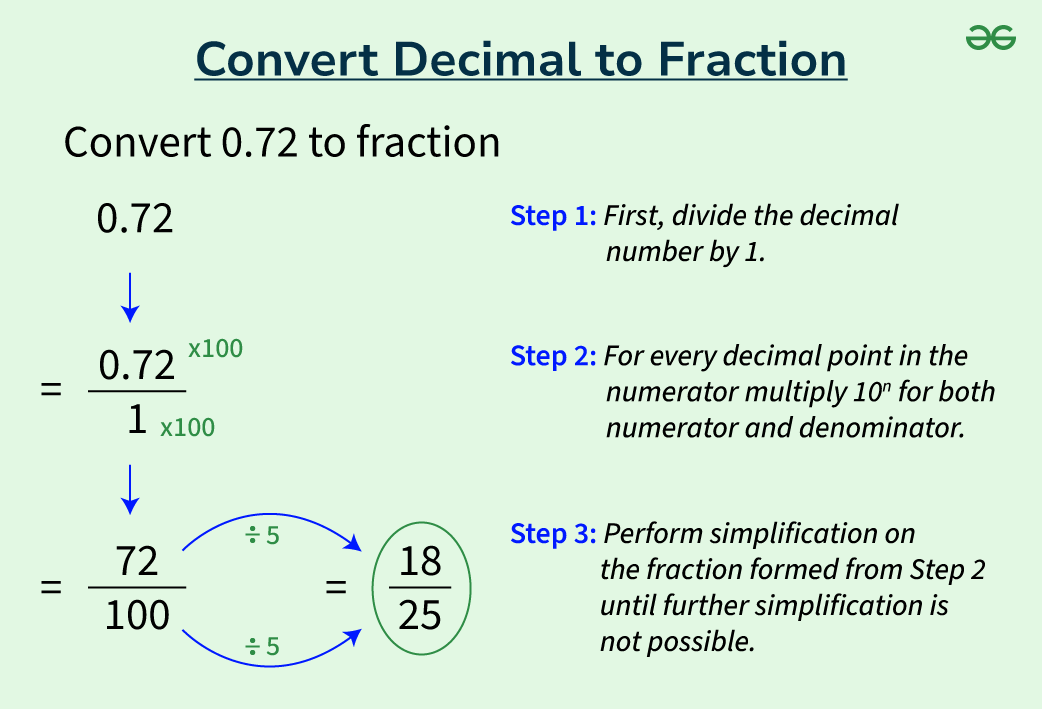
At its heart, converting a decimal to a fraction involves expressing the decimal part as a ratio over a power of ten, then simplifying. For example, 0.75 can be written as 75/100, which simplifies to 3/4. For repeating decimals, the process is slightly more complex, involving algebraic manipulation to isolate the repeating part. While a human can perform these steps manually, technology offers a faster, more accurate, and scalable solution, especially when dealing with complex or numerous conversions. The digital tools we’ll explore automate this logic, often handling the simplification and special cases like mixed numbers or improper fractions with ease.
Leveraging Spreadsheet Software: Excel, Google Sheets, and Beyond
Spreadsheet programs like Microsoft Excel and Google Sheets are ubiquitous tools for data management and analysis. They offer built-in functionalities to convert numbers into fractions, making them an accessible first line of defense for this task. Their intuitive interfaces combine powerful calculation engines with user-friendly formatting options.
Converting Decimals to Fractions in Excel
Excel provides a straightforward method for displaying decimals as fractions through cell formatting. This doesn’t change the underlying numerical value but alters its visual representation.
- Select the Cell(s): Highlight the cell(s) containing the decimal numbers you wish to convert.
- Open Format Cells: Right-click on the selected cells and choose “Format Cells…” (or press Ctrl+1).
- Choose “Fraction” Category: In the “Format Cells” dialog box, navigate to the “Number” tab. From the “Category” list, select “Fraction.”
- Select Fraction Type: Excel offers several fraction types, such as “Up to one digit (1/4)”, “Up to two digits (21/25)”, “Up to three digits (312/943)”, or “As halves (1/2)”, “As quarters (2/4)”, “As eighths (4/8)”, etc. The “Up to three digits” option usually provides a good balance between precision and simplicity. Choose the one that best suits your needs.
- Confirm: Click “OK.”
Excel will then display your decimals as fractions. For example, 0.75 will become 3/4, and 0.333333 will become 1/3 (if the “up to one digit” or “up to three digits” option can approximate it sufficiently). It’s important to remember that this is a display format; the cell’s actual numerical value remains the decimal unless you perform further calculations that explicitly convert it. For exact conversions or to use the fractional output in other formulas, you might need to convert the formatted text back into a usable fraction, often requiring custom formulas or VBA.
Handling Mixed Numbers and Improper Fractions
Excel’s fraction formatting automatically handles mixed numbers (e.g., 1.5 becomes 1 1/2). Improper fractions (where the numerator is greater than the denominator, like 3/2) are typically displayed as mixed numbers by default when formatted this way. If you specifically need an improper fraction representation, you might need a custom formula or a different approach, as Excel’s standard fraction formatting prioritizes mixed numbers for readability. A common workaround involves calculating the numerator and denominator separately using functions like INT and GCD (Greatest Common Divisor) and then concatenating them into a text string.
Google Sheets Equivalents and Custom Formatting
Google Sheets offers similar functionality, though with a slightly different interface:
- Select Cell(s): Highlight the cells containing your decimal numbers.
- Format Menu: Go to “Format” > “Number” > “Fraction.”
- Automatic Conversion: Google Sheets will automatically convert the selected decimals to fractions. Like Excel, this primarily affects the display.
Google Sheets is generally quite adept at finding common fractional representations. For more specific control or to achieve improper fractions, custom number formats or scripts are often employed. For instance, to force an improper fraction or a specific denominator, one might write a custom script using Google Apps Script, which is JavaScript-based and can interact directly with Sheets data.
Programming Approaches: Python, JavaScript, and More for Automated Conversion
For tasks involving large datasets, complex logic, or integration into applications, programming languages offer the ultimate flexibility and automation for converting numbers into fractions. Languages like Python, JavaScript, and Java have built-in libraries or simple algorithms to perform these conversions with high precision.
Basic Decimal-to-Fraction Logic in Python
Python is an excellent choice due to its readability and rich ecosystem of libraries. The fractions module is specifically designed for this purpose.
from fractions import Fraction

def decimal_to_fraction(decimal_number):
    """Converts a decimal number to a fraction."""
    return Fraction(decimal_number)

# Examples:
print(decimal_to_fraction(0.75))       # Output: 3/4
print(decimal_to_fraction(0.333333))  # Output: 333333/1000000 (approximates due to float precision)
print(decimal_to_fraction(1.5))        # Output: 3/2 (improper fraction by default)
print(decimal_to_fraction(1/3))        # Output: 1/3 (exact representation when starting with a true fraction)
The Fraction class in Python automatically simplifies fractions and handles both positive and negative numbers. When converting from a floating-point number (like 0.333333), it’s crucial to remember that floats are approximations. For exact conversions, it’s often better to pass a string representation of the decimal if possible (e.g., Fraction('0.333') will yield 333/1000).
Handling Floating-Point Precision Issues
One of the significant challenges in computational fraction conversion is dealing with the inherent precision limitations of floating-point numbers. Most programming languages represent decimals as binary approximations, which can lead to unexpected results when trying to convert seemingly simple decimals. For example, 0.1 might be stored internally as something slightly different from its true value.
To mitigate this, the fractions module allows specifying a limit for the denominator or finding the “best” rational approximation.
from fractions import Fraction

# Using limit_denominator to find a simpler fraction
# Good for converting floats that are slight approximations of common fractions
print(Fraction(0.3333333333333333).limit_denominator(100)) # Output: 1/3
print(Fraction(0.6666666666666666).limit_denominator(100)) # Output: 2/3

# Converting from string for exact representation
print(Fraction('0.1')) # Output: 1/10
For applications requiring extreme precision, it’s often best to work with numbers as fractions from the outset or use decimal types (like Python’s decimal module) before converting to Fraction objects, especially when dealing with user input that comes as a decimal string.
Real-World Scripting for Data Transformation
Beyond simple conversions, programming allows for advanced scenarios:
- Batch Processing: Convert thousands of numbers in a CSV or database column into fractions.
- Dynamic UI: Build web applications where users input decimals and see fractional results instantly.
- Scientific Computing: Ensure precision in calculations where fractions are more appropriate than floats.
- Data Cleaning: Standardize numerical formats across various data sources.
A simple Python script could read a column of decimals from an Excel file (using pandas), convert them to fractions, and then write them to a new column or a new file, providing an automated and reproducible data transformation pipeline.
Online Tools and Calculators: Quick Solutions for Everyday Needs
For ad-hoc conversions or when you don’t have access to specialized software or programming environments, a plethora of online tools and calculators offer instant solutions. These web-based utilities are invaluable for students, casual users, or professionals needing a quick check.
Specialized Fraction Converters
Many websites are dedicated solely to number-to-fraction conversions. You simply input a decimal (or a mixed number) and the tool provides the equivalent fraction, often simplifying it automatically and sometimes even showing the steps involved.
- How they work: These tools typically employ algorithms similar to those found in programming libraries. They parse your input, perform the necessary mathematical operations (usually finding the greatest common divisor to simplify), and present the result.
- Advantages: Speed, ease of use, no software installation required, often includes explanations.
- Limitations: Dependence on internet access, potential for ads, and varying levels of precision or handling of repeating decimals.
Interactive Math Websites
Beyond dedicated converters, many broader educational math websites and general-purpose calculators (like Wolfram Alpha or various scientific calculator emulators) include fraction conversion capabilities. These often provide more context, such as decimal expansions of fractions, visual aids, or related mathematical functions.
Limitations and Accuracy Considerations of Online Tools
While convenient, online tools aren’t without their caveats:
- Precision: Some tools might round aggressively or struggle with very long repeating decimals, leading to approximate fractions rather than exact ones.
- Input Format: Be mindful of how you input numbers. Some require specific formats for mixed numbers (e.g., “1 1/2” vs. “1.5”).
- Source Reliability: Always consider the source of the tool. Reputable educational or mathematical sites are generally more trustworthy than obscure ones.
- Security: For sensitive data, avoid pasting numbers into unfamiliar online tools. Stick to local software or programming solutions.
Practical Applications and Best Practices: Where and When to Use Fractions
The digital conversion of numbers to fractions is not just an academic exercise; it has tangible benefits across various domains.
Ensuring Precision in Technical Fields
In engineering, architecture, and manufacturing, fractions are often preferred for measurements and specifications because they represent exact values. A CAD program might calculate a dimension as a decimal, but the final blueprint might require it to be presented as a fraction (e.g., 3/16ths of an inch), especially for older machinery or traditional craftsmanship. Converting digital outputs to fractional forms ensures compatibility and reduces ambiguity.
Enhancing Readability in Financial Reporting
While most financial data is decimal-based, certain reports or visualizations might benefit from fractional representation. For example, stock splits, ownership stakes, or proportional allocations within a fund might be clearer when expressed as fractions, providing an immediate sense of the relative parts of a whole.
Educational Tools and Learning Environments
For students learning fractions, digital tools that convert decimals to fractions (and vice-versa) can be invaluable. Interactive calculators and programming exercises allow them to visualize the relationship between these number types, build intuition, and check their manual calculations. Developers building educational software can embed these conversion functionalities to create richer learning experiences.
Best Practices for Digital Fraction Conversion
- Understand the Context: Determine if exact precision is required or if an approximation is acceptable. This dictates whether to use a simple formatter or a robust programming library.
- Beware of Floating-Point Errors: When converting from raw floating-point numbers, be aware of their inherent imprecision. For critical applications, convert from string representations of decimals or use decimal arithmetic first.
- Simplify Appropriately: Most tools simplify fractions automatically. Ensure the simplification level meets your requirements (e.g., proper vs. improper fractions, or a specific denominator limit).
- Validate Outputs: Especially when using online tools or custom scripts, validate a few conversions manually to ensure the tool is working as expected.
- Choose the Right Tool: Select the most appropriate tool for the job – spreadsheet for ad-hoc, programming for automation, online for quick checks.
In conclusion, turning a number into a fraction in the digital realm is far more than a mere mathematical operation; it’s a technical challenge that can be elegantly solved using a variety of digital tools. By understanding the capabilities of spreadsheet software, the power of programming languages, and the convenience of online calculators, you can master this conversion, ensuring precision, clarity, and efficiency in your numerical data handling.
aViewFromTheCave is a participant in the Amazon Services LLC Associates Program, an affiliate advertising program designed to provide a means for sites to earn advertising fees by advertising and linking to Amazon.com. Amazon, the Amazon logo, AmazonSupply, and the AmazonSupply logo are trademarks of Amazon.com, Inc. or its affiliates. As an Amazon Associate we earn affiliate commissions from qualifying purchases.