
In an increasingly digital world, the right technological tools and services can significantly enhance a student’s academic journey and personal life. Among the myriad of digital subscriptions available, Amazon Prime Student stands out as a powerful offering, specifically tailored to meet the unique needs and budgets of college and university students. It’s more than just free two-day shipping; it’s a comprehensive suite of benefits designed to support students through their demanding schedules, from textbook delivery to entertainment and exclusive discounts. For many, the initial hurdle isn’t understanding the value, but rather navigating the precise steps to unlock these advantages. This guide provides a detailed, tech-centric walkthrough of the Prime Student sign-up process, ensuring a smooth transition into a world of convenience and savings.

Understanding Prime Student: A Gateway to Academic and Lifestyle Advantages
Amazon Prime Student is an intelligent iteration of the standard Amazon Prime membership, specifically crafted to cater to the student demographic. It recognizes the financial constraints and unique requirements that come with higher education, offering a blend of essential services and desirable perks at a reduced cost. Before diving into the technical sign-up process, it’s crucial to grasp what this service entails and who qualifies for it, framing it within the broader ecosystem of digital subscriptions and personal productivity tools.
What is Prime Student?
At its core, Prime Student is a subsidized Amazon Prime membership that grants eligible students access to most of the benefits enjoyed by regular Prime members, but with a specific focus on the student lifestyle. The service typically begins with a free trial period, often lasting six months, followed by a discounted monthly or annual fee that is significantly lower than a standard Prime subscription. From a technological perspective, it’s about accessing Amazon’s vast digital infrastructure: its e-commerce platform, streaming services, digital content libraries, and various partner offers, all through a personalized student account. This means instant access to millions of products, expedited shipping, a colossal library of movies and TV shows via Prime Video, ad-free music streaming through Amazon Music, unlimited photo storage, exclusive deals, and much more, all managed through a unified Amazon account.
Eligibility Requirements: Who Qualifies?
The technological access to Prime Student is gated by specific eligibility criteria, designed to ensure the benefits reach genuine students. These requirements are typically verified digitally and include:
-
Active Enrollment: Applicants must be currently enrolled in a two-year or four-year college or university, verified through recognized educational institutions. This is usually the most critical technical hurdle, requiring proof of enrollment.
-
Age Requirement: Generally, applicants must be at least 18 years old. This aligns with legal requirements for entering into subscription agreements.
-
Valid Email Address: A crucial technical component is a valid email address. While a
.eduemail address is often the most straightforward way to verify student status, it’s not always the sole method. Amazon provides alternative verification pathways for those without an institutional email address. -
Proof of Enrollment: If a
.eduemail isn’t available or isn’t sufficient for verification, Amazon may require other forms of proof, such as a transcript, an enrollment verification letter, or a student ID card with an expiration date. These documents are typically uploaded digitally through a secure portal, requiring students to engage with Amazon’s online document submission and verification tools.
Understanding these requirements upfront can streamline the technical sign-up process, preventing unnecessary delays or rejections due to incomplete information.
Why Consider Prime Student?
From a user experience and productivity standpoint, Prime Student offers compelling advantages. The initial free trial provides a no-commitment opportunity to experience the full suite of Prime benefits, helping students gauge its utility in their daily lives. The discounted pricing thereafter makes high-quality digital entertainment, expedited logistical support for academic supplies, and exclusive deals financially accessible. For tech-savvy students, it’s about optimizing their digital toolkit, leveraging a single subscription to cover multiple needs – from streaming lectures and documentaries to ordering last-minute supplies and unwinding with entertainment. It integrates seamlessly into the digital ecosystem most students already navigate, enhancing convenience and offering tangible value beyond just monetary savings.
The Step-by-Step Technical Enrollment Process
Signing up for Prime Student is a straightforward digital process, but it requires careful attention to detail to ensure successful verification. This section breaks down each technical step, from initiating the application to confirming your student status and linking your account to the broader Amazon ecosystem.
Initiating Your Prime Student Journey: Starting the Application
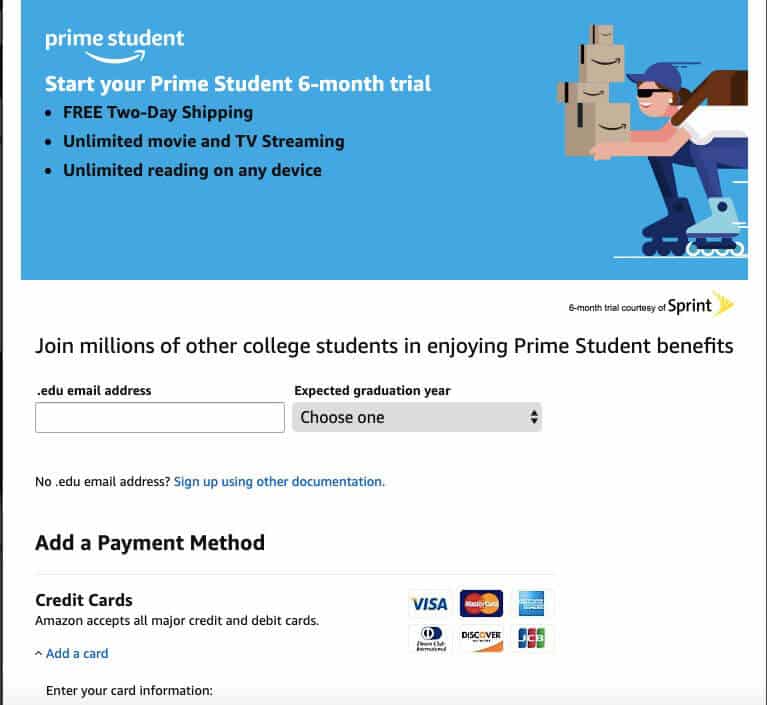
The journey begins on the Amazon Prime Student dedicated landing page. You can typically find this by searching “Prime Student” on Amazon’s website or directly navigating to the relevant URL.
-
Access the Prime Student Page: Open your web browser and go to amazon.com/primestudent or search “Amazon Prime Student” on Google.
-
Locate the Sign-Up Button: On the Prime Student landing page, you’ll find a prominent call-to-action button, often labeled “Start your 6-month trial” or similar. Click this button to begin the application.
-
Log In or Create an Amazon Account: If you already have an Amazon account, you’ll be prompted to log in using your existing credentials. If you don’t, you’ll need to create a new Amazon account. This involves providing your name, email address, and creating a secure password. This step establishes your foundational digital identity within the Amazon platform.
Verification: Confirming Your Student Status
This is the most critical technical step, as Amazon needs to digitally confirm your eligibility. The process is designed to be as automated as possible, but it does allow for manual intervention if needed.
-
Enter Your Academic Email: The primary method for verification is providing an active
.eduemail address issued by your college or university. Enter this email into the designated field. Amazon will then send a verification link or code to this address. -
Verify Via Email: Check your university email inbox (and spam/junk folders). You will receive an email from Amazon with instructions to complete the verification. This usually involves clicking a unique link or entering a verification code back on the Amazon website. This digital handshake confirms ownership of the academic email.
-
Alternative Verification Methods (If Needed): If you don’t have an
.eduemail, or if the automatic verification fails, Amazon will present alternative methods. These typically involve uploading digital copies of documents that prove your student status. This could include:-
Student ID Card: A photo or scan of your current student ID card with an expiration date.
-
Transcript or Class Schedule: A digital copy of your official transcript or current class schedule showing your enrollment for the current term.
-
Acceptance Letter: A recent acceptance letter from your institution.
-
Tuition Bill/Statement: A recent tuition bill or statement that clearly shows your name and the institution.
-
Digital Upload Portal: Amazon provides a secure online portal for uploading these documents. Ensure the files are clear, legible, and meet any specified format or size requirements. This process involves encrypted transmission of sensitive personal data, emphasizing the digital security measures in place.
-
Account Creation and Linking: Connecting to Your Amazon Ecosystem
Once your student status is successfully verified, the final steps involve configuring your membership.
-
Payment Information: You’ll be prompted to enter a valid payment method (credit card, debit card, etc.). Even though the initial trial period is free, Amazon requires this on file for future billing once the trial ends or for any purchases you make.
-
Confirm Membership: Review all the details, including the terms and conditions, and confirm your Prime Student membership.
-
Welcome to Prime Student: You’ll receive a confirmation email, and your Amazon account will be updated to reflect your Prime Student status. You can now immediately begin enjoying the benefits. From a backend perspective, your user profile within Amazon’s system is flagged with “Prime Student,” unlocking the specific features and discounts associated with this membership tier.
Navigating the Prime Student Dashboard and Features
Once you’re signed up, understanding how to navigate and manage your Prime Student membership is key to maximizing its value. This involves exploring the accessible features within the Amazon interface and knowing how to manage your subscription details.
Exploring Your Member Benefits
Upon activation, your Amazon account acts as your central hub for all Prime Student benefits.
-
Amazon.com: When you log in, you’ll see your Prime Student status prominently displayed. This ensures that when you shop, eligible items automatically qualify for free expedited shipping, and you’ll see Prime-exclusive deals.
-
Prime Video: Access the Prime Video library through the Amazon website, the dedicated Prime Video app on your smartphone or tablet, or smart TVs and streaming devices.
-
Amazon Music: Similar to Prime Video, Amazon Music (usually a limited version, or a discounted full version for students) can be accessed via the web or dedicated apps.
-
Prime Reading: Download and read a rotating selection of ebooks, magazines, and comics using the Kindle app on various devices.
-
Prime Gaming: Access free games, in-game content, and a free Twitch channel subscription.
-
Exclusive Student Deals: Keep an eye on the Prime Student section of Amazon or specific emails; exclusive discounts and promotions for students are frequently offered, often requiring specific coupon codes or direct links.
Understanding the digital pathways to each of these services ensures you’re fully leveraging your membership. Each benefit is typically accessed through its corresponding Amazon app or integrated into the main Amazon website, creating a cohesive user experience.
Managing Your Membership: Renewals, Cancellations, and Updates
Effective management of your digital subscriptions is a crucial aspect of responsible technology usage.
-
Accessing Membership Settings: To manage your Prime Student membership, navigate to “Your Account” on Amazon.com, then select “Prime Membership.” Here, you can view your membership details, including the expiration date of your trial or paid period.
-
Automatic Renewal: Prime Student memberships typically auto-renew. If you wish to continue after your trial, no action is needed, and your payment method will be charged.
-
Cancellation: If you decide Prime Student isn’t for you, you can cancel your membership at any time from the “Manage Prime Membership” page. You’ll usually have the option to end it immediately or let it run until the current billing cycle expires. This process is fully self-service through the digital interface, reflecting modern subscription management practices.
-
Updating Payment Information: Should your payment method change, you can update it securely within your account settings to avoid service interruptions.
Troubleshooting Common Sign-Up Issues
Even with a smooth digital process, occasional technical glitches or misunderstandings can arise.
-
Verification Delays: If your student verification is taking longer than expected, check your email (including spam) for follow-up requests from Amazon. If using alternative documentation, processing may take a few business days.
-
Incorrect Information: Double-check all entered information, especially your email address and student ID number, for typos.
-
Document Upload Issues: Ensure uploaded documents are clear, meet file size/type requirements (e.g., PDF, JPEG), and clearly show all necessary information.
-
Contacting Amazon Support: If you encounter persistent problems, Amazon’s customer service can provide direct assistance. They have dedicated teams familiar with Prime Student enrollment issues, accessible via chat, email, or phone, acting as the human layer of technical support.
Maximizing Your Prime Student Experience with Tech Tools
Beyond the basic access, there are ways to strategically integrate Prime Student into your broader technological toolkit to extract maximum value.
Utilizing the Amazon App for Seamless Access
The Amazon mobile app is an indispensable tool for Prime Student members. It provides a streamlined interface for shopping, tracking orders, and quick access to Prime Video, Music, and Reading services. Push notifications can alert you to new deals, shipping updates, and Prime-exclusive content. For students managing busy schedules, the convenience of managing their Prime benefits from a smartphone or tablet is invaluable, turning their device into a portable hub for shopping, entertainment, and academic resources.
Digital Perks Beyond Shipping and Streaming
Prime Student extends beyond the well-known shipping and video benefits. Explore features like:
-
Prime Reading and Audible Channels: Leverage these for supplementary academic resources or recreational reading, directly accessible on your e-reader or mobile device.
-
Prime Gaming: For students who game, this offers free monthly games and in-game content, a nice perk for downtime.
-
Exclusive Textbook Deals: Keep an eye out for special offers on textbooks and academic supplies, often found within the Prime Student portal, which can be delivered rapidly to your dorm or apartment.
-
Amazon Photos: Take advantage of unlimited full-resolution photo storage, a secure cloud solution for academic projects, personal photos, and backups, accessible from any device.
These digital tools enhance your academic and personal life, all integrated within the Prime Student ecosystem.
Integrating Prime Student with Other Educational Tech
While not always direct integrations, Prime Student can complement other educational technologies. For instance, using Prime Video to watch documentaries relevant to a course, or leveraging the fast shipping for a specific tech gadget needed for a project. The overall ecosystem of Amazon’s services, underpinned by Prime Student, makes it a valuable resource within a student’s broader digital learning and lifestyle framework.
Maintaining Your Prime Student Membership and Transitioning Post-Graduation
Prime Student is designed for your academic journey. Understanding how to maintain your membership and what happens when that journey ends is crucial for seamless digital service management.
Annual Verification and Renewal
Prime Student memberships are typically valid for a specified duration, often four years, or until you graduate, whichever comes first. Amazon may require periodic re-verification of your student status, usually annually, to ensure continued eligibility. This process is similar to the initial verification, often requiring you to re-enter your .edu email or upload updated proof of enrollment. Staying proactive with these re-verification requests ensures uninterrupted access to your benefits. Amazon usually sends digital reminders via email as these dates approach.
Understanding Membership Expiration and Transition
Once you graduate, or after the maximum eligibility period (e.g., four years) has passed, your Prime Student membership will typically automatically transition to a standard Amazon Prime membership. Amazon will usually send notifications in advance, informing you of the upcoming change and the associated standard membership fees. This transition is a technological hand-off, moving your account from one subscription tier to another within Amazon’s system, ensuring continuous service unless you choose to cancel.

Seamless Transition to Standard Prime
If you choose to continue with Prime post-graduation, the transition is seamless. All your preferences, digital libraries, and purchase history remain intact. The only change will be the adjustment to the standard Prime membership fee. Should you decide to discontinue, you can cancel your membership before the transition takes effect, preventing any unwanted charges. The flexibility to manage your digital subscriptions ensures that Prime Student remains a valuable service throughout your academic career and provides a clear pathway for continued benefits if desired.
In conclusion, signing up for Prime Student is a straightforward digital process that unlocks a powerful suite of technological benefits. By understanding the eligibility criteria, meticulously following the sign-up steps, and actively managing your membership, students can leverage Amazon’s vast digital ecosystem to support their academic pursuits and enhance their daily lives. It’s a strategic digital investment for any college student looking to optimize their resources and experience convenience at their fingertips.
aViewFromTheCave is a participant in the Amazon Services LLC Associates Program, an affiliate advertising program designed to provide a means for sites to earn advertising fees by advertising and linking to Amazon.com. Amazon, the Amazon logo, AmazonSupply, and the AmazonSupply logo are trademarks of Amazon.com, Inc. or its affiliates. As an Amazon Associate we earn affiliate commissions from qualifying purchases.