
In an increasingly digitized world, managing money and making transactions has evolved beyond traditional banking. Digital payment platforms have become indispensable tools for individuals, entrepreneurs, and businesses alike, and among these, PayPal stands as a pioneer and a global leader. For anyone looking to participate in the modern financial landscape – whether it’s receiving payments for online work, shopping securely across borders, or sending money to family – understanding how to set up a PayPal account is a foundational step. This guide delves into the financial necessities and practical steps involved, positioning PayPal as a critical financial tool for personal and business wealth management.

The Financial Imperative: Why PayPal is Essential in Today’s Economy
In a world where economic activity increasingly transcends geographical boundaries, the ability to send, receive, and manage money digitally is not just a convenience but a financial imperative. PayPal has cemented its role as a cornerstone of this digital financial ecosystem, offering solutions that cater to a broad spectrum of monetary needs.
Bridging Personal Finance and Global Transactions
For the individual, PayPal transforms personal finance by simplifying cross-border transactions that would otherwise be cumbersome and costly through traditional banks. Imagine needing to send money to a relative overseas or receiving a payment from an international online marketplace. PayPal facilitates these transactions with ease, often at competitive rates compared to wire transfers, making it an invaluable tool for global financial connectivity. It acts as a secure intermediary, allowing users to send and receive funds without directly sharing sensitive bank details, thereby adding an extra layer of financial security to personal transactions. This feature is particularly crucial for students studying abroad, expatriates, or families with members living in different countries, ensuring that financial support can be provided or received efficiently and affordably. Moreover, PayPal’s integration with countless online retailers worldwide makes it a preferred payment method for e-commerce, enhancing security and convenience for shoppers who want to protect their credit card information.
Empowering Online Income and Side Hustles
The rise of the gig economy and the proliferation of online platforms for freelancers, content creators, and service providers have made PayPal an essential financial conduit for generating and managing online income. Whether you’re a graphic designer selling services on an international marketplace, a writer receiving payments for articles, or a streamer collecting donations, PayPal provides a reliable and accessible method for invoicing clients and receiving funds. It eliminates the complexities of international banking transfers, offering a streamlined process that allows individuals to focus on their work rather than payment logistics. For many embarking on side hustles, a PayPal account is often the first financial tool they set up, enabling them to monetize their skills and efforts effectively. The ability to quickly receive funds and transfer them to a linked bank account means faster access to earnings, supporting the financial independence and growth of self-employed individuals and small-scale entrepreneurs.
Streamlining Business Payments and Invoicing
Beyond individual use, PayPal offers robust features that streamline financial operations for small businesses and startups. A Business PayPal account can serve as a comprehensive payment gateway, enabling companies to accept credit card payments, issue professional invoices, and manage subscriptions with ease. This is particularly beneficial for businesses without the resources for complex merchant accounts or those operating primarily online. PayPal’s invoicing system simplifies billing, allowing businesses to send customized invoices directly to clients, track payment statuses, and integrate with accounting software. This efficiency in financial administration not only saves time but also reduces overheads associated with traditional payment processing. Furthermore, PayPal’s dispute resolution process offers a layer of protection for both buyers and sellers, fostering trust in online transactions and providing recourse in cases of financial discrepancies. For businesses aiming for growth, PayPal’s versatility in handling various types of transactions—from individual sales to bulk payments—makes it an indispensable financial partner, ensuring smooth cash flow and robust payment management.
Pre-Setup Financial Checklist: Preparing for Your PayPal Journey
Before diving into the actual setup process, a small amount of preparation can ensure a smooth and successful registration. This financial checklist helps you gather the necessary information and understand the options available, aligning your PayPal account with your specific financial goals.
Necessary Financial Information and Documentation
To set up a PayPal account, you’ll need a few key pieces of personal and financial information. This typically includes your full legal name, a valid email address, a secure password, and your date of birth. Depending on your country and the type of account you’re opening, PayPal may also require a phone number and a physical address for verification purposes. For enhanced security and to unlock higher transaction limits, you might be asked to provide identification documents such as a government-issued ID (driver’s license or passport) or proof of address (utility bill). This Know Your Customer (KYC) process is a standard financial regulatory requirement designed to prevent fraud and money laundering, ensuring a safe financial environment for all users. Having these documents readily accessible will expedite your account verification, allowing you to fully utilize PayPal’s financial services without delay.
Understanding Account Types: Personal vs. Business
PayPal offers two primary account types: Personal and Business. Understanding the distinction is crucial for choosing the right fit for your financial activities. A Personal Account is ideal for individuals who primarily use PayPal for sending and receiving money from friends and family, online shopping, or managing personal online income from small-scale activities. It’s simple to set up and navigate, focusing on consumer-centric financial transactions. A Business Account, on the other hand, is designed for entrepreneurs, freelancers, sole proprietors, and registered businesses that need to accept payments from customers, issue invoices, manage sales, and potentially provide multi-user access. Business accounts come with features like more robust reporting, invoicing tools, and options for accepting payments directly from websites. While you can technically use a Personal Account for light business activity, a Business Account is recommended if your financial activities involve regular sales, client payments, or if you anticipate significant transaction volumes, ensuring compliance and access to relevant financial management tools.
Linking Financial Instruments: Bank Accounts and Cards
A critical step in maximizing your PayPal account’s financial utility is linking it to your existing bank accounts and/or credit/debit cards. Linking a bank account allows you to seamlessly transfer funds between PayPal and your bank, enabling you to add money to your PayPal balance or withdraw your earnings. This is particularly important for managing your online income and ensuring liquidity. To link a bank account, you will typically need your bank name, account number, and routing number. PayPal will then perform a small deposit verification process to confirm ownership, which usually involves two small deposits that you’ll need to verify on your PayPal account. Linking credit or debit cards provides an alternative funding source for payments when your PayPal balance is low, or for transactions that specifically require a card. It also offers an additional layer of financial flexibility, allowing you to use your preferred payment method while benefiting from PayPal’s security features. Having both a bank account and at least one card linked ensures you have multiple financial pathways for managing your funds through PayPal.
Step-by-Step Guide: Setting Up Your Personal PayPal Account
Setting up a PayPal account is a straightforward process, designed to be intuitive for users of all technical proficiencies. By following a few simple steps, you can quickly establish your financial presence on this global platform.
Navigating the Registration Page
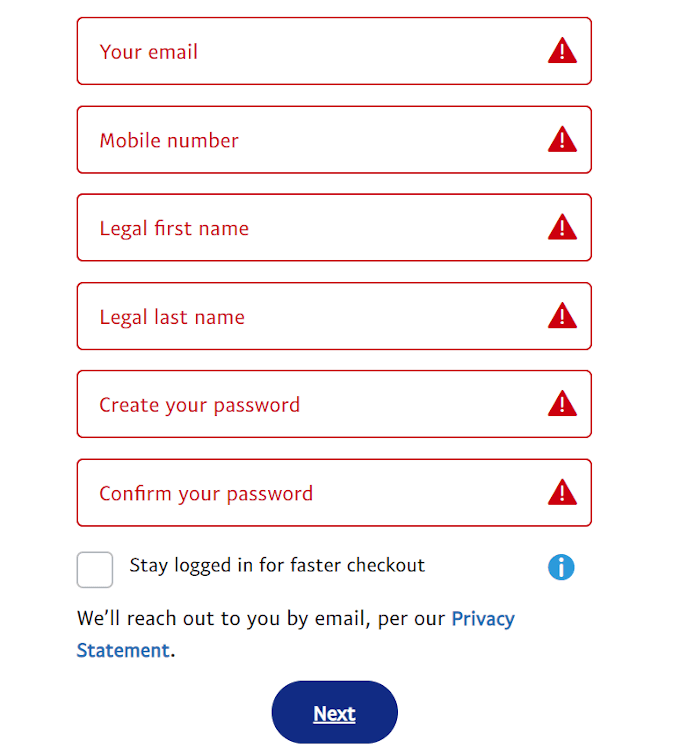
To begin, open your web browser or the PayPal mobile app and navigate to the official PayPal website (paypal.com). Look for the “Sign Up” or “Get Started” button, usually prominently displayed on the homepage. Clicking this will initiate the registration process. You will then be prompted to choose between a “Personal Account” or a “Business Account.” As discussed, select the option that best aligns with your financial needs. For most individuals starting out, a Personal Account is the appropriate choice. After selecting your account type, you will be asked to provide basic personal details: your country of residence, mobile phone number, full legal name, email address, and to create a secure password. It is crucial to use a valid and frequently checked email address, as this will be your primary point of contact for PayPal notifications and financial activities. Ensure your password is strong, combining uppercase and lowercase letters, numbers, and symbols, to safeguard your financial information.
Verifying Your Identity and Information
Following the initial personal details submission, PayPal will likely prompt you to verify your mobile phone number. This is a critical security step, typically involving sending a one-time code via SMS to the number you provided. Enter this code into the designated field on the PayPal website or app to confirm your phone number. Beyond phone verification, PayPal often requires identity verification to comply with financial regulations and enhance account security. This may involve providing additional personal information such as your date of birth, address, and in some cases, a government-issued ID. The process is designed to confirm that you are who you claim to be, protecting both you and PayPal from fraudulent activities. While these steps might seem tedious, they are fundamental to maintaining the integrity and security of your financial transactions on the platform. Completing all verification steps ensures that your account is fully functional and not subject to transaction limits that unverified accounts may face.
Securing Your Account with Strong Credentials
After completing the initial setup and verification, securing your PayPal account is paramount to protecting your financial assets. Beyond creating a strong password, PayPal offers additional security features that you should immediately enable. Two-Factor Authentication (2FA) is highly recommended. This feature requires a second form of verification, usually a code sent to your mobile phone, in addition to your password, every time you log in or perform certain sensitive transactions. This significantly reduces the risk of unauthorized access, even if your password is compromised. You can typically enable 2FA within your account settings under the “Security” or “Login and Security” section. Regularly reviewing your account activity and familiarizing yourself with PayPal’s security center are also important practices. Be vigilant against phishing attempts and never share your login credentials with anyone. By taking these proactive measures, you can ensure a robust financial security posture for your PayPal account.
Advanced Financial Integration: Maximizing Your PayPal Account
Once your basic PayPal account is set up, integrating it with your existing financial ecosystem and exploring its diverse features can unlock its full potential as a comprehensive financial management tool.
Linking and Confirming Bank Accounts for Fund Transfers
The seamless transfer of funds between your PayPal account and your traditional bank account is a cornerstone of its financial utility. To link a bank account, navigate to the “Wallet” or “Money” section within your PayPal dashboard. Select the option to “Link a bank account” and provide the required details: your bank name, account number, and routing number. PayPal will then initiate a small deposit verification process, sending two micro-deposits (typically a few cents each) to your bank account within a few business days. Once these deposits appear on your bank statement, return to your PayPal account, go back to the “Wallet” section, and enter the exact amounts of these deposits to confirm your bank account. This confirmation process is vital for allowing you to add funds to your PayPal balance or withdraw money from PayPal directly into your bank account, effectively integrating your digital and traditional financial holdings. This integration is crucial for managing online earnings and ensuring liquidity.
Integrating Credit/Debit Cards for Flexible Spending
While a linked bank account handles larger transfers, integrating credit and debit cards offers flexibility for online purchases and smaller transactions. To link a card, go to the “Wallet” section and select “Link a debit or credit card.” You’ll need to enter the card number, expiration date, and the 3-digit security code (CVV). PayPal may perform a temporary authorization charge (e.g., $1.00-$2.00) on your card, which will be refunded, to verify its validity. Linking cards means you always have a backup payment method, even if your PayPal balance is low. This enhances your purchasing power and provides an extra layer of financial convenience. Moreover, using PayPal with a linked card often means your financial details are not directly exposed to merchants, adding an extra layer of security to your online spending habits.
Exploring PayPal’s Financial Tools and Features
PayPal is more than just a payment processor; it’s a suite of financial tools designed to cater to various monetary needs. Explore features like:
-
Request Money/Invoicing: Essential for freelancers and small businesses, allowing you to professionally request payments from clients or send detailed invoices.
-
Send Money to Friends and Family: Facilitates quick and often fee-free personal transfers within the same country, if funded by your PayPal balance or bank account.
-
PayPal.Me: A personalized link you can share for others to send you money easily.
-
Donations: Tools for individuals or organizations to accept charitable contributions.
-
Cryptocurrency: In some regions, PayPal offers the ability to buy, hold, and sell select cryptocurrencies, integrating digital assets into your financial portfolio.
-
Buy Now, Pay Later (Pay in 4): A feature that allows consumers to split eligible purchases into interest-free payments, offering flexible budgeting options.
-
Seller Protection/Buyer Protection: Policies designed to safeguard your financial transactions against fraud and disputes, providing peace of mind for both sides of a transaction.
By familiarizing yourself with these advanced features, you can leverage PayPal to its fullest, optimizing your personal and business financial management strategies.
Financial Security and Best Practices with PayPal
Maintaining the security of your PayPal account is paramount to protecting your financial assets in the digital realm. While PayPal employs robust security measures, user vigilance and adherence to best practices are equally crucial.
Protecting Your Funds: Understanding PayPal’s Security Measures
PayPal invests heavily in advanced security technologies to protect user funds and data. This includes sophisticated encryption protocols to secure all transactions and personal information, fraud detection algorithms that continuously monitor for suspicious activity, and a dedicated team of security experts working around the clock. PayPal’s Buyer Protection policy offers recourse if an eligible item you purchased doesn’t arrive or isn’t as described, providing a financial safety net for online shopping. Similarly, Seller Protection shields eligible sales against unauthorized transactions and buyer claims of non-receipt. However, it’s vital for users to understand that these protections are not absolute and often depend on adherence to PayPal’s terms and conditions. Familiarizing yourself with these policies empowers you to make informed financial decisions and take appropriate action if an issue arises.
Vigilance Against Financial Fraud and Scams
Despite PayPal’s security efforts, users remain a target for fraudsters and scammers attempting to gain unauthorized access to accounts or trick individuals into sending money. Common threats include:
-
Phishing Emails: Deceptive emails designed to look like they’re from PayPal, asking for login credentials or personal financial information. Always check the sender’s email address and hover over links before clicking.
-
Fake Invoices/Requests: Receiving an invoice or money request for services you didn’t authorize, hoping you’ll pay without thinking. Always verify the sender and the legitimacy of the request.
-
“Too Good to Be True” Offers: Scammers often promise large sums of money or prizes in exchange for a small upfront payment. Exercise extreme caution with unsolicited offers.
-
Public Wi-Fi Risks: Avoid accessing your PayPal account on unsecured public Wi-Fi networks, which can be vulnerable to data interception.
Always log directly into your PayPal account through the official website or app to check messages or respond to notifications. PayPal will never ask you for your full password or banking details via email. If you suspect a scam or identify fraudulent activity, report it immediately to PayPal. Your proactive approach is the first line of defense in safeguarding your financial security.
Regular Review of Transactions and Account Activity
A proactive approach to financial security includes regularly reviewing your PayPal transaction history and account activity. Make it a habit to check your balance and recent transactions at least once a week, or more frequently if you use PayPal often. This allows you to quickly identify any unauthorized payments, unfamiliar activity, or discrepancies. If you spot anything suspicious, don’t hesitate to report it to PayPal’s resolution center. Prompt reporting is crucial for investigating fraudulent activity and potentially recovering lost funds. Additionally, keeping your contact information (email address and phone number) up to date in your PayPal profile ensures you receive all security alerts and notifications in a timely manner. By integrating these practices into your financial routine, you transform your PayPal account into not just a convenient payment tool, but a secure and reliable financial hub.
aViewFromTheCave is a participant in the Amazon Services LLC Associates Program, an affiliate advertising program designed to provide a means for sites to earn advertising fees by advertising and linking to Amazon.com. Amazon, the Amazon logo, AmazonSupply, and the AmazonSupply logo are trademarks of Amazon.com, Inc. or its affiliates. As an Amazon Associate we earn affiliate commissions from qualifying purchases.