
In an increasingly digital world, the ability to transfer funds swiftly and securely has become a cornerstone of modern financial interaction. Among the myriad of applications designed to facilitate these transactions, Cash App stands out as a prominent player, celebrated for its user-friendly interface and robust feature set. For many, Cash App is not just an application; it’s a vital digital tool that simplifies everything from splitting dinner bills to sending emergency funds across states. This guide aims to demystify the process of sending money via Cash App, offering a detailed tutorial alongside insights into its underlying technology and essential digital security practices.
Understanding Cash App: A Technological Overview
At its core, Cash App is a mobile payment service developed by Block, Inc. (formerly Square, Inc.), designed to enable peer-to-peer (P2P) money transfers through a smartphone app or web interface. It’s a testament to how modern technology has revolutionized the way individuals manage and move their money. Beyond simple transfers, Cash App integrates a suite of features that position it as a multifaceted financial technology platform, accessible right from your pocket.
The Underlying Architecture of Peer-to-Peer Payments
The seemingly instant transfer of funds via Cash App is underpinned by sophisticated technological architecture. When you initiate a payment, the app doesn’t physically move money between bank accounts in real-time in the traditional sense. Instead, it operates on a system of ledgers and digital credits. Your bank account or linked debit card funds your Cash App balance, which then acts as an intermediary. When you send money, Cash App debits your balance (or directly pulls from your linked source) and credits the recipient’s Cash App balance. The actual settlement between banks typically happens in batches through automated clearing house (ACH) networks, but the user experience is one of immediate transfer, creating a perception of instantaneous transaction thanks to clever software design and robust backend infrastructure. This abstraction layer makes complex financial operations feel simple and direct to the end-user. The system relies on secure encryption protocols and real-time data processing to ensure accuracy and prevent fraud across millions of daily transactions.
Key Features Beyond Basic Transfers
While sending and receiving money is Cash App’s primary function, its technological ecosystem offers much more:
- Cash Card: A customizable, free debit card linked to your Cash App balance, allowing users to spend their funds directly anywhere Visa is accepted. This extends the app’s utility beyond digital transfers into physical retail spaces.
- Direct Deposit: Users can receive their paychecks directly into their Cash App account, positioning it as an alternative to traditional bank accounts for some users, particularly those seeking mobile-first solutions.
- Investing: Cash App allows users to buy and sell stocks and Bitcoin directly within the application, democratizing access to investment opportunities through a simplified interface. This integration highlights the app’s ambition to be a comprehensive financial hub.
- Boosts: A reward program linked to the Cash Card, offering instant discounts at various retailers. This feature leverages geo-location and user spending patterns to provide tailored offers, enhancing user engagement.
- Tax Filing: In a strategic move to broaden its financial service offerings, Cash App has also ventured into tax filing services, integrating another critical financial function into its digital platform.
These features demonstrate Cash App’s evolution from a simple P2P payment tool into a holistic financial technology platform, leveraging software integration and user experience design to offer a wide array of services.
Step-by-Step Tutorial: Sending Money with Ease
Sending money on Cash App is designed to be intuitive, requiring just a few taps. Here’s a detailed breakdown of the process:
Initiating a Payment: Finding Your Recipient
-
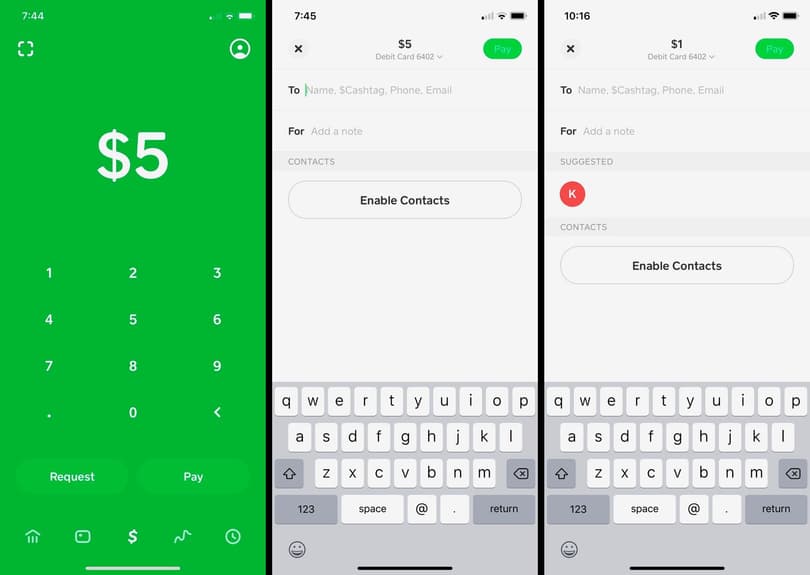
Open the Cash App: Launch the application on your smartphone. You’ll typically land on the “My Cash” or “Home” screen, which displays your current balance.
-
Enter the Amount: On the main screen, you’ll see a large number pad. Type in the precise amount of money you wish to send. The minimum amount is typically $1.
-
Tap “Pay”: After entering the amount, a prominent “Pay” button (often green) will appear or become active. Tap this to proceed.
-
Identify the Recipient: This is a crucial step. Cash App offers several ways to find who you’re sending money to:
- $Cashtag: This is the most common and secure method. A $Cashtag is a unique identifier (e.g., $JohnDoe123) that users create. Enter the recipient’s exact $Cashtag.
- Phone Number: You can enter the recipient’s phone number if it’s linked to their Cash App account.
- Email Address: Similarly, an email address linked to their account can be used.
- QR Code: For in-person transactions, some users might have a QR code you can scan. This feature leverages your phone’s camera technology for quick identification.
- Contact List: If the recipient is in your phone’s contact list and has a Cash App account linked to that number/email, they might appear as a suggestion.
Always double-check the recipient’s identifier (especially the $Cashtag) to ensure you’re sending money to the correct person. Cash App transactions are often irreversible.
Confirming and Executing the Transaction
- Add a Memo (Optional but Recommended): After selecting the recipient, a field will appear for a “For” or “What’s it for?” note. It’s good practice to add a brief description of the payment (e.g., “Dinner,” “Rent,” “Birthday Gift”). This acts as a digital receipt and helps both parties track transactions.
- Review Details: Before the final send, Cash App will present a summary screen displaying the amount, the recipient’s $Cashtag/name, and your memo. Carefully review all the information.
- Tap “Pay”: If everything looks correct, tap the final “Pay” or “Confirm” button.
- Authentication (if required): Depending on your security settings and the transaction amount, you might be prompted to enter your PIN, use Touch ID, or Face ID to authorize the payment. This is a vital security layer designed to protect your funds.
- Confirmation: Once authenticated, the money will be sent, and you’ll receive an immediate confirmation screen, usually with a green checkmark and a transaction ID. The recipient will also receive a notification.
The entire process, from opening the app to confirmation, is designed for speed and efficiency, often taking less than 30 seconds for experienced users.

Common Pitfalls and How to Avoid Them
Even with a streamlined interface, users can encounter issues.
- Sending to the Wrong Person: This is the most significant pitfall. Cash App transactions are largely irreversible. Always verify the recipient’s $Cashtag, phone number, or email address multiple times. If you send to the wrong person, immediately contact the recipient and request a refund. If they are unresponsive, contact Cash App support, though success is not guaranteed.
- Insufficient Funds: Ensure your linked debit card or Cash App balance has enough funds to cover the transaction. A failed transaction due to insufficient funds will result in an error message.
- Network Issues: A stable internet connection (Wi-Fi or mobile data) is essential for transactions to process correctly. Poor connectivity can lead to delays or failed payments.
- Scams: Be vigilant against phishing attempts or requests from unknown individuals. Cash App will never ask for your PIN or full sign-in code via email or text.
- Account Limits: New or unverified accounts may have lower sending limits. Verify your identity with Cash App (providing your SSN and date of birth) to increase these limits.
Ensuring Digital Security: Protecting Your Transactions
While Cash App’s technology enables convenient transfers, its robust security features are paramount to maintaining user trust. Understanding both the app’s built-in protections and user best practices is crucial for safe digital transactions.
Cash App’s Built-in Security Protocols
Cash App employs several layers of technological security to safeguard user data and funds:
- Data Encryption: All data transmitted between your device and Cash App’s servers is encrypted using industry-standard protocols, protecting sensitive information like bank details and transaction data from interception.
- PCI-DSS Compliance: Cash App is Payment Card Industry Data Security Standard (PCI-DSS) Level 1 compliant, which is the highest level of certification for data security in the payment industry. This means it adheres to strict guidelines for protecting cardholder data.
- Fraud Detection Algorithms: Sophisticated algorithms continuously monitor transactions for suspicious activity. If an unusual pattern is detected, the system may flag the transaction, pause it, or require additional verification from the user.
- Two-Factor Authentication (2FA): While not always strictly 2FA in the traditional sense, Cash App uses login codes sent to your phone or email. This ensures that even if someone has your password, they can’t access your account without access to your registered device or email.
- In-App PIN/Biometric Security: Users are encouraged to set a PIN, Touch ID, or Face ID requirement for transactions, adding an immediate layer of security to prevent unauthorized payments if your device falls into the wrong hands.
User Best Practices for Enhanced Protection
While Cash App’s technology is robust, user vigilance significantly enhances security:
- Enable PIN/Biometric Lock: Always activate and use the in-App PIN, Touch ID, or Face ID requirement for all transactions. This is your first line of defense against unauthorized use.
- Use Strong, Unique Passwords: Ensure your Cash App password (if you use one for web login) is complex and unique to avoid credential stuffing attacks.
- Monitor Account Activity: Regularly review your transaction history within the app. Report any unauthorized transactions to Cash App support immediately.
- Be Skeptical of Unsolicited Requests: Cash App will never ask for your sign-in code, PIN, or other sensitive information outside of the app. Beware of phishing emails, texts, or calls claiming to be from Cash App support.
- Public Wi-Fi Caution: Avoid making financial transactions over unsecured public Wi-Fi networks, as these can be vulnerable to eavesdropping. Use a secure network or your mobile data.
- Verify Identity Thoroughly: When sending money, always verify the recipient’s $Cashtag, phone number, or email. A single typo can send your money to an unintended recipient, and retrieval can be difficult or impossible.
Advanced Features and Troubleshooting
Cash App’s design extends beyond simple “send money” functionality, offering features that cater to diverse financial needs and robust mechanisms for when things don’t go as planned.
Requesting Money and Bill Splitting
The inverse of sending money is requesting it, a feature that also relies on the app’s P2P framework.
- Requesting Money: From the main screen, enter the amount you wish to request and tap the “Request” button. You’ll then select the person(s) from whom you’re requesting the funds, similar to identifying a recipient for sending. This is incredibly useful for collecting money for group activities or settling debts.
- Bill Splitting: While Cash App doesn’t have a dedicated “split bill” button like some other apps, the request feature serves this purpose effectively. One person can pay the entire bill and then send individual requests to others for their share, making group expenses easily manageable. This leverages the core P2P technology in a practical, social context.
What to Do If a Transaction Fails
Despite its reliability, technological glitches or user errors can occasionally lead to failed transactions.
- Check Internet Connection: The most common reason for failure is a poor or unstable internet connection. Ensure you have strong Wi-Fi or mobile data signal.
- Verify Funds: Confirm that your linked bank account or debit card has sufficient funds.
- Review Recipient Details: Double-check that the $Cashtag, phone number, or email address entered is correct and that the recipient’s account is active.
- Contact Cash App Support: If the transaction continues to fail after basic troubleshooting, or if you suspect an issue with your account or the app itself, immediately contact Cash App support through the app. Navigate to your profile icon, then scroll down to “Support” and select “Something Else” to explain your issue. Cash App’s support system is integrated directly into the application to facilitate timely assistance. Provide all relevant details, including the transaction ID (if available), to expedite resolution.
Conclusion
Cash App has firmly established itself as a leading financial technology application, simplifying the complex process of money transfer into a few intuitive taps. Its robust architecture, encompassing secure data encryption, fraud detection, and compliance with stringent industry standards, forms the backbone of its reliable service. By understanding not just how to send money but also the technological principles that govern the app and the importance of digital security best practices, users can leverage Cash App effectively and safely.
From its core functionality of instant peer-to-peer transfers to its integrated features like the Cash Card, direct deposit, and investment options, Cash App exemplifies how technology continues to evolve the landscape of personal finance. It empowers users with a versatile tool that extends far beyond simple transactions, making it an indispensable part of the digital financial toolkit for millions worldwide. Embracing this technology wisely ensures seamless and secure management of your digital funds.
aViewFromTheCave is a participant in the Amazon Services LLC Associates Program, an affiliate advertising program designed to provide a means for sites to earn advertising fees by advertising and linking to Amazon.com. Amazon, the Amazon logo, AmazonSupply, and the AmazonSupply logo are trademarks of Amazon.com, Inc. or its affiliates. As an Amazon Associate we earn affiliate commissions from qualifying purchases.