
In the evolving landscape of digital finance, peer-to-peer (P2P) payment applications have become indispensable tools, streamlining transactions and simplifying money management for millions. Among these, Venmo stands out as a pioneering platform, seamlessly blending social interaction with financial utility. For many, the question “how do I pay using Venmo?” is more than just a query about a transaction; it’s an inquiry into leveraging a powerful piece of financial technology that has reshaped how we exchange money. This article will serve as a comprehensive guide, delving into the technical functionalities, user experience, and practical applications of paying with Venmo, strictly from a technology-centric perspective.

Understanding Venmo: More Than Just a Payment App
Venmo, at its core, is a mobile payment service owned by PayPal, designed to facilitate quick and easy money transfers between individuals. However, its technological architecture and user interface extend far beyond mere transactions. It integrates social networking elements, allowing users to share payment details, add emojis, and interact with friends within the app, creating a unique “social payment” experience. This blend of financial utility and social engagement is a key technological differentiator, making Venmo more than just a digital wallet.
The Rise of Social Payments and UX Design
The emergence of Venmo in the early 2010s tapped into a burgeoning demand for simpler, more immediate payment solutions, especially among younger demographics accustomed to instant digital communication. Its user experience (UX) design prioritizes intuitiveness and speed. From the moment you launch the app, the focus is on facilitating a payment quickly, whether it’s splitting a dinner bill, sharing rent, or sending a gift. This design philosophy, rooted in minimizing friction for the user, is a hallmark of successful consumer technology. The public feed, showcasing anonymized transactions between friends, further gamifies the payment process, making it feel less like a chore and more like an extension of social interaction. Technologically, this involves robust backend systems capable of handling millions of transactions per day, coupled with a frontend that remains fluid and responsive across various mobile operating systems.
Key Features and Ecosystem Integration
Venmo’s technological ecosystem extends beyond simple P2P transfers. It offers a suite of features designed to enhance its utility:
-
Linked Payment Methods: Users can connect bank accounts, debit cards, and credit cards for funding payments, showcasing robust API integrations with financial institutions.
-
Venmo Debit Card: A physical Mastercard debit card linked directly to a user’s Venmo balance, allowing spending in brick-and-mortar stores and online, thereby extending the app’s utility into the traditional retail space.
-
Business Profiles: Enabling small businesses and freelancers to accept payments from customers directly through Venmo, complete with transaction tracking and reporting.
-
QR Code Payments: Streamlining in-person transactions through scannable QR codes, a contactless payment solution increasingly popular in retail environments.
-
Crypto on Venmo: An innovative feature allowing users to buy, sell, and hold cryptocurrencies directly within the app, demonstrating Venmo’s commitment to integrating emerging financial technologies.
-
Direct Deposit: Allowing users to receive paychecks or government payments directly into their Venmo account, further solidifying its role as a primary financial hub for many.
These features illustrate Venmo’s evolution from a niche P2P app to a comprehensive digital payment platform, continually leveraging new technologies to expand its functionality and reach.
Getting Started with Venmo: Setting Up Your Account
Before you can pay using Venmo, setting up and configuring your account is a prerequisite. This process is designed to be straightforward, guiding users through necessary steps while ensuring security and compliance.
Download and Registration
The journey begins with downloading the Venmo application, available on both iOS and Android platforms. The app’s footprint is relatively small, ensuring quick downloads even on slower connections. Upon launch, new users are prompted to create an account. This typically involves:
-
Providing basic personal information: Name, email, phone number.
-
Creating a secure password: Adhering to modern security standards for password strength.
-
Verifying identity: Often through a phone number verification code, a standard security protocol to confirm user authenticity and prevent fraud.
-
Setting up a unique username: This becomes your Venmo handle, allowing others to easily find and pay you.
This initial setup leverages standard mobile app development practices, focusing on user-friendly onboarding while gathering essential data for account creation and security.
Linking Payment Methods (Bank, Debit/Credit Cards)
The core functionality of paying with Venmo relies on having a funded account or linked payment source. Venmo supports several options, each with its own technical implications and user experience:
-
Bank Account: Linking a bank account allows for direct transfers to and from your Venmo balance. This typically involves logging into your bank through a secure portal (powered by third-party financial data aggregators like Plaid) or manually entering your account and routing numbers, followed by a micro-deposit verification process. The secure connection ensures encrypted transmission of sensitive banking information.
-
Debit Card: Linking a debit card provides immediate access to funds from your bank account without the need for micro-deposit verification. Transactions are typically processed through card network APIs (Visa, Mastercard, etc.).
-
Credit Card: While convenient, credit card payments on Venmo usually incur a 3% fee, a standard practice reflecting the processing costs imposed by credit card networks. This option is primarily for convenience when other funding sources are unavailable.
Venmo’s system securely stores these payment methods, tokenizing sensitive card details to minimize the risk of data breaches, ensuring that actual card numbers are not directly accessible by Venmo employees or systems beyond what is necessary for transaction processing.
Verifying Your Identity for Enhanced Limits
To unlock higher transaction limits and access certain features (like the Venmo Debit Card or crypto trading), users must complete an identity verification process. This is a crucial technological and regulatory requirement, adhering to Know Your Customer (KYC) and Anti-Money Laundering (AML) regulations. The process typically involves:
-
Providing Date of Birth and the last four digits of your Social Security Number (SSN): For U.S. residents, this data is cross-referenced with national databases.
-
Sometimes, a photo of a government-issued ID: A more stringent verification step involving optical character recognition (OCR) and potentially facial recognition technology to match the ID to the user.
This robust verification system protects both Venmo and its users from fraudulent activities, money laundering, and other illicit financial behaviors, demonstrating a commitment to secure and compliant financial technology.
The Core Functionality: Making Payments
Once your account is set up and funded, the primary reason you’re using Venmo—to pay someone—becomes remarkably simple. The app is designed to streamline this process into a few intuitive taps.
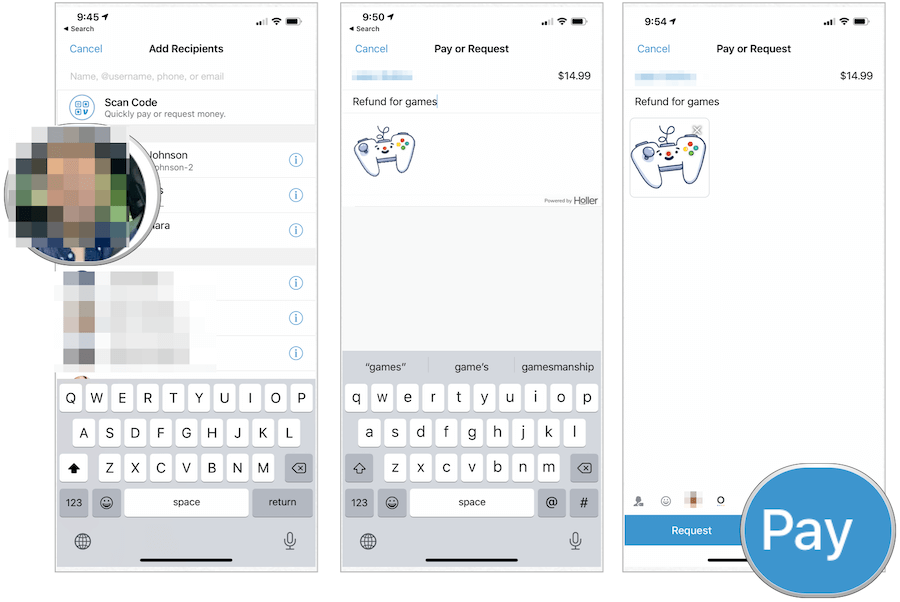
Sending Money to Friends and Family
This is Venmo’s bread and butter. The process is as follows:
-
Tap the “Pay & Request” button: Usually prominently displayed in the app interface.
-
Select the recipient: You can search by username, phone number, or email address. If they’re in your phone contacts and use Venmo, they’ll often appear automatically.
-
Enter the amount: Key in the exact sum you wish to send.
-
Add a note: This is where the social aspect comes in. You can describe the payment, add emojis, and choose privacy settings (public, friends-only, or private).
-
Select payment source: Choose whether to use your Venmo balance, linked bank account, or card.
-
Confirm and send: A final review screen allows you to double-check details before authorizing the transaction.
Technologically, this process involves secure API calls to Venmo’s backend, which then processes the payment, updates balances, and sends notifications. For payments funded by a bank account or debit card, the transaction often initiates an Automated Clearing House (ACH) transfer or a card network transaction, respectively, which can take 1-3 business days to fully settle, though the Venmo balance updates instantly for the recipient.
Paying Businesses with Venmo
Venmo has expanded its utility to allow payments to participating businesses, blurring the lines between P2P and merchant payments. This functionality typically works in two ways:
-
In-App Purchases: Many online retailers integrate “Pay with Venmo” as a checkout option. When selected, the user is redirected to the Venmo app to authorize the payment, which is then securely communicated back to the merchant’s payment gateway.
-
QR Code Payments: In physical stores, businesses can display a Venmo QR code. Users scan this code with the Venmo app, enter the amount, and confirm the payment. This leverages the device’s camera and Venmo’s QR decoding technology for a seamless, contactless transaction.
For businesses, integrating Venmo as a payment option means tapping into a large user base with established payment habits, facilitated by robust SDKs (Software Development Kits) and API documentation provided by Venmo/PayPal.
Splitting Bills and Requesting Payments
Beyond sending money, Venmo also facilitates the common scenarios of splitting expenses and requesting funds.
-
Requesting Money: Similar to sending money, users can initiate a request from another Venmo user. This sends a notification to the recipient, prompting them to pay the requested amount. It’s a polite and efficient way to remind friends about shared expenses.
-
Splitting Bills: Venmo offers an intuitive “Split” feature, particularly useful for group dinners or shared costs. One person pays the total, then uses the “Split” function to divide the cost among specific Venmo friends, who then receive individual payment requests.
These features demonstrate Venmo’s understanding of real-world financial interactions, building technological solutions that directly address user needs for collective financial management.
Ensuring Secure Transactions and Troubleshooting
In any financial technology, security is paramount. Venmo employs multiple layers of security, but users also play a critical role in safeguarding their accounts.
Venmo’s Security Measures
Venmo’s security infrastructure is built on industry-standard practices:
-
Data Encryption: All sensitive information, including payment details and personal data, is encrypted both in transit (using TLS/SSL protocols) and at rest on Venmo’s servers.
-
Fraud Detection: Sophisticated algorithms and machine learning models continuously monitor transactions for unusual patterns that might indicate fraudulent activity.
-
PCI DSS Compliance: Venmo adheres to the Payment Card Industry Data Security Standard, a global benchmark for securing cardholder data.
-
Multi-Factor Authentication (MFA): Users can enable MFA (e.g., PIN, fingerprint, facial recognition) for enhanced login security.
-
Transaction Monitoring: A dedicated team monitors transactions and user activity to identify and prevent unauthorized access or illicit uses of the platform.
These technological safeguards are constantly updated and refined to counteract evolving cyber threats, providing a robust security framework for user funds and data.
Best Practices for Users
While Venmo provides strong security, user vigilance is essential:
-
Strong, Unique Passwords: Use complex passwords and avoid reusing them across multiple services.
-
Enable Multi-Factor Authentication: This adds an extra layer of security to your account.
-
Be Wary of Phishing: Venmo will never ask for your password or sensitive information via email or text. Always verify the sender and URL for any communications.
-
Public vs. Private Transactions: Be mindful of your privacy settings. While the social feed is fun, ensure you’re comfortable with the visibility of your transactions.
-
Verify Recipients: Double-check the recipient’s username, phone number, or email before sending money, as Venmo payments are often irreversible.
-
Secure Your Device: Use screen locks (PIN, fingerprint, face ID) on your smartphone to prevent unauthorized access to your apps, including Venmo.

Common Payment Issues and Solutions
Despite Venmo’s robust design, users might occasionally encounter issues. Understanding common technical glitches and their solutions can save time and frustration:
-
Payment Not Going Through:
-
Insufficient Funds: Check your Venmo balance or linked payment method.
-
Bank/Card Issues: Your bank or card issuer might have declined the transaction (e.g., due to fraud alert, daily limits). Contact your financial institution.
-
Network Connectivity: Ensure you have a stable internet connection.
-
Venmo Account Limits: You might have reached daily or weekly spending limits, especially if your identity isn’t fully verified.
-
-
Pending Payments: Sometimes payments might be pending due to bank processing times or Venmo’s security review. Allow a few business days for settlement.
-
Incorrect Recipient: If you send money to the wrong person, immediately try to request the money back from them. If they don’t respond, contact Venmo support, though recovery is not guaranteed.
-
Technical Glitches: If the app is acting up, try restarting it, clearing its cache, or reinstalling it. Check Venmo’s status page for any widespread outages.
Venmo’s support system, accessible through the app, can provide further assistance for complex issues, leveraging customer service portals and ticketing systems to resolve user problems efficiently.
In conclusion, paying with Venmo is a testament to modern financial technology, blending ease of use with powerful features and robust security. By understanding its technological underpinnings, how to set up an account, navigate its core functionalities, and practice good digital hygiene, users can fully leverage Venmo as an essential tool in their digital financial lives.
aViewFromTheCave is a participant in the Amazon Services LLC Associates Program, an affiliate advertising program designed to provide a means for sites to earn advertising fees by advertising and linking to Amazon.com. Amazon, the Amazon logo, AmazonSupply, and the AmazonSupply logo are trademarks of Amazon.com, Inc. or its affiliates. As an Amazon Associate we earn affiliate commissions from qualifying purchases.