
In the intricate landscape of personal and business finance, tax files stand as cornerstone documents. They are not merely receipts of past financial activity but critical tools for present compliance, future planning, and ensuring long-term financial health. The simple act of “opening a tax file” can sometimes be deceptively complex, involving various formats, software, and digital security considerations. This guide delves into the financial necessity of accessible tax records and provides a comprehensive approach to navigating the challenge of opening these crucial documents, firmly rooted in the principles of robust financial management.
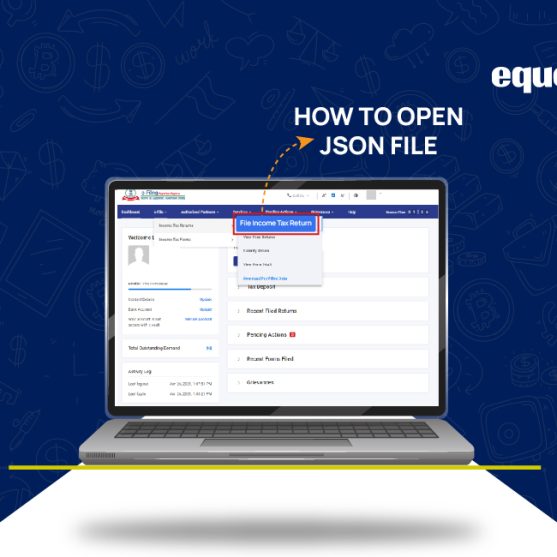
The ability to quickly and securely access your tax files is paramount for several reasons: it aids in financial reconciliation, supports loan applications, facilitates audits, and forms the bedrock for strategic financial decisions. Understanding the different types of tax files and the financial tools required to open them is therefore not just a technicality, but a vital component of informed financial stewardship.
The Financial Imperative of Accessible Tax Records
Your tax files encapsulate a significant portion of your financial narrative for any given year. From income earned to deductions claimed, and credits received, these documents are indispensable. The ease with which you can access them directly impacts your financial agility and preparedness.
Understanding Different Tax File Formats and Their Origins
Tax files come in a myriad of formats, each originating from different sources and requiring specific methods for access. Recognizing these distinctions is the first step in effective financial data management.
- PDF Documents: Perhaps the most common format, PDFs are often generated by tax preparation software (e.g., TurboTax, H&R Block), directly downloaded from IRS or state tax agency portals, or created from scanned paper documents. They are universally readable, but their origin dictates their content. A PDF from the IRS might be a tax transcript, while one from your tax preparer would be your filed return.
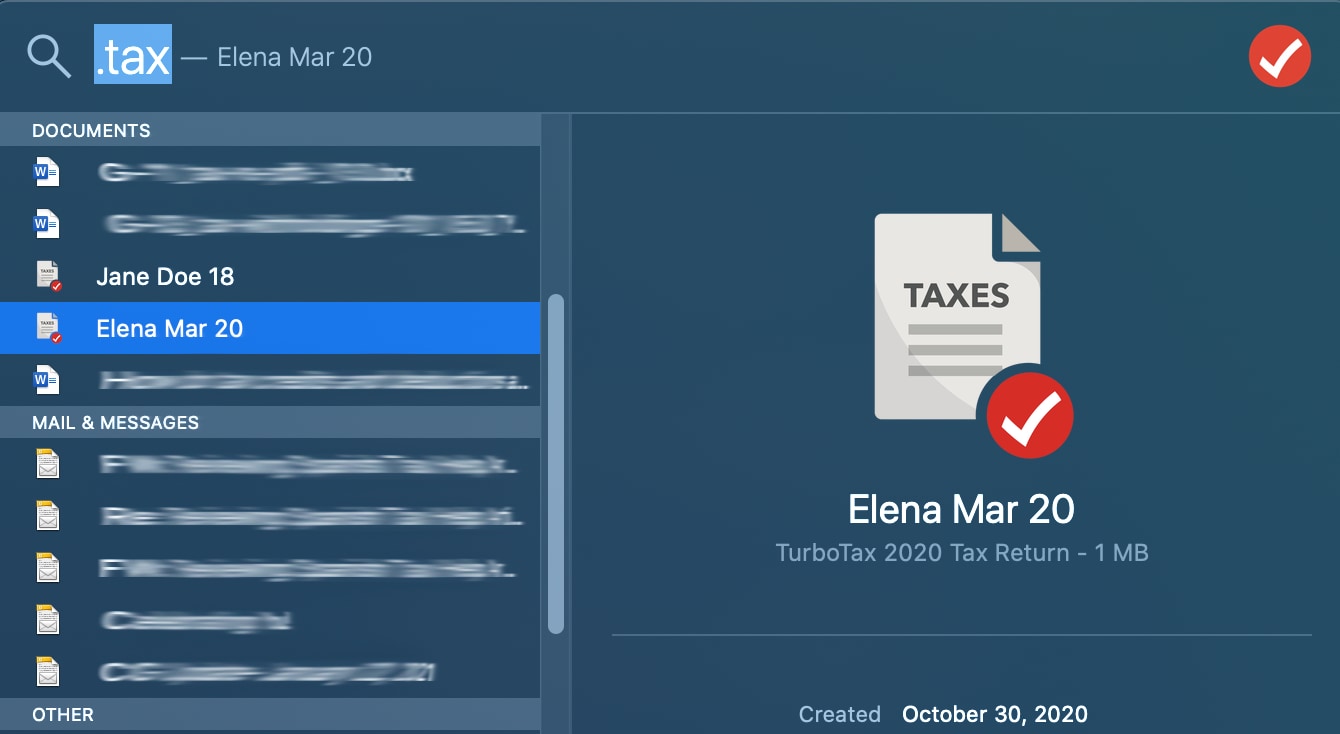
- Proprietary Software Files: If you use desktop tax software, your tax return data is often saved in a proprietary format unique to that program (e.g.,
.taxfor TurboTax,.tXXfor H&R Block, where XX is the tax year). These files contain not just the final return, but all the underlying data entries and calculations, making them crucial for amending returns or preparing future ones. - Spreadsheet Files (CSV, XLSX): While less common for the final tax return itself, many supporting documents, especially for businesses (e.g., expense reports, income statements), might be saved in spreadsheet formats. These are essential for reconciling data and feeding into tax preparation.
- Image Files (JPG, PNG): Scanned copies of W-2s, 1099s, receipts, or even entire paper tax returns might exist as image files. These are crucial for record-keeping but often require optical character recognition (OCR) software if you need to extract data for analysis or direct input.
- Online Portal Data: Increasingly, tax information resides directly within online platforms provided by tax software companies or government agencies. While not a “file” in the traditional sense, accessing these portals retrieves your data digitally.
Importance for Audits, Loans, and Future Financial Planning
Beyond basic compliance, accessible tax records are critical for navigating various financial milestones and challenges:
- Audits and Inquiries: Should the IRS or state tax authority have questions or initiate an audit, immediate access to your filed returns and supporting documentation is non-negotiable. Missing or inaccessible records can lead to penalties or adverse rulings.
- Loan Applications: Whether applying for a mortgage, business loan, or even student financial aid, lenders frequently request copies of your recent tax returns (often the past two to three years) to verify income and financial stability. Delays in providing these can jeopardize your application.
- Strategic Financial Planning: Tax returns offer a historical snapshot of your income, expenses, deductions, and tax liabilities. Analyzing this data helps in projecting future tax burdens, optimizing investment strategies, identifying potential tax savings, and making informed decisions about retirement planning, wealth accumulation, and estate planning. They highlight trends in income and expenses that are vital for budgeting and forecasting.
Navigating Common Tax File Formats and Opening Methods
The method you use to open a tax file largely depends on its format and source. Understanding these methods is key to seamless financial data access.
Standard Digital Formats: PDFs and Image Files
For the majority of users, PDF files will be the most frequently encountered tax document.
- PDFs: These can be opened with a wide array of software. Most modern operating systems have built-in PDF viewers (e.g., Microsoft Edge on Windows, Preview on macOS). Third-party applications like Adobe Acrobat Reader (free), Foxit Reader, or Nitro PDF are also excellent, often offering more advanced features like annotation or digital signatures, which can be useful for financial review. Simply double-clicking the file usually launches the default PDF viewer. If not, right-click, select “Open with,” and choose your preferred program.
- Image Files (JPG, PNG): These open easily with any image viewer or photo application built into your operating system (e.g., Photos on Windows, Preview on macOS). If the image is of a document, you might need to zoom in to read details. For data extraction, OCR software (like Adobe Acrobat Pro or various online tools) can convert the image into searchable text, integrating it into your digital financial ecosystem.
Proprietary Tax Software Files: Quicken, TurboTax, H&R Block, etc.
Files saved by desktop tax preparation software are unique and require specific handling.
- Specific Software Requirement: Files with extensions like
.tax,.tXX, or similar can only be opened by the exact software version that created them, or a compatible newer version. For instance, a 2022 TurboTax file (.tax2022) typically needs TurboTax 2022 or 2023 to open it. If you no longer have the software installed, you might need to reinstall it. Many software providers offer free downloads of prior-year versions for this purpose. - Data Migration and Export: Once opened, these files allow you to view the entire return, make amendments, or even export data to other formats. Most tax software allows you to print to PDF, which creates a universally accessible copy. Some also offer options to export specific financial data to spreadsheets, facilitating further analysis or import into personal finance management software like Quicken or YNAB.
- Challenges with Older Files: Accessing very old proprietary files can be challenging if the software is no longer supported or compatible with modern operating systems. In such cases, your best bet is often to retrieve a PDF copy from the original software’s online archive (if available) or directly from the IRS/state tax authority.
Online Tax Portals and Digital Archives
Many individuals now prepare and file taxes entirely online.
- Direct Access: If you used an online tax preparation service (e.g., TurboTax Online, H&R Block Online), your completed tax returns and supporting documents are typically stored securely within your account on their website. You can log in at any time to view, download, or print these documents as PDFs. This method often negates the need to “open” a local file, as the data is accessed via a web browser.
- Government Portals: The IRS offers its “Get Your Tax Record” service, allowing you to access tax transcripts (which summarize your return information) online or request copies of your actual returns. State tax agencies often provide similar services through their respective online portals. These are invaluable if you’ve lost your personal copies or need verification directly from the source.
Essential Financial Tools and Software for Tax File Management
Effective management of tax files relies heavily on leveraging the right financial tools and software. These tools extend beyond mere file openers, providing comprehensive solutions for organization, security, and analysis.
Universal Document Viewers vs. Specialized Tax Software
Choosing the right tool depends on your immediate need and long-term financial strategy.
- Universal Document Viewers: For simply viewing a PDF of your tax return, a standard PDF reader (like Adobe Acrobat Reader) is sufficient. These are free, widely available, and ensure basic accessibility. They are tools for consumption, not creation or modification of tax data.
- Specialized Tax Software: To fully engage with your tax data—whether amending a return, reviewing calculations, or importing data for the next tax year—the original tax preparation software is indispensable. This software acts as a financial tool, allowing manipulation and analysis of your tax position, offering insights that a flat PDF cannot. Investing in a consistent tax software solution year over year simplifies tax file management immensely.
Cloud-Based Financial Management Solutions
The shift towards cloud computing has significantly impacted how we manage financial documents, including tax files.
- Integrated Platforms: Many personal finance management (PFM) tools (like Mint, Quicken, YNAB) now offer cloud storage or integration capabilities. While they don’t open proprietary tax files directly, they can categorize income and expenses, helping prepare you for tax season, and some allow for secure storage of PDF tax returns.
- Secure Cloud Storage: Services like Google Drive, Dropbox, Microsoft OneDrive, or specialized secure document vaults (e.g., LastPass’s Secure Notes, dedicated financial cloud services) offer secure, encrypted storage for your tax files (preferably in PDF format). This ensures accessibility from anywhere and provides a critical backup, protecting against local drive failure. Always ensure the service offers strong encryption and multi-factor authentication for sensitive financial data.
Data Conversion and Export Options
Being able to convert or export tax data can greatly enhance its utility for financial analysis.
- PDF to Spreadsheet: While not perfect, tools exist (both online and desktop-based, some integrated into PDF editors) to convert tabular data from PDFs into editable spreadsheets. This can be invaluable for extracting detailed financial figures from your tax return for budgeting, forecasting, or feeding into financial models.
- Tax Software Export: As mentioned, most tax software allows exporting data to various formats. Leveraging these features ensures your tax data isn’t siloed and can be integrated into your broader financial planning ecosystem. For instance, exporting business income and expense summaries to a spreadsheet allows for easier reconciliation with your accounting software.
Best Practices for Secure Financial Record Keeping
The sensitivity of tax files demands stringent security measures. Protecting these documents is not just about privacy but safeguarding your financial identity and assets.
Secure Storage and Backup Strategies
Preventing data loss and unauthorized access is paramount for all financial documents.
- Digital Storage Hierarchy: Keep your primary digital tax files (e.g., proprietary software files, original PDFs) in a secure, encrypted folder on your local computer. Complement this with at least two forms of backup: an external hard drive (also encrypted) and a reputable, secure cloud storage service.
- Regular Backups: Implement a schedule for backing up your tax files and other critical financial documents. Automating this process, where possible, minimizes the risk of human error.
- Physical Backups for Select Documents: While digitizing is efficient, some individuals prefer a physical paper copy of their final tax return, stored in a fireproof safe or secure filing cabinet. This provides an ultimate failsafe against digital catastrophes.
Password Management for Sensitive Financial Documents
Every layer of access to your tax information should be protected.
- Strong, Unique Passwords: Use complex, unique passwords for any online tax portals, cloud storage accounts, and even for local folders containing sensitive tax files (if your operating system allows folder encryption).
- Password Managers: Employ a reputable password manager (e.g., LastPass, 1Password, Bitwarden) to generate and store these complex passwords securely. This avoids password reuse and helps you manage numerous credentials without compromise.
- Two-Factor Authentication (2FA): Always enable 2FA on any online service that holds your tax information (tax software accounts, cloud storage, IRS portal). This adds a crucial layer of security, requiring a second verification method beyond just a password.
Verifying File Integrity and Source
In a world rife with phishing and scams, verifying the authenticity of your tax files is a critical financial security measure.
- Trusted Sources Only: Only open tax files received from trusted sources, such as your tax preparer, recognized government agencies, or your own tax software. Be wary of unsolicited emails with attachments claiming to be tax documents.
- Digital Signatures: Many legitimate PDFs from government agencies or professional preparers will feature digital signatures. Checking these signatures can verify the document’s authenticity and ensure it hasn’t been tampered with.
- Antivirus and Anti-Malware: Ensure your computer’s antivirus and anti-malware software are up-to-date and run regular scans. Malicious files disguised as tax documents can compromise your financial data and system security.
What to Do When You Can’t Open a File: Troubleshooting Financial Data Access
Despite best practices, you might occasionally encounter a tax file that refuses to open. This can be a source of significant financial stress, but troubleshooting steps can often resolve the issue.
Common Error Messages and Their Financial Context
Error messages are often clues to the problem.
- “File type not supported” or “Windows cannot open this file”: This typically means you’re trying to open a proprietary tax software file with a generic document viewer. The financial context here is that you need the specific financial tool (the tax software) to access that data.
- “File corrupted” or “Invalid file”: This is more serious, indicating the file itself might be damaged. This could be due to an incomplete download, a storage error, or a virus. From a financial perspective, this means your historical data is at risk.
- “Access denied” or password prompt (when you don’t expect one): This points to permission issues or unexpected encryption. Ensure you have the necessary administrative rights or that you’re using the correct password if the file was intentionally encrypted for security.
Seeking Professional Help for Data Recovery or Access
When self-troubleshooting fails, don’t hesitate to seek expertise.
- Contact Software Support: If it’s a proprietary file, contact the support team for that tax software. They often have tools or knowledge base articles to help recover or open files.
- IT Professionals for Corrupted Files: For truly corrupted files, a data recovery specialist might be able to retrieve the information, though this can be costly.
- Tax Professionals: Your tax accountant or enrolled agent may be able to access copies of your filed returns or assist in navigating the process of obtaining transcripts from the IRS. They understand the financial implications of inaccessible data.
Alternative Methods for Obtaining Tax Information
If a local file proves inaccessible, remember there are always fallback options.
- IRS and State Tax Agency Transcripts: As mentioned, the IRS’s “Get Your Tax Record” tool is an invaluable resource for obtaining summaries of your past tax returns. State tax agencies offer similar services. This can often provide enough information for loan applications or basic financial planning, even if you can’t open your personal copy.
- Tax Preparer Copies: If you used a tax preparer, they are legally required to keep copies of your returns for a certain period. Contacting them is often the quickest way to get a new copy.
- Reconstructing from Financial Records: In a worst-case scenario, you might have to reconstruct your tax information from bank statements, W-2s, 1099s, and other financial documents. This is a tedious process but possible.
Conclusion
The ability to effectively open and manage your tax files is not merely a technical skill but a fundamental component of sound financial management. From ensuring compliance during audits to securing loans and making informed future financial decisions, accessible tax records are indispensable. By understanding the various file formats, leveraging appropriate financial tools and software, and adhering to rigorous security best practices, you empower yourself with the financial data needed to navigate your economic landscape confidently. Proactive organization and a clear strategy for accessing these critical documents will undoubtedly contribute to your overall financial well-being and peace of mind.
aViewFromTheCave is a participant in the Amazon Services LLC Associates Program, an affiliate advertising program designed to provide a means for sites to earn advertising fees by advertising and linking to Amazon.com. Amazon, the Amazon logo, AmazonSupply, and the AmazonSupply logo are trademarks of Amazon.com, Inc. or its affiliates. As an Amazon Associate we earn affiliate commissions from qualifying purchases.