
In an increasingly digitized world, managing personal and business finances has become significantly more convenient, and tax obligations are no exception. The Internal Revenue Service (IRS) has embraced technology to offer a suite of secure and efficient online payment options, transforming what was once a cumbersome process into a streamlined digital experience. For millions of taxpayers, understanding and utilizing these online portals is key to ensuring timely and accurate payments, avoiding penalties, and maintaining good financial standing with the federal government. This comprehensive guide delves into the various methods available for remitting your tax payments to the IRS online, equipping you with the knowledge to choose the best option for your specific needs.

Understanding Your IRS Payment Obligations
Before diving into the mechanics of online payments, it’s crucial to understand the different types of tax obligations that you might need to fulfill. The IRS collects various forms of taxes throughout the year, and recognizing which payment applies to your situation is the first step toward effective financial management.
Types of Tax Payments
The IRS manages a broad spectrum of tax payments, each with its own purpose and due dates. Understanding these distinctions is fundamental to making correct and timely online payments.
-
Annual Income Tax (Form 1040 Balance Due): This is perhaps the most common payment, representing any outstanding balance owed after filing your annual federal income tax return (Form 1040). Many taxpayers have taxes withheld from their paychecks or make estimated payments throughout the year, but if these don’t fully cover their tax liability, a balance due payment is required by the tax deadline, typically April 15th.
-
Estimated Taxes (Form 1040-ES): For individuals who earn income not subject to withholding – such as self-employed individuals, gig workers, freelancers, or those with significant investment income – estimated taxes are paid quarterly. These payments are crucial to avoid underpayment penalties at the end of the tax year. The IRS sets specific due dates for each quarter, usually in April, June, September, and January of the following year.
-
Extension Payments: If you file for an extension of time to file your tax return (typically Form 4868), this grants you more time to submit your paperwork, but it does not extend the time to pay any taxes owed. If you anticipate owing taxes, you must estimate and pay that amount by the original tax deadline to avoid penalties and interest. Online payment methods are ideal for this scenario.
-
Underpayment Penalties: Should you fail to pay enough tax through withholding or estimated payments throughout the year, the IRS may assess an underpayment penalty. These can also be paid online once assessed.
-
Amended Returns: If you discover an error on a previously filed tax return that results in an additional tax liability, you’ll need to file an amended return (Form 1040-X) and pay the additional tax owed. Online payments are a straightforward way to handle this.
-
Business Taxes: Businesses have their own set of tax obligations, including employer payroll taxes, corporate income taxes, and excise taxes. Many of the online payment systems available to individuals also cater to businesses, offering tailored options for different entity types.
Why Pay Online?
The shift from mailing paper checks to making digital payments isn’t merely a matter of convenience; it offers substantial benefits for both taxpayers and the IRS.
-
Unparalleled Convenience: Online payment portals are accessible 24/7 from anywhere with an internet connection. This eliminates the need for stamps, envelopes, and trips to the post office, allowing taxpayers to fulfill their obligations on their schedule, even outside traditional business hours.
-
Speed and Efficiency: Digital payments are processed far more rapidly than paper checks. In many cases, you receive instant confirmation, providing immediate peace of mind that your payment has been successfully initiated. This is especially critical for last-minute payments near a deadline.
-
Enhanced Accuracy: Manual processes are prone to human error. Online payment systems guide you through data entry, reducing the chances of mistakes in payment amounts, tax years, or account numbers. This minimizes the risk of your payment being misapplied or delayed.
-
Robust Security: The IRS employs advanced encryption and security protocols for its online payment systems. While no system is entirely impervious, official IRS payment channels are designed to protect your sensitive financial information, often exceeding the security measures of traditional mail.
-
Improved Record-Keeping: Every online payment generates a digital confirmation. These confirmations, often sent via email and stored within the payment system, provide an easily accessible and verifiable record of your transaction, simplifying future tax preparations or inquiries.
Navigating the IRS’s Official Online Payment Gateways
The IRS offers several official avenues for making online payments, each designed to cater to different preferences and needs. Understanding the distinctions between these gateways is crucial for selecting the most appropriate method for your circumstances.
IRS Direct Pay
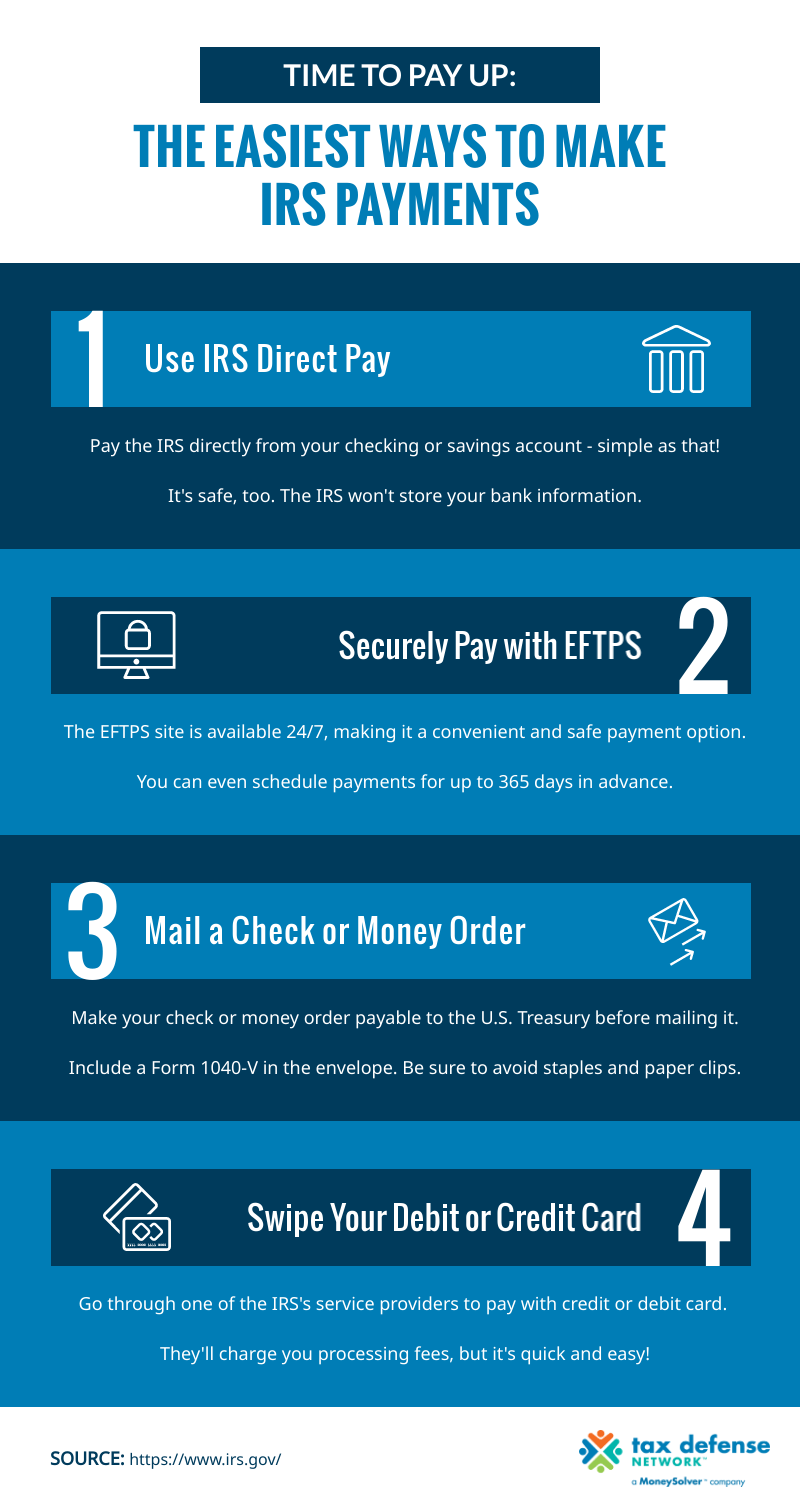
IRS Direct Pay is one of the most straightforward and widely used online payment options for individual taxpayers. It allows you to pay your taxes directly from your checking or savings account, without any processing fees.
-
Explanation: This service facilitates a direct debit from your bank account to the U.S. Treasury. It’s user-friendly and doesn’t require prior registration.
-
Advantages: The primary benefit is that it’s completely free – no additional fees are charged. It’s also simple to use, secure, and provides immediate email confirmation once the payment is scheduled or completed. You can schedule payments up to 365 days in advance.
-
Process: To use IRS Direct Pay, visit the official IRS.gov website. You’ll need to provide your name, Social Security Number (SSN), filing status, and date of birth to verify your identity. Then, you select the reason for your payment (e.g., “Balance Due,” “Estimated Tax”), the tax year, and the amount. Finally, you enter your bank account and routing numbers.
-
Confirmation: After submitting, you’ll receive a confirmation number immediately. It’s highly recommended to save this number. An email confirmation will also be sent to the address you provide, typically within a few business days, once the payment has been fully processed.
Pay by Debit Card, Credit Card, or Digital Wallet
For those who prefer the flexibility of credit cards, debit cards, or popular digital wallets, the IRS partners with several third-party payment processors.
-
Explanation: Instead of paying the IRS directly, you pay a trusted third-party service provider (e.g., PayUSAtax, OfficialPayments, ACI Payments Inc.), which then remits your payment to the IRS.
-
Advantages: This method offers several benefits, particularly for credit card users. You can earn credit card rewards (points, cashback, miles), and for some, it provides a way to pay taxes even if current cash flow is tight (though be mindful of interest rates on credit cards). Digital wallets like PayPal or Click to Pay offer an additional layer of convenience and security by not requiring you to directly input card details on the processor’s site.
-
Disadvantages: The main drawback is that these third-party processors charge a convenience fee, which varies depending on the processor and the type of card used. This fee is typically a percentage for credit card payments and a flat fee for debit card payments. It’s important to factor this cost into your decision.
-
Process: On the IRS.gov website, you’ll find links to approved payment processors. You choose a processor, and you’ll be redirected to their secure website to complete the transaction. You’ll enter your tax information, payment amount, and card or digital wallet details.
-
Confirmation: The processor will provide an immediate confirmation number, and usually send an email confirmation. Keep these records for your files.
Electronic Federal Tax Payment System (EFTPS)
EFTPS is a robust system designed for both individuals and businesses, especially beneficial for those who make recurring tax payments, such as estimated taxes or business payroll taxes.
-
Explanation: Unlike IRS Direct Pay, EFTPS requires enrollment. Once enrolled, you can schedule payments in advance and view your payment history. It’s essentially an electronic banking service for federal taxes.
-
Advantages: EFTPS is free of charge and allows you to schedule payments up to 365 days in advance. This is particularly useful for managing quarterly estimated tax payments or regular business tax deposits, ensuring they are never missed. It also offers a comprehensive payment history for easy record-keeping and audit purposes.
-
Disadvantages: The primary hurdle is the enrollment process, which can take 5-7 business days to complete as the IRS mails you a Personal Identification Number (PIN). This means it’s not ideal for last-minute payments if you’re not already enrolled.
-
Process: You must first enroll online at EFTPS.gov or by calling their enrollment line. Once enrolled and you receive your PIN, you can log in securely using your SSN/EIN, PIN, and an Internet password. From there, you can schedule and manage your tax payments.
-
Confirmation: You’ll receive an immediate EFTPS confirmation number. You can also opt for email confirmations, and your payment history is always accessible within your EFTPS account.
IRS2Go Mobile App
For mobile-savvy taxpayers, the IRS offers the IRS2Go app, providing a convenient way to make payments on the go.
-
Explanation: The official IRS mobile app, available for iOS and Android devices, allows users to make payments using IRS Direct Pay or through third-party credit/debit card processors.
-
Advantages: It offers the ultimate mobile convenience, allowing you to quickly check your refund status, access tax tips, and make payments directly from your smartphone or tablet.
-
Process: Download the IRS2Go app from your device’s app store. Within the app, navigate to the payment section. You’ll then be given the option to pay via IRS Direct Pay (linking to the online service) or through the approved third-party credit/debit card processors.
-
Confirmation: Confirmation procedures are similar to those for IRS Direct Pay or third-party processors.
Essential Considerations Before Making Your Online Payment
While online payments offer unparalleled convenience, a few critical considerations can help ensure a smooth and error-free transaction. Careful attention to these details can prevent common pitfalls and potential penalties.
Double-Checking Information
Accuracy is paramount when dealing with tax payments. A minor oversight can lead to significant headaches, including misapplied payments, delays, or even penalties.
-
Payment Amount: Verify the exact amount you intend to pay. This should match the amount on your tax return, estimated tax voucher, or IRS notice.
-
Tax Year: This is a frequent point of error. Always ensure you select or enter the correct tax year for which the payment is being made. Paying for the wrong year can cause your current year’s payment to appear late or missing.
-
SSN/EIN: Double-check your Social Security Number (SSN) or Employer Identification Number (EIN). This is how the IRS identifies your account and correctly applies your payment.
-
Bank Account/Credit Card Details: Meticulously review your bank account number, routing number, or credit card details to prevent payment rejections or incorrect debits.
Payment Deadlines
Understanding and adhering to payment deadlines is non-negotiable in tax matters. The IRS strictly enforces these dates, and missing them can result in penalties and interest.
-
Varying Due Dates: Be aware that different types of payments have different deadlines. The annual income tax deadline is typically April 15th, but estimated taxes are due quarterly, and extension payments must still meet the original due date.
-
Weekends and Holidays: If a payment due date falls on a weekend or a legal holiday, the deadline is generally shifted to the next business day. However, it’s always best to pay a few days in advance to avoid any last-minute issues.
-
Consequences of Late Payments: The IRS assesses penalties for late payments and failure to pay, in addition to charging interest on underpayments. These can quickly add up, so timely payment is in your best financial interest.
Record Keeping
Even with digital confirmations, diligent record-keeping remains a best practice for all financial transactions, especially tax payments.
-
Save Confirmation Numbers: For every online payment, save the confirmation number provided by the IRS or the third-party processor. This is your primary proof of payment.
-
Retain Email Confirmations: Keep all email confirmations in an organized digital folder. These often provide more details than just the confirmation number.
-
Maintain Bank/Card Statements: Regularly review your bank and credit card statements to ensure the payment was successfully processed and posted.
-
Importance for Audits or Inquiries: Should there ever be a discrepancy or an IRS inquiry, having clear, accessible records of your payments will be invaluable in demonstrating your compliance.
Understanding Fees and Limits
Being informed about any associated costs or transaction limits is essential for making an educated choice among the various payment methods.
-
No-Fee Options: IRS Direct Pay and EFTPS are completely free to use. These should be your go-to options if you prefer to avoid extra costs.
-
Fee-Based Options: Payments made via debit card, credit card, or digital wallet through third-party processors incur convenience fees. These fees are set by the processors, not the IRS, and typically range from 1.87% to 2.29% for credit cards and a flat fee of around $2.50 to $3.95 for debit cards. Always check the exact fee before confirming your payment.
-
Transaction Limits: While generally not an issue for most taxpayers, some third-party processors may have per-transaction limits, especially for very large payments. If you anticipate a substantial payment, it’s wise to confirm any limits with your chosen processor.
Troubleshooting and Best Practices for Online Payments
Even with the most careful planning, issues can sometimes arise. Knowing how to troubleshoot common problems and adopting best practices can help ensure a smooth online payment experience.
What If My Payment Fails or Is Incorrect?
If you encounter a problem with your online payment, don’t panic. There are steps you can take to rectify the situation.
-
Check Confirmation Status: First, verify if you received a confirmation number or email. If not, the payment may not have gone through.
-
Review Bank/Card Statement: Check your bank account or credit card statement to see if the payment was debited. If it was, but you didn’t get a confirmation, contact the IRS or the payment processor directly.
-
Contact the Right Party:
-
For IRS Direct Pay/EFTPS: If you suspect a technical issue or an incorrect application of funds, contact the IRS directly. Their website provides specific phone numbers for payment-related inquiries.
-
For Third-Party Processors: If the issue is related to your credit card, debit card, or digital wallet payment, first contact the third-party processor you used. They can usually resolve card-related issues, declined payments, or fee discrepancies.
-
-
Resubmit Payment: If a payment failed or was declined, determine the reason (e.g., incorrect bank details, insufficient funds) and then correct the issue before resubmitting the payment. Be mindful of deadlines, and if close to a deadline, use the fastest available method.
-
Document Everything: Keep a detailed record of all communication, including dates, times, names of representatives, and summary of discussions, especially if you have to follow up on a problem.
Security Measures for Online Payments
Protecting your financial information is paramount. While the IRS systems are secure, taxpayers also play a critical role in safeguarding their data.
-
Always Use Official IRS Websites: Always initiate your payment from the official IRS website (irs.gov). Never click on links in unsolicited emails or pop-ups that claim to be from the IRS, as these are likely phishing scams. Type the URL directly into your browser.
-
Beware of Phishing and Scams: The IRS will never initiate contact with you via email, text message, or social media to request personal or financial information. Any such communication is a scam. The IRS communicates via postal mail for official notices.
-
Use Strong, Unique Passwords: For services like EFTPS that require login credentials, use strong, unique passwords and consider enabling two-factor authentication if available.
-
Secure Internet Connection: Avoid making tax payments over public Wi-Fi networks, which are often unsecure and vulnerable to data interception. Use a private, secure network for all sensitive financial transactions.
-
Keep Software Updated: Ensure your operating system, web browser, and antivirus software are up to date. These updates often include critical security patches.
When to Seek Professional Assistance
While online payment systems are designed for ease of use, there are situations where professional guidance is highly recommended.
-
Complex Tax Situations: If your tax situation is complex (e.g., involving foreign income, multiple businesses, significant capital gains, or unusual deductions), a tax professional can ensure your tax liability is correctly calculated before you make a payment.
-
Difficulty Understanding Payment Options: If you’re unsure which payment method is best for you, or if you’re struggling to navigate the online portals, a tax advisor can walk you through the process or even make the payment on your behalf (with proper authorization).
-
Disputes with the IRS: If you’re disputing an amount owed to the IRS, or if you’ve received a notice you don’t understand, it’s crucial to consult with a tax attorney or enrolled agent before making any payments that might implicitly acknowledge a debt you believe is incorrect.
-
Inability to Pay: If you cannot afford to pay your tax bill in full, do not ignore it. The IRS offers various payment options, such as installment agreements or offers in compromise. A tax professional can help you negotiate these terms with the IRS and set up an appropriate payment plan.
Making payments to the IRS online has become an indispensable part of modern financial management. By leveraging the secure, convenient, and efficient tools provided by the IRS, taxpayers can ensure their obligations are met accurately and on time, avoiding unnecessary stress and penalties. Whether you opt for the no-fee simplicity of IRS Direct Pay, the reward-earning potential of credit cards, the advance scheduling capabilities of EFTPS, or the mobile convenience of IRS2Go, understanding these options empowers you to take control of your tax responsibilities. Always prioritize accuracy, adhere to deadlines, maintain diligent records, and remember that official IRS channels are your safest bet for a secure transaction. With these insights, you can navigate your tax payments with confidence and ease, ensuring your financial house remains in order.
aViewFromTheCave is a participant in the Amazon Services LLC Associates Program, an affiliate advertising program designed to provide a means for sites to earn advertising fees by advertising and linking to Amazon.com. Amazon, the Amazon logo, AmazonSupply, and the AmazonSupply logo are trademarks of Amazon.com, Inc. or its affiliates. As an Amazon Associate we earn affiliate commissions from qualifying purchases.