
In an era saturated with streaming services and on-demand content, the allure of satellite radio remains strong, particularly for drivers. SiriusXM offers an expansive universe of audio entertainment, free from the vagaries of local terrestrial radio and often unburdened by commercial interruptions. For many, the open road is synonymous with a personalized soundtrack or an engaging discussion, and SiriusXM provides just that. But for those new to the service or driving older vehicles, the question “how do I get SiriusXM in my car?” is a common one, often followed by a maze of options and technical jargon. This guide aims to demystify the process, offering a clear, professional, and insightful look into integrating SiriusXM into your driving experience, strictly from a technological standpoint.
Demystifying SiriusXM: Your Gateway to Premium Audio Entertainment
Before diving into the “how,” it’s crucial to understand the “what” and “why” behind SiriusXM. It’s more than just a radio service; it’s a unique technological offering that transforms your car’s audio landscape.
What is SiriusXM and Why It’s Unique?
SiriusXM operates on a satellite-based broadcast system, transmitting a vast array of audio channels across North America. Unlike traditional FM/AM radio, which relies on terrestrial towers with limited range and prone to interference, SiriusXM’s signals are beamed from satellites orbiting Earth. This allows for coast-to-coast coverage and a consistent, high-quality audio experience, regardless of where you’re driving (barring deep tunnels or dense urban canyons with extreme signal obstruction).
Its uniqueness lies not just in its broadcast method but also in its content. Subscribers gain access to hundreds of channels spanning every imaginable genre of music – often commercial-free – alongside exclusive talk shows, live sports, breaking news, comedy, and dedicated channels for specific artists or events. This diversity and exclusivity differentiate it significantly from standard radio, offering a premium, curated listening experience designed for the discerning listener.
Benefits of Bringing SiriusXM into Your Vehicle
Integrating SiriusXM into your car unlocks a suite of benefits that enhance every journey:
-
Uninterrupted Entertainment: Say goodbye to scanning for new stations on long drives or enduring repetitive commercial breaks. SiriusXM offers continuous entertainment, making road trips fly by.
-
Diverse Content Library: From classical to rock, jazz to hip-hop, political commentary to celebrity interviews, and live play-by-play sports, there’s always something to suit your mood or interest.
-
National Coverage: Enjoy consistent audio quality and access to your favorite channels whether you’re in a bustling city or driving through a remote desert, something local radio simply cannot offer.
-
Exclusive Programming: Many channels and shows are exclusive to SiriusXM, featuring renowned personalities, artists, and live events you won’t find elsewhere.
-
Enhanced Driving Experience: The right audio can transform a mundane commute into an enjoyable escape or keep you informed and entertained during lengthy periods behind the wheel.
The Two Main Avenues: Factory Integration vs. Aftermarket Solutions
Getting SiriusXM in your car typically boils down to two primary methods, each with its own set of technical considerations, advantages, and disadvantages. Understanding these will guide your decision-making process.
Factory-Installed SiriusXM: Seamless and Integrated
The most seamless way to enjoy SiriusXM is through a factory-installed system. Many new vehicles come with SiriusXM hardware pre-installed, often as part of the infotainment system.
-
Prevalence: A vast number of new cars sold today include a SiriusXM-ready radio. You’ll typically find a “SAT” or “SiriusXM” button on the dashboard or as an option within the infotainment menu.
-
Trial Periods: New car purchases often include a complimentary trial subscription (e.g., 3-6 months), allowing you to experience the service before committing to a paid plan.
-
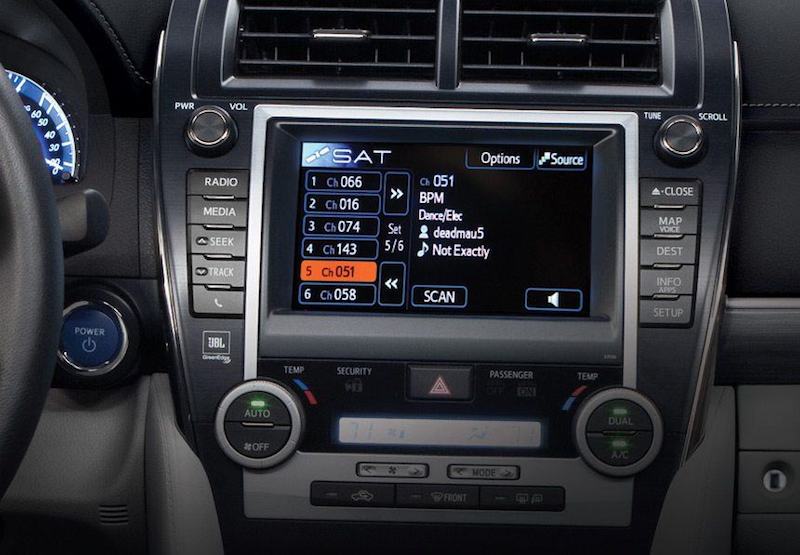
Integration: Factory systems are designed to integrate flawlessly with your car’s interior. The radio display will show channel logos, song titles, artist information, and often advanced features like “TuneMix” or “Start Over.” The antenna is typically discreetly mounted, often within the car’s existing roof fin or embedded in the windshield.
-
Technical Simplicity: For the user, this is the simplest option. No additional hardware installation is required; it’s purely a matter of activating a subscription. The car’s internal wiring and digital bus handle all the communication and display.
Aftermarket Options: Bringing SiriusXM to Any Car
If your vehicle wasn’t equipped with factory-installed SiriusXM, or if you drive an older model, aftermarket solutions provide a robust pathway to satellite radio. These options offer flexibility and can be tailored to various vehicle types and budgets.
Standalone Satellite Radios
These are dedicated SiriusXM units that function independently of your car’s existing radio, though they typically transmit audio to it.
-
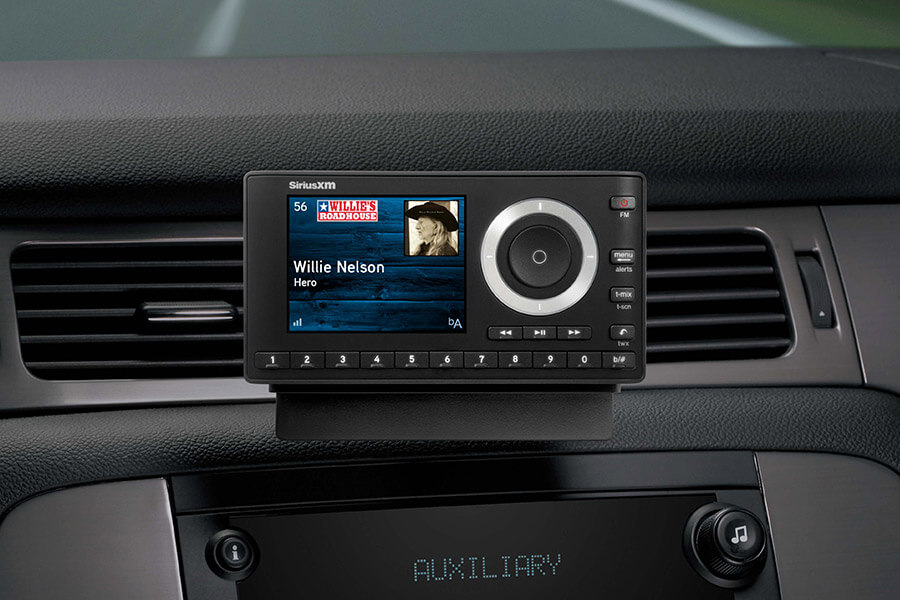
Components: A standalone unit usually consists of a receiver (the “radio” part), a small magnetic antenna that mounts on the car’s exterior, and a power adapter that plugs into your car’s 12V outlet.
-
Portability: Many standalone units are portable, meaning you can easily move them between vehicles (with additional car kits) or even use them at home with an optional home kit.
-
Display: These units have their own display screens, ranging from basic monochrome to full-color interfaces that show channel information.
-
Audio Output: Audio can be sent to your car’s stereo via an auxiliary input (AUX), a built-in FM transmitter, or in some cases, Bluetooth. The FM transmitter offers universal compatibility but can be susceptible to local radio interference.
-
Installation: Installation is generally DIY-friendly, involving mounting the antenna, securing the receiver, and connecting power and audio.
Car Kits for Existing Radios
These kits offer a more integrated, “factory-like” appearance by connecting directly to your car’s existing stereo system.
-
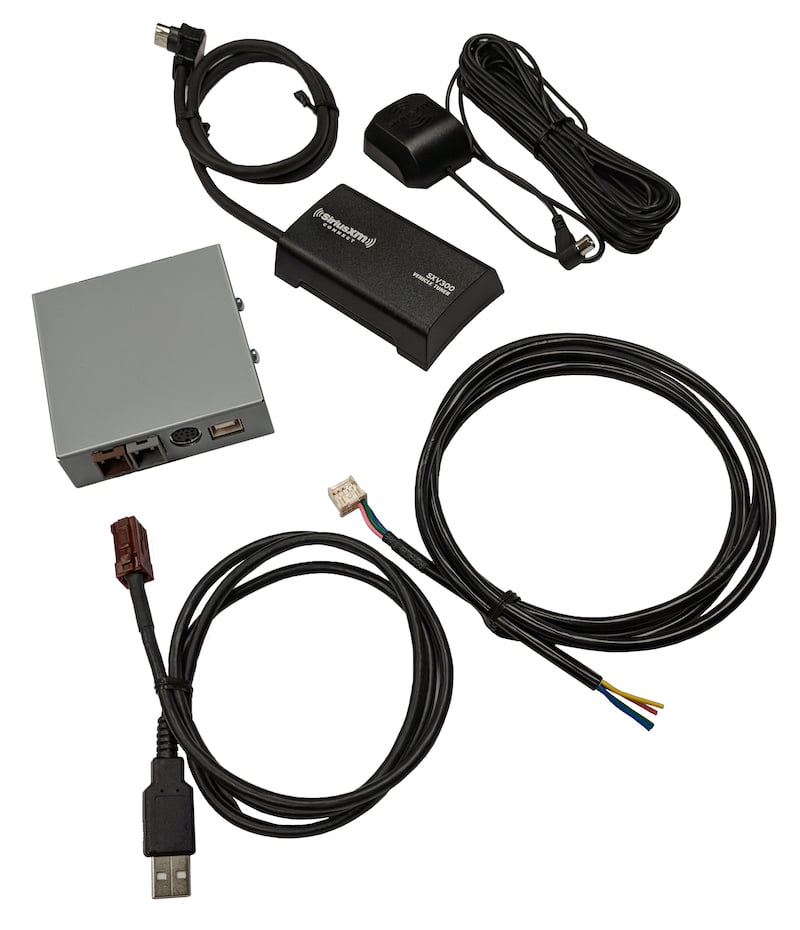
Vehicle-Specific Adapters: Many kits are designed for specific car makes and models, allowing for direct connection to the car’s wiring harness behind the dashboard. This bypasses the need for FM transmitters or AUX cables, providing superior audio quality.
-
Professional Installation Recommended: While some adept DIYers can handle these, they often require disassembling parts of your dashboard and connecting to complex wiring, making professional installation a common choice.
-
Display Integration: Some advanced kits can even display SiriusXM information on your car’s existing infotainment screen, mimicking factory functionality.
-
Bluetooth Connectivity: Newer iterations might leverage Bluetooth standards to integrate with modern infotainment systems, providing metadata display and control without extensive wiring.
Smartphone App Integration
With the proliferation of smartphones and advanced car infotainment systems, using the SiriusXM app is a viable and increasingly popular method.
-
Requirements: A SiriusXM streaming subscription (often included with satellite radio plans, or available as a standalone app-only plan) and a smartphone with the SiriusXM app installed.
-
Connectivity Options:
-
Apple CarPlay/Android Auto: If your car supports these platforms, the SiriusXM app integrates seamlessly, displaying channels and controls on your car’s touchscreen. This is arguably the most modern and user-friendly “aftermarket” solution for newer cars.
-
Bluetooth: Connect your phone to your car’s audio system via Bluetooth. You control the app on your phone, and the audio streams wirelessly to your car speakers.
-
AUX Input: Use a 3.5mm audio cable to connect your phone’s headphone jack (or a dongle) to your car’s AUX input.
-
USB: For charging and sometimes for direct audio input, though Bluetooth or CarPlay/Android Auto are generally preferred for better integration.
-
-
Pros: No additional hardware purchase (beyond your phone), access to on-demand content and personalized stations not available on satellite, always up-to-date with app features.
-
Cons: Relies on cellular data (unless content is downloaded), potential for data caps, phone battery drain, and signal reliability dependent on cellular coverage.
Navigating Your Choices: A Guide to Selecting the Right Setup
With multiple options available, choosing the best way to get SiriusXM in your car requires careful consideration of your vehicle, budget, and desired user experience.
Assessing Your Current Vehicle’s Compatibility
The first step is to evaluate your car’s existing technology.
-
Check for Factory-Installed System: Does your radio have a “SAT” or “SiriusXM” button? Can you find SiriusXM listed in the audio source menu? If so, you likely only need to activate a subscription. Many vehicles from the mid-2000s onwards have this capability.
-
Infotainment System: Does your car have Apple CarPlay or Android Auto? If yes, the smartphone app integration is a highly recommended and robust option.
-
Connectivity Ports: Does your car have an AUX input, USB ports, or Bluetooth audio streaming capabilities? These will dictate the easiest ways to integrate standalone units or your smartphone.
-
Dashboard Space: For standalone units, consider where you’ll mount the receiver without obstructing your view or controls.
Budgetary Considerations: Weighing Costs and Benefits
The cost of getting SiriusXM involves two main components: hardware and subscription.
-
Factory Activation: If pre-installed, the hardware cost is already factored into your car’s price. You only pay for the subscription.
-
Standalone Units: These range from $50 to $150 for the receiver and car kit. Installation is often DIY.
-
Car-Specific Integration Kits: These can range from $100 to $300+ for the hardware, plus potentially $100-$300 for professional installation.
-
Smartphone App: No hardware cost beyond your phone, but requires a data plan.
-
Subscription Plans: SiriusXM offers various plans, from basic entertainment to “All Access” which includes streaming. Costs vary, so check their website for current pricing and promotions.
Installation Preferences: DIY or Professional?
Your comfort level with car electronics will influence your choice.
-
DIY-Friendly: Standalone units and smartphone app integration are generally easy to set up yourself. This involves simple power connections, antenna placement, and audio routing.
-
Professional Installation: Car-specific integration kits, which involve disassembling dashboard components and wiring, are often best left to car audio specialists. This ensures correct installation, prevents damage, and maintains a clean, factory look. Most electronics retailers that sell SiriusXM car kits also offer installation services.
Feature Preferences: What Matters Most to You?
Consider what aspects of the SiriusXM experience are most important.
-
Display Quality: Do you want full channel art and detailed information on your car’s main screen, or is a small, dedicated receiver display sufficient?
-
Recording/Pause/Rewind: Some advanced standalone units and the smartphone app offer features like pausing live radio, rewinding, or even storing content.
-
Seamless Integration: Do you prioritize a clutter-free dashboard and full control through your car’s existing buttons and screen?
-
Portability: Do you want to use your SiriusXM subscription in multiple vehicles or even outside your car? Standalone units and the smartphone app excel here.
Step-by-Step: Getting SiriusXM Up and Running
Once you’ve chosen your method, the actual setup process can begin.
Activating Your SiriusXM Subscription
Regardless of your hardware, activating your service is essential.
-
Trial Activation: If you have a trial, tune to Channel 184 (the preview channel) or Channel 1 (the activation channel). If you receive an audio message instructing you to refresh your radio, go to siriusxm.com/refresh or call their customer service. You’ll need your radio ID, which can typically be found on Channel 0 or in your infotainment system settings.
-
New Subscription: Visit the SiriusXM website or call their sales line to choose a plan. You’ll provide your radio ID during this process. They will then send an activation signal to your radio.
Installing Aftermarket Hardware (for standalone units/kits)
This section focuses on the physical installation for aftermarket devices.
-
Antenna Placement: The antenna is crucial for signal reception.
-
Location: For magnetic antennas, the best spot is usually the center of your car’s roof, providing an unobstructed view of the sky.
-
Cable Routing: Carefully route the antenna cable from the exterior into the car, typically through a seam in the rear window or trunk lid, tucking it under trim panels to hide it. Avoid sharp bends.
-
-
Power Connection: Most units use a 12V adapter that plugs into your car’s cigarette lighter or power outlet. Ensure the adapter is securely seated and doesn’t interfere with driving controls.
-
Audio Integration:
-
AUX Input: Plug one end of a 3.5mm audio cable into your SiriusXM receiver and the other into your car’s AUX jack. Select “AUX” as your audio source. This offers the best sound quality for direct connection.
-
FM Transmitter: Tune your car’s radio to an unused FM frequency (usually a static-filled one). Then, set your SiriusXM receiver’s FM transmitter to the exact same frequency. Experiment to find the clearest frequency in your area.
-
Bluetooth: If both your SiriusXM receiver and car radio support Bluetooth audio, pair them. This allows wireless streaming.
-
-
Mounting the Receiver: Use the provided mount (suction cup, vent clip, or adhesive) to securely place the receiver within easy reach and view, without obstructing airbags or visibility.
Troubleshooting Common Issues
-
No Signal: Check antenna placement for obstructions. Ensure the antenna cable is securely connected and not damaged. Drive to an open area away from tall buildings or dense foliage.
-
Activation Issues: Ensure you’ve provided the correct radio ID. Try refreshing your radio signal via the SiriusXM website.
-
Poor Audio Quality (FM Transmitter): Find a clearer, less congested FM frequency. Move the receiver or antenna slightly. If persistent, consider an AUX connection or a professional car kit.
-
App Not Connecting: Check your phone’s Bluetooth or USB connection. Ensure CarPlay/Android Auto is enabled. Verify your data connection.
Integrating with Smartphone Apps
If you’re using the SiriusXM app, the process is largely about connectivity.
-
Download & Login: Download the SiriusXM app from your phone’s app store and log in with your streaming credentials.
-
Connect to Car:
-
Bluetooth: Pair your phone with your car’s Bluetooth system. Select Bluetooth audio on your car’s stereo.
-
USB/AUX: Connect your phone via USB or AUX cable. Select the appropriate input on your car’s stereo.
-
CarPlay/Android Auto: Connect your phone via USB or wirelessly (if your car supports it). The SiriusXM app should appear on your car’s infotainment screen.
-
Elevating Your In-Car Audio Experience with SiriusXM
Once you’re set up, it’s time to truly enjoy the capabilities of SiriusXM. It’s more than background noise; it’s a dynamic media platform.
Discovering Content Beyond Music
While SiriusXM is famed for its commercial-free music channels, its true strength lies in its diverse content. Explore:
-
Talk & Entertainment: From Howard Stern to political commentary, comedy channels, and lifestyle shows.
-
Sports: Live play-by-play for major leagues (NFL, NBA, MLB, NHL), dedicated sports talk channels, and fantasy sports analysis.
-
News: Up-to-the-minute reports from various reputable sources, allowing you to stay informed on the go.
-
Podcasts & On-Demand: Many plans offer access to a library of podcasts and on-demand content, allowing you to catch up on shows you missed.
Personalizing Your Listening Experience
SiriusXM offers features to tailor your experience.
-
Favorites: Save your preferred channels for quick access. Most radios allow a significant number of presets.
-
Custom Channels: On the app, you can often create custom stations based on artists or genres.
-
Channel Surfing: The sheer volume of channels means there’s always something new to discover. Utilize the browse features on your radio or app.
Leveraging Advanced Features
Modern SiriusXM systems and the app provide intelligent features:
-
TuneMix: Creates a blend of songs from your favorite music channels, allowing you to enjoy variety without constantly switching stations.
-
Start-Over: On select channels, you can restart a program from the beginning if you tune in late.
-
Xtra Channels: Access a wider selection of online-only channels through the app.
The journey to getting SiriusXM in your car is a technological exploration, offering options for virtually every vehicle and user preference. By understanding the core technologies, evaluating your specific needs, and following the appropriate setup steps, you can unlock a world of unparalleled in-car audio entertainment. Whether through factory integration, a standalone receiver, or the versatile smartphone app, SiriusXM promises to transform your daily commute and cross-country adventures into richer, more enjoyable experiences.
aViewFromTheCave is a participant in the Amazon Services LLC Associates Program, an affiliate advertising program designed to provide a means for sites to earn advertising fees by advertising and linking to Amazon.com. Amazon, the Amazon logo, AmazonSupply, and the AmazonSupply logo are trademarks of Amazon.com, Inc. or its affiliates. As an Amazon Associate we earn affiliate commissions from qualifying purchases.