
In an increasingly fragmented media landscape, the question “how do I get local channels?” remains as relevant as ever. Despite the proliferation of streaming services and on-demand content, local news, weather updates, community events, and live sports featuring hometown teams retain a unique and essential value. For many, cutting the cord from traditional cable or satellite TV was a liberating step, yet the desire to stay connected to local broadcasts persists. This guide dives deep into the technological solutions available, from time-tested over-the-air (OTA) antennas to modern streaming platforms, ensuring you can access your local content reliably and efficiently.
Understanding the Landscape: Why Local Channels Matter in a Digital Age
The shift away from traditional cable subscriptions has been a defining trend in media consumption over the past decade. Yet, for all the convenience of on-demand libraries and niche streaming platforms, the core offerings of local television—urgent news alerts, critical weather updates, public affairs programming, and regional sports—continue to be indispensable.
The Enduring Value of Local Broadcasts
Local channels serve as the backbone of community information. They are often the first source for breaking news affecting your immediate area, detailed weather forecasts crucial for daily planning and safety, and direct coverage of local government and community events. For many, there’s also the cultural connection—watching local high school football games, celebrating regional traditions, or simply catching the evening news anchor who feels like a familiar neighbor. These channels maintain a unique role that even the most advanced global streaming services cannot replicate, providing context and relevance specific to your geographical location.
The Cord-Cutting Revolution and Its Implications
The “cord-cutting” phenomenon refers to the growing number of households opting out of expensive cable or satellite TV packages in favor of more flexible, often cheaper, internet-based alternatives. While this movement has opened up a world of content choices, it initially posed a challenge for local channel access. Traditional cable bundles often included all local affiliates, making their availability a given. With cord-cutting, consumers needed to actively seek out new ways to receive these essential broadcasts, driving innovation in both hardware and streaming solutions designed to bridge this gap.
Digital Transition and ATSC Standards: What “Digital” Means for Over-the-Air
The transition from analog to digital television broadcasting in most countries, including the United States, marked a significant technological leap. The Advanced Television Systems Committee (ATSC) standards dictate how digital signals are broadcast and received. This digital conversion brought about several benefits: clearer pictures, better sound quality, and the ability to broadcast multiple sub-channels (e.g., 5.1, 5.2, 5.3) on a single frequency. Understanding that even “over-the-air” broadcasts are now digital is crucial, as it informs the type of equipment needed (e.g., a digital antenna and a tuner capable of decoding ATSC signals) and the superior quality you can expect compared to the fuzzy analog days.
Free Over-the-Air (OTA) Solutions: The Original Cord-Cutting Method
Before cable and satellite, antennas were the sole means of receiving television signals. Today, with digital broadcasting, these “rabbit ears” or roof-mounted aerials are not only relevant but often provide the highest quality, most reliable, and entirely free access to local channels.
The Magic of Digital Antennas: How They Work and Types
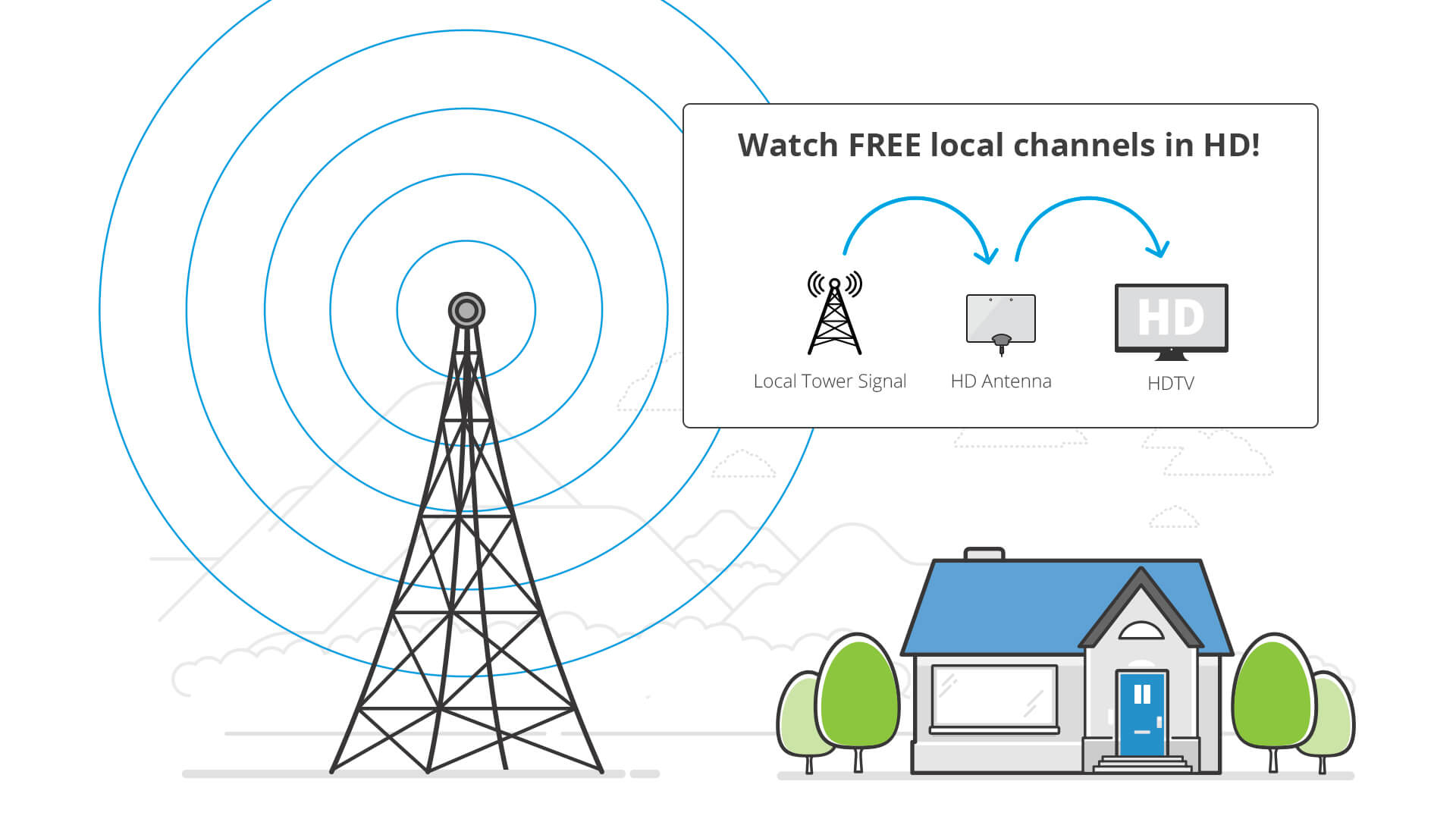
Digital antennas don’t “create” channels; they capture the digital signals broadcast by local television stations. These signals travel through the air, and an antenna converts these electromagnetic waves into electrical signals that your TV’s tuner can decode. The type of antenna you need largely depends on your geographical location and distance from broadcast towers.
- Indoor Antennas: Designed for convenience, these are typically flat, rectangular, or “rabbit ear” styles placed near your TV. They are best for urban areas with strong signals and close proximity to broadcast towers.
- Outdoor Antennas: These are more powerful, often larger, directional antennas mounted on a roof or mast. They are ideal for suburban or rural areas where signals are weaker or blocked by terrain/buildings. They provide the best reception and access to the most channels.
- Attic Antennas: A compromise between indoor and outdoor, offering some protection from the elements while generally outperforming indoor options.
- Amplified Antennas: These antennas include a signal booster to strengthen weak signals, which can be beneficial in areas with moderate signal strength or when splitting the signal to multiple TVs. However, an amplifier can also amplify noise if the signal is too weak or too strong, sometimes worsening reception.
Considerations for antenna selection include your precise location, the distance to local broadcast towers, and any topographical obstructions like hills or large buildings. Websites like AntennaWeb.org or TVFool.com can analyze your address and recommend antenna types and directions.
Setting Up Your Antenna for Optimal Reception
Proper antenna setup is critical for maximizing the number and quality of channels you receive.
- Placement is Key: For indoor antennas, experiment with different locations—near a window facing the broadcast towers is often best. Higher positions generally yield better results. For outdoor antennas, a clear line of sight to the towers is paramount.
- Directionality: Most outdoor and many indoor antennas are directional, meaning they perform best when pointed directly at the broadcast towers. Use online tools to identify the bearing (compass direction) of your local stations.
- Channel Scan: After connecting your antenna to your TV or digital tuner, you must perform a “channel scan” (sometimes called “auto-program” or “auto-tune”) through your TV’s menu. This allows your device to find and save all available digital channels. Repeat this process if you move the antenna or if channels change frequencies.
- Signal Strength: Some TVs or external tuners have a signal strength meter in their settings menu. Use this to fine-tune antenna placement and direction for the strongest signal on your weakest channels.
Essential Tools for OTA Success
Beyond the antenna itself, several tools can enhance your OTA experience. Online resources like AntennaWeb.org and TVFool.com are invaluable for identifying nearby broadcast towers, their distances, directions, and estimated signal strengths. For more advanced setups, a signal strength meter can provide precise feedback during antenna aiming, especially for outdoor installations. A preamplifier (for outdoor antennas, placed near the antenna) or a distribution amplifier (for splitting signals to multiple TVs) can help overcome signal loss over long cable runs or splits.
Leveraging Streaming Services for Local Content
While OTA antennas offer free local channels, streaming services provide an alternative, often more integrated, approach, especially for those accustomed to the user interface and convenience of internet-based content delivery.
Live TV Streaming Services with Local Affiliates
Several “skinny bundle” live TV streaming services aim to replicate the cable experience but delivered over the internet, often including local channels based on your geographic location.
- YouTube TV: Offers a comprehensive lineup of major network affiliates (ABC, CBS, FOX, NBC, CW, PBS) in most markets, along with a robust cloud DVR.
- Hulu + Live TV: Combines Hulu’s extensive on-demand library with live channels, including many local affiliates.
- Sling TV: A more budget-friendly option, though local channel availability can be more limited, often depending on whether your specific market is covered by their “Blue” or “Orange” packages. They sometimes integrate with an OTA antenna for locals.
- FuboTV: Heavily focused on sports, but also includes a good selection of local network affiliates.
- DirecTV Stream: Offers traditional bundles with a strong emphasis on live TV, including local channels, and sometimes resembles a modern cable alternative.
Considerations: Local channel availability on these services is determined by your billing zip code and the licensing agreements they have with local broadcasters. Always check their websites to verify which local channels are available in your specific area before subscribing. Pricing varies significantly, and most offer free trials.
News and Sports Apps from Local Broadcasters
Many individual local TV stations, as well as national networks, offer their own standalone apps. These apps often provide live streams of their broadcasts, on-demand news segments, weather updates, and sometimes even exclusive local content. For example, apps from NBC News, CBS News, FOX News, or even specific stations like “WXYZ Detroit News” can provide direct access to their programming, often for free, though sometimes with ads. While they might not offer the full 24/7 linear broadcast, they are excellent for catching up on specific local news and events.
Free Ad-Supported Streaming TV (FAST) Services
An increasingly popular segment of the streaming market, FAST services offer a wide array of channels—often themed or genre-specific—entirely for free, supported by advertisements. While they typically don’t carry the main ABC, CBS, NBC, or FOX affiliates, many FAST services now include channels dedicated to local news from various cities across the country or aggregated local news feeds.

- Pluto TV: Offers a “Local News” category with numerous channels dedicated to news from different US cities.
- Tubi: While primarily on-demand, Tubi also features a live TV section with some local news options.
- Plex: Known for organizing personal media libraries, Plex also has a robust free live TV section with local news channels.
- The Roku Channel: Similar to Pluto TV, it offers a range of free live channels, including local news.
These services are an excellent supplement for general local news awareness, though they might not always provide the hyper-local, real-time coverage of your specific market’s primary affiliate.
Smart Devices and Integrated Solutions
The modern home entertainment ecosystem offers various devices that can consolidate your access to local channels, whether through OTA or streaming, creating a seamless viewing experience.
Smart TVs with Built-in Tuners
Most modern Smart TVs come equipped with a built-in digital tuner (ATSC tuner in North America). This means you can simply plug an OTA antenna directly into your TV’s “Antenna In” port, perform a channel scan, and access free local channels directly through your TV’s interface. The integration is seamless, often allowing you to flip between OTA channels and streaming apps without switching inputs. This simplifies your setup by eliminating the need for an external tuner box.
DVRs for OTA Content: Recording Live TV
For those who want to record live local broadcasts, pause live TV, or skip commercials, Over-the-Air DVRs are indispensable.
- Tablo: These devices connect to your antenna and home network, streaming live and recorded TV to various devices (Smart TVs, streaming sticks, phones, tablets) in your home and even remotely. Many Tablo models require a subscription for full guide data and advanced features.
- HDHomeRun: Unlike Tablo, HDHomeRun devices act as network tuners. They connect to your antenna and router, making the live TV streams available to apps on various devices. You’ll need third-party apps or software (like Plex or Windows Media Center) to record, and some features may require a subscription (e.g., Plex Pass for DVR functionality).
- TiVo (for OTA): While known for cable DVRs, TiVo also offers specific models (e.g., TiVo Bolt OTA) designed for antenna users, providing advanced DVR features, a polished interface, and integration with streaming apps. These typically involve a device purchase and a subscription fee.
These DVR solutions enhance the OTA experience by adding convenience features previously exclusive to cable.
Streaming Devices (Roku, Fire TV, Apple TV) as Hubs
Dedicated streaming devices like Roku, Amazon Fire TV, and Apple TV serve as central hubs for all your media consumption. While they don’t have built-in tuners for OTA reception, they can host apps for:
- Live TV Streaming Services: YouTube TV, Hulu + Live TV, etc.
- FAST Services: Pluto TV, Tubi, Plex, The Roku Channel.
- Local Broadcaster Apps: Specific news and weather apps.
- OTA DVR Apps: Many OTA DVRs (like Tablo and HDHomeRun with Plex) have apps for these platforms, allowing you to watch live and recorded antenna TV through the same interface as your streaming content.
This convergence means you can manage a diverse range of local and global content from a single, familiar interface, simplifying the “how do I get local channels” question into a seamless technological integration.
Troubleshooting and Maximizing Your Local Channel Experience
Even with the right equipment, achieving perfect local channel reception can sometimes be a puzzle. Understanding common issues and advanced strategies can significantly improve your viewing experience.
Diagnosing Reception Issues
- Pixelation and Freezing: This is a hallmark of a weak or intermittent digital signal. It’s often caused by antenna misplacement, obstructions, or insufficient signal strength.
- Missing Channels: If you’re missing channels you expect to receive, it could be due to a highly directional antenna not pointed correctly, insufficient signal for that specific station, or a need for a new channel scan.
- Intermittent Signal: Signals can fluctuate due to weather conditions (rain, heavy clouds), changes in atmospheric pressure, or even nearby electrical interference.
Start by checking all cable connections, ensure the antenna is correctly aimed, and perform multiple channel scans in different antenna positions.
Advanced Antenna Strategies
For challenging reception environments, consider these advanced approaches:
- Attic Installation: Mounting an antenna in the attic protects it from the elements while often providing better reception than indoor options. Ensure the attic isn’t excessively cluttered with metallic objects or insulation that can block signals.
- Mast Mounting: Elevating an outdoor antenna on a mast, especially above the roofline, can significantly improve line-of-sight to broadcast towers, overcoming ground-level obstructions.
- Rotator Antennas: If local broadcast towers are spread in different directions, a rotor allows you to remotely change the antenna’s direction for optimal reception of different channels.
- Combine Antenna Types: In some cases, a small, multi-directional antenna might pick up closer stations, while a larger, highly directional antenna focuses on more distant ones. You can use an A/B switch or a signal combiner (with careful planning to avoid signal conflicts) to integrate both.
Combining Solutions for the Ultimate Setup
The most comprehensive and robust local channel experience often comes from combining different technologies:
- OTA Antenna + Smart TV: For free, high-quality, reliable primary access to your core local channels.
- OTA DVR (e.g., Tablo/HDHomeRun) + Streaming Device: Adds recording capability and streams antenna content to all your connected devices.
- Live TV Streaming Service (e.g., YouTube TV) + OTA Antenna: Provides local channels digitally (with cloud DVR) and offers a fallback or supplementary option with the antenna for any locals not covered by the streamer, or during internet outages.
- FAST Services: Augment with free local news channels for additional perspective or coverage from other regions.
This multi-pronged approach ensures redundancy and provides the widest possible array of local content access tailored to your preferences and technical environment.
Future-Proofing with ATSC 3.0 (NextGen TV)
Looking ahead, ATSC 3.0, also known as NextGen TV, is the latest over-the-air broadcasting standard. It promises 4K resolution, improved audio, more robust signal reception, and interactive features delivered over IP. While still in its early rollout phases in select markets, investing in a TV or external tuner compatible with ATSC 3.0 can future-proof your setup, ensuring you’re ready for the next generation of free broadcast television as it becomes more widely available.
Getting local channels in the digital age is more accessible and flexible than ever. Whether you prefer the simplicity and freedom of an antenna, the integrated experience of streaming services, or a hybrid approach, the technology exists to keep you connected to the news, weather, and community programming that matters most to you. By understanding the options and applying these technical insights, you can tailor a solution that perfectly fits your home entertainment needs.
aViewFromTheCave is a participant in the Amazon Services LLC Associates Program, an affiliate advertising program designed to provide a means for sites to earn advertising fees by advertising and linking to Amazon.com. Amazon, the Amazon logo, AmazonSupply, and the AmazonSupply logo are trademarks of Amazon.com, Inc. or its affiliates. As an Amazon Associate we earn affiliate commissions from qualifying purchases.