
Obtaining a voided check from Chase, or any financial institution for that matter, is a common requirement for various financial transactions. Whether you’re setting up direct deposit for your paycheck, establishing automatic bill payments, or linking external accounts, a voided check serves as a critical piece of documentation to verify your bank account and routing numbers. This seemingly simple task is essential for ensuring the accurate and secure flow of your funds. In this comprehensive guide, we’ll delve into the precise methods for acquiring a voided check from Chase, understand its importance, and explore alternative solutions for different scenarios.
Understanding the Purpose and Importance of a Voided Check
Before diving into the “how-to,” it’s crucial to grasp why a voided check is so frequently requested and what it signifies. Far from being a mere formality, it’s a vital tool for preventing errors and safeguarding your financial details.
Why You Might Need One
The primary reason entities request a voided check is to accurately capture your bank account and routing numbers. These numbers are unique identifiers for your specific account at your specific bank. Manual entry of these numbers can lead to transcription errors, which could delay payments, misdirect funds, or even incur fees. A voided check provides an undeniable, physical (or digital) representation of these numbers directly from your bank’s pre-printed stationery.
Common scenarios requiring a voided check include:
- Direct Deposit Setup: For your employer to send your salary directly to your Chase account.
- Automatic Bill Payments: To allow utility companies, landlords, or loan providers to debit your account regularly.
- External Account Linking: When connecting your Chase account to an investment platform, another bank account, or a payment app like PayPal or Venmo.
- Loan Applications: Some lenders may request it for verification purposes.
- Insurance Policy Setup: For premium deductions.
What “Voided” Means and Why It’s Safe
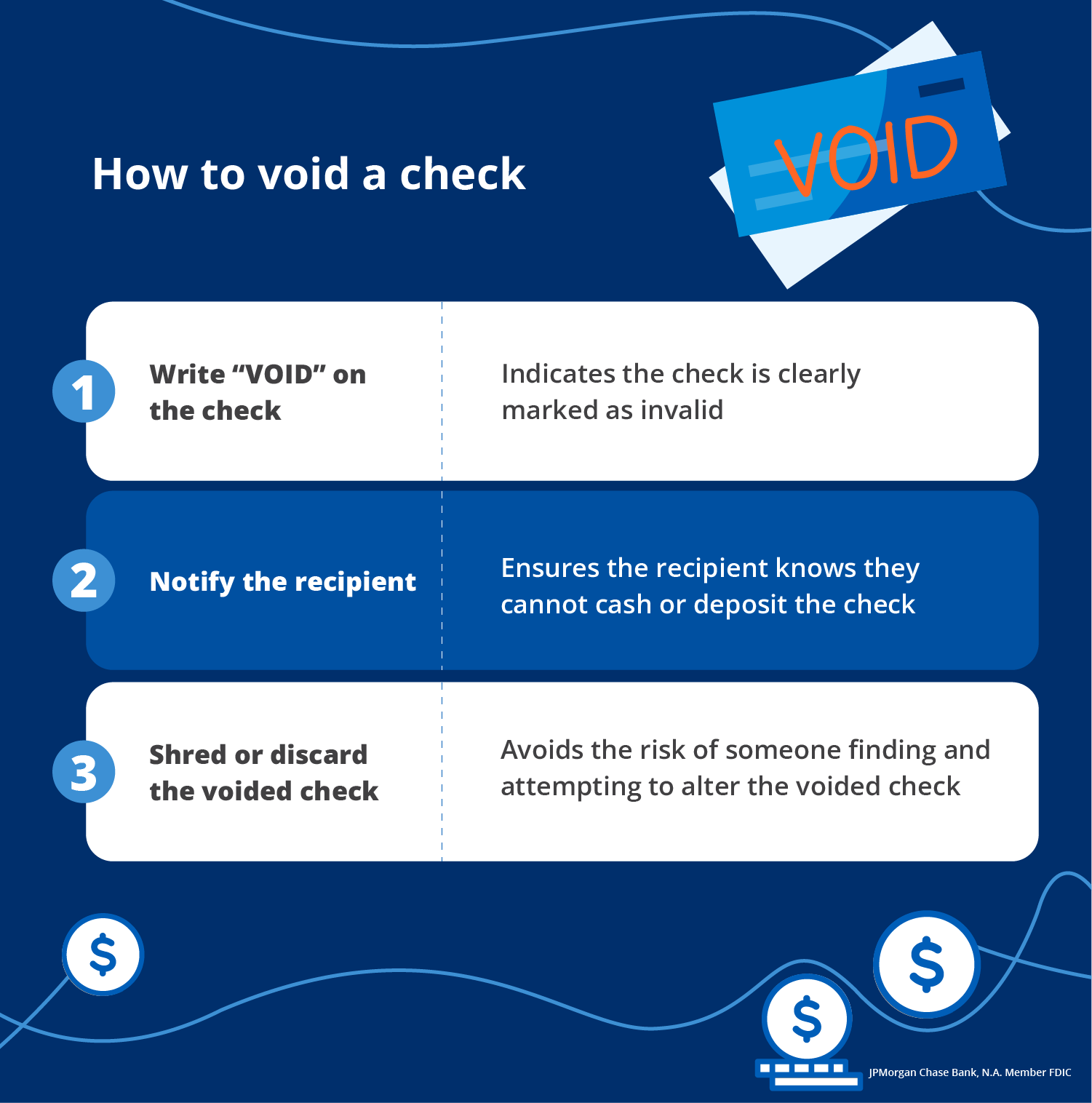
When a check is “voided,” it means it’s rendered unusable for payment. You achieve this by writing “VOID” in large, clear letters across the front of the check, ensuring it covers the amount box, payee line, and signature line. The key is that while the check cannot be cashed or deposited, the pre-printed account and routing numbers remain perfectly legible.
This process serves a dual purpose:
- Verification: It provides the necessary banking details in an undisputed format.
- Security: By voiding the check, you eliminate the risk of someone fraudulently attempting to cash or deposit it. The word “VOID” immediately signals to any financial institution that the check is invalid for transaction purposes, protecting your funds from unauthorized access while still providing the required information to the legitimate recipient.
It’s a balance between sharing necessary information and maintaining financial security.
The Simplest Method: Voiding an Existing Check
For most Chase account holders, the easiest and most common way to get a voided check is to simply void one of the checks from their existing checkbook. This method is quick, free, and uses the official banking information already printed for your account.
Step-by-Step Instructions
- Locate a Blank Check: Open your Chase checkbook and select the next available blank check. It’s often recommended to use the very first check in a new book if you’re just starting, or any other blank check.
- Write “VOID” Clearly: Using a pen with permanent ink (blue or black is preferred), write the word “VOID” across the front of the check. Make sure the letters are large enough to cover the key areas: the payee line (“Pay to the order of”), the amount box, and the signature line. Some people draw two diagonal lines and write “VOID” between them for extra clarity. The goal is to make it unequivocally clear that the check cannot be used for payment but allows the account and routing numbers at the bottom to remain fully visible.
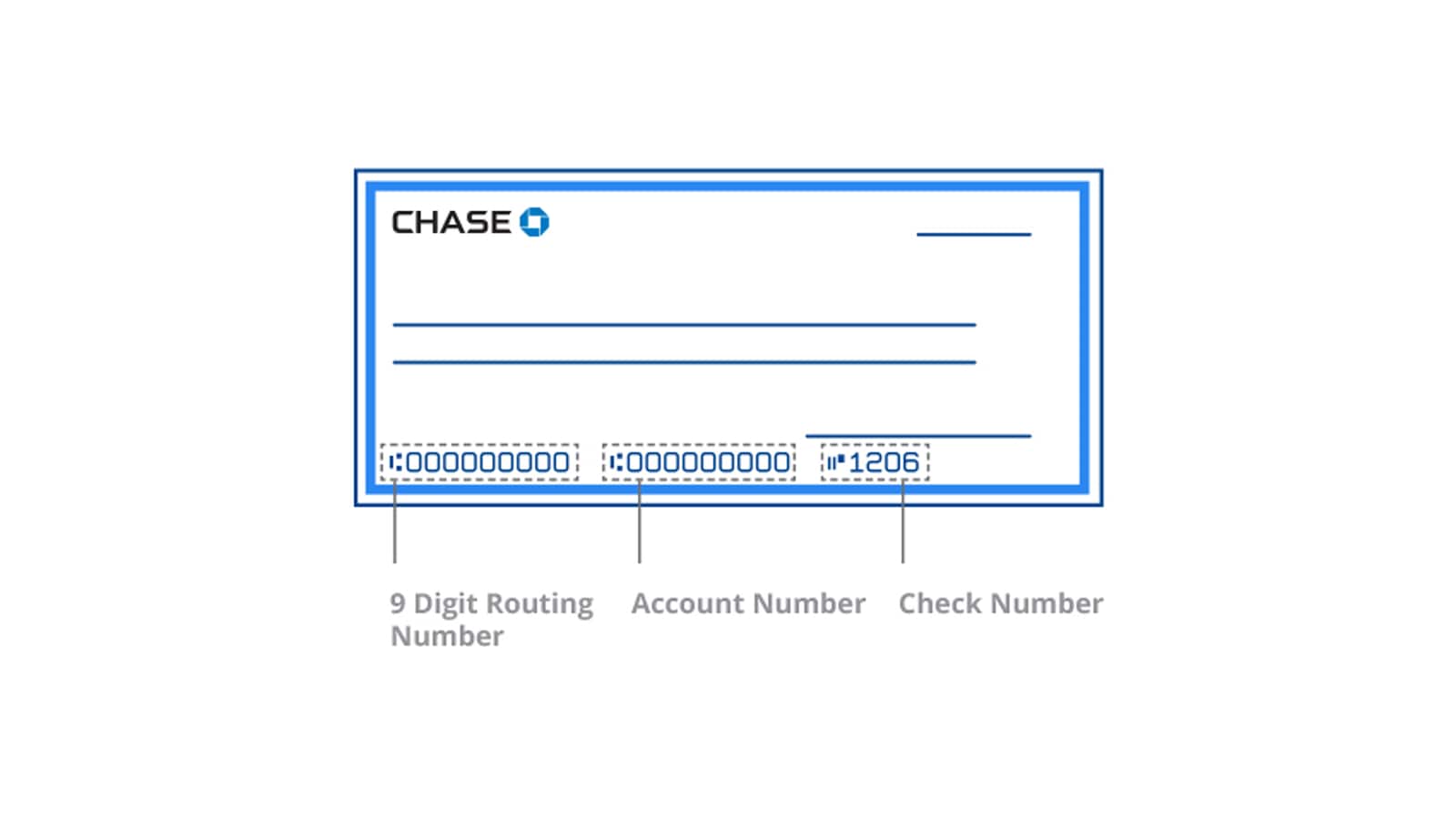
- Ensure Legibility of Numbers: Double-check that the routing number (the first nine digits on the bottom left) and your account number (typically the second set of numbers) are still completely legible. These are the crucial pieces of information the recipient needs.
- Make a Copy (Optional but Recommended): Before handing over the original, make a photocopy or take a clear picture of the voided check for your own records. This can be helpful if there are any disputes or if you need to refer back to the details.
- Submit the Voided Check: Provide the physical voided check to the requesting entity. In some cases, a digital scan or photo of the voided check might be accepted, especially for online setups. Always confirm the preferred submission method with the requester.
Important Considerations for Using an Existing Check
- Security: Always be mindful of who you are providing your voided check to. Only give it to trusted employers, legitimate service providers, or financial institutions.
- Check Number: Note the check number of the voided check in your check register to avoid confusion and ensure your records are accurate.
- Avoiding Errors: Ensure the “VOID” is clear and covers the necessary areas, but does not obscure the critical account and routing numbers.
Alternative Methods When You Don’t Have Checks (or Prefer Not To)
What if you don’t have a checkbook, have run out of checks, or simply prefer not to use one? Chase offers several alternatives to provide the necessary banking information without needing a physical check.
Obtaining a Starter Check or Deposit Slip from a Chase Branch
If you don’t have a checkbook, or need a voided check immediately, visiting a Chase branch is an excellent option.
- Visit Any Chase Branch: Go to your nearest Chase bank branch during business hours.
- Speak to a Teller or Customer Service Representative: Inform them that you need a voided check or a document with your account and routing numbers for direct deposit or automatic payments.
- Request a Starter Check or Deposit Slip: The bank can typically print a starter check or a deposit slip (which also contains your account and routing numbers) on the spot. You can then write “VOID” across it, or they may provide a pre-voided version, depending on their policy.
- Identity Verification: Be prepared to show a valid photo ID (like a driver’s license or passport) and possibly your Chase debit card or account details to verify your identity as the account holder.
- Cost: This service is usually free, especially for a single starter check or deposit slip.
Using a Bank Letter (Chase Official Document)
Some organizations might specifically request a “bank letter” or “direct deposit form” from your financial institution. This is an official document generated by Chase that explicitly states your account holder information, routing number, and account number.
- Request at a Branch: You can request a bank letter directly from a Chase branch. Explain its purpose to the representative.
- Contact Customer Service: Alternatively, you might be able to request this by calling Chase customer service. They may be able to mail it to you or advise if it can be sent digitally.
- Online Banking (Limited Capability): While Chase’s online banking portal provides access to your account and routing numbers, it typically doesn’t generate a formal “bank letter” that some entities require as an official document. You can usually find your routing and account numbers by logging into your Chase Online account, selecting your checking account, and looking for “See account details” or similar options. You can often print this page, but confirm with the requesting party if this suffices as an “official” document.
Utilizing Online Banking and Mobile App Features
Chase’s digital platforms are incredibly robust, offering quick access to your account details. While you cannot “generate” a voided check digitally in the traditional sense, you can certainly retrieve the necessary information.
- Log In to Chase Online: Go to chase.com and log in with your username and password.
- Access Account Details: Navigate to your checking account. Look for an option like “Account details,” “Routing and account numbers,” or “See account details.”
- Locate Numbers: Your routing number (the nine-digit number that identifies Chase Bank) and your full account number will be displayed.
- Print or Screenshot (with Caution): You can print this page, or take a screenshot if submitting electronically. However, ensure that any printout or screenshot is clear and contains all required information. Be extremely cautious about sending screenshots over insecure channels. Always verify with the requesting party if a printout from your online account will be accepted in lieu of a voided check or bank letter. Many entities prefer the structured format of a check or a formal bank letter.
What to Do If You’ve Run Out of Checks and Need One Urgently
Running out of checks can be inconvenient, especially when a voided check is needed on short notice. Luckily, Chase provides several avenues to address this.
Visiting a Chase Branch for Immediate Assistance
As mentioned, a branch visit is the quickest solution for an urgent need. Tellers can typically print a few starter checks or a deposit slip that contains your account and routing numbers. This allows you to immediately void it and provide it to the requesting party. It’s the most reliable option for same-day fulfillment when you don’t have existing checks.
Ordering New Checks Through Chase
If you find yourself frequently needing checks or want to ensure you have a supply for future needs, ordering new checks is a straightforward process with Chase.
- Through Chase Online: Log in to your Chase online banking account. Navigate to your checking account, and typically under a “Services” or “Account Management” section, you’ll find an option to “Order Checks.” You can customize the style, quantity, and sometimes even add personal information.
- Through the Chase Mobile App: Similar functionality is often available within the mobile app.
- By Phone: Call Chase customer service. They can assist you with placing a check order over the phone.
- In a Branch: You can also order checks directly from a teller or customer service representative at a Chase branch. They can help you with the selection and placement of the order.
Standard check orders usually arrive by mail within 7-10 business days. If you need checks faster, inquire about expedited shipping options, though these may incur additional fees.
Important Security Tips and Best Practices
While sharing a voided check is necessary, it’s crucial to do so securely and responsibly. Your banking information is sensitive, and protecting it should always be a priority.
Safeguarding Your Financial Information
- Only Share with Trusted Entities: Never provide a voided check or your account information to unverified individuals or organizations. Be wary of unsolicited requests via email, text, or phone.
- Secure Submission: If submitting digitally (e.g., a scanned image), use secure methods. Avoid sending sensitive financial documents via unencrypted email or public Wi-Fi networks. Consider password-protecting the document if possible, and sharing the password separately.
- Shred Old Checks: Once checks are no longer needed or if they are outdated, shred them instead of simply throwing them away. This prevents fraudsters from accessing your account details.
- Monitor Your Accounts: Regularly check your Chase account statements and online activity for any unauthorized transactions or suspicious activity. Promptly report any discrepancies to Chase.
Verifying the Recipient’s Legitimacy
Before handing over your banking details, take a moment to verify who is requesting the information.
- Employers: Confirm the request directly with your HR department or a known contact person.
- Service Providers: Call the company directly using a verified phone number from their official website or bill, not one provided in an email or text.
- Online Platforms: Ensure you are on the legitimate website or app of the service you are trying to link. Look for “https://” in the URL and a padlock icon.
Digital Alternatives and Modern Solutions
In an increasingly digital world, some entities are moving away from requesting physical voided checks.
- Pre-notification (ACH Micro-deposits): Many online services and financial apps verify bank accounts by making two small deposits (e.g., $0.12 and $0.23) into your account. You then confirm these amounts, proving you own the account. This method is highly secure as it doesn’t require sharing your account numbers directly.
- Bank Linking Services: Third-party services (like Plaid, often integrated into financial apps) allow you to securely link your bank account by logging in directly through your bank’s portal, without directly sharing your account and routing numbers with the third-party app. Chase frequently partners with such services to facilitate secure data sharing.
Always inquire if such alternative verification methods are available before providing a voided check, especially when setting up online accounts.
Getting a voided check from Chase is a straightforward process, whether you opt for voiding an existing check, visiting a branch for a starter check, or leveraging your online banking access for account details. By understanding the purpose, following the correct procedures, and prioritizing security, you can confidently provide this essential financial document whenever required, ensuring your financial transactions proceed smoothly and securely.
aViewFromTheCave is a participant in the Amazon Services LLC Associates Program, an affiliate advertising program designed to provide a means for sites to earn advertising fees by advertising and linking to Amazon.com. Amazon, the Amazon logo, AmazonSupply, and the AmazonSupply logo are trademarks of Amazon.com, Inc. or its affiliates. As an Amazon Associate we earn affiliate commissions from qualifying purchases.