
In an increasingly digital world, the way we handle money has undergone a significant transformation. Traditional cash and card transactions are rapidly being supplemented, if not replaced, by convenient peer-to-peer (P2P) payment apps. Among these, Venmo stands out as a leading platform, known for its user-friendly interface and social payment features. If you’ve been curious about joining the millions who use Venmo to send and receive money effortlessly, this guide will walk you through every step of getting your own account, ensuring you can leverage this powerful digital tool with confidence and security.
The Digital Evolution of Payments: Understanding Venmo’s Role
Before diving into the mechanics of account creation, it’s beneficial to understand what Venmo is, how it operates within the broader digital payment ecosystem, and why it has become such a popular choice for personal transactions. From splitting dinner bills to sending rent money, Venmo simplifies financial interactions between friends and family, and increasingly, between consumers and small businesses.
What is Venmo and Why It Matters
Venmo is a mobile payment service owned by PayPal that allows users to transfer money to one another using a mobile app or web interface. At its core, Venmo is an app that facilitates quick, informal transactions, often accompanied by emojis and brief messages that form a social feed. This social aspect, while optional, has differentiated Venmo from more traditional payment systems by making financial exchanges feel more connected and less transactional.
Its importance stems from its sheer convenience. Gone are the days of fumbling for exact change or writing checks for small sums owed. With Venmo, you can pay someone back in seconds, directly from your smartphone. This accessibility has made it an indispensable tool for students, roommates, friends, and anyone looking for a frictionless way to manage shared expenses. Furthermore, its integration with various online merchants and growing support for business profiles broadens its utility beyond just peer-to-peer payments, positioning it as a versatile digital wallet.
Key Features at a Glance
Understanding Venmo’s core features will illuminate why it’s a valuable addition to your digital toolkit:
- Peer-to-Peer Payments: The primary function, allowing users to send and receive money directly to and from others using their phone number, email, or Venmo username.
- Social Feed: Users can choose to make their transactions public, visible to friends, or private. This optional social element adds a unique flavor to the app.
- Payment Notes: Each transaction can include a note, often using emojis, making the context of the payment clear and sometimes humorous.
- Debit Card & Credit Card: Venmo offers a physical debit card linked to your Venmo balance, allowing you to spend your funds anywhere Mastercard is accepted. They also offer a Venmo Credit Card for earning cash back.
- Business Profiles & Payments: Small businesses can set up Venmo business profiles, allowing them to accept payments from customers directly through the app, often at a lower transaction fee than traditional card processors.
- Direct Deposit: Users can set up direct deposit to receive paychecks or government benefits directly into their Venmo account.
- Cryptocurrency: Venmo also allows users to buy, hold, and sell cryptocurrency directly within the app, offering a streamlined entry point into digital assets.
These features combine to create a robust and dynamic payment application that caters to a wide range of personal and casual business financial needs.
Step-by-Step: Creating Your Venmo Account
Getting started with Venmo is a straightforward process, designed for ease of use from the moment you download the app. This section breaks down the account creation into manageable steps, ensuring you can navigate the initial setup with confidence.
Downloading the App and Initial Setup
The journey begins with acquiring the Venmo application itself:
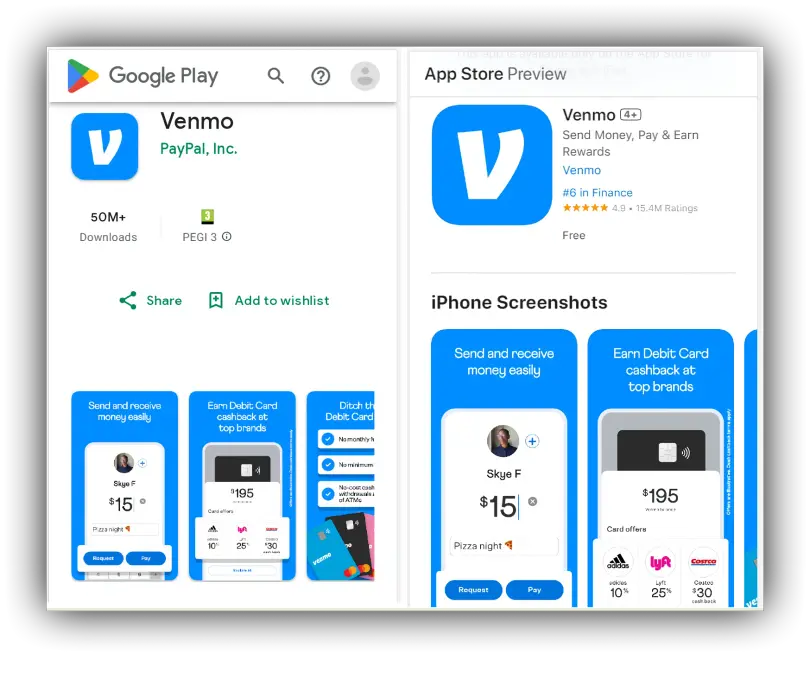
- Download the Venmo App: Open the App Store (for iOS devices) or Google Play Store (for Android devices) on your smartphone. Search for “Venmo” and download the official application. It’s free to download.
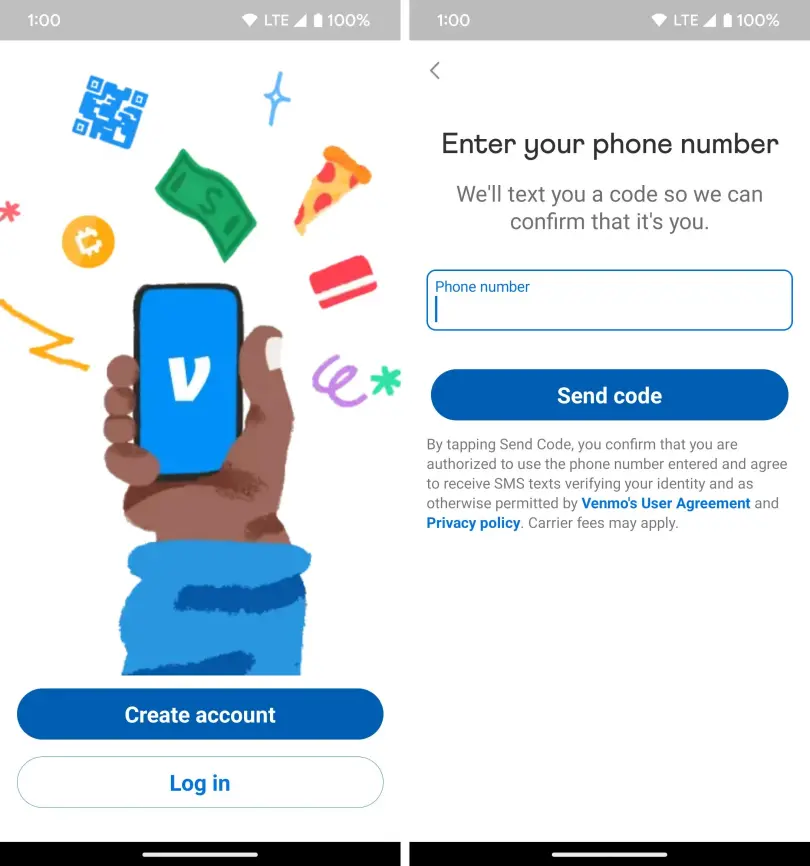
- Open the App and Sign Up: Once downloaded, launch the Venmo app. You’ll be greeted with a welcome screen. Tap on “Get Started” or “Sign Up” to begin the registration process.
- Choose Your Sign-Up Method: Venmo offers several ways to sign up:
- Phone Number: This is the most common method. Enter your mobile phone number. Venmo will send a verification code via SMS to confirm your identity.
- Email Address: You can also opt to sign up using your email address, which will require email verification.
- Facebook: For a quicker signup, you can connect your Facebook account, which helps pre-fill some personal information.
- Create Your Password: Choose a strong, unique password. It should be a combination of uppercase and lowercase letters, numbers, and symbols to ensure maximum security for your account.
- Enter Personal Details: You’ll be prompted to enter your legal first name, last name, and date of birth. Ensure these details match your government-issued ID, as they will be used for identity verification later.
- Set Up Your Username: Your Venmo username is how other users will find and pay you. Choose something recognizable, as it will be public. You can change this later if needed.
Verifying Your Identity and Linking a Funding Source
For security and regulatory compliance, particularly regarding money transmission laws, Venmo requires identity verification and a linked funding source before you can fully utilize all features.
- Verify Your Phone Number/Email: If you haven’t already, confirm the verification code sent to your phone or click the link in the email Venmo sent. This establishes primary contact for your account.
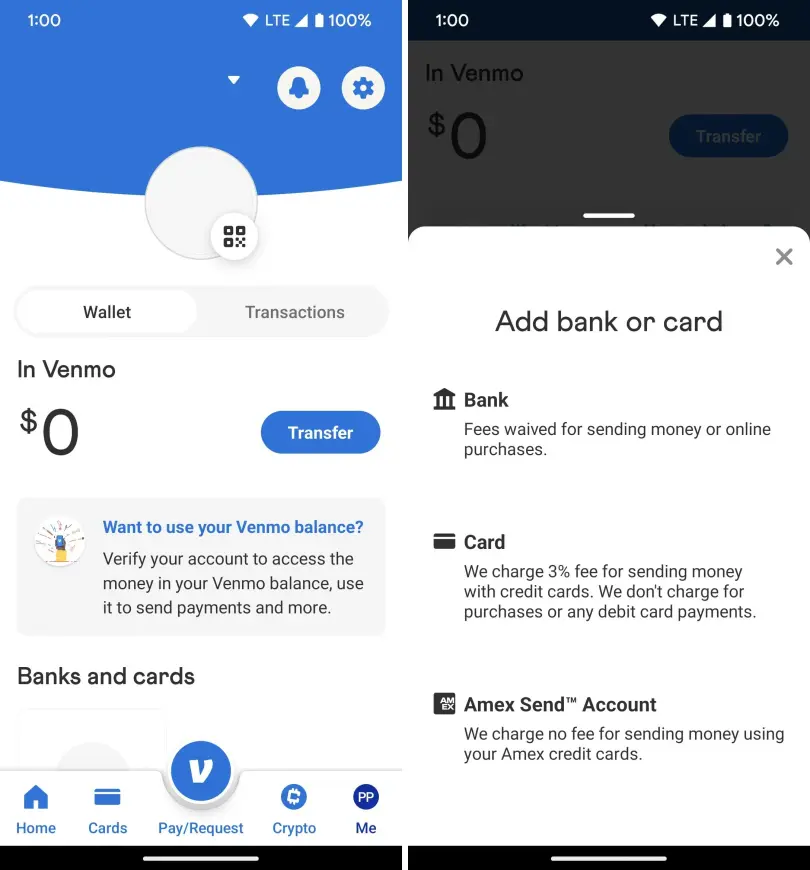
- Add a Funding Source: To send money, you need a way to fund your transactions. Venmo allows you to link:
- Bank Account: This is the most common method. You’ll need to securely link your bank account, usually by logging in through your bank’s portal (using services like Plaid) or by manually entering your routing and account numbers, which Venmo will then verify with small deposits.
- Debit Card: You can also link a debit card directly. Enter the card number, expiration date, and CVV.
- Credit Card: While you can link a credit card, be aware that Venmo charges a 3% fee for sending money from a credit card. Linking a bank account or debit card for transfers is typically free.
- Complete Identity Verification (KYC): To unlock higher transaction limits and send larger sums, Venmo will ask for more detailed personal information, often including your mailing address and the last four digits of your Social Security Number (SSN). This is a standard Know Your Customer (KYC) requirement for financial services and helps prevent fraud and money laundering. Venmo uses secure encryption to protect this sensitive data.
Navigating Privacy Settings for a Personalized Experience
Venmo’s social feed is a unique aspect, but you have full control over your privacy settings.
- Access Privacy Settings: After setup, navigate to the settings menu within the app (usually represented by a gear icon or three lines). Look for “Privacy.”
- Choose Your Default Audience:
- Public: Your transactions and notes are visible to everyone on Venmo.
- Friends: Only your Venmo friends can see your transactions.
- Private: Only you and the recipient/sender can see the transaction details. This is often the preferred setting for sensitive financial exchanges.
- Adjust Past Transactions: You can also go back and change the privacy settings for individual past transactions if you wish.
- Friend Requests & Profile Visibility: Review who can send you friend requests and how searchable your profile is. Customizing these settings ensures your Venmo experience aligns with your comfort level regarding public visibility.
Maximizing Your Venmo Experience
Once your account is active, understanding how to effectively use Venmo’s features and troubleshoot common issues will enhance your overall experience. This section focuses on practical application and proactive problem-solving.
Sending and Receiving Money: Best Practices
The core functionality of Venmo is designed to be intuitive, but a few best practices can make your transactions smoother and more secure:
- Double-Check Recipient Details: Always verify the recipient’s username, phone number, or email address before sending money. Venmo payments are typically instant and irreversible if sent to the wrong person.
- Add Clear Notes: Use the payment note field to clearly state the purpose of the payment (e.g., “Dinner,” “Rent,” “Concert Tickets”). This helps both parties keep track of finances.
- Understand Transaction Limits: Be aware of Venmo’s weekly spending limits for sending money, which increase once your identity is verified.
- Receive Funds Directly: When someone pays you, the money goes into your Venmo balance. You can either leave it there for future payments or transfer it to your linked bank account. Standard bank transfers are free but can take 1-3 business days. Instant transfers are available for a small fee.
Exploring Additional Venmo Features
Beyond basic P2P transfers, Venmo offers several features that cater to diverse financial needs:
- Split the Bill: Venmo simplifies splitting expenses among a group. You can select a past transaction or create a new request, specifying who owes what.
- Shop with Venmo: Many online retailers and apps accept Venmo as a payment method at checkout, offering a streamlined way to pay using your Venmo balance or linked funding source.
- Venmo Debit Card: Consider getting the Venmo Debit Card to spend your Venmo balance directly in stores or online, similar to a traditional bank debit card. It offers rewards at select merchants.
- Cryptocurrency Trading: For those interested in digital assets, Venmo’s in-app crypto feature allows you to buy and sell Bitcoin, Ethereum, Litecoin, and Bitcoin Cash with as little as $1. It simplifies access to the crypto market without needing a separate exchange.
Troubleshooting Common Account Setup Issues
While Venmo setup is generally smooth, you might encounter minor hurdles:
- Verification Code Not Received: Check your spam folder or ensure you entered the correct phone number/email. Try requesting the code again.
- Bank Account Linking Problems: Double-check your routing and account numbers. If using instant verification, ensure your bank’s online login details are correct. Sometimes, a manual verification via micro-deposits might be necessary.
- Identity Verification Delays: Venmo may take a few business days to review your identity documents. Ensure the information you provided matches your official ID. If there’s a prolonged delay, contact Venmo support.
- Account Freezes/Suspensions: If Venmo flags unusual activity, your account might be temporarily restricted. Follow their instructions to verify your identity or transaction details. Provide all requested information promptly to resolve the issue.
Safeguarding Your Digital Transactions: Venmo Security & Best Practices
As with any financial technology, security is paramount. Venmo employs robust measures to protect your account, but users also play a critical role in maintaining their financial safety.
Understanding Venmo’s Security Measures
Venmo implements several layers of security to protect users and their funds:
- Data Encryption: All sensitive information, including personal data and financial details, is encrypted both in transit and at rest, protecting it from unauthorized access.
- Fraud Detection: Venmo uses sophisticated algorithms and fraud detection systems to monitor for suspicious activity and block potentially fraudulent transactions.
- Two-Factor Authentication (2FA): This critical security feature adds an extra layer of protection by requiring a code sent to your phone in addition to your password when logging in from a new device.
- Transaction Monitoring: Venmo continuously monitors transactions for unusual patterns that might indicate unauthorized use.
- PCI DSS Compliance: Venmo adheres to Payment Card Industry Data Security Standard (PCI DSS) compliance, which sets rigorous security requirements for handling cardholder data.
User-End Security Tips
While Venmo provides strong security, your vigilance is crucial:
- Strong, Unique Passwords: Use a complex password that is unique to your Venmo account and change it periodically. Avoid using easily guessable information.
- Enable Two-Factor Authentication (2FA): This is arguably the most important step you can take. It prevents unauthorized access even if someone obtains your password.
- Monitor Account Activity: Regularly review your Venmo transaction history for any unfamiliar charges or payments. Report suspicious activity immediately.
- Be Wary of Phishing Attempts: Venmo will never ask for your password, SSN, or full bank account number via email or text message. Be skeptical of unsolicited communications pretending to be Venmo.
- Secure Your Mobile Device: Use a strong passcode, fingerprint, or facial recognition to lock your smartphone. If your phone is lost or stolen, report it to Venmo immediately.
- Understand Privacy Settings: Only share transaction details with your desired audience (Friends or Private) to avoid inadvertently exposing personal spending habits.
Recognizing and Avoiding Scams
Unfortunately, where money flows, scammers follow. Be aware of common Venmo-related scams:
- Overpayment Scams: A scammer sends you more money than owed, then asks you to send back the difference. The original payment might later be reversed due to fraud, leaving you out of pocket.
- Fake Customer Support: Scammers posing as Venmo support may ask for your login credentials or personal information. Always contact Venmo through their official channels.
- “Accidental” Payments: A scammer sends you money “by accident” and asks you to send it back. Similar to overpayment, the original transaction can be reversed, costing you money.
- Unsolicited Offers/Giveaways: Be suspicious of offers that seem too good to be true, especially if they require you to send money first or click suspicious links.
Always exercise caution and critical thinking. If something feels off, it probably is. When in doubt, contact Venmo’s official customer support directly through the app or website.
In conclusion, getting a Venmo account is a straightforward process that opens the door to a world of convenient digital payments. By following the steps outlined, understanding its features, and adhering to best security practices, you can confidently integrate Venmo into your financial routine, making everyday transactions simpler, faster, and more social. Embrace the future of frictionless payments with your new Venmo account.
aViewFromTheCave is a participant in the Amazon Services LLC Associates Program, an affiliate advertising program designed to provide a means for sites to earn advertising fees by advertising and linking to Amazon.com. Amazon, the Amazon logo, AmazonSupply, and the AmazonSupply logo are trademarks of Amazon.com, Inc. or its affiliates. As an Amazon Associate we earn affiliate commissions from qualifying purchases.