
In the modern landscape of digital finance and peer-to-peer software, PayPal remains a cornerstone platform for millions of users worldwide. However, despite its ubiquity, navigating the user interface to find specific account details—such as your official account name or your unique “PayPal.Me” handle—can occasionally be counterintuitive. Whether you are setting up a freelance invoice, receiving a payment from a friend, or verifying your identity for security purposes, knowing exactly where your “PayPal name” resides within the software is essential.
Understanding your PayPal identity involves more than just looking at a display name. The platform utilizes several layers of identification, ranging from your legal name used for tax and regulatory compliance to the public-facing handles used for simplified transactions. This guide provides a comprehensive technical walkthrough on how to locate these identifiers across various devices and explains the security implications of your digital identity on the platform.

Understanding Your PayPal Identity: Names, Usernames, and Handles
Before diving into the “how-to” steps, it is important to clarify what “PayPal name” actually refers to. Depending on your goal, you might be looking for one of three distinct identifiers within the software ecosystem.
The Difference Between Your Display Name and PayPal.Me Link
Your display name is the legal name associated with your account. This is the name that appears on official transaction logs, bank transfer requests, and security notifications. It is pulled directly from the identification documents you provided during the account setup or verification process.
Conversely, the PayPal.Me link is a technical evolution of the platform designed to simplify mobile and web transactions. It acts as a unique username or “handle” (e.g., paypal.me/YourName). Unlike your legal name, this handle can often be customized and is used specifically to generate a direct URL that others can use to send you funds without needing your email address or phone number.
Legal Name vs. Business Name
For users operating within the PayPal “Business” account tier, there is an additional layer of identity: the Business Name. In this context, your personal legal name might be hidden from customers, replaced by a “Doing Business As” (DBA) name. Understanding which identity is currently active is crucial for maintaining a professional digital presence and ensuring that your customers recognize the charges on their bank statements.
Step-by-Step: Locating Your PayPal Name on Desktop and Mobile
The PayPal user interface is updated frequently to improve user experience and digital security. Consequently, the steps to find your account information can vary slightly between the web-based dashboard and the mobile application.
Navigating the Web Interface
For users on a desktop or laptop, the web browser provides the most detailed view of account settings. To find your account name and associated handles, follow these technical steps:
-
Authentication: Log in to your account at the official PayPal website. Ensure you are on a secure connection (HTTPS) to protect your credentials.
-
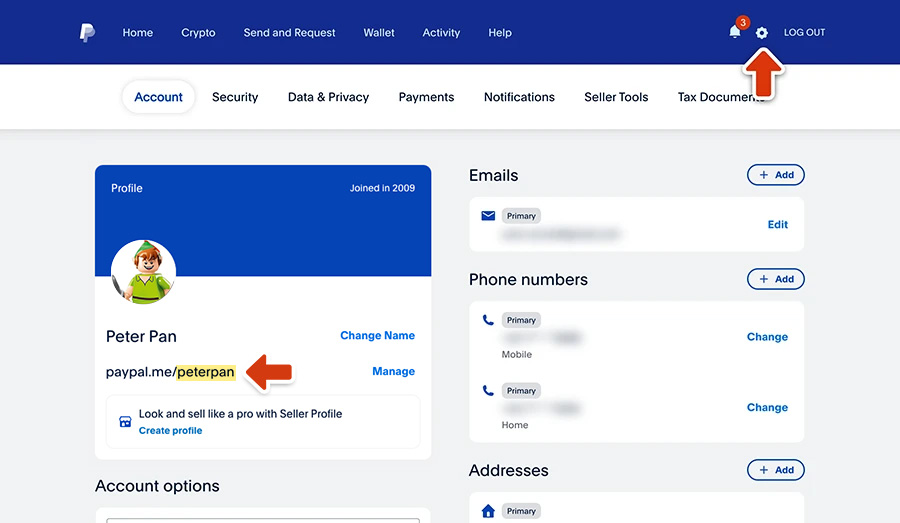
Accessing Settings: Once on the Dashboard, locate the “Settings” icon—typically represented by a gear or cogwheel in the top-right corner of the screen.
-
Account Profile: Clicking the settings icon will default you to the “Account” tab. Here, your “Legal Name” is displayed prominently at the top of the profile section.
-
Finding the PayPal.Me Handle: On the same Account Profile page, look for the “Profile” section. If you have set up a PayPal.Me link, it will be listed here. If you haven’t, the software will provide an option to “Create a Profile” to generate your unique link.
Accessing Profile Details on the PayPal App
The mobile app is optimized for quick actions, meaning your name and handle are often just a few taps away.
-
Launch and Log In: Open the PayPal app on your iOS or Android device and authenticate using biometrics (FaceID/Fingerprint) or your PIN.
-
Profile Icon: Tap the “Profile” icon, which is usually located in the top-right or top-left corner of the home screen (represented by a person icon or your uploaded photo).
-
Personal Information: Within the Profile menu, tap on “Personal Info.” This section will display your full legal name as registered on the account.
-
Viewing Your Handle: To find your PayPal.Me name specifically, you can often find it directly under your name in the main Profile menu or by selecting the “PayPal.Me” option within the settings list.
Managing and Updating Your Digital Identity on PayPal
Identifying your name is often the first step toward managing it. There are several technical reasons why you might need to update or change the name associated with your PayPal account, such as a legal name change, correcting a typo, or rebranding a business.
How to Correct a Typo or Update Your Legal Name
PayPal treats legal names with a high level of security to prevent fraud and money laundering (AML compliance). Therefore, changing your name isn’t as simple as editing a social media bio. If you find that your name is misspelled or needs updating:
-
Minor Changes: For typos (1–2 characters), you can typically request a change through the Settings > Account > Change Name path.
-
Legal Changes: For significant changes (marriage, divorce, or legal renaming), the software will prompt you to upload digital copies of government-issued identification, such as a passport, driver’s license, or marriage certificate. The PayPal backend team reviews these documents manually or via automated OCR (Optical Character Recognition) software to verify the validity of the request.
Customizing Your PayPal.Me Link for Faster Payments
Your PayPal.Me link is a vital piece of your digital identity. If you find your current name or handle is outdated, you should be aware that PayPal.Me links are generally permanent once created. However, you can toggle the visibility of this link. In the “Profile” settings of the app or website, you can choose whether your profile is “Public” or “Private.” When public, other users can find you by searching for your name or handle, facilitating a more seamless “search-and-pay” experience similar to modern social payment apps.
Digital Security and the Importance of Accurate Account Information
In the realm of digital security, your PayPal name is a key data point used for verification and the prevention of unauthorized access.
Why Your Name Matters for Account Recovery
If you are ever locked out of your account due to a forgotten password or a security breach, your registered legal name becomes a primary verification factor. PayPal’s security algorithms compare the name on your linked bank accounts and credit cards with the name on your PayPal profile. Discrepancies between these names can trigger “security flags,” leading to temporary account freezes or “Limited Account” status. Ensuring your name is accurate and matches your financial documents is a critical step in proactive digital security.
Avoiding “Name Squatting” and Impersonation Scams
From a software and ecosystem perspective, the move toward usernames and PayPal.Me links has introduced risks such as “name squatting” (where users claim handles belonging to famous brands or individuals). When finding your name or sharing it with others, always ensure you are providing the exact handle.
Furthermore, users should be wary of phishing attempts that use “Display Name Spoofing.” In these scams, a malicious actor might change their PayPal display name to “PayPal Security Team” or “Account Verification” to trick users into clicking links. Always remember that your official name in the PayPal system is tied to your legal identity, and official communications from the platform will typically address you by that specific legal name.
Troubleshooting Common Issues with PayPal Identification
Sometimes, the software may not display your name as expected, or you may encounter errors when attempting to view your profile.
What to Do If Your Name Is Hidden or Incorrect
If you log in and find that your name is missing or replaced by a string of alphanumeric characters, this may indicate a synchronization error between the mobile app and the PayPal servers. Often, clearing the app cache or updating the software to the latest version via the App Store or Google Play Store will resolve these visual bugs.
If the name is genuinely incorrect (e.g., an old maiden name or a nickname used during a hasty setup), you must go through the “Change Name” protocol mentioned earlier. Using a “fake” name on PayPal is a violation of their Terms of Service and can lead to the permanent suspension of your digital wallet, as it interferes with the platform’s ability to perform mandatory “Know Your Customer” (KYC) checks.
Verifying Your Identity for High-Volume Transactions
As you use the platform more frequently, the software may trigger an “Identity Verification” prompt. This is a technical checkpoint where the system confirms that the person operating the account is the person whose name is on the profile. During this process, you may be asked to re-confirm your name and provide a Social Security Number (SSN) or equivalent tax ID. This process integrates your PayPal “name” with global financial databases to ensure the platform remains a secure environment for digital commerce.
By understanding the technical nuances of your PayPal identity—from the legal name used for compliance to the public handles used for convenience—you can better navigate the platform, secure your financial data, and ensure a seamless experience in the digital economy. Regardless of whether you are using the web dashboard or the mobile app, your PayPal name is the foundation of your account’s security and functionality.
aViewFromTheCave is a participant in the Amazon Services LLC Associates Program, an affiliate advertising program designed to provide a means for sites to earn advertising fees by advertising and linking to Amazon.com. Amazon, the Amazon logo, AmazonSupply, and the AmazonSupply logo are trademarks of Amazon.com, Inc. or its affiliates. As an Amazon Associate we earn affiliate commissions from qualifying purchases.