
Navigating the complexities of personal finance often requires quick access to crucial information, and your bank account number is undeniably at the top of that list. Whether you’re setting up direct deposit, initiating a wire transfer, paying bills, or simply reconciling your finances, knowing how to locate your Chase account number efficiently is a fundamental skill for managing your money effectively. This guide will walk you through various reliable methods to find your Chase account number, emphasizing both convenience and security.
The Critical Role of Your Account Number in Personal Finance
Your bank account number is a unique identifier that distinguishes your specific account from millions of others within your bank. It’s more than just a sequence of digits; it’s a gateway to various financial transactions and services. Understanding its importance and knowing when and how to use it is paramount for financial literacy.

When You’ll Need It Most
You might be surprised by how frequently your Chase account number becomes a necessary piece of information. Here are some common scenarios:
-
Setting Up Direct Deposit: For paychecks, government benefits, or tax refunds, your employer or the issuing agency will require your account number (and routing number) to deposit funds directly into your Chase checking or savings account. This is often the most common reason individuals seek this information.
-
Initiating Wire Transfers: Whether you’re sending or receiving money domestically or internationally, a wire transfer mandates your full account number to ensure funds reach the correct recipient.
-
Automatic Bill Payments and Subscriptions: While many services only ask for your debit card details, some utility companies or subscription services might offer or require direct bank draft, which necessitates your account number.
-
Linking External Accounts: If you’re using budgeting apps, investment platforms, or linking accounts with another bank for transfers, you’ll often need to provide your Chase account number during the setup process to verify ownership and facilitate transactions.
-
Applying for Loans or Credit: Some financial applications may request your primary bank account number for verification or to establish payment methods.
-
Resolving Banking Issues: In cases of transaction disputes, fraudulent activity, or other customer service inquiries, the bank representative will likely ask for your account number to quickly access your records.
Differentiating Your Account Number from Your Routing Number
It’s crucial to understand the distinction between your account number and your routing number, as they serve different, albeit complementary, purposes.
-
Account Number: This is the specific identifier for your individual account within the bank. It tells the bank which specific pot of money to access. Chase account numbers typically range from 10 to 12 digits.
-
Routing Number (ABA Transit Number): This nine-digit code identifies the financial institution itself and its geographical location. It tells other banks where to send the money. Chase has different routing numbers depending on the state where you opened your account and the type of transaction. For example, a wire transfer might use a different routing number than an ACH transfer.
Both are essential for electronic fund transfers, but they identify different aspects of the transaction. Always double-check which number is being requested to avoid delays or misdirected funds.
Locating Your Chase Account Number Through Digital Channels
In an increasingly digital world, Chase offers several convenient online and mobile options to find your account number, allowing you to access this information quickly from almost anywhere.
Step-by-Step Guide for Chase Online Banking
The most straightforward way for many to find their account number is through Chase’s secure online banking portal.
-
Log In to Chase Online: Open your web browser and go to the official Chase website (chase.com). Enter your User ID and Password to log in to your account.
-
Select the Desired Account: Once logged in, you’ll see a dashboard displaying all your Chase accounts (checking, savings, credit cards, etc.). Click on the specific checking or savings account for which you need the account number.
-
Access Account Details: On the account’s summary page, look for a section titled “Account details,” “See account details,” or a similar link. This is usually located near the account balance or recent transactions.
-
Reveal Account and Routing Numbers: Clicking this link will typically open a new window or expand a section showing both your full account number and the associated routing number. For security, Chase often masks a portion of the account number, requiring you to click a “show” or “unmask” button to view the complete sequence. You may also be prompted to re-enter your password or respond to a security question for an additional layer of protection.
-
Note or Copy: Carefully note down or copy the full account number.
Using the Chase Mobile App
For those who prefer managing their finances on the go, the Chase Mobile app provides an equally convenient method.
-
Open and Log In to the Chase Mobile App: Launch the app on your smartphone or tablet and log in using your User ID and Password, or via biometric authentication (fingerprint, facial recognition) if enabled.
-
Select the Account: From the main dashboard, tap on the checking or savings account you need the number for.
-
Find Account Details: On the account summary screen, look for a “Show details,” “Account details,” or an “i” icon (for information) near the account name or balance.
-
View Information: Tapping this option will display your account details, including the full account number and routing number. Similar to online banking, the app may initially mask the full account number, requiring a tap to reveal it. You might need to confirm your identity again for security purposes.
Security Considerations for Online Access
While digital methods are convenient, it’s paramount to exercise caution:
-
Secure Connection: Always ensure you are using a secure internet connection (e.g., your home Wi-Fi, not public Wi-Fi) when accessing sensitive banking information.
-
Official Channels Only: Only log in through the official Chase website (chase.com) or the verified Chase Mobile app downloaded from official app stores. Beware of phishing scams that mimic banking sites.
-
Strong Passwords: Use a strong, unique password for your Chase online account and enable two-factor authentication (2FA) if available.
-
Device Security: Keep your devices updated, use antivirus software, and avoid sharing your login credentials.
Finding Your Account Number Through Traditional Methods
Sometimes, digital access isn’t available, or you prefer a physical record. Fortunately, several traditional methods can still provide you with your Chase account number.
Checking Your Physical Checks
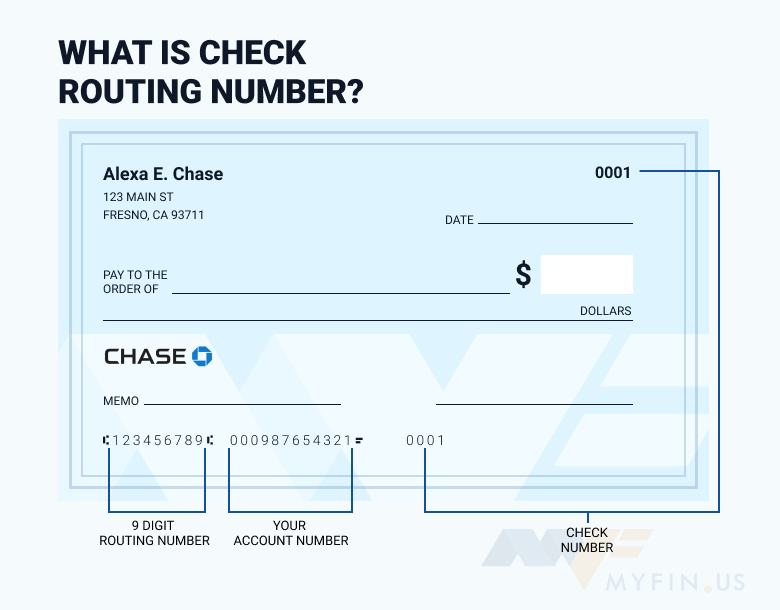
For checking accounts, your personal checks are one of the most reliable and readily available sources of your account number.
-
Location: Look at the bottom of a physical check. You’ll typically find three sets of numbers printed in a special font (MICR font).
-
Order: From left to right, these numbers are usually:
-
Routing Number: The first set of nine digits.
-
Account Number: The second set of numbers, varying in length (typically 10-12 digits for Chase).
-
Check Number: The third set, which matches the printed check number in the top right corner.
-
-
Verification: If you’re unsure, compare the check number at the bottom with the one at the top right to confirm you’re looking at the correct segments.
Reviewing Your Bank Statements
Whether you receive paper statements by mail or access e-statements online, your account number is always present.
-
Paper Statements: Your full account number is typically printed on the upper section of your monthly or quarterly paper statement, often near your name and address. For security, some banks might mask part of the number, but typically enough is visible to identify it clearly.
-
E-Statements: If you’ve opted for paperless statements, you can access past statements through Chase Online Banking or the Chase Mobile app. Navigate to the “Statements & Documents” section, select the desired account and month, and open the PDF statement. Your account number will be clearly visible, usually at the top.
Visiting a Chase Branch
For those who prefer face-to-face assistance or are unable to use digital or paper methods, a visit to a local Chase branch is an option.
-
Locate a Branch: Use the Chase website or app to find the nearest branch.
-
Bring ID: Remember to bring a valid government-issued photo identification (e.g., driver’s license, passport).
-
Speak to a Banker: A customer service representative or banker will be able to look up your account details for you. They may ask for additional verification questions to confirm your identity before providing the number.
Calling Chase Customer Service
If you can’t get to a branch and digital methods aren’t working, calling Chase customer service is another reliable avenue.
-
Find the Number: The general customer service number for Chase is typically found on the back of your debit card, on your bank statements, or on the official Chase website (chase.com).
-
Prepare for Verification: When you call, you’ll go through a series of identity verification questions. This might include your name, address, date of birth, Social Security Number, and answers to security questions you set up.
-
Request Account Number: Once your identity is confirmed, the representative can provide you with your account number. Be prepared to write it down accurately.
Safeguarding Your Financial Information
Knowing where to find your account number is vital, but equally important is understanding how to protect it from unauthorized access. Your account number, especially when combined with your routing number and other personal details, can be used for fraudulent activities.
Best Practices for Account Security
-
Be Discretionate: Only provide your account number when absolutely necessary and to trusted entities (e.g., your employer, government agencies, reputable billers).
-
Secure Storage: If you write down your account number, store it in a secure, private location. Avoid leaving it in easily accessible places or carrying it unnecessarily.
-
Shred Old Documents: When disposing of old checks, statements, or other financial documents, always shred them to prevent dumpster diving identity theft.
-
Monitor Your Accounts: Regularly review your bank statements and online transaction history for any unauthorized activity.
-
Be Wary of Unsolicited Requests: Chase will never ask for your full account number, password, or PIN via unsolicited email, text message, or phone call. Be suspicious of any such requests.
What to Do If Your Information is Compromised
If you suspect your Chase account number or other financial information has been compromised:
-
Contact Chase Immediately: Call Chase’s fraud department or customer service hotline right away to report the incident. They can guide you on the next steps, which may include placing alerts on your account or issuing a new account number.
-
Monitor Credit Reports: Regularly check your credit reports from the three major bureaus (Equifax, Experian, TransUnion) for any suspicious activity. You can obtain free copies annually.
-
File a Police Report: In cases of significant fraud, consider filing a police report.
-
Change Passwords: Update passwords for your online banking and other financial accounts.
Common Pitfalls and Troubleshooting
While finding your account number is generally straightforward, a few issues can arise.
Incorrectly Identifying Numbers
A common mistake is confusing the account number with the routing number or the check number on a physical check. Always remember the order: Routing (9 digits), Account (10-12 digits), Check Number. On statements, the account number is usually clearly labeled. If in doubt, use Chase Online or call customer service.
Access Issues and How to Resolve Them
-
Forgotten Online Banking Credentials: If you’ve forgotten your User ID or Password for Chase Online, use the “Forgot User ID” or “Forgot Password” links on the login page. You’ll typically need to verify your identity using personal details.
-
Locked Account: If your account is locked due to multiple incorrect login attempts, you’ll need to follow the prompts to unlock it or contact Chase customer service for assistance.
-
Technical Glitches: If the website or app isn’t displaying correctly, try clearing your browser’s cache and cookies, restarting the app, or trying a different device or browser. If the issue persists, contact technical support.
Knowing how to efficiently locate your Chase account number through various secure channels is an essential skill for managing your personal finances. By using the methods outlined above and always prioritizing security, you can confidently access the information you need, when you need it, ensuring smooth and secure financial transactions.
aViewFromTheCave is a participant in the Amazon Services LLC Associates Program, an affiliate advertising program designed to provide a means for sites to earn advertising fees by advertising and linking to Amazon.com. Amazon, the Amazon logo, AmazonSupply, and the AmazonSupply logo are trademarks of Amazon.com, Inc. or its affiliates. As an Amazon Associate we earn affiliate commissions from qualifying purchases.