
The annual ritual of tax filing, once synonymous with piles of paperwork, endless calculations, and stressful deadlines, has undergone a significant transformation. Today, thanks to advancements in financial technology, millions of taxpayers are opting for the convenience and efficiency of filing their taxes online. This shift not only simplifies a historically complex process but also empowers individuals with greater control and insight into their financial obligations. For those new to this digital landscape, or seeking to optimize their approach, understanding the nuances of online tax filing is crucial for a smooth and successful tax season.

The Digital Evolution of Tax Filing: Efficiency Meets Empowerment
Gone are the days when mailing a physical envelope to the IRS was the only path to compliance. The internet has revolutionized how we interact with financial institutions and regulatory bodies, and tax agencies are no exception. The move towards online tax filing isn’t merely about convenience; it represents a broader trend in personal finance towards digitization, transparency, and self-service.
From Paper Forms to Digital Platforms: A Paradigm Shift
Historically, tax preparation involved manual entry into complex forms like the 1040, often requiring painstaking reference to instructions and schedules. This paper-based system was prone to errors, time-consuming, and resource-intensive for both taxpayers and the government. The advent of dedicated tax software and online portals has streamlined this process dramatically. These digital tools guide users step-by-step, perform calculations automatically, and even cross-reference data, significantly reducing the likelihood of mistakes. This shift empowers individuals to take a more active role in managing their financial compliance, understanding where their money goes, and ensuring they receive appropriate refunds or pay the correct amount.
The Undeniable Advantages of Filing Online
Beyond mere convenience, online tax filing offers a multitude of benefits that resonate deeply with modern financial management principles. Firstly, accuracy is significantly enhanced. Digital platforms employ sophisticated algorithms that check for errors, omissions, and potential red flags, often flagging issues before submission. This proactive error detection can save taxpayers from costly mistakes, penalties, or delays in receiving refunds. Secondly, speed is a major draw. E-filed returns are processed much faster than paper returns, meaning refunds arrive sooner—often within 21 days for those who opt for direct deposit. Thirdly, accessibility is paramount. Taxpayers can file from virtually anywhere, at any time, using a computer or even a mobile device, eliminating the need for office visits or specific operating hours. Lastly, online platforms often provide audit support and record keeping features, securely storing tax documents and submitted returns for future reference, simplifying financial planning and future tax seasons. These advantages collectively make online tax filing a cornerstone of efficient personal finance.
Navigating Your Options: Choosing the Right Online Tax Solution
With numerous online tax filing platforms available, selecting the one that best suits your individual financial situation is a critical first step. The choice often boils down to a balance between cost, features, and the complexity of your tax return. Understanding these nuances can help you make an informed decision that saves you both time and money.
Free vs. Paid Services: What’s the Best Value for Your Wallet?
The landscape of online tax filing is broadly divided into free and paid services. Free services are an excellent option for taxpayers with simple returns, often those filing only W-2 income, taking the standard deduction, and not claiming many credits or deductions. Many reputable providers offer free federal (and sometimes state) filing for these straightforward scenarios. The IRS also provides its own Free File program, offering free tax preparation and e-filing through partnerships with commercial software companies for taxpayers meeting specific income thresholds.
Paid services, on the other hand, are designed for more complex financial situations. This includes individuals with self-employment income (1099s), investments, rental properties, itemized deductions, or those who need to file multiple state returns. Paid software typically offers more comprehensive features, such as guidance for specific tax situations, access to tax professionals for advice, audit defense, and robust tools for maximizing deductions and credits. While they come with a fee, the potential savings from identified deductions or the peace of mind from expert guidance can often outweigh the cost.
Key Features to Prioritize in Tax Software
When evaluating different platforms, several key features should guide your decision-making process:
- User Interface and Ease of Use: Is the software intuitive and easy to navigate? Does it offer clear, step-by-step guidance?
- Comprehensive Coverage: Does it support all the forms and schedules relevant to your tax situation (e.g., Schedule C for self-employment, Schedule D for investments)?
- Error Checking and Accuracy Guarantees: Does it automatically check for errors and offer guarantees against IRS penalties due to software calculation mistakes?
- State Filing Integration: Can you easily file your state taxes alongside your federal return, and is the cost reasonable?
- Customer Support: What kind of support is offered (chat, phone, email) and during what hours? Is there access to tax professionals?
- Audit Support/Defense: Does the service provide resources or assistance if your return is audited?
- Past Year Import: Can it import data from previous years’ returns, especially if you used the same software?
- Security Measures: What encryption and security protocols are in place to protect your sensitive financial data?
By carefully considering these features against your personal financial needs, you can select a platform that offers the best blend of functionality and value.
Your Step-by-Step Guide to Filing Taxes Online
Filing your taxes online, while intuitive, involves a structured process that ensures accuracy and compliance. Approaching it methodically can help alleviate stress and ensure you don’t overlook critical steps or information.
Gathering Your Financial Documents: The Foundation of Your Return
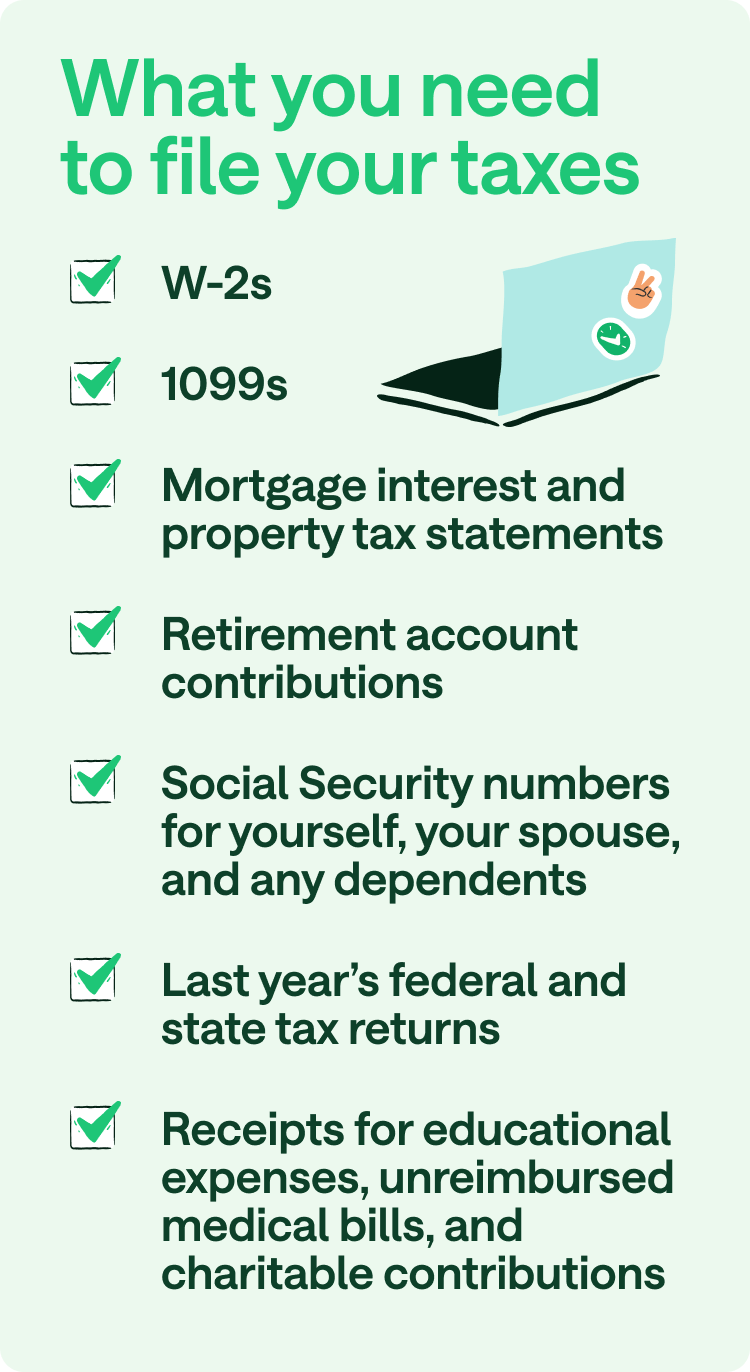
Before you even log into a tax software, the most crucial step is to meticulously gather all necessary financial documents. This preparation phase is vital for accuracy and efficiency. Key documents typically include:
- Income Statements: W-2s (from employers), 1099-MISC or 1099-NEC (for freelance/contract work), 1099-INT (interest income), 1099-DIV (dividend income), 1099-B (stock sales), Schedule K-1 (partnership/S-corp income).
- Deduction and Credit Documents: 1098-E (student loan interest), 1098-T (tuition statement), receipts for charitable contributions, medical expense records, property tax statements, mortgage interest statements (1098).
- Personal Information: Your Social Security number (SSN) or Individual Taxpayer Identification Number (ITIN), and those for your spouse and dependents.
- Prior Year’s Tax Return: This can be a useful reference, especially for carrying over information like capital losses or state tax refunds.
Having these documents organized and at hand will make the data entry process much smoother and reduce the chances of errors.
Navigating the Software Interface and Entering Data
Once you have your documents, you’ll log into your chosen online tax filing platform. Most software guides you through the process with a series of questions designed to elicit all necessary information.
- Personal Information: Start by entering your basic personal data, including your filing status (single, married filing jointly, head of household, etc.) and information for any dependents.
- Income Entry: Systematically enter all your income sources from your W-2s, 1099s, and other income statements. The software will prompt you for the specific boxes and figures.
- Deductions and Credits: This is where you can potentially reduce your taxable income or your tax liability. The software will ask about common deductions (standard vs. itemized) and credits (child tax credit, education credits, energy credits, etc.). Be thorough here, as missing a valid deduction or credit can mean overpaying your taxes.
- State Taxes: Most software seamlessly integrates federal and state tax filing. Data often flows directly from your federal return to your state return, simplifying the process.

The software will perform all the complex calculations automatically, showing you your estimated refund or amount due in real-time as you progress.
Reviewing, E-Signing, and Submitting Your Return
Before you hit “submit,” a thorough review is non-negotiable.
- Comprehensive Review: Utilize the software’s review feature. It will typically highlight any potential issues, missing information, or opportunities for optimization. Double-check all numbers against your original documents. Verify names, SSNs, and bank account information for direct deposit.
- E-Signature: Once you’re confident in the accuracy of your return, you’ll electronically sign it. This typically involves entering your Prior Year Adjusted Gross Income (AGI) or a self-selected PIN as verification.
- Submission: After e-signing, you’ll submit your federal and state returns. You should receive a confirmation email from the software provider, followed by an official acceptance notification from the IRS (and your state tax authority, if applicable), usually within 24-48 hours. This acceptance confirms that your return has been received and processed.
- Record Keeping: Save a copy of your filed return and all supporting documents. Most online platforms allow you to download a PDF of your complete return. Store these securely for at least three years (or longer for certain situations).
Maximizing Your Online Tax Filing Experience and Beyond
Filing taxes online is more than just data entry; it’s an opportunity for strategic financial planning. By understanding how to optimize your filing process, you can ensure accuracy, capitalize on savings, and set yourself up for future financial success.
Identifying All Potential Deductions and Credits
One of the most significant advantages of tax software is its ability to help you uncover deductions and credits you might otherwise miss. The guided interview process is designed to prompt you with questions related to various tax-saving opportunities. Be honest and thorough in your answers.
- Standard vs. Itemized Deductions: Understand which option benefits you most. For many, the standard deduction is simpler and sufficient, but if your itemized deductions (mortgage interest, state and local taxes, charitable contributions, medical expenses) exceed the standard amount, itemizing can lead to significant savings.
- Common Credits: Don’t overlook credits for education (American Opportunity Tax Credit, Lifetime Learning Credit), childcare (Child and Dependent Care Credit), retirement savings (Saver’s Credit), and earned income (Earned Income Tax Credit). Credits directly reduce your tax liability dollar-for-dollar, making them incredibly valuable.
- Business Expenses: If you’re self-employed, meticulously track all business-related expenses. Tax software can help you categorize these to maximize deductions on Schedule C.
Proactive record-keeping throughout the year, utilizing financial tracking apps, or simply maintaining a dedicated folder for receipts can make identifying these opportunities much easier come tax season.
Strategies for Avoiding Common Mistakes
Even with intuitive software, mistakes can happen. Here are common pitfalls to avoid:
- Incorrect Personal Information: Double-check names, SSNs, and birth dates for yourself, your spouse, and dependents. A simple typo can delay your return.
- Wrong Filing Status: Choosing the wrong filing status can significantly impact your tax liability. Review the criteria for each status carefully.
- Missing Income: Ensure you report all sources of income, no matter how small. The IRS receives copies of most income statements, so discrepancies will be flagged.
- Mathematical Errors: While software automates calculations, review any manually entered figures.
- Bank Account Errors for Direct Deposit: If you’re expecting a refund via direct deposit, confirm your bank routing and account numbers are correct to avoid delays or misdirected funds.
- Forgetting to Sign: An unsigned return is an unfiled return. Ensure you complete the e-signature process.
Taking your time and performing a final, meticulous review can prevent these common errors and ensure a smooth tax filing experience.
When to Seek Professional Assistance
While online tax filing is suitable for most, there are instances where professional assistance is invaluable. If your financial situation is particularly complex—involving significant investments, multiple businesses, international income, or recent life changes like marriage, divorce, or major property sales—a certified public accountant (CPA) or enrolled agent can provide expert guidance. They can help navigate intricate tax laws, offer strategic advice for future planning, and represent you in the event of an audit. Many online tax platforms also offer options to connect with tax professionals for an additional fee, providing a hybrid solution that combines the convenience of software with expert oversight. Recognizing when your situation warrants professional help is a smart financial decision that can save you significant headaches and potentially optimize your tax outcome.
Safeguarding Your Financial Information Online
The convenience of online tax filing comes with the critical responsibility of protecting your sensitive financial data. With increasing cyber threats, understanding and implementing robust security practices is paramount to prevent identity theft and fraud.
Protecting Your Personal Information
When filing taxes online, you are entrusting highly sensitive data—Social Security numbers, income details, bank account information—to digital platforms. Here’s how to safeguard it:
- Strong, Unique Passwords: Use complex passwords for your tax software account, combining letters, numbers, and symbols. Never reuse passwords across different online services.
- Two-Factor Authentication (2FA): Always enable 2FA if your tax software offers it. This adds an extra layer of security, requiring a code from your phone or email in addition to your password.
- Secure Internet Connection: Only file your taxes using a private, secure internet connection. Avoid public Wi-Fi networks, which are often unencrypted and susceptible to eavesdropping.
- Beware of Phishing Scams: The IRS will never initiate contact with you via email, text message, or social media to request personal or financial information. Be extremely wary of unsolicited communications claiming to be from the IRS or a tax software provider.
- Keep Software Updated: Ensure your operating system and tax software are always up-to-date with the latest security patches.
Verifying the Legitimacy of Tax Services
Before committing to an online tax filing service, verify its credibility:
- Reputation and Reviews: Choose well-known, reputable tax software companies with a history of reliable service. Check independent reviews and consumer reports.
- Official IRS Information: The IRS website provides a list of authorized e-file providers. Ensure your chosen service is on this list.
- Privacy Policy: Read the company’s privacy policy to understand how your data is collected, stored, and shared.
- Security Certificates: Look for “HTTPS” in the website’s URL and a padlock icon in your browser’s address bar, indicating a secure connection.
By being vigilant and proactive, you can confidently leverage the benefits of online tax filing while minimizing your exposure to digital risks, ensuring your financial peace of mind.
Filing your taxes online is a modern necessity for effective personal finance management. It offers a powerful blend of convenience, accuracy, and efficiency that traditional paper-based methods simply cannot match. By understanding the available tools, following a structured approach, and prioritizing digital security, you can transform a once-dreaded annual task into a straightforward process, empowering you to better manage your financial obligations and secure your financial future.
aViewFromTheCave is a participant in the Amazon Services LLC Associates Program, an affiliate advertising program designed to provide a means for sites to earn advertising fees by advertising and linking to Amazon.com. Amazon, the Amazon logo, AmazonSupply, and the AmazonSupply logo are trademarks of Amazon.com, Inc. or its affiliates. As an Amazon Associate we earn affiliate commissions from qualifying purchases.