
In an increasingly digital financial landscape, managing our online accounts is paramount. Services like Cash App have revolutionized peer-to-peer payments and personal finance, offering convenience and speed. However, circumstances can arise where a user might decide to deactivate or delete their Cash App account. Whether driven by security concerns, a desire to consolidate financial tools, or simply no longer needing the service, understanding the correct procedure for account deletion is crucial. This guide provides an insightful, step-by-step tutorial on how to navigate the process, ensuring a smooth and secure digital offboarding.

Navigating Your Decision: Why Deleting a Cash App Account Matters
The decision to delete a digital financial account like Cash App is often multifaceted. It’s not merely about clicking a button; it involves understanding the implications and ensuring all necessary precautions are taken. For tech-savvy users, this process should be approached with the same diligence applied to setting up and using the app.
Common Reasons for Account Deactivation
Users consider deleting their Cash App accounts for a variety of reasons, each highlighting a different facet of digital financial management:
- Security Concerns: Data breaches, phishing attempts, or unauthorized access attempts can prompt users to remove themselves from platforms they perceive as vulnerable, even if the vulnerability is external to the app itself. The desire to reduce one’s digital footprint to minimize risk is a significant motivator.
- Switching Platforms or Consolidating Finances: The market for peer-to-peer payment apps is competitive. Users might find a different service better suits their needs, offers more features, or integrates more seamlessly with other financial tools they use. Consolidating finances often means streamlining accounts to simplify budgeting and tracking.
- Privacy Preferences: In an era of heightened awareness regarding data privacy, some users opt to delete accounts to limit the amount of personal and financial data stored by third-party services. This is a proactive step in managing one’s digital privacy posture.
- No Longer Needed: For many, Cash App might have served a temporary purpose, such as splitting costs for a specific event or receiving a one-time payment. Once that need passes, maintaining an active account becomes redundant.
- Issues with Account Management: Sometimes, users encounter persistent issues that customer support cannot resolve to their satisfaction, leading them to abandon the service altogether. This could range from transaction disputes to identity verification problems.
Understanding the Implications of Deletion
Before proceeding with deletion, it’s vital to grasp the technical and practical implications. Deleting a Cash App account is generally a permanent action, differing significantly from merely uninstalling the app from your phone.
- Loss of Transaction History: All past transaction data associated with the account will typically become inaccessible. This can be problematic for tax purposes, personal budgeting, or resolving future disputes. It underscores the importance of downloading records beforehand.
- Inability to Recover Old Data: Once deleted, your account profile, associated contacts, and any settings will be permanently removed. There’s no “undo” button in most cases, and attempting to log in with old credentials will often result in a “user not found” error, or you might be prompted to create a new account.
- Impact on Linked Services: Any recurring payments, subscriptions, or direct deposits linked to your Cash App account or its associated routing and account numbers will cease to function. This requires careful pre-planning to avoid service interruptions or missed payments.
- Reactivation Challenges: While some services allow a grace period for account reactivation, Cash App’s policy often treats deletion as final. Rejoining the platform typically means creating an entirely new account, which might involve new verification processes and a fresh start without any previous data.
- No More Payments: Naturally, a deleted account cannot send or receive money, nor can it use any of Cash App’s additional features like investing in stocks or Bitcoin.
Essential Pre-Deletion Steps: Securing Your Digital Assets
Deleting a financial account, even one primarily for peer-to-peer payments, requires meticulous preparation. Rushing the process can lead to lost funds, unlinked services, or inaccessible historical data. These preparatory steps are crucial for any user committed to good digital hygiene.
Withdrawing All Funds: The First Critical Action
The absolute first step before initiating account deletion is to ensure your Cash App balance is zero. Any funds left in the account are at risk of being inaccessible after deletion.
- Ensuring Balance is Zero: Navigate to your Cash App balance. If there’s any money, initiate a withdrawal. This can typically be done by tapping your balance on the main screen and selecting “Cash Out.”
- Different Withdrawal Methods: Cash App usually offers two primary methods:
- Standard Deposit: Funds are transferred to your linked bank account, often free, but can take 1-3 business days to clear.
- Instant Deposit: For a small fee (usually 0.5%–1.75%, with a minimum fee of $0.25), funds are transferred immediately to your linked debit card. Choose this if you need immediate access or want to ensure all funds are cleared before initiating deletion.
- Potential Fees/Limits: Be aware of any minimum cash-out amounts or daily/weekly limits. Ensure your linked bank account or debit card is active and correctly linked to receive the funds. If you only have a credit card linked, you won’t be able to cash out directly to it, emphasizing the need for a linked bank account or debit card.
- Bitcoin and Stock Holdings: If you have Bitcoin or stock investments within Cash App, these must be sold and the proceeds cashed out before you can delete the account. Navigate to the respective sections in the app to liquidate these assets. This process itself can take a few business days for funds to settle before they can be withdrawn.
Unlinking Connected Accounts and Services
Your Cash App account is likely connected to various external financial services. These links must be severed before deletion to prevent issues.
- Bank Accounts and Debit Cards: Go to the “Linked Banks” section within your profile settings. Tap on each linked account or card and select the option to “Remove” or “Unlink.” This prevents any accidental charges or attempts to link the non-existent Cash App account in the future.
- Direct Deposit: If you’ve used Cash App for direct deposits (e.g., for paychecks or government benefits), you must update your direct deposit information with your employer or benefit provider to point to a different bank account before deleting Cash App. Failure to do so will result in lost or delayed funds.
- Investment Features (Stocks, Bitcoin): As mentioned, any active investments must be sold and the resulting cash balance withdrawn. Simply unlinking without selling will leave you in limbo.
- Other Apps/Services: Review any other third-party apps or services where you might have used Cash App as a payment method or linked it for verification. Update those payment methods accordingly.
Preserving Your Records: Downloading Transaction History
For personal finance management, tax purposes, or potential future disputes, retaining your transaction history is invaluable.
- Importance for Taxes: For anyone using Cash App for business transactions or receiving income, a complete transaction history is essential for tax reporting.
- Personal Finance Tracking: Maintaining records helps in budgeting, understanding spending habits, and identifying any unauthorized transactions.
- Future Reference: Should any past transaction come under scrutiny or need clarification, having the records on hand is critical.
- How to Download: Cash App typically allows users to download monthly statements or a full transaction history from the app or its website. Navigate to your profile, look for “Statements & Reports,” and select the option to export your transaction history, usually as a CSV or PDF file. Save these files securely to your computer or a cloud storage service.
The Step-by-Step Process: Deleting Your Cash App Account
Once all preparatory steps are complete, you can proceed with the actual deletion of your Cash App account. The process is designed to be straightforward but requires user verification to ensure it’s not an unauthorized deletion.
In-App Deactivation: A Detailed Walkthrough
Cash App generally provides an intuitive path for account closure directly within the application, assuming you’ve completed all pre-requisites.
- Open Cash App: Launch the Cash App on your smartphone (iOS or Android).
- Navigate to Your Profile: Tap the profile icon (it looks like a person or a circle with your photo/avatar) in the top-right corner of the main screen.
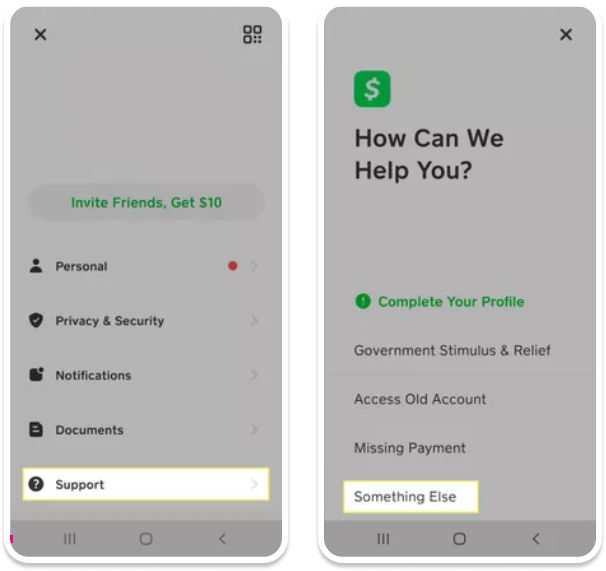
- Access Support or Privacy Settings: Scroll down through your profile settings. You’ll typically find an option like “Support,” “Cash App Support,” or sometimes a dedicated “Privacy & Security” section. The exact wording can vary slightly with app updates.
- Find Account Closure Option: Within the support or privacy section, look for topics related to “Account,” “Account Settings,” or “Closing Your Account.” There should be an option like “Close My Cash App Account” or “Delete My Account.”
- Follow On-Screen Prompts: The app will guide you through a series of prompts. This usually involves:
- Confirming Zero Balance: It will verify that your balance is $0.
- Unlinking Accounts: It might prompt you to confirm all linked accounts have been removed.
- Security Verification: You may need to confirm your identity via a passcode, Touch ID, Face ID, or a code sent to your registered phone number/email.
- Final Confirmation: You’ll be asked to confirm your decision one last time, often with a warning about the permanency of the action.
- Confirmation Message: Upon successful deletion, you should receive an in-app message or an email confirming that your account has been closed. Keep this confirmation for your records.
Contacting Support for Account Closure
There might be situations where the in-app option is not available, or you encounter difficulties. In such cases, contacting Cash App support directly is the next course of action.
- When to Contact Support:
- If you cannot access your account (e.g., forgotten password, lost phone, suspicious activity).
- If the in-app deletion option is missing or you receive an error message.
- If you have a remaining balance that cannot be cashed out due to technical issues.
- If you have complex issues related to linked accounts or historical transactions.
- Contact Methods:
- Phone: Cash App typically offers phone support for critical issues. Find the current support number on their official website. Be prepared for wait times.
- Email/In-App Chat: Within the app’s support section, there’s usually an option to send a message or start a chat session. Clearly state your intent to delete your account and explain any issues you’re facing.
- Website: The Cash App support website also has contact forms.
- Required Information for Verification: When contacting support, you will be required to provide specific information to verify your identity and ownership of the account. This could include your full name, associated phone number/email, Cash App Cashtag, date of birth, and possibly details of recent transactions or linked bank accounts. This robust verification process is a standard security measure for financial services.
Confirmation and Verification
After initiating the deletion process, whether in-app or via support, it’s crucial to ensure it has been successfully processed.
- What to Expect: Typically, Cash App will send a confirmation email to the address associated with your account within a few hours or days. This email will formally state that your account has been closed.
- Typical Timeframes: While the in-app process is often immediate, if you go through support, it might take a few business days for them to process the request and provide confirmation.
- Final Confirmation Messages: Look for specific language confirming permanent deletion rather than just deactivation or temporary suspension. Save these emails.
- Attempt a Login (Optional, for Verification): A day or two after receiving confirmation, you can attempt to log in with your old credentials. If the account is truly deleted, you should be unable to access it, or the system might prompt you to create a new account, which serves as an additional verification that the old one is gone.
Post-Deletion Considerations and Digital Hygiene
Deleting an account is a significant step in managing your digital identity, but the process doesn’t end with the confirmation email. There are several post-deletion considerations and broader digital hygiene practices to adopt.
What Happens After Your Account is Closed?
Understanding the long-term effects of account closure is key to effective digital asset management.
- Data Retention Policies: While your account is deleted from your perspective, financial institutions are often legally required to retain certain transaction data and personal information for a specified period (e.g., 5-7 years for regulatory compliance). This data is typically archived and not publicly accessible or actively used.
- Inability to Send/Receive: Your Cashtag will no longer be active, and any attempts to send money to it will fail. If someone tries to send you money via an old link or your phone number, it will usually bounce back or indicate the recipient is not found.
- Effect on Old Cashlinks: Any public Cashlinks you might have shared will no longer be functional. People clicking them will likely be directed to a generic Cash App page or an error message.
Addressing Potential Residual Issues
Even after deletion, a few loose ends might arise that require attention.
- Unrecognized Charges: Monitor your linked bank accounts and debit/credit cards for a few weeks after deletion to ensure no residual charges related to Cash App or services previously linked through it appear. This is rare if all pre-deletion steps were followed, but vigilance is always good.
- Forgotten Subscriptions: Double-check your list of subscriptions to ensure none were inadvertently tied to your Cash App account as a payment method. If so, update them with a new payment source.
- Identity Theft Monitoring: While deleting an account can reduce your digital footprint, it doesn’t eliminate all risks. Continue to practice good identity theft monitoring, especially if security concerns were a reason for deletion.
Best Practices for Digital Account Management
Beyond Cash App, adopting a holistic approach to managing your online financial accounts is crucial.
- Regular Review of Financial Apps: Periodically review all financial apps you use. Delete those that are no longer needed or used frequently.
- Strong Password Hygiene: Always use strong, unique passwords for each financial account and enable two-factor authentication (2FA) wherever possible. A password manager can be invaluable for this.
- Two-Factor Authentication (2FA): 2FA adds an extra layer of security by requiring a second form of verification (like a code from your phone) in addition to your password. Ensure it’s active on all sensitive accounts.
- Awareness of Phishing/Scams: Remain vigilant against phishing emails, texts, or calls purporting to be from financial institutions. Always verify the source directly before clicking links or sharing information.
- Secure Device Management: Keep your devices’ operating systems and apps updated, use antivirus software, and secure your phone with strong passcodes/biometrics.
Alternatives to Full Deletion
For some users, full account deletion might feel too drastic. There are alternatives that offer more flexibility while still addressing common concerns.
Temporarily Disabling or Limiting Account Access
If you anticipate needing Cash App again in the future, or just want a break, consider these options:
- Unlinking Cards and Bank Accounts: You can remove all linked bank accounts and debit/credit cards without deleting the account itself. This effectively prevents you from sending or receiving money but keeps your account profile and history intact.
- Changing Passwords and Enabling 2FA: If security is the main concern, changing your password to a strong, unique one and enabling two-factor authentication can significantly enhance security without needing to delete the account.
- Uninstalling the App: Simply uninstalling the Cash App from your phone removes local access but doesn’t delete the account. You can always reinstall and log back in later.

Updating Account Information and Security Settings
Instead of deletion, a proactive approach to account maintenance can often suffice.
- Refreshing Security Protocols: Regularly review and update your security settings. This includes changing passwords periodically, especially after any suspected breach or suspicious activity.
- Enabling Advanced Security Features: Take advantage of any advanced security features offered by Cash App, such as login notifications, PIN requirements for transactions, or location-based security.
- Updating Personal Information: Ensure your registered phone number and email are current, as these are critical for account recovery and security alerts.
In conclusion, deleting a Cash App account, while seemingly a simple technical task, is a process that demands careful consideration and preparation. By following these comprehensive steps—from understanding your reasons and preparing your digital assets to executing the deletion and managing post-deletion concerns—you can ensure a secure, clean, and controlled exit from the platform, maintaining optimal digital hygiene in your financial life.
aViewFromTheCave is a participant in the Amazon Services LLC Associates Program, an affiliate advertising program designed to provide a means for sites to earn advertising fees by advertising and linking to Amazon.com. Amazon, the Amazon logo, AmazonSupply, and the AmazonSupply logo are trademarks of Amazon.com, Inc. or its affiliates. As an Amazon Associate we earn affiliate commissions from qualifying purchases.