
In an increasingly digital world, managing our online presence extends beyond social media to financial platforms. PayPal, a ubiquitous service for online payments and money transfers, often becomes a cornerstone of our digital financial lives. However, circumstances change, and you might find yourself needing to step back from an account you no longer use or require. Whether it’s due to security concerns, a shift to alternative payment methods, or simply a desire to declutter your digital footprint, knowing how to properly deactivate your PayPal account is a crucial piece of digital literacy. This guide will walk you through the process, ensuring you understand the implications and can execute the steps confidently within the broader context of managing your technology and digital security.
Understanding Account Deactivation vs. Closure: A Crucial Distinction
Before embarking on the process, it’s vital to clarify what we mean by “deactivating” a PayPal account. Unlike some social media platforms that offer temporary deactivation, PayPal’s terminology is more direct: you close your account. This is a permanent action, not a temporary pause. Understanding this distinction is the first step in making an informed decision.
Temporary Suspension vs. Permanent Removal
Many users confuse the idea of temporarily disabling an account with permanently closing it. On platforms like Facebook or Instagram, you might have the option to temporarily “deactivate” your profile, making it invisible while retaining the ability to reactivate it later with all your data intact. PayPal does not offer such a temporary deactivation feature for general users.
When you choose to “deactivate” your PayPal account, you are initiating a permanent closure. This means that once the process is complete, the account, along with its transaction history and associated data, will no longer be accessible to you. While PayPal has data retention policies, your ability to log in and manage the account will cease. This permanence underscores the importance of careful preparation before proceeding. If you simply wish to take a break from using PayPal, but foresee needing it again in the future, consider leaving the account open and simply removing linked bank accounts or cards, rather than outright closing it.
Key Differences and Why They Matter
The difference between temporary suspension (which PayPal doesn’t offer for user-initiated “deactivation”) and permanent closure has significant implications.
- Reversibility: A temporary suspension would typically allow for easy reactivation. A permanent closure, however, means you generally cannot simply “reactivate” the old account. If you wish to use PayPal again after closing your account, you will likely need to open a brand-new account, subject to current registration policies and potentially different terms of service. This means losing your transaction history, verified status, and any established relationships from the old account.
- Data Access: With a temporary suspension, your data remains intact and accessible upon reactivation. With permanent closure, your access to historical data (like past transactions, receipts, and linked information) is severed. While PayPal retains certain data for legal and compliance reasons, you will not have direct access to it through your user interface.
- Linked Services: Many online services, subscriptions, and merchants link directly to your PayPal account for payments. A temporary suspension might maintain these links in a paused state. A permanent closure will definitively break these links, potentially leading to failed payments for recurring services if you haven’t updated your payment methods elsewhere.
Recognizing that “deactivating” your PayPal account is synonymous with permanently closing it is crucial. This understanding should inform your preparation and final decision, emphasizing the need to complete all necessary pre-steps to avoid future complications.
Preparing for Deactivation: Essential Pre-steps
Given the permanent nature of closing a PayPal account, a thorough preparation phase is critical. Rushing into the closure without addressing outstanding issues can lead to financial headaches, lost data, and difficulties with linked services. These preparatory steps ensure a smooth exit and safeguard your financial interests.
Withdrawing Funds and Resolving Disputes
The most immediate and vital step is to ensure your PayPal balance is zero. Any funds remaining in your account when you attempt to close it will either prevent the closure or be forfeited, depending on the amount and PayPal’s specific terms for your region.
- Withdraw All Funds: Transfer any available balance to your linked bank account. If you don’t have a linked bank account, you may need to add one temporarily, or consider sending the funds to a trusted friend or family member (who can then send them back to your bank account via an alternative method). Ensure all pending transactions have cleared.
- Resolve Pending Disputes: If you have any open disputes, claims, or chargebacks, these must be resolved before you can close your account. Actively participate in the dispute resolution process. Attempting to close an account with unresolved disputes can complicate the process, potentially leaving you unable to access necessary information or participate in the resolution. Wait until all disputes are fully closed, whether in your favor or against you.
- Clear Negative Balances: If your account has a negative balance, you must clear it. This typically happens if a payment you made was reversed or rejected, and there weren’t sufficient funds in your PayPal balance or linked bank account to cover it. You’ll need to add funds to bring the balance to zero or positive before proceeding.
Cancelling Subscriptions and Recurring Payments
PayPal is often used as a payment gateway for subscriptions, online services, and recurring donations. Before closing your account, you must ensure that all such automatic payments are either canceled or redirected to an alternative payment method.
- Review Automatic Payments: Log into your PayPal account and navigate to your “Settings.” Look for sections related to “Payments,” “Automatic Payments,” or “Pre-approved Payments.” Here, you’ll find a list of all merchants and services authorized to draw funds from your PayPal account.
- Cancel or Update: For each active subscription, you have two options:
- Cancel within PayPal: Many services allow you to cancel the recurring payment directly from your PayPal dashboard.
- Update with the Merchant: Alternatively, and often preferably, log into each merchant’s website or service platform directly and update your payment method to a different credit card or bank account. This ensures continuity of service if you wish to keep the subscription active.
- Why this is crucial: If you close your PayPal account without cancelling or updating these subscriptions, those services will attempt to charge a non-existent account, leading to failed payments, potential service interruptions, and administrative hassle for you to fix later.
Downloading Transaction History and Data
Once your account is closed, your direct access to your transaction history and other associated data will be severed. While PayPal retains data for a period as per its privacy policy and legal obligations, you will not be able to log in and retrieve it yourself. Therefore, it’s highly advisable to download a complete record of your activity for your personal records, tax purposes, or future reference.
- Access Activity Reports: In your PayPal account, navigate to the “Activity” or “History” section. Look for options to “Download” or “Generate Reports.”
- Select Date Range: Ensure you select the broadest possible date range to capture all your transactions, from the account’s inception to the present day.
- Choose Format: Typically, you can download statements in formats like CSV or PDF. CSV is useful for importing into spreadsheet software for analysis, while PDF is good for static records. Download both if available.
- Save Securely: Store these downloaded files in a secure location on your computer or cloud storage, encrypted if possible, as they contain sensitive financial information.
Completing these pre-steps meticulously will ensure that your financial affairs are in order and that you have a comprehensive record of your PayPal activity before you proceed with the permanent closure.
Step-by-Step Guide to Deactivating Your PayPal Account
With all the preparatory steps completed, you are now ready to officially close your PayPal account. The process is relatively straightforward, but it requires careful navigation within the platform’s interface.
Accessing Account Settings
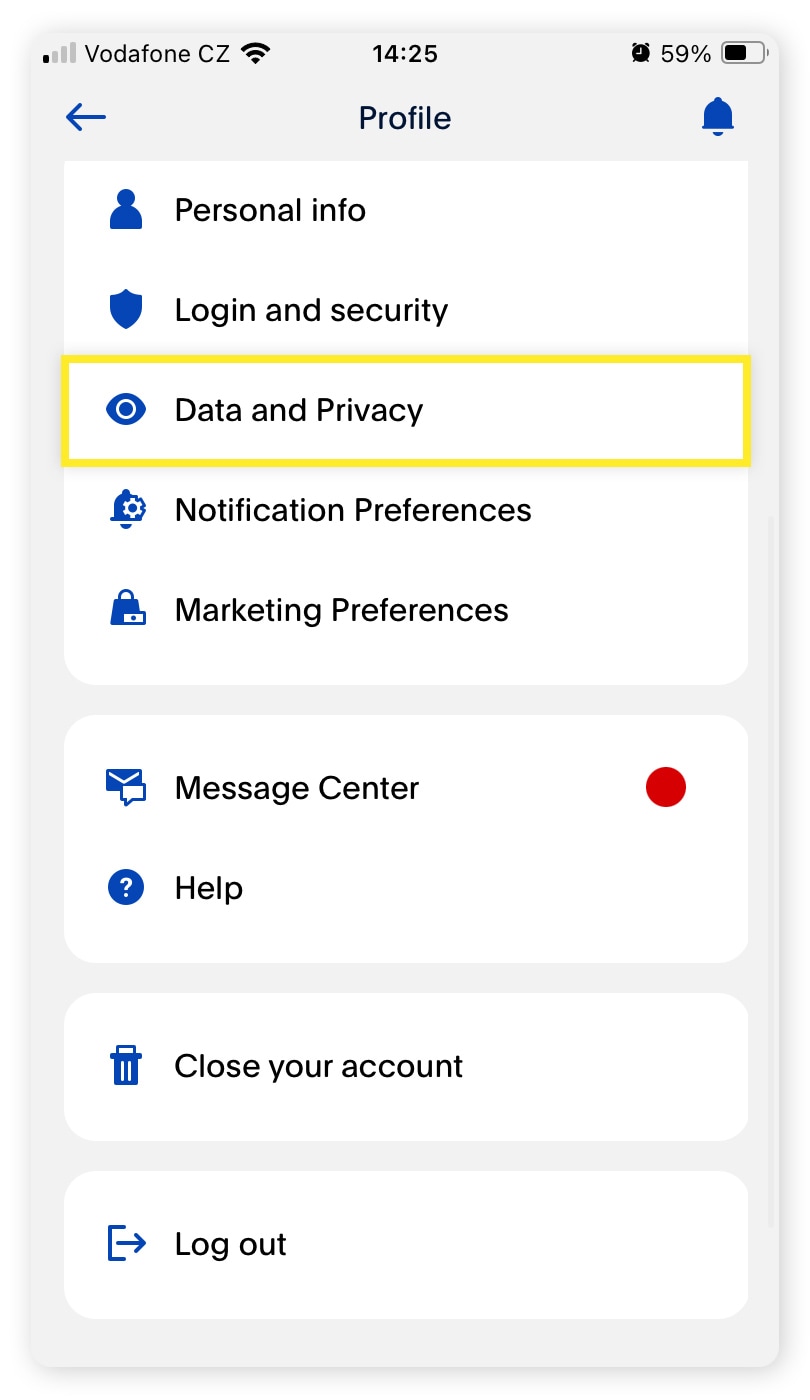
The first step is to log into your PayPal account through a web browser on a computer. While some options might be available on the mobile app, the full suite of account management features, including closure, is typically more accessible and clearly presented on the desktop version of the website.
- Log In: Go to the official PayPal website (www.paypal.com) and log in with your username (usually your email address) and password.
- Navigate to Settings: Once logged in, look for the “Settings” icon. This is usually represented by a gear or cog icon, often located in the top right corner of the dashboard. Click on it.
- Find Account Settings: Within the Settings menu, you’ll typically see various tabs or sections such as “Account,” “Security,” “Payments,” etc. Click on the “Account” or “Account Settings” tab.
Navigating to the Closure/Deactivation Option
Within the Account Settings, the option to close your account might not be immediately obvious. PayPal, like many services, tends to place such permanent actions slightly out of the way to ensure users are deliberate in their choices.
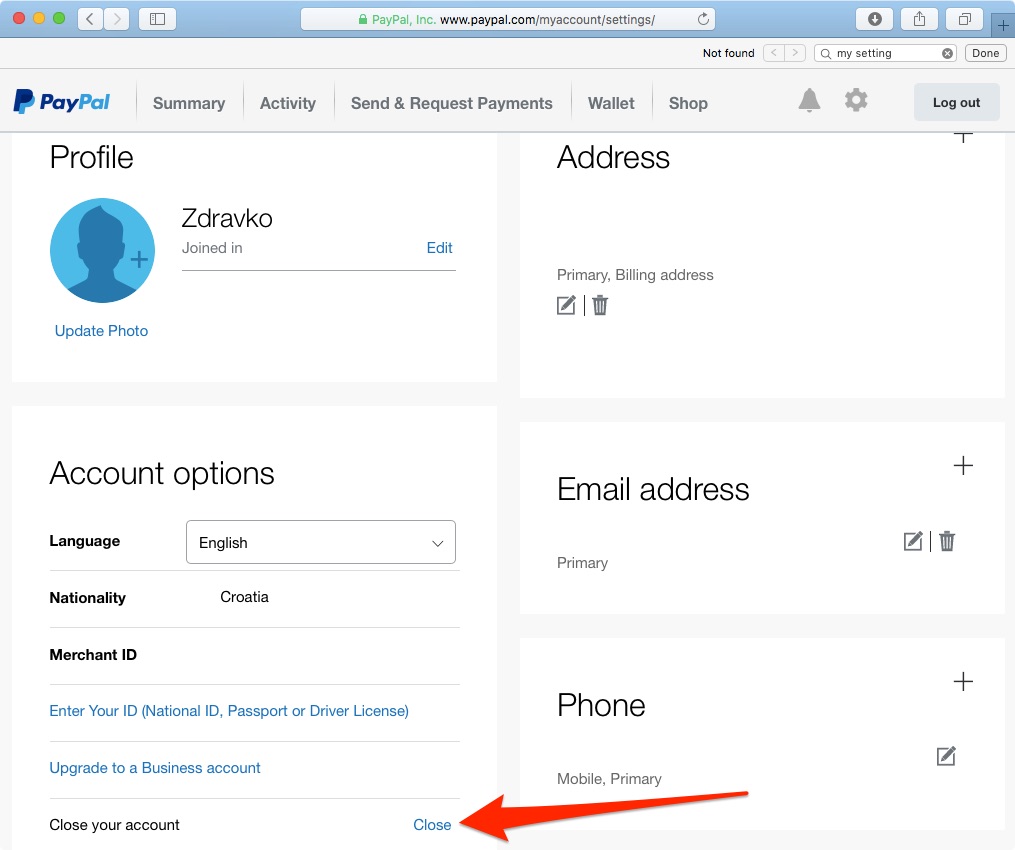
- Locate “Close Account”: Scroll down the “Account” or “Account Settings” page. You are looking for a link or button labeled “Close Account” or “Close your account.” It might be found under a section like “Account Options,” “More Options,” or simply at the bottom of the page.
- Note: The exact wording and placement can vary slightly based on your region, account type (personal vs. business), and any recent PayPal interface updates.
- Click “Close Account”: Once you’ve found it, click on the “Close Account” link or button.
Confirming Your Decision and Security Checks
PayPal will not allow you to close your account with a single click. There will be several confirmation steps and security checks to ensure that you genuinely intend to close the account and that it’s you initiating the action, not an unauthorized party.
- Reason for Closing: PayPal may ask you to select a reason for closing your account from a dropdown list or provide a brief explanation. While optional, providing feedback can help PayPal improve its services.
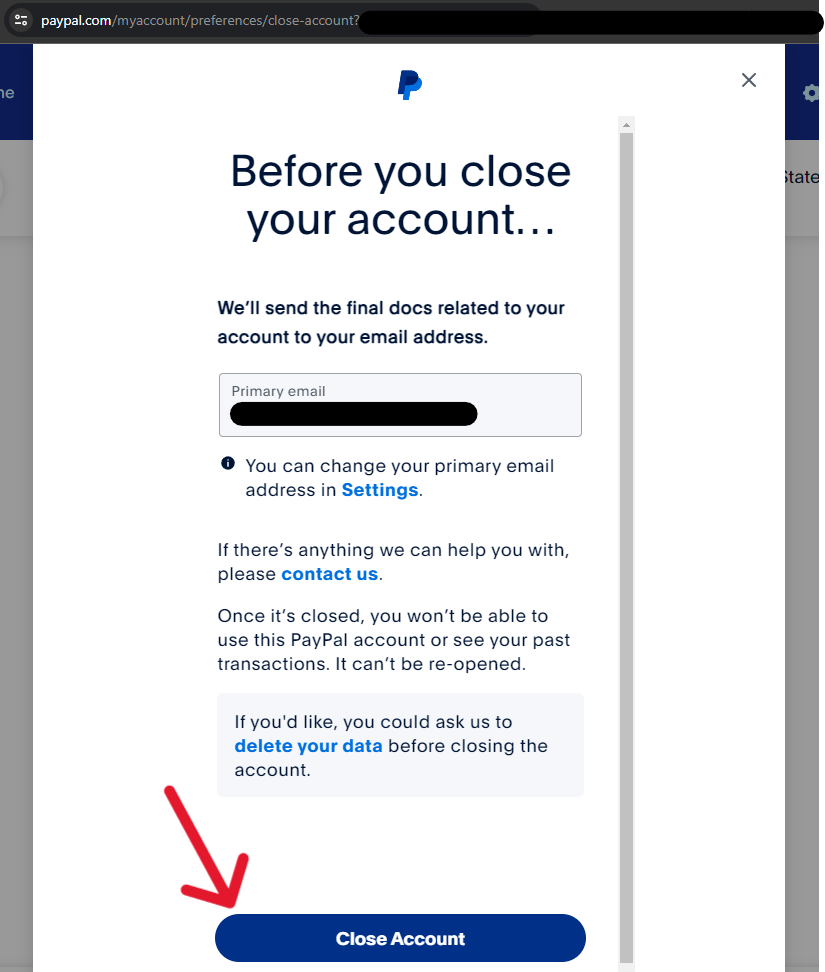
- Final Checks and Warnings: The system will likely display warnings about the permanence of the action, reminding you about outstanding balances, linked subscriptions, and the loss of transaction history. This is your final opportunity to review your preparation and ensure all pre-steps were completed.
- Security Verification: To confirm your identity, PayPal will typically require you to re-enter your password. They might also send a security code to your registered email address or phone number, which you’ll need to input on the screen. This two-factor authentication step is crucial for protecting your account from unauthorized closure.
- Confirm Closure: After completing all verification steps, you will be prompted to confirm the closure one last time. Click the final “Close Account” or “Confirm Closure” button.
Once confirmed, you should receive an email from PayPal confirming that your account has been successfully closed. This email serves as your official record of the deactivation. Keep it for your records.
What Happens After Deactivation?
Once your PayPal account is officially closed, the immediate impact is a cessation of service. However, the ramifications extend beyond simply not being able to log in. Understanding these post-deactivation effects is important for long-term digital hygiene and privacy.
Data Retention and Privacy Considerations
When you close your PayPal account, your data isn’t immediately and entirely purged from PayPal’s systems. This is standard practice for financial institutions due to legal, regulatory, and operational requirements.
- Legal Compliance: PayPal, like all financial service providers, is subject to various laws (e.g., anti-money laundering, counter-terrorism financing, tax regulations) that require them to retain certain transaction records and user data for a specified period, often several years, even after an account is closed.
- Fraud Prevention: Retaining some historical data helps PayPal in fraud detection and prevention, ensuring that closed accounts are not used for illicit activities or to bypass platform rules.
- Privacy Policy: PayPal’s privacy policy outlines its data retention practices. It’s advisable to review this policy before closing your account to understand exactly what data is retained, for how long, and for what purposes. While your account is closed and inaccessible to you, the retained data is typically used only for internal compliance and regulatory purposes, not for active marketing or user engagement.
- Right to Erasure (GDPR): In regions with strong data protection laws like GDPR (General Data Protection Regulation) in Europe, users may have a “right to erasure” or “right to be forgotten.” However, this right is not absolute and often has exemptions for financial institutions where data retention is legally mandated. If you have specific concerns about your data, you may contact PayPal’s privacy office.
Implications for Linked Services and Merchants
As mentioned in the preparation phase, failing to update or cancel recurring payments before closing your account can lead to issues. Even if you’ve done everything correctly, it’s worth understanding the broader implications for services that previously used your PayPal account.
- Failed Payments: Any recurring payments or subscriptions that you missed updating will now fail. This could lead to service interruptions, late fees from merchants, or even account suspension with those services.
- Account Verification: Some online services use PayPal as a method for identity verification. If you close your account, that specific verification link is broken. While this usually isn’t an issue for existing accounts, it might impact your ability to re-verify or sign up for new services that previously relied on a PayPal link.
- Merchant Records: Merchants with whom you’ve transacted via PayPal will retain records of those transactions, as they are independent entities. Closing your PayPal account does not erase your purchase history or account details from the merchant’s own databases.
The Possibility of Account Reactivation (and its Limits)
As discussed, PayPal account closure is permanent. Therefore, direct “reactivation” of the same account is generally not possible.
- Opening a New Account: If you wish to use PayPal again after closing your account, you will typically need to open a brand-new account. This means going through the full registration process again, linking new bank accounts/cards, and building up a new transaction history. Your old account’s details (e.g., transaction history, verified status, linked services) will not transfer.
- Limitations for Specific Scenarios: In very rare, specific circumstances (e.g., immediate accidental closure, or if PayPal itself suggests it for a technical reason), customer support might be able to offer a solution. However, this is not a standard feature and should not be relied upon. For all practical purposes, assume closure is final.
Why Deactivate? Common Scenarios and Considerations
People choose to deactivate (close) their PayPal accounts for a variety of valid reasons, often related to evolving digital security practices, personal financial management, or dissatisfaction with the service. Understanding these common motivations can help others make informed decisions.
Security Concerns and Data Minimization
In an era of frequent data breaches and heightened awareness of online privacy, many users opt for data minimization. Having fewer online accounts reduces your digital footprint and, consequently, the attack surface for potential security threats.
- Reduced Risk: Every active online account, especially one linked to financial services, represents a potential vulnerability. If PayPal were ever compromised, having an active account could expose your information. By closing unused accounts, you reduce this risk.
- Decluttering Digital Life: Similar to physical decluttering, digital decluttering involves removing unnecessary accounts and subscriptions. This can improve mental clarity and make it easier to manage the essential services you do use.
- Phishing and Scams: An unused account can still be a target for phishing attempts. Closing it removes one potential avenue for scammers to try and trick you.
Consolidating Financial Tools
The financial technology landscape is dynamic, with new apps and services constantly emerging. Users might close their PayPal account as part of a broader strategy to consolidate their financial management to fewer, preferred platforms.
- Streamlined Management: Managing multiple financial apps can be cumbersome. If another service now handles all your online payment needs more efficiently or integrates better with your other financial tools, consolidating makes sense.
- Unified Oversight: Having all your funds and transactions channeled through one or two primary platforms can offer a clearer, more holistic view of your personal finance, simplifying budgeting and tracking.
Moving to Alternative Payment Platforms
The rise of competitors and specialized payment solutions means PayPal is no longer the sole dominant player. Users may find better features, lower fees, or more tailored services elsewhere.
- Competitive Landscape: Services like Stripe, Square, Wise (formerly TransferWise), Venmo (though owned by PayPal), and various bank-specific P2P payment apps offer compelling alternatives.
- Specific Needs: A user might find a platform that better suits their specific needs, such as international transfers with lower fees, better integration with a specific e-commerce platform, or simply a user interface they prefer.
Dealing with Account Fraud or Misuse
While rare, a user might choose to close their PayPal account if they have experienced fraud, significant security incidents, or believe their account has been misused, and they feel a fresh start is necessary.
- Post-Fraud Protocol: After dealing with a fraud incident, some users prefer to close the compromised account entirely and open a new one with stronger security measures and new credentials, rather than continuing to use an account they feel has been tainted.
- Persistent Issues: If a user has faced persistent issues, technical glitches, or unsatisfactory customer support experiences that lead to a lack of trust in the platform, closing the account can be a final recourse.
Ultimately, deactivating (closing) your PayPal account is a significant decision that should be approached with careful planning and an understanding of its permanent implications. By following the preparation steps and navigating the closure process diligently, you can ensure a smooth transition and maintain control over your digital financial landscape, aligning with best practices in digital security and personal technology management.
aViewFromTheCave is a participant in the Amazon Services LLC Associates Program, an affiliate advertising program designed to provide a means for sites to earn advertising fees by advertising and linking to Amazon.com. Amazon, the Amazon logo, AmazonSupply, and the AmazonSupply logo are trademarks of Amazon.com, Inc. or its affiliates. As an Amazon Associate we earn affiliate commissions from qualifying purchases.