
In the vast digital landscape of the 21st century, Amazon stands as an undeniable behemoth, an e-commerce giant that has woven itself into the fabric of daily life for millions worldwide. From purchasing everyday essentials and discovering new products to streaming entertainment and managing smart home devices, an Amazon account is the essential gateway to this multifaceted ecosystem. For newcomers or those simply seeking a refresher, the process of setting up an Amazon account might seem daunting, but it is, in fact, a straightforward procedure designed for user accessibility. This comprehensive guide will demystify the steps, providing an insightful, professional walkthrough to establish your presence on Amazon, ensuring you can unlock its full potential securely and efficiently. We’ll delve into the necessary prerequisites, walk through the step-by-step registration process, and explore crucial aspects of account management and security that are vital for any modern online user.
Understanding the Gateway to Amazon’s Ecosystem
Before embarking on the account creation journey, it’s beneficial to grasp why an Amazon account is not just a convenience but a near-necessity in today’s digital world, and what foundational elements you’ll need at your disposal. Understanding these aspects will streamline the process and set the stage for a secure and functional online experience.
Why an Amazon Account is Essential
An Amazon account is far more than just a tool for purchasing goods. It acts as a unified digital identity across a diverse range of Amazon services, linking everything from your shopping preferences to your digital content libraries and cloud storage. Here’s why it has become an essential digital utility:
- Unified Shopping Experience: At its core, an Amazon account allows you to browse, select, and purchase millions of products from countless sellers. It tracks your orders, manages your shipping addresses, and simplifies returns. The power of personalized recommendations, informed by your browsing and purchase history, is a significant draw, making the shopping experience more efficient and tailored.
- Digital Content Access: Beyond physical goods, an Amazon account unlocks a vast universe of digital content. This includes access to Amazon Prime Video for movies and TV shows, Amazon Music for audio streaming, Kindle for e-books, and Audible for audiobooks. Each of these services leverages your single Amazon login, creating a seamless entertainment hub.
- Cloud Services and Storage: Through your account, you can access Amazon Photos, offering unlimited photo storage for Prime members, and utilize Amazon Drive for other files. This cloud integration provides convenience and peace of mind, knowing your digital memories and important documents are securely backed up and accessible from anywhere.
- Smart Home Integration: With the proliferation of smart home devices, an Amazon account is central to configuring and managing Alexa-enabled devices, Ring security systems, and various other smart appliances. It serves as the control hub, enabling voice commands and remote management of your connected home environment.
- Personalized Experience and Notifications: Your account stores preferences, wish lists, and shopping carts, creating a personalized experience that evolves with your interactions. It also enables you to receive tailored notifications about deals, order updates, and product recommendations, ensuring you never miss out on relevant opportunities.
Prerequisites for Account Creation
While the process itself is user-friendly, having a few things ready beforehand will make the setup even smoother. These are fundamental for most online account registrations and crucial for maintaining digital security.
- A Valid Email Address or Mobile Number: This is the primary identifier for your Amazon account. It will be used for verification, password recovery, and important communications regarding your orders and account activity. Ensure it is an email address you check regularly and have secure access to, or a mobile number that is active and able to receive SMS messages.
- Internet Access: A stable internet connection is, of course, essential to access the Amazon website or app and complete the registration process.
- A Secure Password: While you will create this during the process, it’s always a good practice to think about a strong, unique password beforehand. This should be a combination of uppercase and lowercase letters, numbers, and symbols, and ideally, not be used for any other online accounts.
- Payment Method (Optional, but Recommended for Shopping): While you can create an account without adding a payment method immediately, to make purchases, you’ll eventually need a credit card, debit card, or Amazon gift card details. Having this information handy will allow you to complete your first purchase right after account setup.
Step-by-Step Guide to Setting Up Your Amazon Account
With the prerequisites in order, let’s dive into the practical steps of creating your Amazon account. This segment will walk you through each stage, from initiating the process to securing your primary details.
Initiating the Registration Process
The journey begins at the Amazon website or mobile application. The interface is designed to be intuitive, guiding you towards the sign-up option.
- Navigate to Amazon: Open your web browser and go to www.amazon.com (or your country-specific Amazon domain, e.g., amazon.co.uk, amazon.de). If you’re using a mobile device, download and open the Amazon Shopping app from your device’s app store.
- Locate “Accounts & Lists”: On the Amazon homepage, look for the “Accounts & Lists” or “Hello, Sign in” option, usually located in the top right corner. Hovering over or clicking this will reveal a dropdown menu.
- Click “Start here”: Within the dropdown menu, you’ll see a prominent button or link that says “Sign in” or “New customer? Start here.” Click “Start here” to begin the registration process for a new account. On the mobile app, you’ll typically see a “New to Amazon?” option.
Providing Your Personal Details
This is where you’ll input the fundamental information Amazon needs to create your unique profile. Accuracy and security are paramount here.
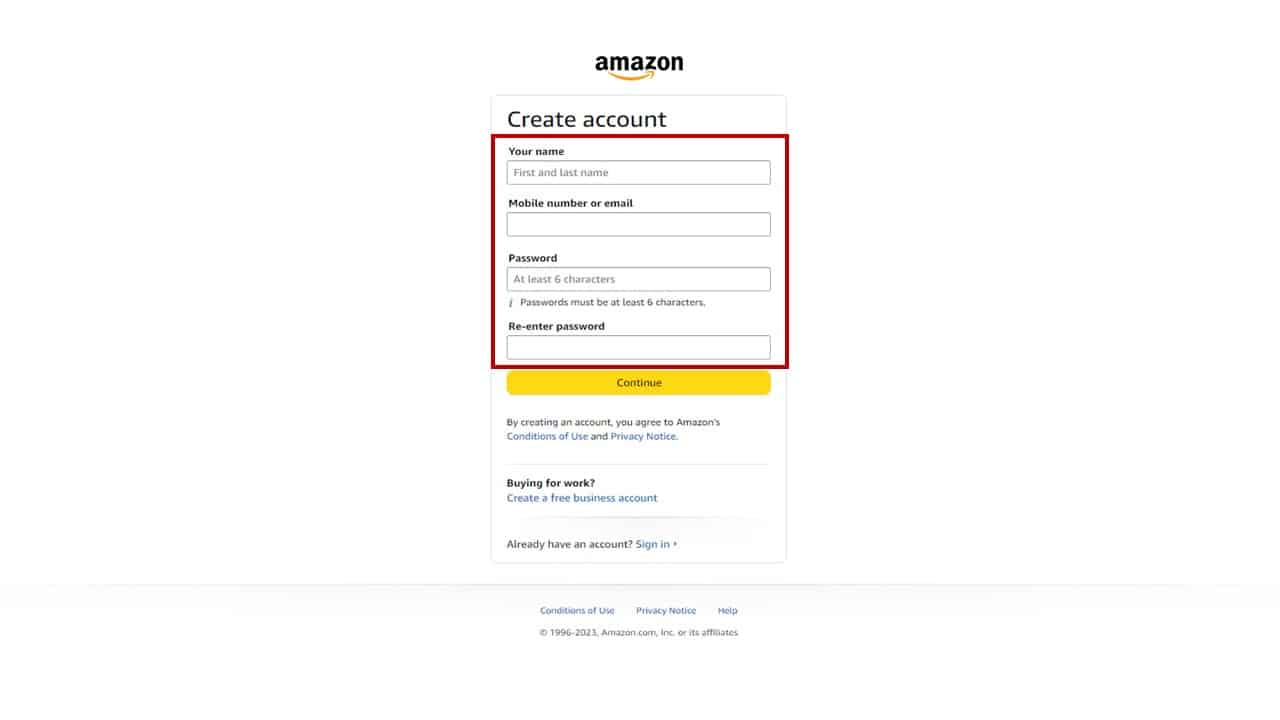
- Enter Your Name: You’ll be prompted to enter your full name. This helps Amazon personalize your experience and is used for shipping details.
- Enter Your Email or Mobile Number: Input the valid email address or mobile number you prepared earlier. Amazon will use this for communication and verification. Be careful to enter it correctly to avoid verification issues later.
- Create Your Password: Choose a strong, unique password. Amazon usually provides guidance on password strength. Remember, this password protects your account, so make it robust and memorable for you, but difficult for others to guess. Avoid using personal information or common phrases.
- Re-enter Password: Confirm your chosen password by entering it again to ensure there are no typos.
- Click “Continue” or “Verify mobile number/email”: After entering all details, click the appropriate button to proceed.
Verifying Your Account
A crucial security step, verification ensures that the email address or mobile number provided actually belongs to you. This prevents unauthorized account creation and protects your identity.
- OTP (One-Time Password) or Link: Amazon will send a One-Time Password (OTP) to the email address or mobile number you provided.
- For Email: Check your inbox (and spam/junk folder) for an email from Amazon containing a verification code.
- For Mobile Number: You’ll receive an SMS message with the OTP.
- Enter the OTP: Return to the Amazon registration page and enter the OTP into the designated field.
- Click “Create your Amazon account”: Once the OTP is successfully entered and verified, your basic Amazon account will be created. You’ll typically be redirected to your new Amazon homepage, ready to explore.
Setting Up Payment Methods (Optional but Recommended)
While not strictly necessary for account creation, adding a payment method immediately allows you to fully utilize your account for shopping.
- Navigate to “Account & Lists”: After logging in, go back to “Accounts & Lists” and select “Your Account.”
- Choose “Payment Options”: Under the “Ordering and shopping preferences” section, you’ll find “Payment options.”
- Add a New Payment Method: Click “Add a payment method” and follow the prompts to enter your credit card, debit card, or gift card details. This usually includes card number, expiration date, and cardholder name. Amazon uses secure, encrypted connections for all payment transactions.
- Set Default Address: While you’re in your account settings, it’s also a good idea to add your primary shipping address under “Your addresses” to expedite future purchases.
Navigating and Securing Your New Amazon Account
Creating your account is just the beginning. To truly leverage Amazon and protect your digital footprint, it’s essential to understand how to navigate its various features and, crucially, how to secure your account against potential threats.
Exploring Your Amazon Dashboard
Your Amazon dashboard, accessible through “Your Account,” is the control center for all your activities and preferences. Familiarizing yourself with its layout is key to efficient usage.
- Order History: Track current orders, view past purchases, initiate returns, and access invoices.
- Address Book: Manage multiple shipping addresses for yourself, friends, or family.
- Payment Options: Add, remove, or update credit cards, debit cards, and bank accounts linked to your Amazon Pay.
- Digital Content & Devices: Manage your Kindle library, Prime Video watchlist, Amazon Music preferences, and registered devices (Echo, Fire TV, etc.).
- Communication Preferences: Control the types of emails and notifications you receive from Amazon.
- Your Profiles: Manage your public profiles, such as those used for leaving product reviews.
Enhancing Account Security with Two-Factor Authentication (2FA)
In the realm of digital security, a strong password is the first line of defense, but Two-Factor Authentication (2FA) is the crucial second. Amazon strongly recommends enabling 2FA, also known as Two-Step Verification, for all accounts.

- Access Security Settings: Go to “Accounts & Lists” > “Your Account” > “Login & security.”
- Enable Two-Step Verification: Locate the “Two-Step Verification” section and click “Turn On.”
- Choose Verification Method: You can typically choose between receiving an OTP via text message (SMS) to your registered mobile number or using an authenticator app (like Google Authenticator or Authy) on your smartphone. The authenticator app method is generally considered more secure than SMS.
- Follow Prompts: Amazon will guide you through linking your phone or app and generating a backup code list, which is essential if you lose access to your primary 2FA device.
- Importance: With 2FA enabled, even if someone obtains your password, they won’t be able to access your account without the second verification code, significantly bolstering your account’s security against unauthorized access.
Managing Your Privacy Settings
Amazon collects data to personalize your experience, but you have control over various privacy aspects. Regularly reviewing these settings ensures your data usage aligns with your preferences.
- Advertising Preferences: You can control whether Amazon uses your shopping activity to display interest-based ads.
- Personalized Recommendations: While often helpful, you can remove items from your browsing history or adjust recommendations if you prefer.
- Alexa Privacy: If you use Alexa devices, you can review and delete voice recordings and manage privacy settings related to your interactions with the AI assistant.
- Review Your Data: Amazon provides tools within your account settings to view the data they collect about you and, in some cases, request its deletion. Staying informed about these settings empowers you to make conscious choices about your digital privacy.
Leveraging Your Amazon Account Beyond Shopping
Your Amazon account is a comprehensive portal to much more than just e-commerce. It integrates a suite of services and opportunities, each designed to enhance your digital life in various ways.
Exploring Amazon Prime Benefits
Amazon Prime is a subscription service that dramatically amplifies the utility of your account, transforming it into an all-in-one hub for convenience and entertainment.
- Expedited Shipping: The flagship benefit, offering free and fast shipping (often one-day or two-day) on eligible items.
- Prime Video: Unlimited streaming of thousands of movies and TV shows, including Amazon Originals.
- Amazon Music Prime: Access to millions of ad-free songs and thousands of stations and playlists.
- Prime Reading: A rotating selection of free e-books, magazines, and comics.
- Amazon Photos: Unlimited full-resolution photo storage, plus 5 GB for videos and other files.
- Exclusive Deals: Early access to Lightning Deals and special discounts during events like Prime Day.
Digital Content and Services (Kindle, Music, Video)
Your Amazon account is the key to managing your digital libraries and subscriptions across various content platforms.
- Kindle: All your purchased e-books and borrowed Prime Reading titles are accessible and synced across your Kindle devices and apps.
- Amazon Music: Manage playlists, download music for offline listening, and customize your audio experience.
- Prime Video: Create watchlists, manage profiles for family members, and track your viewing history.
- Audible: For audiobook enthusiasts, your account seamlessly integrates with Audible purchases and subscriptions.
Smart Home Integration (Alexa, Ring)
For those embracing smart home technology, your Amazon account acts as the central control for many devices.
- Alexa App: The Alexa app, linked to your Amazon account, is where you set up, manage, and customize your Echo devices, smart plugs, light bulbs, and other Alexa-compatible gadgets.
- Ring App: Similarly, your Ring security cameras and doorbells are managed through an app tied to your Amazon login, allowing for remote monitoring, alerts, and interaction.
- Seamless Ecosystem: The integration allows for a cohesive smart home experience, enabling devices to interact and respond to voice commands or routines set up through your Amazon profile.
Seller and Affiliate Opportunities (Brief Mention)
While this guide focuses on the consumer aspect, it’s worth noting that your Amazon account can also be a springboard for other tech-driven ventures.
- Amazon Seller Central: Your existing account credentials can be used to set up a seller account, allowing you to list and sell your own products on Amazon’s marketplace. This involves leveraging Amazon’s robust e-commerce platform and fulfillment network.
- Amazon Associates: You can sign up for the Amazon Associates program (an affiliate marketing program) to earn commissions by recommending Amazon products on your website or social media, utilizing Amazon’s tracking technology.
Troubleshooting Common Account Creation Issues and FAQs
Even with a comprehensive guide, minor hitches can occur. Knowing how to navigate common problems and where to find help is an important part of any digital process.
Password Reset and Recovery
Forgetting a password is a common occurrence. Amazon provides a straightforward recovery process.
- “Forgot your password?” link: On the sign-in page, click this link.
- Verification: You’ll be prompted to enter your email address or mobile number associated with the account. Amazon will then send a verification code or a password reset link to that registered contact method.
- New Password: Follow the instructions to create a new, strong password.
Dealing with Account Verification Problems
Occasionally, the OTP or verification email might not arrive, or there could be issues with entering the code.
- Check Spam/Junk Folder: For email verification, the OTP might have landed in your spam or junk folder.
- Resend Code: Look for an option to “Resend code” on the Amazon verification page.
- Verify Contact Info: Double-check that the email address or mobile number you entered during registration is absolutely correct. A simple typo can prevent successful delivery.
- Network Issues: Ensure your mobile device has good signal if you’re expecting an SMS, or that your email service is working correctly.
Contacting Amazon Customer Service
If you encounter persistent issues that you cannot resolve independently, Amazon’s customer service is equipped to assist.
- “Help” or “Customer Service” Link: These are usually found at the bottom of the Amazon homepage.
- Contact Options: You’ll typically find options to contact support via phone, live chat, or email. Live chat is often the quickest way to get real-time assistance for account-related problems.
- Prepare Information: Have your registered email address/mobile number, and any relevant details about the issue, ready to provide to the representative. For security reasons, they may ask for additional verification details to confirm your identity.

Conclusion
Creating an Amazon account is the foundational step to unlocking a vast digital ecosystem that encompasses e-commerce, entertainment, smart home integration, and much more. While the process itself is designed for simplicity, a professional approach involves understanding each step, prioritizing security, and familiarizing yourself with the tools available for managing your digital presence. By following this comprehensive guide, from initial registration to enabling robust security measures like Two-Factor Authentication, you are now well-equipped to navigate Amazon’s extensive offerings. Your new account is not just a portal for purchases; it’s a personalized, secure gateway to a world of convenience and innovation, waiting to be explored with confidence and insight.
aViewFromTheCave is a participant in the Amazon Services LLC Associates Program, an affiliate advertising program designed to provide a means for sites to earn advertising fees by advertising and linking to Amazon.com. Amazon, the Amazon logo, AmazonSupply, and the AmazonSupply logo are trademarks of Amazon.com, Inc. or its affiliates. As an Amazon Associate we earn affiliate commissions from qualifying purchases.