
In the evolving landscape of digital finance, the tools we use to manage our capital must be under constant review. For over two decades, PayPal has stood as the titan of online payments, bridging the gap between traditional banking and the internet economy. However, as the fintech sector matures, many users find themselves seeking specialized alternatives that offer lower fees, better exchange rates, or more robust business features. Closing a PayPal account is not merely a technical task; it is a strategic move toward financial consolidation and security.
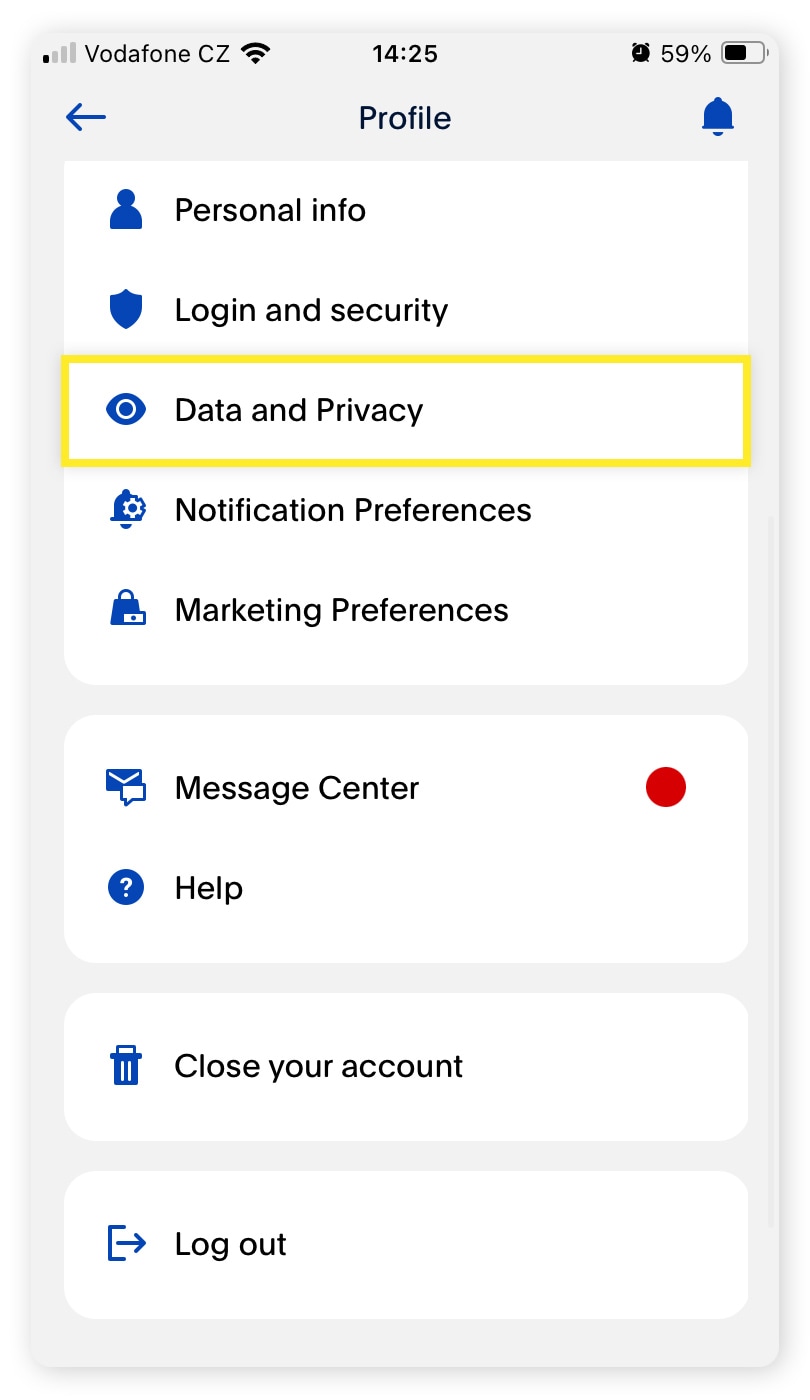
This guide provides a professional overview of the financial implications, necessary prerequisites, and the step-by-step process of closing your PayPal account while ensuring your digital assets and records remain protected.
1. The Financial Logic Behind Account Consolidation
Before proceeding with an account closure, it is vital to understand the strategic reasons a professional or business might choose to move away from PayPal. Financial hygiene involves minimizing “account creep”—the accumulation of various digital wallets and payment gateways that can lead to security vulnerabilities and fragmented financial reporting.
Eliminating Hidden Fees and Optimizing Liquidity
While PayPal is convenient, its fee structure—particularly for cross-border transactions and currency conversions—can be significantly higher than modern competitors like Wise or Revolut. For those managing a side hustle or an online business, these margins matter. Closing an underutilized account prevents the risk of inactivity fees (which PayPal has introduced in certain jurisdictions) and ensures that your liquidity is concentrated in accounts that offer better yield or lower operational costs.
Mitigating Security Risks and Identity Theft
Every active financial account is a potential entry point for cybercriminals. By closing accounts you no longer use, you reduce your “attack surface.” In an era of sophisticated phishing and data breaches, keeping a financial portal open with linked bank accounts and credit cards—without regular monitoring—is a liability. Closing the account is a proactive step in a broader personal finance security audit.
2. Essential Pre-Closure Protocols: Protecting Your Data
A PayPal account is more than just a payment portal; it is a repository of financial history. Deleting your account is permanent. Once the “Close Account” button is pressed, your transaction history, tax documents, and dispute records vanish. Therefore, several fiduciary steps must be taken before the final exit.
Extracting Financial Records and Tax Documentation
From a personal finance perspective, maintaining a paper trail is non-negotiable. Before closing the account, you should download your transaction history for at least the last seven years, especially if you have used the account for business purposes or large purchases.
- Navigate to the Activity tab.
- Select Statements and then Standard.
- Download your annual reports in PDF or CSV format.
These records are essential for future tax audits or for verifying past purchases for warranty claims.
Settling Balances and Resolving Disputes
PayPal will not allow an account to be closed if there are pending issues. This includes:
- Remaining Balances: You must transfer your remaining balance to your linked bank account. If you have only a few cents left that cannot be transferred, consider donating it to a charity via the PayPal Giving Fund.
- Pending Transactions: Ensure all “Pending” or “In-Process” payments have cleared.
- Active Disputes: If you have an open “Item Not Received” or “Significantly Not as Described” claim, you must wait for the resolution center to finalize the case. Closing an account with an active dispute can lead to complications with your bank or credit card issuer.
3. Step-by-Step Execution: Personal vs. Business Accounts
The process of closing a PayPal account varies slightly depending on whether you are managing a personal profile or a corporate/business entity. It is important to perform these actions on a desktop browser rather than the mobile app, as the full suite of security settings is more accessible there.
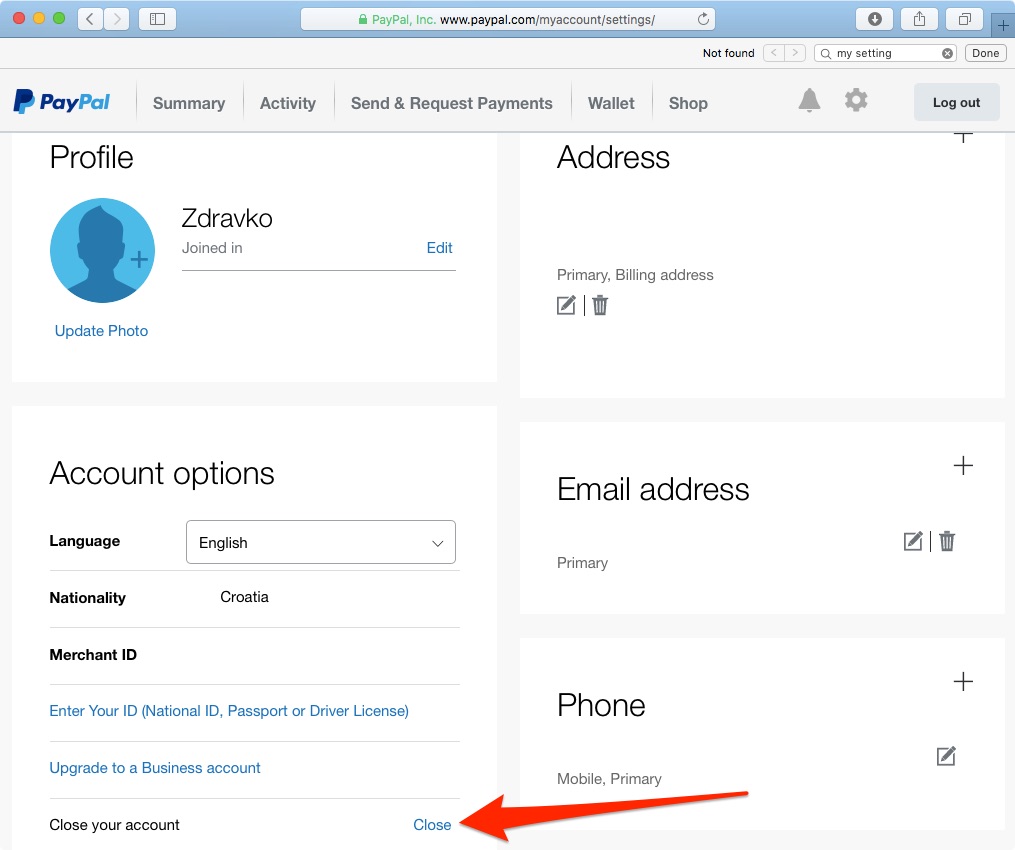
Closing a Personal Account
For the individual user, the process is streamlined but requires confirmation of identity.
- Login: Access your account via a secure, private connection.
- Settings: Click the “Gear” icon in the top right corner.
- Account Options: Under the “Account” tab, scroll to the bottom to find “Close your account.”
- Verification: PayPal may ask you to confirm your identity via a text code or email.
- Confirmation: Follow the prompts to finalize the closure.
Deactivating a Business Account
Closing a business account involves higher stakes, especially regarding Merchant Services. If you have integrated PayPal as a payment gateway on a website, you must first remove the API integrations and “Buy Now” buttons from your storefront. Failure to do so will result in broken checkout pages for your customers. Furthermore, if you have issued PayPal Working Capital loans, these must be paid in full before the account can be shuttered.
4. Managing Recurring Payments and Subscriptions
One of the most common pitfalls in closing a financial account is the “zombie subscription.” PayPal is a popular hub for recurring billing for services like Netflix, Spotify, or professional software.
Auditing Your Automatic Payments
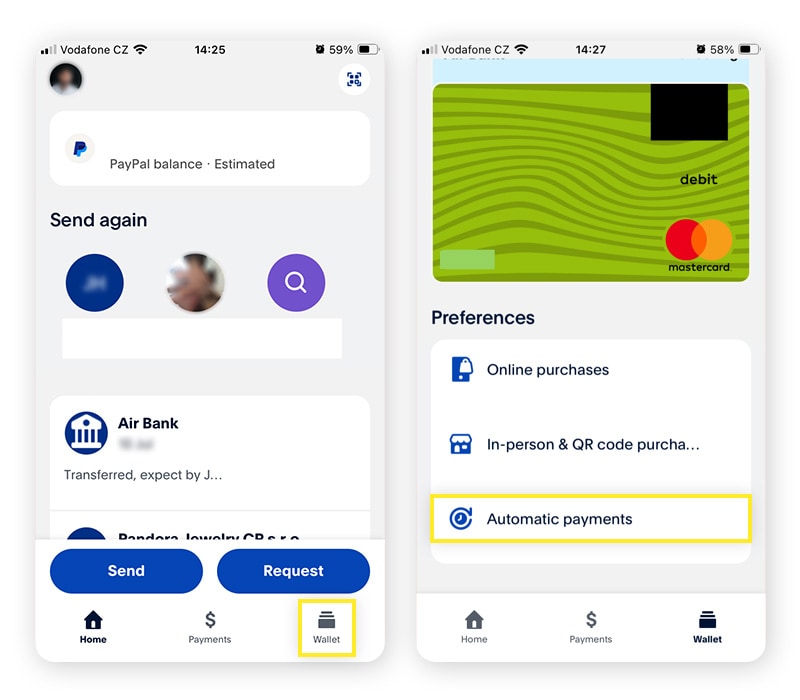
Before the final closure, you must perform a thorough audit of your “Automatic Payments.”
- Go to Settings > Payments > Manage Automatic Payments.
- This list shows every merchant authorized to pull funds from your account.
- You must manually log in to each of these third-party websites and update your payment method to a different credit card or bank account.
If you close your PayPal account without updating these, you risk service interruptions or, worse, late fees and hits to your credit score if a recurring debt (like a gym membership or insurance policy) fails to process. From a wealth management perspective, this is the perfect time to cancel “ghost subscriptions”—services you pay for but no longer use.
The Impact on Credit and Financial Reputation
A common question in personal finance is whether closing a PayPal account hurts your credit score. Generally, closing a standard PayPal account has no impact on your credit. However, if you have a PayPal Credit line or a PayPal Mastercard, closing the account will close that line of credit. This could potentially lower your total available credit and affect your credit utilization ratio, which does influence your score. If you have a high credit limit with PayPal Credit that you’ve held for a long time, consult with a financial advisor before closing it, as account age is a factor in credit health.
5. Transitioning to Superior Financial Tools
Closing a PayPal account is often the first step in upgrading to a more sophisticated “financial stack.” The modern fintech ecosystem offers specialized tools that often outperform PayPal in specific niches.
For International Transactions: Wise and Revolut
If your primary reason for using PayPal was sending money abroad, platforms like Wise (formerly TransferWise) offer the mid-market exchange rate with transparent, low fees. This is a superior choice for expatriates, digital nomads, and international freelancers who want to maximize their take-home income.
For Business Owners: Stripe and Adyen
For those running an e-commerce empire, Stripe provides much better integration, detailed reporting, and a more professional checkout experience for customers. Stripe’s developer-friendly environment allows for greater customization of the “Brand Experience,” which is vital for scaling a business.
For Daily Consumer Use: Digital Wallets (Apple & Google Pay)
For domestic peer-to-peer payments and retail shopping, Apple Pay and Google Pay offer higher levels of encryption and “tokenization,” meaning your actual card numbers are never shared with the merchant. This enhances financial security beyond what traditional PayPal transactions offer.
Conclusion: Achieving Financial Clarity
Deciding to cancel a PayPal account is a sign of an engaged and proactive approach to personal finance. It requires a meticulous review of one’s digital footprint, the preservation of essential financial records, and the strategic selection of alternative tools that better serve your current economic goals. By following the protocols outlined above—from settling balances to auditing recurring subscriptions—you can exit the PayPal ecosystem with confidence, ensuring your financial history is preserved and your future transactions are optimized for lower costs and higher security. In the world of money management, simplicity is often the ultimate sophistication; consolidating your accounts is a powerful step toward that goal.
aViewFromTheCave is a participant in the Amazon Services LLC Associates Program, an affiliate advertising program designed to provide a means for sites to earn advertising fees by advertising and linking to Amazon.com. Amazon, the Amazon logo, AmazonSupply, and the AmazonSupply logo are trademarks of Amazon.com, Inc. or its affiliates. As an Amazon Associate we earn affiliate commissions from qualifying purchases.