
Deciding to close a credit card account is a significant financial move that requires more than just a quick phone call. Whether you are looking to trim annual fees from your budget, simplify your wallet, or move toward a different financial strategy, canceling a Chase credit card involves several strategic steps to ensure your credit score remains protected and your earned rewards aren’t lost. Chase is one of the largest card issuers in the world, and while their cancellation process is relatively straightforward, the secondary effects on your personal finances can be long-lasting.

In this guide, we will explore the precise mechanics of canceling a Chase credit card, the financial implications of doing so, and the alternatives that might better serve your long-term wealth-building goals.
Preparing Your Finances Before You Cancel
Before you reach out to Chase customer service, you must perform a financial audit of the account in question. Canceling a card prematurely can result in the immediate forfeiture of accumulated rewards or unexpected hits to your credit report.
Maximizing and Protecting Your Ultimate Rewards Points
If you are holding a card that earns Chase Ultimate Rewards—such as the Chase Sapphire Preferred®, Chase Sapphire Reserve®, or the Ink Business Preferred®—your points are tied to that specific account. If you close the account without moving the points, they typically vanish instantly.
Before canceling, you have three primary options for your points:
-
Transfer to another Chase card: If you have another card in the Ultimate Rewards family, you can move your points to that account through the “Combine Points” feature on the Chase portal.
-
Transfer to travel partners: Move your points to airline or hotel partners like United MileagePlus, Southwest Rapid Rewards, or World of Hyatt.
-
Redeem for cash or statement credit: While often the least valuable move in terms of cents-per-point, it ensures you don’t walk away empty-handed.
Clearing Balances and Managing Autopay
Chase generally requires that your account balance be paid in full before they officially close the line of credit. If you have an outstanding balance, the interest will continue to accrue even after you express your intent to cancel. Furthermore, you must audit your recent transactions for recurring subscriptions. From streaming services to insurance premiums, many automated payments are linked to credit cards. Canceling the card without updating your payment method on these external sites can lead to missed payments and late fees, which could eventually harm your credit score.
The 30-Day Annual Fee Window
If your motivation for canceling is to avoid a high annual fee, timing is everything. Chase typically provides a 30-day window after the annual fee posts to your account during which you can cancel the card and receive a full refund of that fee. If you miss this window, you may only receive a prorated refund, or in some cases, no refund at all.
Step-by-Step Guide to the Cancellation Process
Once your rewards are secured and your balance is settled, you can proceed with the actual cancellation. Chase offers a few different avenues to accomplish this, ranging from direct human interaction to digital requests.
The Customer Service Phone Call
The most common method is calling the number on the back of your card (or 1-800-432-3117). When you call, you will likely be routed through an automated system before reaching a representative.
When speaking to a Chase agent, be firm but polite. You should state clearly, “I would like to close my account.” The representative is trained to retain customers and may ask why you are leaving. This is a critical moment for your personal finances because it leads to the “Retention Offer.” Sometimes, Chase may offer to waive your annual fee for a year or give you a “spend X, get Y” bonus to keep the account open. If the offer outweighs the cost of the card, it may be financially prudent to keep it.
Using the Secure Message Center
If you prefer to avoid a high-pressure sales pitch from a retention specialist, you can cancel your card through Chase’s Secure Message Center.
-
Log into your Chase Online account.
-
Navigate to the “Secure Messages” section.
-
Choose “New Message” and select “Account Inquiry.”
-
Select the specific card you wish to close and write a brief message stating your request.
While this method is more passive, it provides a written paper trail of your request. Chase will usually respond within 24 to 48 hours to confirm the closure or ask for additional verification.
Requesting a Formal Confirmation
Regardless of the method used, always request a written confirmation (via email or physical mail) that the account has been closed at the consumer’s request. This distinction is important for your credit report; it looks slightly better to future lenders if an account was closed by the cardholder rather than the issuer.
Understanding the Impact on Your Credit Score
Canceling a credit card is not a neutral act in the eyes of credit reporting agencies like Equifax, Experian, and TransUnion. Before you finalize the closure, you must understand how this move affects the two major pillars of your credit health.
The Credit Utilization Ratio
Your credit utilization ratio is the amount of credit you are using divided by the total amount of credit available to you. It accounts for roughly 30% of your FICO score. When you cancel a Chase card, you are effectively removing a portion of your total available credit.
For example, if you have two credit cards each with a $5,000 limit (Total $10,000) and you carry a $2,000 balance on one, your utilization is 20%. If you cancel the empty card, your total limit drops to $5,000, and your utilization instantly jumps to 40%. Financial experts generally recommend keeping utilization below 30% to maintain a high credit score. If closing your Chase card will push your utilization too high, it might be better to keep the account open but dormant.
Average Age of Accounts
The length of your credit history accounts for about 15% of your credit score. While a closed account in good standing will remain on your credit report for up to 10 years, it will eventually drop off. If the Chase card you are canceling is one of your oldest accounts, its eventual disappearance could shorten your average credit age, potentially lowering your score. If the card has no annual fee, there is rarely a financial reason to close an old account, as it serves as an anchor for your credit history.
Strategic Alternatives to Cancellation
Often, the goals a consumer hopes to achieve through cancellation—avoiding fees or simplifying accounts—can be reached through “Product Changing” or “Credit Line Transfers,” which have a much softer impact on your credit health.
The Product Change (Downgrading)
Instead of canceling a card with a high annual fee, you can request a “Product Change” to a card with no annual fee. For instance, if you have the Chase Sapphire Reserve ($550 annual fee), you can request to downgrade it to a Chase Freedom Unlimited® or a Chase Freedom Flex®.
The benefits of a product change are significant:
-
Keep your credit line: Your total available credit remains the same, protecting your utilization ratio.
-
Maintain account age: The “opening date” of the account remains the original date, preserving your credit history.
-
Avoid the fee: You stop paying the annual fee while keeping the account active.
-
Preserve points: In most cases, your points will move to the new card (though they may lose some “transfer” functionality if moving from a premium to a no-fee card).
Transferring Credit Lines
If you are determined to close the account but want to protect your credit score, you can ask Chase to transfer the credit limit from the card you are closing to another Chase card you plan to keep. If you have a $10,000 limit on a Sapphire card you are closing and a $5,000 limit on a Freedom card, you can often move $9,500 of that limit to the Freedom card. This keeps your total “buying power” and utilization ratio intact even after the physical account is closed.
Post-Cancellation Checklist
After the account is officially closed, your financial responsibilities haven’t quite ended. There are several “housekeeping” tasks to ensure the transition is seamless.
Destroying the Physical Card
Once the account is closed, the physical card is a liability. If it is a plastic card, use a high-quality paper shredder or heavy-duty scissors. If it is a metal card (like the Sapphire series or the Amazon Prime Rewards card), do not put it in a shredder. You can mail the card back to Chase, or visit a local branch, and they will dispose of it securely for you.
Monitoring Your Credit Report
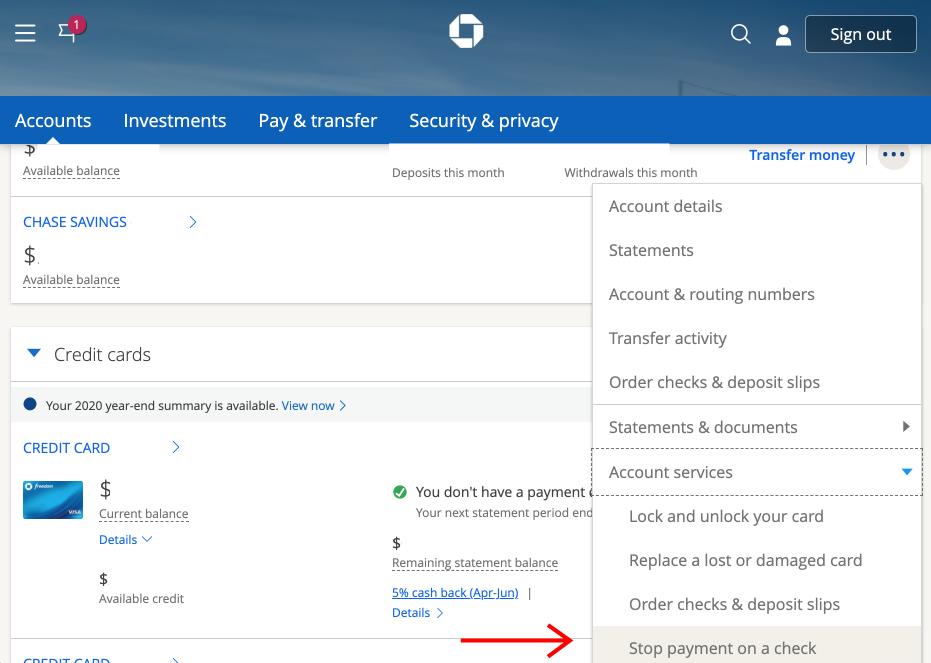
Approximately 30 to 60 days after cancellation, check your credit report via AnnualCreditReport.com or a monitoring service. Ensure the account status is updated to “Closed by Consumer.” If it reflects “Closed by Grantor” or remains “Open” with an incorrect balance, you will need to file a dispute with the credit bureaus to correct the record.
Final Statement Audit
Keep an eye on your login portal for one last billing cycle. Occasionally, “zombie” charges or residual interest (interest that accrued between the last statement and the payoff date) can appear. Ignoring these small amounts can lead to late fees and credit damage on an account you thought was long gone.
By approaching the cancellation of a Chase credit card as a strategic financial decision rather than an administrative task, you can navigate the process without sacrificing your rewards or your credit standing. Whether you choose to downgrade, transfer your credit line, or close the account entirely, the key is to act with a full understanding of your personal financial ecosystem.
aViewFromTheCave is a participant in the Amazon Services LLC Associates Program, an affiliate advertising program designed to provide a means for sites to earn advertising fees by advertising and linking to Amazon.com. Amazon, the Amazon logo, AmazonSupply, and the AmazonSupply logo are trademarks of Amazon.com, Inc. or its affiliates. As an Amazon Associate we earn affiliate commissions from qualifying purchases.